Sports Event Photography: Shoot, Share, and Sell

Sports event photography earns its value by pairing sharp, fast action capture with same-day attendee retrieval through a shareable event photo sharing link or QR code photo gallery. A practical starting point is continuous autofocus with a shutter speed of about 1/1000s or faster, followed by a delivery workflow that lets guests find their own moments without scrolling through full galleries.
The tournament has just finished. Parents are checking their phones, athletes are tagging teammates, and the organizer wants images ready while the event still has energy. Meanwhile, the photographer is looking at thousands of files and knows that a beautifully captured finish-line moment has limited value if nobody can find it.
That's the operational reality of modern sports event photography. Capture is only half the job. The other half is sorting, sharing, protecting, and helping the right person retrieve the right image quickly. The history of the craft supports that emphasis on speed, from early motion studies to digital distribution, while current market estimates show substantial demand around youth sports, specialized lenses, and high-volume image workflows. The Olympic Museum's history of sports photography traces that long movement from physical prints toward rapid digital delivery, and recent youth sports photography market data describes a commercial market valued at $3.8 billion in 2025.
The Real Sports Event Photography Workflow
The familiar post-tournament routine is simple enough. The photographer returns with cards full of action, exports a large folder, sends a hopeful email, and waits for attendees to identify themselves. Parents ask where their child's photos are, athletes search through near-identical frames, and organizers forward the same gallery link repeatedly.
That workflow treats delivery as an afterthought. It also assumes that every attendee has the patience to browse a large collection, recognize a useful filename, and download images manually. At a small club presentation, that may be manageable. At a busy tournament producing thousands of images, it becomes a support queue.
The stronger model separates the work into two connected systems:
- Capture, where the photographer anticipates action and produces technically sound images.
- Retrieval, where attendees reach their own images through a controlled, shareable experience.
A dedicated upload workflow can sit between those stages. The photographer uploads selected or complete event coverage, the organizer receives a shareable event photo sharing link, and a QR code photo gallery can be displayed at the venue or included in follow-up messages.
Operational rule: If attendees need to search the entire gallery to find themselves, the photographer has transferred the work to the customer.
Same-event and same-day delivery are increasingly discussed as an expectation rather than a premium extra in current sports photography workflow guidance. A 2026 guide to sports event photography identifies attendee retrieval, post-event engagement, and the reduction of “where are my photos?” requests as important gaps in conventional coverage.
That changes the photographer's priorities. You still need reliable exposure, focus, composition, and backup equipment, but you also need a delivery plan before the first whistle. Decide what will be shared, who controls access, how attendees will retrieve images, and whether the gallery supports downloads, purchases, or sponsor-approved sharing.
The job isn't finished when the last athlete crosses the line. It's finished when the organizer can distribute the gallery confidently and participants can find, use, and share their moments.
Camera Settings and Gear Choices That Actually Help
Sports photography rewards decisive settings more than complicated menus. Start with a shutter speed of about 1/1000s or faster, continuous autofocus, and a controlled burst mode. The shutter speed helps freeze movement, continuous AF tracks an athlete who changes distance or direction, and burst mode gives you a better chance of recording the decisive expression, contact point, or landing.
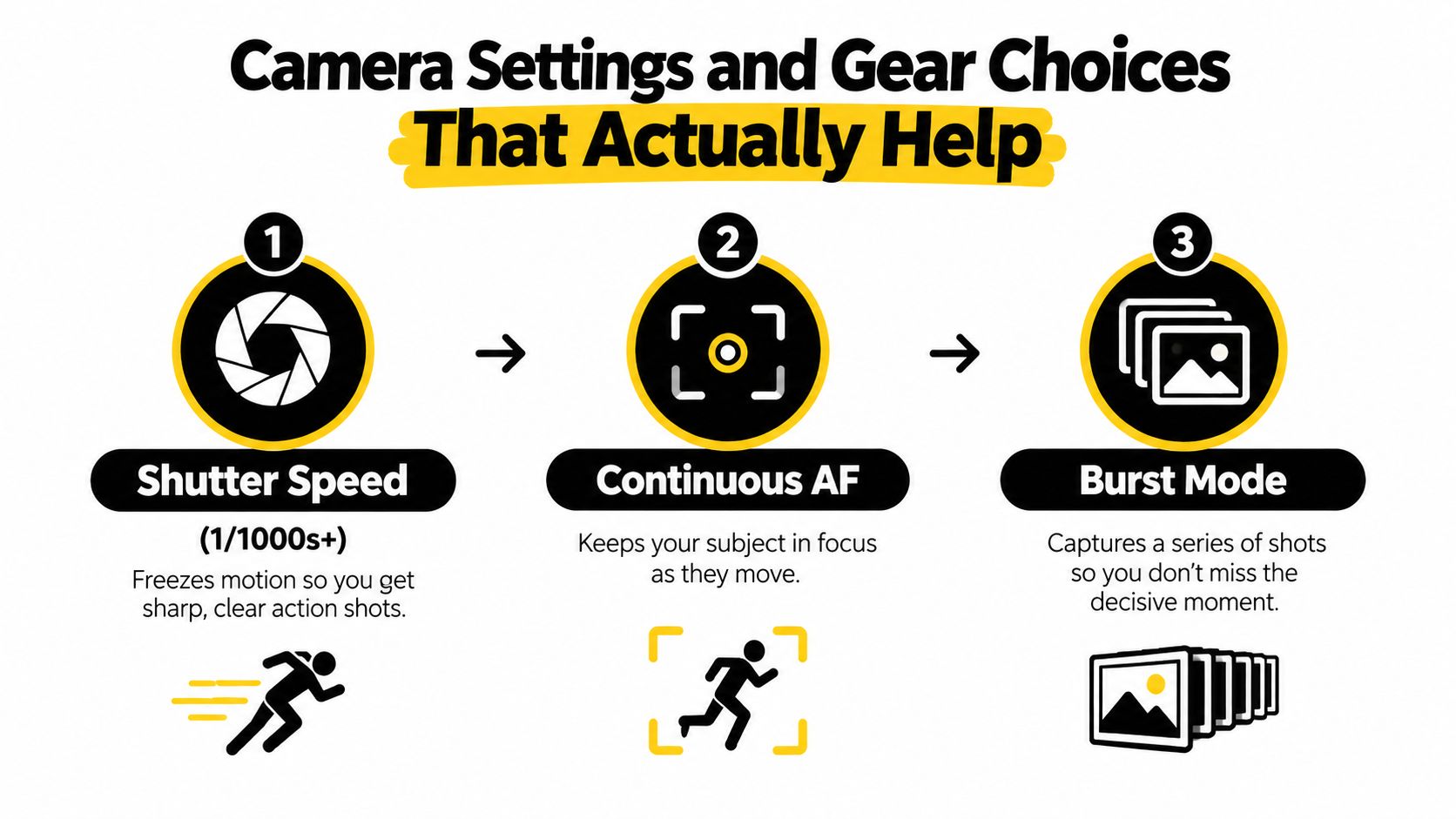
A practical sports photography settings guide supports that baseline and explains the trade-off that catches many photographers in gyms and stadiums. Indoor or low-light conditions can push ISO to 1600 to 3200 or higher when you need to preserve a fast shutter speed. That isn't a technical failure. It's the cost of protecting sharpness when the alternative is motion blur.
Make the exposure decision in the right order
Set the shutter speed first when movement matters. If a sprinter, basketball player, cyclist, or goalkeeper is moving quickly, a beautifully exposed blurred frame still fails the brief. Once the shutter is protected, open the aperture as far as the lens and composition allow, then raise ISO until the exposure is workable.
You're balancing three competing outcomes:
- Sharpness: A faster shutter protects the action.
- Noise: A higher ISO makes the image possible in poor light but can reduce file cleanliness.
- Depth of field: A wide aperture admits light but leaves less room for error in focus.
Use continuous AF rather than single-shot autofocus for unpredictable subjects. Select a focus area that gives the camera enough information to follow the athlete without allowing nearby spectators, netting, or barriers to steal priority. Burst with discipline. Holding the button through every play creates a larger culling problem and can fill cards faster than the moment deserves.
Choose reach according to the venue
A 70–200mm lens is a strong general-purpose choice for courts, fields, finish lines, and sideline portraits because it offers reach while remaining flexible. A longer telephoto can isolate athletes from the far side of a field or track, but it adds weight, cost, and handling demands. A 24–70mm lens is more useful for team groups, celebrations, environmental frames, and close access near the start or finish.
There's no universal winning lens. A compact setup may be the sensible choice for a small indoor event, while a course-based endurance event may justify longer glass and a monopod. A monopod can reduce fatigue during long periods in one position, but it can also slow repositioning when the action moves unexpectedly.
Buy the lens that solves your actual access problem before upgrading the camera body. A camera with impressive specifications can't compensate for being too far away, too slow in the available light, or too cumbersome to carry through a full event.
Same-Day Delivery with QR Code Selfie Retrieval
The most practical distribution workflow begins before the event. Create the gallery structure, agree on organizer permissions, prepare the shareable link, and decide where attendees will see the QR code. That preparation turns delivery from an improvised post-production task into part of the event plan.
The basic process is straightforward:
- Upload the event photos. Move selected images or the complete event collection into the delivery platform through a drag-and-drop workflow.
- Generate the access point. Create one shareable event photo sharing link and its matching QR code.
- Display it where people already gather. Use screens, signage, registration desks, email, WhatsApp, social posts, or the event website.
- Let attendees retrieve their own images. A guest scans the code, submits a selfie, and receives images in which they appear.
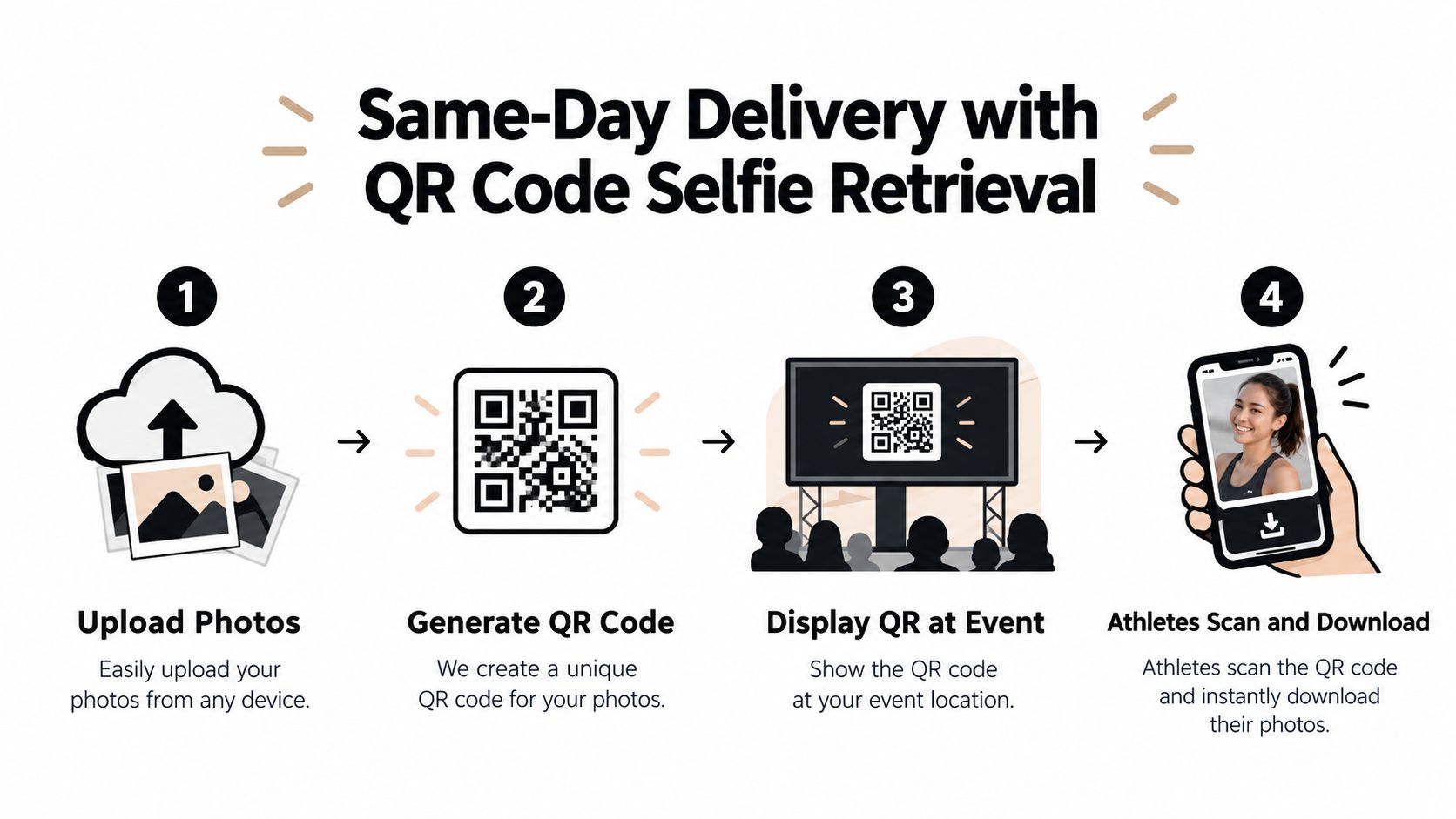
The important design choice is that the attendee doesn't need to understand the photographer's folder structure. They don't need to search filenames, identify camera positions, or scroll through every heat. Selfie photo matching turns discovery into a personal retrieval action.
Behind the scenes, facial processing can run after upload while the organizer controls what is shared and how the gallery is presented. That matters operationally. The photographer can keep working on the next batch while the gallery becomes searchable, rather than manually tagging every participant or answering individual messages.
Practical test: Ask a volunteer who wasn't involved in the upload to scan the QR code and retrieve an image. If they need verbal instructions, the attendee journey is still too complicated.
This workflow also reduces pressure on the event team. A single link can appear on a finish-line screen, printed sign, email, and social post without creating separate galleries for every team. The same destination can support free sharing, controlled downloads, or later purchasing, depending on the organizer's policy.
The QR code is only the doorway. The genuine improvement comes from combining quick access with relevant results, clear permissions, and a gallery that works on the attendee's own device. A full folder may technically contain every photograph, but it still leaves the customer responsible for finding the right one.
See the process in action here:
Full Gallery Links versus Facial Search Retrieval
A full gallery link is not automatically a bad choice. It's simple, familiar, and often appropriate when the collection is small, the audience knows the photographer, or the organizer wants everyone to browse the same curated set. The problem appears when volume rises and the audience becomes less patient.
Traditional email delivery has a similar limitation. It can announce that images are ready, but it doesn't solve discovery. Social sharing drops create excitement and help the event reach more people, but they usually showcase selected images rather than giving every participant a practical route to their own action photos.
Facial search retrieval changes the first question from “Which folder contains my team?” to “Can the system identify the images in which I appear?” That can reduce browsing and manual tagging, especially when a tournament produces thousands of images and includes athletes, parents, sponsors, and organizers with different retrieval needs.
| Model | Speed of attendee discovery | Admin effort | Best fit |
|---|---|---|---|
| Full gallery link | Moderate to slow when the collection is large | Low at setup, higher after delivery | Small club events and curated collections |
| Email delivery | Fast notification, slow image discovery | Moderate, with follow-up requests | Known participant lists and smaller audiences |
| Social sharing drop | Fast for selected highlights | Moderate, with ongoing selection | Promotion, sponsor visibility, and event atmosphere |
| Selfie photo matching | Fast for attendees seeking their own images | Lower manual search effort, with governance required | High-volume tournaments and participant-led retrieval |
| Organizer-controlled face recognition event gallery | Fast discovery with access rules | Higher planning effort, lower repeated support work | Youth events, schools, leagues, and privacy-sensitive venues |
The right choice depends on both volume and audience behavior. A small club may prefer a clean gallery link because the collection is manageable and participants enjoy browsing. A large tournament needs a faster path because parents and athletes typically want their own images, not an archive tour.
A gallery settings workspace should let organizers decide how the link is distributed, what content is visible, and which attendee actions are enabled. That control is important because discovery speed shouldn't come at the cost of uncontrolled access.
Use full galleries when browsing is part of the experience. Use selfie retrieval when the audience has a specific person or athlete in mind. Use social posts to extend the event's reach, not as the only mechanism for participant delivery.
Privacy, Consent, and Biometric Governance
Selfie matching is not merely a faster search box. It can involve facial data, which makes deployment a governance decision, especially when the event includes minors, schools, public venues, or participants from multiple countries.
The organizer should decide the policy before uploading images. That policy needs to explain what the feature does, who controls the gallery, how attendees provide consent, how someone opts out, and how a person requests removal. Retention also matters. Keeping data longer than the event requires can create unnecessary exposure and weaken trust.
Current privacy guidance for sports photo sales highlights the relevance of GDPR, CCPA, India's DPDP, venue rules, and youth-safeguarding expectations. Industry guidance on sports photo sales software also points to consent, notice, removal processes, and retention limits as practical requirements rather than optional legal decoration.
Build the permission path first
Before the event, document the answers to these questions:
- Who is the controller: Is it the organizer, photographer, venue, school, or a combination?
- What is being processed: Are selfies used temporarily for retrieval, or stored for later use?
- What does consent look like: Is participation opt-in, clearly notified, or governed by an existing event policy?
- What happens after a request: Can an attendee remove images or prevent future matching?
- What is the alternative: Can someone access photographs without submitting a selfie?
For youth events, don't assume that a parent's general event registration automatically covers every later use of facial matching. Align the gallery with the organizer's safeguarding policy and obtain appropriate advice for the relevant jurisdiction.
Privacy principle: The fastest retrieval experience is not a success if the organizer can't explain how consent, removal, and retention work.
Privacy-preserving design can become a competitive advantage. Temporary processing, explicit opt-in, no permanent face database, organizer-controlled galleries, and a non-biometric alternative give schools and clubs a clearer path to adoption. They also make the photographer easier to trust when the event includes children or sensitive participant groups.
A photographer should never enable face search without consent just because it makes sorting easier. Put the choice in front of the organizer, document the decision, and configure the experience accordingly. A controlled authentication entry point can support a deliberate access model, but the technology doesn't replace a clear notice or a responsible policy.
The practical standard is simple. Explain the feature in plain language, collect the permission the organizer requires, minimize retention, honor removal requests, and offer a route for people who don't want facial data processed.
Post-Event Engagement and Athlete Photo Monetization
A gallery can't create value if people abandon it before finding a usable image. Faster retrieval changes the commercial conversation because an attendee who immediately sees a strong action frame is more likely to share it, return to the gallery, or consider a paid upgrade.
That creates several possible revenue paths for photographers and organizers:
- Digital downloads: Offer high-resolution files for personal use after participants preview their images.
- Prints: Provide individual prints, team sets, or finish-line enlargements.
- Premium edits: Sell retouched portraits, color treatments, or tightly cropped hero images.
- Featured sets: Curate a small package for athletes who want several moments from the same event.
- Sponsored frames: Add event-approved branding where sponsors want visibility without overwhelming the photograph.
The order matters. Don't lead with an upsell before the attendee can find the image. First make retrieval private, quick, and understandable. Then present relevant choices beside the image, with clear pricing and usage terms supplied by the organizer.
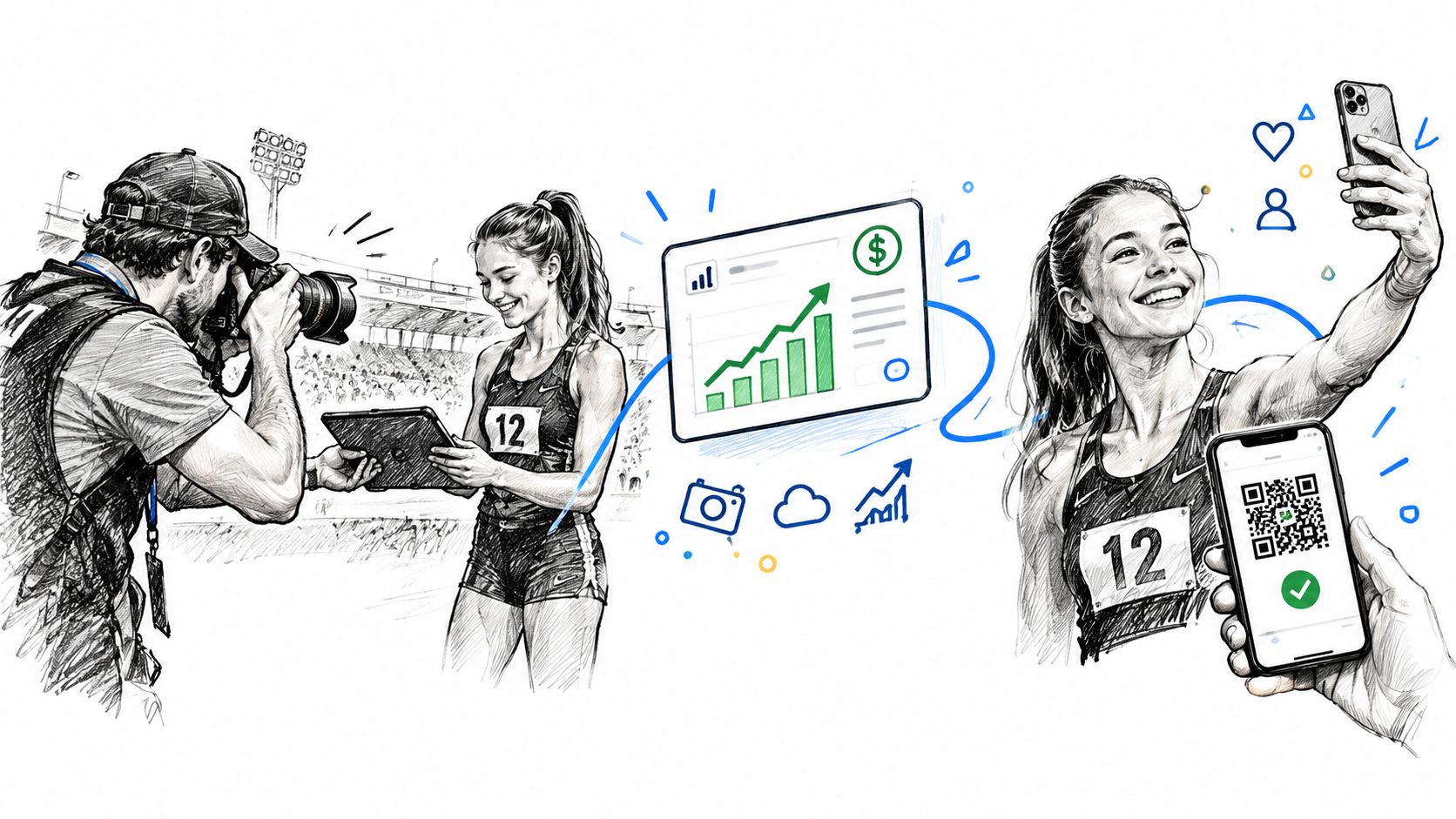
For organizers, the benefit extends beyond direct sales. Participants sharing their own images can produce useful user-generated content, while branded frames can reinforce sponsors and event identity. For photographers, the gallery becomes a direct-to-attendee channel instead of a final handoff to the organizer.
A platform such as Saucial can support upload, a shareable event link, QR distribution, selfie retrieval, and attendee-facing options such as downloads or sponsored frames. The important point isn't the feature list by itself. It's the connection between finding the image and taking the next action.
Measure the parts you control. Track gallery visits, retrieval activity, downloads, shares, and purchases where the platform and organizer permissions allow. Those signals help determine whether a premium edit, print package, or sponsor treatment belongs in the next event plan.
Tournament Photo Checklist and Next Steps
A reliable tournament workflow starts with decisions that are easy to overlook. The photographer needs to understand the brief, the organizer needs to understand the delivery experience, and both need a clear policy for participant access.
Use this checklist before the next event.
Before the event
- Clarify the brief: Confirm whether the job covers every participant, selected marketing moments, team groups, sponsor visibility, or a mixture.
- Scout the venue: Identify backgrounds, access points, light changes, safe shooting positions, and places where QR signage can be seen.
- Set the capture baseline: Prepare continuous AF, a shutter speed of about 1/1000s or faster, burst behavior, and an ISO strategy for the venue.
- Plan the lens mix: Use a longer lens when access is restricted, a 24–70mm for groups and atmosphere, and a 70–200mm when you need flexible reach.
- Protect the workflow: Carry charged batteries, spare cards, weather protection, and a reliable way to transfer files.
- Agree on delivery: Decide whether the organizer wants a full gallery, selected images, a QR code photo gallery, or selfie photo matching.
- Document privacy: Confirm notice, consent, opt-out, removal, retention, and access rules before any facial processing begins.
During capture
Don't overshoot just because the camera can. Build a sequence with purpose, then move to the next useful position. Look for the moment before and after the obvious action, including concentration, contact, celebration, team support, and the quiet reactions that give an event its identity.
Keep the technical decisions tied to the brief. A sponsor may need clean space around an athlete for branding. An organizer may need wide context showing the venue. Parents may care more about recognizable expressions than technically complex angles. One camera setting won't solve every assignment, so review conditions as the event moves from outdoor light to indoor shade or evening illumination.
Maintain a card and file structure that someone else could understand. If several photographers are working, agree on naming, handoff, and selection rules before the first heat. A rapid first delivery may contain a small selection, while the complete gallery follows after culling and editing.
On-site distribution
Place the QR code where participants naturally pause:
- Registration areas: Give early arrivals a clear explanation of how to retrieve images.
- Finish zones: Reach athletes while the emotional peak of the event is still fresh.
- Screens and signage: Use a large, high-contrast code with short instructions.
- Announcements: Ask the presenter or MC to explain the gallery without promising that every image is available immediately.
- Digital channels: Share the same link through the event website, email, WhatsApp, and approved social accounts.
Prefer a QR code photo gallery over a generic folder when the event produces thousands of images, participants want individual retrieval, or the organizer expects same-day engagement. Prefer a full gallery when the collection is small, the audience is comfortable browsing, or privacy policy makes biometric retrieval inappropriate.
After the event
Cull with the audience in mind. Remove missed focus, closed eyes, duplicates, awkward frames, and images that don't meet the brief. Then publish the strongest available set first, rather than waiting for an enormous collection to become perfect.
Check the attendee path on a phone. Scan the code, follow the instructions, retrieve an image, and test the download or purchase action. Ask whether a parent, athlete, or sponsor representative would understand the result without help.
Review the operational signals after delivery:
- Retrieval activity: Did people reach their own images?
- Shares: Did participants distribute images beyond the original gallery?
- Support requests: Were there repeated questions about access or missing photos?
- Downloads and purchases: Which products attracted interest?
- Privacy requests: Did anyone opt out or request removal?
- Organizer feedback: Was the workflow easy to explain and manage?
Run the process at a smaller event before taking it into a major tournament. A club match, school meet, or local race gives you room to test upload timing, QR placement, consent language, culling discipline, and attendee behavior. Once those pieces work together, the same workflow can scale to a larger audience without relying on a giant folder and a hope that people will search it.
The best sports event photography workflow protects both sides of the job. The photographer captures sharp, purposeful images. The organizer controls access and communication. The attendee finds a personal moment quickly, understands what they can do with it, and receives a better reason to return after the event.
Saucial gives photographers and organizers a practical way to upload event images, create a shareable gallery link or QR code, and help attendees find their own photos through selfie retrieval. Visit Saucial to test a faster, more organized approach to tournament photo delivery and attendee engagement.