How to Price Digital Downloads: Photo Pricing That Sells

Most advice on how to price digital downloads starts with a number. Pick something between $5 and $30 per file, build three tiers, test the middle one. That advice isn't wrong, but it flattens four different products into a single price and skips the only question that sets your floor: what did this file cost you to produce?
A downloadable photo isn't one product. An attendee grabbing a screen-size shot for Instagram is buying a memory. A sponsor putting the same frame into a paid ad is buying reach, rights and duration. A team parent buying the whole gallery is buying coverage. Charge all three the same and you'll underprice the sponsor and overprice the parent.
What follows is the system I'd hand a photographer before their next event: a starting price table, a cost floor you can do on a napkin, a test protocol with a fixed review date, and the access models that decide whether free discovery earns more than a paid gate.
Starting Prices for Each Download Type
A useful price table separates what the buyer receives, not just the file size. Treat these figures as starting tests, not established market rates.
| Download type | Typical buyer | Starting test price | What it includes |
|---|---|---|---|
| Single web-resolution image | Attendee sharing on social media | $5–$10 | Screen-size file, personal use |
| Single print-resolution image | Attendee wanting a keepsake | $12–$20 | High-resolution file, personal use |
| Curated set of 5–10 images | Families, teams, alumni groups | $60 | Best-of selection, personal use |
| Full event gallery | Guests who want every matched photo | $120 | All matched photos, personal use |
| Commercial or sponsor license | Brands and sponsors reusing images | Quote per use | Advertising and paid media rights |
The single-image prices sit within the broad range often suggested for digital photo downloads. Guidance on selling photos online puts downloads roughly between $5 and $30 per file. The web-resolution price starts near the low end; the print-resolution price asks more for a file suited to keepsakes.
A familiar entry price can make a new purchase easier to compare. Apple opened the iTunes Music Store on April 28, 2003, pricing songs at 99 cents without a subscription. By February 2005, it had sold more than 250 million tracks, typically at that price, according to the Chicago Reader's history of the 99-cent download. The same history records Apple's move in January 2009 to three price tiers: 69 cents, 99 cents and $1.29. One price did not fit every track.
The higher rows charge for more than file count. A $60 curated set includes the photographer's selection, saving the buyer from sorting through images. A $120 full gallery offers event-wide coverage. Keep the commercial or sponsor license separate from personal access: quote for the intended use, duration, placement and exclusivity rather than treating a personal download price as a rights fee.
Use the table as a test sheet. Pick the rows that fit your event, then compare purchases and revenue after a full event cycle.
Calculate Your Cost Floor and Buyer Groups
Take one edited file and cost it out before you look at a competitor's price. Say the image needs 10 minutes of culling, color and crop work, and you value your time at $40 an hour. That's roughly $6.70 of labor per delivered image, whether you sell one copy or twenty.
The payment fee is the second deduction. On a $10 card payment at a typical 2.9% plus 30 cents, processing takes about $0.59, leaving roughly $6.08 before storage, delivery and any margin you can defend. Add a modest buffer for hosting and support, and the floor for that tier lands around $7 to $8. A $10 web-resolution price works. A $6 one doesn't, no matter how many you sell.
Run the same math for each tier, not each file
The curated set at $60 might cost three hours of editing across ten images, so its labor floor is far higher even though the per-image cost looks identical. The full gallery at $120 carries culling time for hundreds of frames. Set a floor per product, then let the target price float above it.
Buyers split by use, and the split changes what you can charge:
- Personal keepsake: one attendee, one image, emotional value, low price sensitivity until it passes the cost of a drink.
- Branded event content: a sponsor or organizer wanting images for social and web, where the fee is a marketing line item rather than pocket money.
- Team or alumni package: a parent or group secretary buying for a whole roster, which is a bundle conversation, not a single-file one.
- Commercial reuse: paid media, print, long duration and exclusivity, priced from a quote every time.
Before you test, get a rough reading on willingness to pay for each group. The willingness-to-pay and pricing research overview sets out the four methods worth using: structured interviews, Van Westendorp price-sensitivity questions, Gabor-Granger questions and package-choice tests. Each gives a different angle, and combining what buyers say with what they choose beats either method alone.
That same overview notes that field experiments in large e-commerce settings have produced more than 15% revenue and more than 10% profit improvement when demand estimates informed price decisions, which is the argument for doing this work before the event rather than after. Write down one floor and one target price for each buyer group, then move to a real test.
Free Discovery Versus Paid Access
A gate before the photo match is a price on finding yourself, and that is a different product from a price on downloading. Most galleries never separate the two. Free discovery with paid downloads often earns more in total than a paid gate, because it lifts reach, sharing and the number of people who ever see an offer.
| Access model | Guest reach | Direct sales | Best event type | Main risk |
|---|---|---|---|---|
| Free discovery, paid downloads | High | Medium | Alumni dinners, community festivals | Lower immediate revenue per guest |
| Paid access before matching | Low | Higher from buyers who pay | Sports tournaments with strong parent demand | Guests skip matching and never see their photos |
| Hybrid: free matching, paid high-resolution files | High | Medium to high | Galas, trade shows | Buyers must understand what the fee unlocks |
| Sponsor-funded gallery, free to guests | High | Low direct, sponsor revenue instead | Brand activations | Sponsor may restrict usage rights |
Read the rows as four different businesses. The paid gate in row two works when demand is intense and the audience already expects to buy, which is why a tournament with team photo sales can carry it. The same gate on an alumni dinner kills participation, because nobody at that event came prepared to pay for a photograph.
Timing is a price lever most photographers never pull. One photography pricing guide claims that same-day or next-day delivery can justify a 10 to 20 percent premium, which reframes speed as a product feature rather than an operational chore. If your files land before guests leave the venue, that's a reason to hold price, not discount it.
A gate is a filter, not a revenue strategy. Ask what the gate is meant to achieve before you set it: more sales per guest, or more guests reached.
The mechanics matter here. Saucial uses AI-powered face recognition to find the event photos that feature each attendee, so matching runs before any payment step and guests see what they came for regardless of the model you choose.
Choose by goal, not by habit. Engagement-driven events, alumni dinners, community festivals, brand activations, want free matching and paid upgrades. Sales-driven events with obvious buyer intent, tournaments and school sports especially, can justify charging earlier. Test both while keeping rights language and gallery controls identical, and you'll have a defensible answer instead of an assumption.
Using Anchors and Bundles to Justify Higher Prices
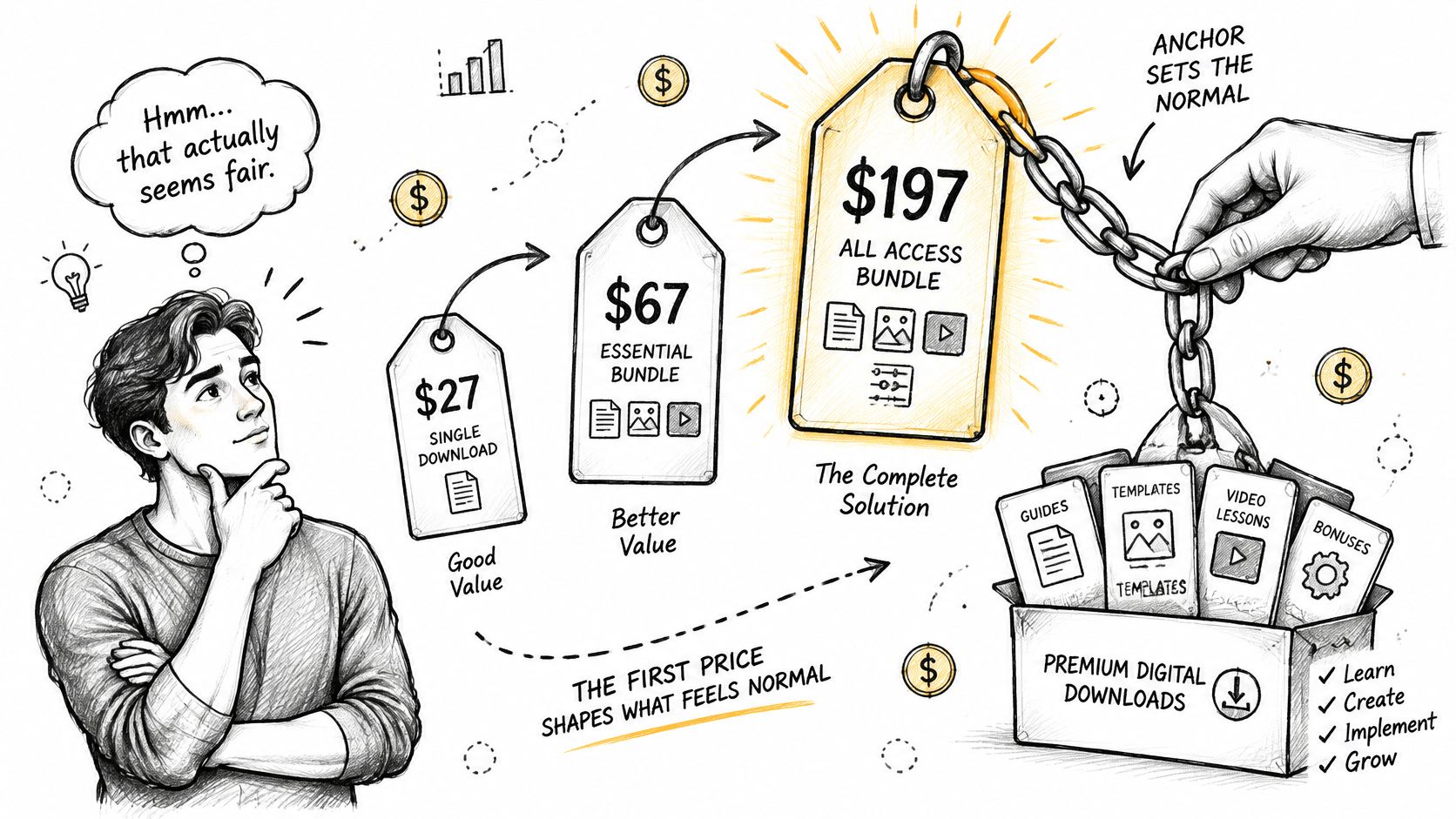
A three-tier menu can make a higher-priced gallery easier to assess, but the prices need to reflect real differences. For example, list a single print-resolution image at $15, a curated set of ten at $60, and the full gallery at $120. Explain what each option includes. Those figures are starting prices to test, not universal market rates.
The first price a guest sees frames the others. Make each tier useful on its own, then give buyers a clear reason to choose a larger package. A label such as “best value” only helps when the contents and savings support it.
What each tier actually contains
Explain the deliverable beside the price. A buyer should be able to tell what changes as the price rises.
- Resolution: distinguish a screen-size file from one suitable for printing at 8x10.
- Editing: say whether the file receives batch color correction or individual finishing.
- Quantity: define the offer as one image, a curated selection, or every matched photo.
- Exclusivity: clarify whether the image remains in your public portfolio or is delivered privately.
- Rights: price personal sharing separately from advertising use. A broader license has a different value from access to a download.
Keep access, usage rights, and event-wide value as separate decisions. A full gallery can cost more because it includes more images; commercial use can carry a separate fee; and an event-wide arrangement should be priced for the value it provides across the event, not hidden inside a personal download tier.
The bundle has to make sense on the numbers. At $15 per image, ten singles cost $150; a $60 set saves $90 compared with buying those same images individually. State the selection limit clearly, and make sure buyers understand what happens if they want images outside the set. A plainly described recommendation is more persuasive than a discount badge.
How to Run a Price Test on Your Galleries
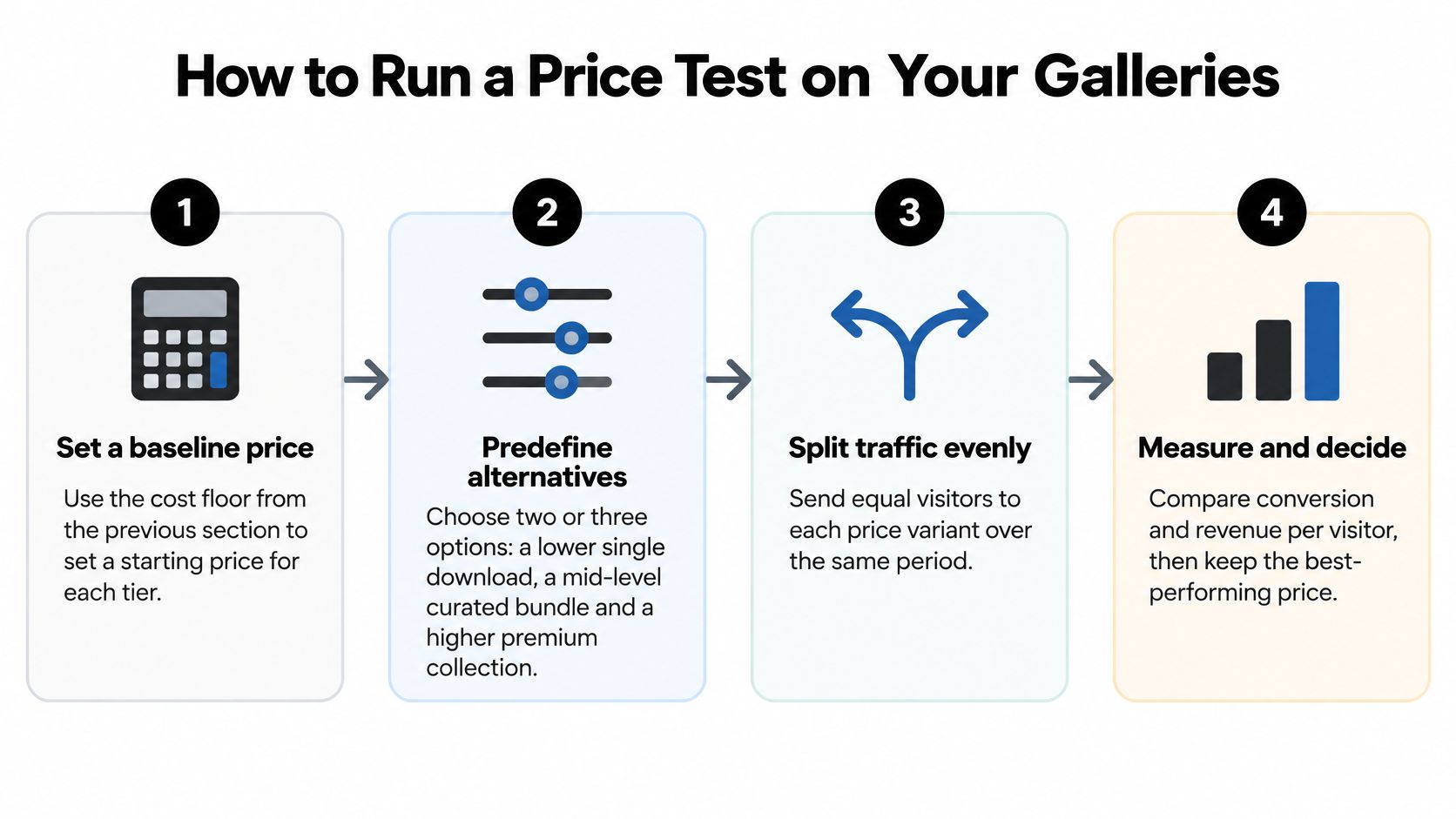
A price that sells more downloads can still earn less. Test what each price earns per visitor after fees, then keep the option that contributes more without changing the gallery experience.
Set a baseline for each offer. Use your cost floor for a single file, a curated set, and the full gallery. A test price must have room to cover editing, delivery, fees, and your time; otherwise, higher sales volume may still leave you short.
Choose two or three prices before the test. Keep the offer itself consistent while changing the price. If the single-file price, bundle contents, and licensing terms all change together, you will not know which change affected buying behavior.
Split eligible visitors evenly across prices. Show each group a different price during the same period. Comparing one price this week with another next week can confuse a change in event traffic with a change in demand.
Keep each visitor's price consistent. A guest who sees one price and later sees another may lose trust or delay buying. Use a setup that keeps the assigned price stable throughout the test.
Cover the gallery's buying window. Include the full period when guests are likely to return and purchase. A short test can overrepresent people who buy immediately and miss those who need more time to choose.
Track more than conversion. Compare conversion rate, revenue per visitor, contribution after fees, refunds, and time to purchase. A lower price may attract more buyers while reducing the amount each visitor contributes.
Separate results by event category. A fundraiser, trade show, and sports tournament may attract buyers with different reasons to purchase. Compare like with like before applying a result across all your galleries.
Set a sample target before you start. Estimate how many visitors each price group needs. If the groups are small, treat the result as an early signal rather than a reliable winner.
Keep the test focused. Survey responses can indicate interest, but they do not show whether a guest will complete checkout. A discount can raise conversion while cutting contribution, and unclear licensing or expiry terms can lead to refunds that offset sales.
Judge the outcome by net contribution per gallery visitor or matched attendee, not download count alone. Keep consent, access permissions, and organizer-controlled distribution consistent throughout the test.
Pricing Mistakes and How to Fix Them
| Symptom | Likely cause | Fix |
|---|---|---|
| Many gallery views, few purchases | Only the cheapest option is visible | Add a labeled bundle and list what it includes |
| Most buyers choose the cheapest tier | Bundle priced too close to a single image | Widen the gap so the bundle is clearly better value |
| Sales spike at the event, then drop | Discounts applied before willingness to pay was tested | Stop blanket discounts and run a price test instead |
| Refund requests or usage complaints | Licensing or expiry terms shown only at checkout | Show rights and expiry on the gallery page |
| Guests match photos but never buy | Payment requested before matching | Move payment to after the photo match |
Diagnose before you change a number. Several rows above produce the same visible result, a gallery that gets traffic and doesn't convert, so cutting the price is usually a guess rather than a fix. If views are high and purchases are low, the problem is what's on the page, not what the file costs.
The bundle gap catches more photographers than any other item on that list. A $15 single and a $60 set of ten is a clear proposition. A $15 single and a $50 set of five is not, and the buyer takes the single.
Blanket discounts after an event are the most expensive habit here. They train your repeat buyers to wait, and they answer a question nobody asked, because the issue is often a missing recommendation or a rights note that arrives too late.
Change one variable per cycle. Rerun across a full event window, judge by net contribution per visitor, and only then decide whether the fix held.
Set Your First Price This Week
- Pick one upcoming event and one buyer group. Choose from the four groups you segmented: personal keepsake, branded content, team package or commercial reuse.
- Write floors for three tiers. Single image, curated set, full gallery, using the labor-plus-fees math. Round up to a number you can say out loud without flinching.
- Choose starting prices from the table. Adjust up or down against your floor and against what buyers in that group told you they'd pay.
- Publish three tiers with one labeled bundle. State personal and commercial rights on the page, not at checkout.
- Set a review date 30 days after the event. Record conversion, revenue per visitor, refunds and support requests in the same place.
- Keep the price with the best net contribution. Change one thing at the next event, never three.
If you run galleries through Saucial, the organizer controls which tiers and which free access are enabled, so the test runs inside the same permissions guests already see when they open the link. You can adjust the settings on the gallery and access settings page before the gallery goes out.
Your first price is a hypothesis. The review date is when it becomes a decision.
Saucial gives you the front end that makes this test possible: guests take a selfie, see only the photos they appear in, and meet your tiers on a gallery page instead of a shared drive link. Organizers control what's shared and which upgrades are switched on, so free discovery and paid downloads can coexist without extra admin. Publish your three tiers before the next event and let the numbers settle the argument at Saucial.