How to Sell Sports Photos at Tournaments: A Field Guide
The global race photography sales platform market was valued at USD 420.7 million in 2024, according to Growth Market Reports. That scale doesn't guarantee your tournament pays. When you sell sports photos, the profit is usually decided before the first whistle, by permissions, gallery access, labor math and a short offer menu that families can act on while they're still excited.
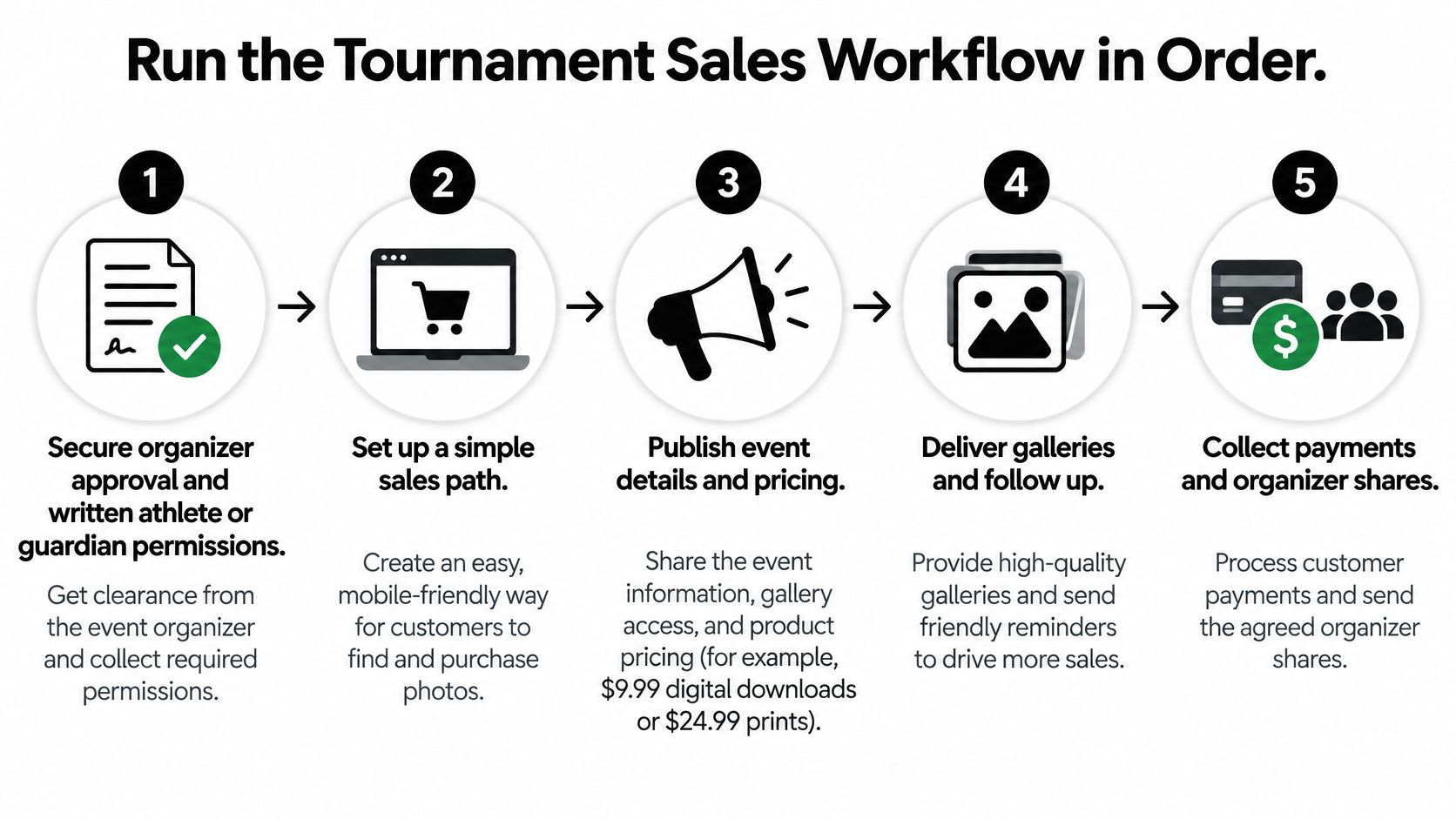
Run the Tournament Sales Workflow in Order
Tournament sales depend on a sequence families can follow: learn where to find the photos, see the gallery, then choose an offer. Set up that path before the event so questions about access and pricing do not crowd out order support afterward.
Do the admin before you shoot
- Agree on permission and terms: Get organizer approval and written athlete or guardian permissions. Confirm whether coverage is paid by the organizer, families, or both.
- Prepare the ordering page: Make the page available before the first game, with prices and the delivery window stated clearly.
- Plan QR distribution: Put codes on schedules and signage, and share them in team messages so families can save the gallery link.
- Set a search-friendly shooting routine: Organize images consistently by athlete, team, and event segment, using names and divisions families recognize.
- Prepare the upload workflow: Check the photo upload page before the event, not during the post-game rush. With Saucial, organizers upload photos by dragging and dropping them, while AI processes faces in the background.
- Set the release sequence: Curate and publish the preview before opening time-limited bundles, individual downloads, prints, or premium edits.
A sports photography cost guide from Photographers Ranked estimates that an approximately 3-hour game can produce 1,000 to 3,000 raw frames, followed by 3 to 6 hours of culling and editing to deliver roughly 80 to 200 final images. Consistent file organization makes that post-production easier to manage and helps families find the right photos.
Why the order matters
For a Saturday tournament with eight games across two fields, a Sunday morning preview gives families a chance to browse while the event is still fresh. If the bundle is announced before the gallery is available, families may ask where their child's photos are instead of placing an order. Publish first, then make the offer.
Practical rule: Set the offer deadline only after the gallery is ready. Before packing, confirm permissions, a live ordering page, QR codes, an agreed file-naming routine, and a tested upload process.
Break-Even Math Before You Set Prices
A tournament price has to cover more than the time spent shooting. Culling, editing, delivery, customer support, refunds, payment fees and the organizer's share all affect what you keep. Set the price from that full cost stack before families see an offer.
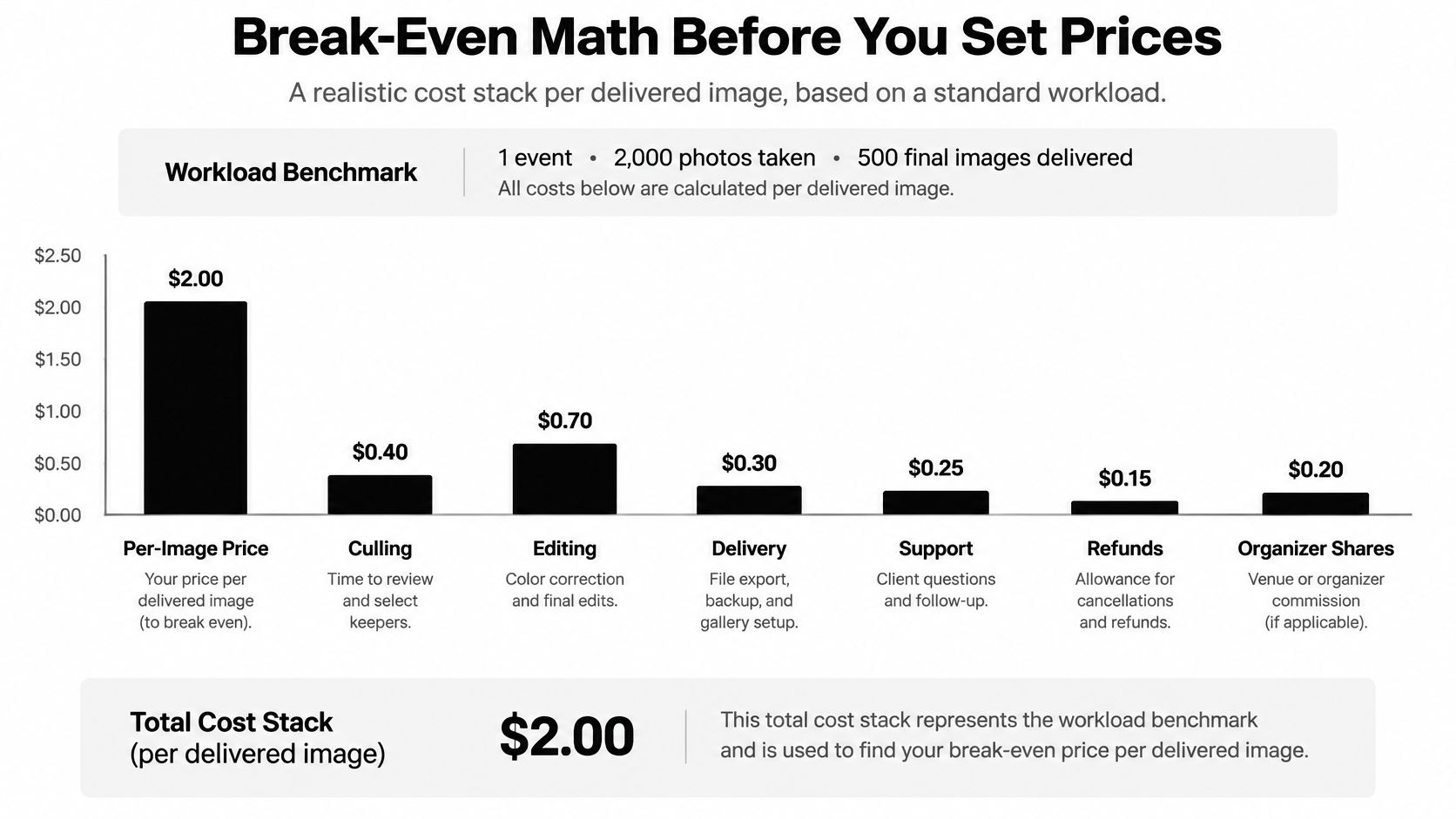
Start with labor. A three-hour shoot plus 3 to 6 hours of post-production adds up to roughly 6 to 9 labor hours per event. Multiply those hours by your target hourly rate to find the gross revenue needed for labor. Then divide by the bundle price to estimate the sales required.
Bundles needed to cover labor at different hourly targets
| Target hourly rate | Labor hours per event | Gross needed | $25 bundles to sell |
|---|---|---|---|
| $50/hour | 6 | $300 | 12 |
| $75/hour | 6 | $450 | 18 |
| $50/hour | 9 | $450 | 18 |
| $75/hour | 9 | $675 | 27 |
| Illustrative example, before costs | 6 | $200 gross (about $33/hour) | 8 purchases from 15 families |
Those figures cover labor only. The sports photography pricing guidance from Xposure describes league commissions as commonly 10% to 20% of sales or a flat fee per package. At a 15% commission, a $25 bundle nets $21.25. Covering $300 in labor then takes 15 bundles, or $375 in sales, before payment fees or refunds.
The video below covers the same pricing decision: calculate the labor cost before setting the offer price.
Subtract payment fees and expected refunds before comparing sales with your target. An organizer-funded minimum guarantee can cover fixed labor before family purchases come in, reducing the risk of a low-conversion event. Test any revenue claim against your own roster, hours and conversion before using it to set expectations with an organizer.
Pricing Offers Tournament Families Actually Buy
Families don't buy "photography." They buy a file they can post tonight, a set of their child, or a print for a grandparent. The audience is there. USAFacts, summarizing the U.S. National Survey of Children's Health, reported that 55.4% of children ages 6 to 17, approximately 27.3 million young people, played on a sports team or took sports lessons in 2023. Your job is matching the offer to the fulfillment it creates.
Tournament offers by price, contents and fulfillment load
| Offer | Typical price | What the family gets | Fulfillment load |
|---|---|---|---|
| Single action-shot download | about $10 | one high-resolution file | high: one order per file and frequent support requests |
| Player gallery | $40 to $75 | every shot of one athlete | medium: one order covers many images |
| Team bundle | $25 (example bundle) | a curated set for one team | low to medium |
| Print-plus-digital bundle | player gallery price plus print markup | prints plus full-resolution digital files | high: printing and shipping |
| Season pass | set at three player galleries | all games in a season for one athlete | low per image, but needs a longer delivery window |
Read the table by workload, not price
A single download looks simple, but each file becomes a separate order, a separate delivery check and often a separate "where's my link?" message. Per dollar earned, it's frequently your most expensive product. A player gallery is cleaner. One payment covers every usable shot of that athlete, and the parent stops doing math on each frame.
The team bundle suits coaches and team parents who want a shared set without picking individuals. Print-plus-digital earns more per family but adds lab orders, addresses and damaged-package support. A season pass only works when you'll see the same families repeatedly and can keep delivering on schedule.
Start when you sell sports photos with three or four options, not a long menu. Too much choice slows ordering on a phone in a parking lot. For a small one-team event, I'd offer a player gallery and a team bundle. For a large multi-age tournament with repeat weekends, add the season pass.
Put QR Galleries Where Families Will Scan
A QR code doesn't create demand. It shortens the distance between interest and the first purchasable image, but only if a parent can scan it without breaking stride.
Place the code where families already stand still. On site, that usually means check-in, the scoring table and the snack bar queue.
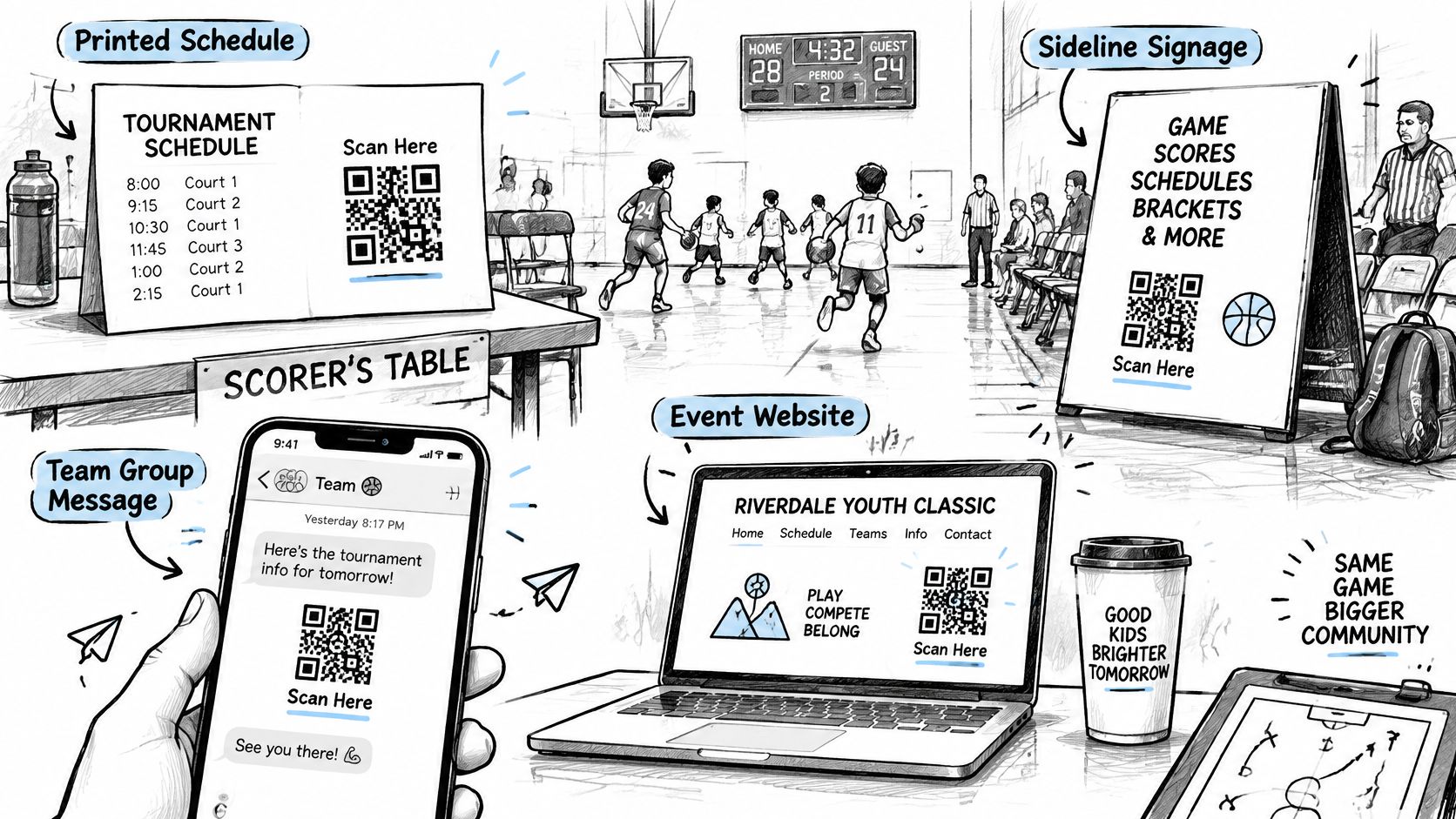
Placements that earn scans
- Printed schedule: Parents keep it all day and check field changes against it.
- Sideline signage near the scoring table: Coaches and scorekeepers point families there when asked.
- Team group messages the night before: The link is already on the phone when the gallery opens.
- Event website: Grandparents who didn't travel can still buy.
A code on a corridor wall people walk past at pace won't get scanned. A code at the check-in table, where a parent waits with a phone in hand, will.
Two routes into the same gallery
The gallery page should show the team name, a search box for athlete name or jersey number, and a clear price for the first option before anything else. Show the manual route first. Families search by athlete or team with no selfie, no guesswork and no dead end.
Then offer the optional selfie route. Event organizers upload event photos by dragging and dropping them, and our AI processes faces in the background. Attendees take a selfie and instantly see all photos featuring them, with no app and typically no account needed. Keep that route clearly optional, because some families will skip it and they still need a fast way to buy.
Test it yourself from the parking lot. Scan the code, time how long it takes to reach the first purchasable image, and fix anything that takes more than a few taps. If you can't do it one-handed, a parent holding a folding chair can't either.
Offer Selfie Matching Only With Consent
Faster discovery can create its own friction. If a parent feels pushed into biometric processing to see their child's photos, you haven't removed a barrier. You've replaced a browsing problem with a trust problem, and trust problems cost sales and organizer relationships.
The rules aren't uniform either. The New York State Bar Association's analysis of facial recognition at entertainment venues notes that Illinois, Texas, Washington, Colorado, California, New York City and other jurisdictions impose different obligations, with no federal commercial facial-recognition privacy law in the United States. Under GDPR, biometric data used to uniquely identify someone is special-category data and needs a lawful basis and safeguards.
The consent checklist
- Give pre-event notice: Tell families, in the organizer's normal communications, how photo finding works.
- Collect explicit opt-in where required: Don't bury it in general event terms.
- Keep a manual gallery route: Team and athlete search must work for everyone, every time.
- Limit retention: State how long matching data is kept and stick to it.
- Honor deletion requests: Give families a named contact, not a generic inbox.
- Treat minors separately: Handle children and non-consenting attendees apart from consenting adults.
Say a parent wants every shot of their daughter but refuses biometric matching. The sale should still take two minutes through team and athlete search. If it doesn't, your "convenience" feature has become a gate.
Permission-conscious convenience sells. Forced biometric processing gives a school or sponsor a reason to say no to the whole gallery.
Then measure the commercial claim instead of assuming it. Compare paid conversion for families who chose selfie matching against families who used manual search. If the optional route doesn't lift completed orders, keep it optional and invest your effort in better team labeling instead.
Track Conversion and Average Order Value
Counting uploaded images tells you how busy you were. It doesn't tell you whether the event paid. For youth and amateur tournaments, your dashboard starts with one denominator: eligible athletes photographed. Every rate after that depends on it.
Funnel metrics to record after every tournament
| Metric | What it tells you | Benchmark |
|---|---|---|
| Eligible athletes photographed | the denominator for every rate | count from the roster you covered |
| Gallery visitors | how many families reached the gallery | record your first-event baseline |
| Identified athletes | how many families found their own photos | compare against eligible athletes |
| Checkout starts | how many families began an order | compare against gallery visitors |
| Completed orders | paid outcomes after checkout | compare against checkout starts |
| Share of photographed athletes ordering | the core conversion rate | roughly 40% (anecdotal) |
| Average order value | the revenue per buying family | above $55 (anecdotal) |
| Refund rate | whether packages create support cost | track refunds per completed order |
| Margin | profit after labor and fees | around 70% (anecdotal) |
Derive the two numbers that matter
Share ordering is completed orders divided by eligible athletes photographed. Photograph 120 athletes and get 48 orders, and you're at 40% conversion. Average order value is revenue divided by completed orders. Together they give you revenue per photographed athlete, which you can set directly against your labor hours.
Those benchmarks come with a warning. A community discussion among sports photographers on Reddit reports roughly 40% of photographed subjects ordering, average orders above $55 and margins around 70%, but those figures are anecdotal. Use them as hypotheses to test, not numbers to promise an organizer.
Watch refund rate closely. A package that converts well but generates refunds and support threads may be less profitable than a quieter bundle. Record all of it in one sheet after every event, while you still remember which field had bad light and which division never got the QR message. Your second pricing decision should start from your own funnel, not from a forum thread.
Pick One Tournament and Run a Pilot
Pick one upcoming tournament and run the full sales workflow with a single pricing test. Keep the scope small enough to see where time and money go.
Offer a player gallery and a team bundle during a set ordering window. Confirm permissions, publish the ordering page, place QR codes where families are likely to pause, and agree on file-naming conventions with the organizer before the first game. Record the funnel measures you chose, then review them within a week while the event is still fresh.
For the photo-finding experience, Saucial uses AI-powered face recognition to find event photos featuring each attendee. Before choosing any platform, check its consent, retention, and sharing controls, and agree with the organizer on how families will be informed.
A pilot gives you the labor hours, conversion, and refund costs to price the next tournament with less guesswork.
Ready to run a pilot? Saucial lets organizers upload event photos by dragging and dropping them, then processes faces in the background. Share the event photo link or QR code; attendees take a selfie to instantly see the photos featuring them. You can offer downloads or prints alongside the gallery, with sharing and attendee options controlled by the organizer.