Sell Event Photos Online: A Photographer's Playbook
You've just finished a gala with 4,000 frames on your cards and 600 attendees who'd happily see the photos, if they could find themselves without scrolling through a generic folder. The organizer has received the promised gallery, but the commercial question remains: how do you turn all that attention into revenue instead of treating sales as a lucky afterthought?
The answer is to sell event photos online as a per-attendee revenue channel. That means designing the shoot, gallery, pricing, permissions, and follow-up around the guest's path from recognition to purchase. Event imagery already sits inside a substantial spending category. The global event photography market was projected at about USD 2.78 billion in 2025, with a low-case CAGR of 9.5%, while Eventiere estimates the wider events economy at about USD 1.5 trillion and photography and videography at roughly 3% of event budgets, or about USD 44 billion globally. Those market estimates point to a practical opportunity, not a niche experiment.
Why Selling Event Photos Online Is a Different Game
At the end of that gala, the photographer is standing beside a laptop, looking at thousands of usable images and wondering why the normal delivery model feels so unproductive. A disc, Dropbox folder, or WeTransfer link fulfills the contract, but it asks every attendee to do the sorting. Most won't. They'll open the link once, fail to find themselves quickly, and move on.
That old workflow treats the gallery as a warehouse. A revenue-focused workflow treats it as a storefront. Guests scan a QR code photo gallery, take a selfie, see the photos they appear in, and reach a purchase option while the event is still fresh. A platform such as Saucial for event photo delivery reflects this shift by connecting uploads, shareable access, and attendee discovery in one workflow.
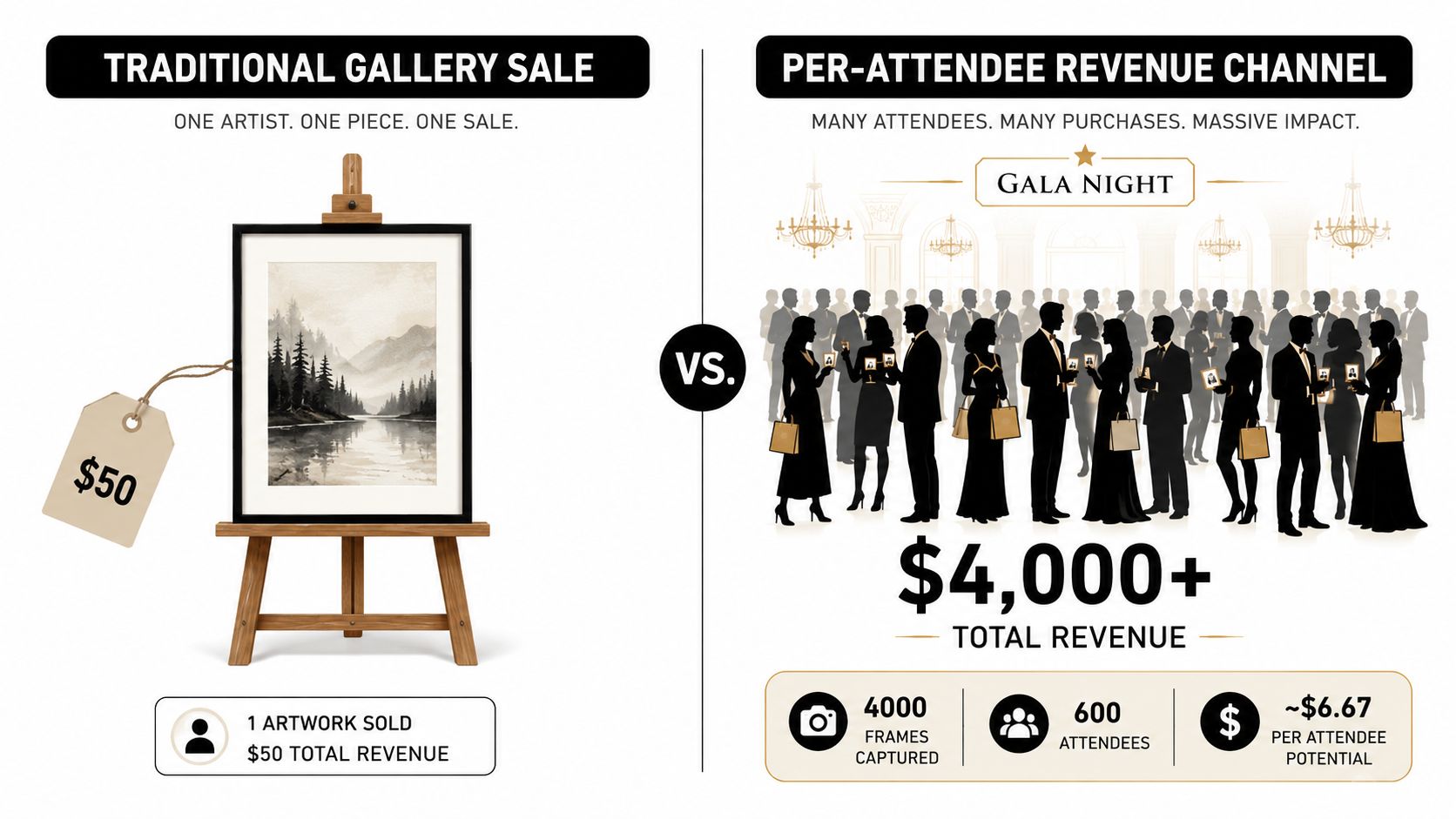
The attendee is the commercial unit
A portrait session usually has a defined buyer. Event photography has a room full of possible buyers, each with a different reason to purchase. One guest wants a polished portrait, another wants a group shot, and someone else wants a branded image to share with colleagues.
That creates three advantages over a standard gallery handoff:
- Volume: One shoot creates many possible buyer relationships.
- Repeat exposure: Attendees may return to the gallery after seeing friends share images.
- Impulse: A guest who finds a great photo immediately is more likely to buy than someone revisiting an old folder months later.
The market has also moved toward searchable delivery. Industry coverage describes face matching and selfie-based discovery as standard features in event photo-sharing tools, while one industry estimate projects AI-driven photo tools, matchmaking, scheduling, and analytics at about USD 5.7 billion by 2029. Eventiere's event photography overview places this development within a broader photographic services market where event photography represented 32.5% of service-type demand in 2024.
Three constraints shape every decision
First, turnaround is tight. Attendees expect the gallery while the experience still has emotional weight. Second, attention is measured in seconds. A guest won't tolerate a maze of folders, account creation, or unclear buttons. Third, the organizer controls access. Your sales channel depends on the venue agreement, the event brand, the QR placement, and the post-event communication plan.
The working model is simple: capture, identify, present, offer, measure. Once you track the event as a funnel, the organizer handoff becomes the top of a broader commercial system rather than the end of the job.
Pricing Models That Actually Convert at Events
Pricing fails when photographers copy a portrait price list and paste it into an event gallery. Attendees aren't buying a sitting. They're choosing between convenience, emotional value, social usefulness, and a physical reminder of the occasion.
The four models below cover most event sales situations. The exact price should reflect the event's purpose, audience, organizer budget, production cost, and the value of the finished image. Don't combine every option by default. A crowded menu can lower confidence and reduce the value of the items that carry your margin.
Event Photo Pricing Models Compared
| Pricing Model | Best Event Type | Avg Order Value | Checkout Friction | Fits When |
|---|---|---|---|---|
| Individual prints | Galas, awards nights, formal dinners | Varies by print size and finish | Moderate, because delivery is physical | Guests want a tangible keepsake |
| Digital downloads | Tournaments, school events, trade shows | Varies by file access and bundle size | Low when checkout is immediate | Attendees need social-ready images quickly |
| Premium edits | Corporate activations, conferences, branded portraits | Varies by editing depth | Moderate, because the offer needs explanation | Brand consistency or polish matters |
| Organizer subscriptions | Venues, promoters, recurring event series | Contract-dependent | Low for attendees, higher for the organizer | The same buyer runs repeated events |
Prints still make sense at a gala or awards night. A framed image, polished print, or small keepsake has a physical quality that a download lacks. The trade-off is fulfillment. You need a reliable print partner, clear shipping or collection terms, and a sales window long enough to complete orders without creating endless support work.
Digital downloads usually fit faster-moving events. A tournament participant wants a shareable action shot. A trade-show attendee may want a professional image for social media or a company post. Watermarked social files can serve as the entry product, while full-resolution downloads provide the higher-value option.
Premium edits work when the image has a business purpose. Retouching, color grading, branded frames, and consistent crops can turn a basic event portrait into approved marketing material. These offers need a strong before-and-after presentation, otherwise buyers won't understand what they're paying for.
Subscriptions are an organizer product rather than an attendee product. A venue or promoter running recurring events may prefer a predictable service that includes galleries, branded delivery, and sales infrastructure. The photographer gives up some one-off pricing flexibility in exchange for a relationship with repeat volume.
Pricing rule: Match the offer to the event's purpose, the attendee's mindset, and the organizer's budget before choosing the file format.
Avoid stacking discounts until every item feels cheap. A low-priced download may attract attention, but several low-margin products can consume editing, payment, and support time without producing useful per-attendee revenue. Start with one clear entry offer, one sensible bundle, and one premium option. Then measure which path buyers choose.
Delivering Photos So Attendees Actually Buy
The gallery is the conversion engine. If a guest can't locate a relevant image quickly, the quality of the photograph won't rescue the sale.
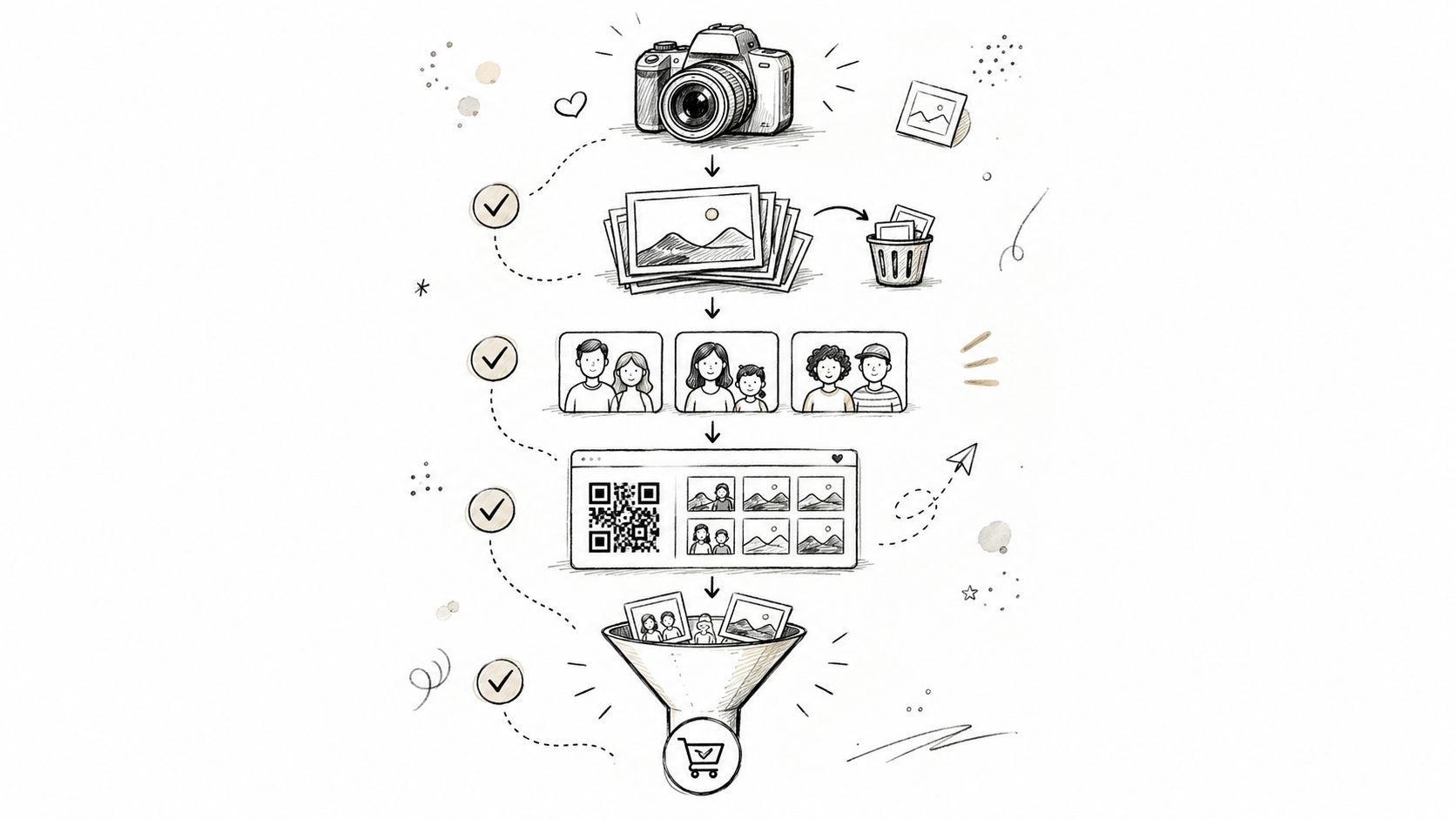
Start with a clean delivery pipeline:
- Ingest the files as soon as the event workflow allows, using a platform that can handle bulk uploads and background processing.
- Cull aggressively. Remove blurred frames, duplicates, closed eyes, and images that weaken the gallery.
- Group by person, moment, or collection so the guest sees a useful result rather than an undifferentiated archive.
- Create the access point. Put the event link and QR code on signage, table cards, venue screens, email, and approved social posts.
- Place the purchase path beside discovery. The guest shouldn't have to leave the personal gallery to understand what's available.
Why selfie matching matters
Folder search asks the attendee to remember when a photo was taken, guess which collection contains it, and scroll through images of other people. Selfie photo matching reverses that burden. The guest taps the camera, submits a selfie, and receives a personalized result set.
That shorter path matters because event attention disappears quickly. A guest who finds a strong image in a few taps can buy or share it immediately. A guest who has to create an account, confirm an email, browse multiple folders, and hunt for the buy button has already encountered enough friction to abandon the process.
For photographers who want a direct upload workflow, Saucial's event photo upload process is one example of a system built around uploading first and distributing through a personalized event gallery.
The gallery should also make the commercial hierarchy obvious:
- Visible watermarks on social downloads can protect the preview while encouraging a purchase.
- Subtle watermarks suit premium previews where the image itself needs to remain attractive.
- Expiration windows can create a legitimate reason to act, provided the date is clear and honored.
- Featured sets should appear near the top, not after a guest has browsed through every collection.
Here's the operational test I use: can a first-time attendee scan the code, identify themselves, understand the available purchase, and reach checkout without asking the organizer for help? If not, the system is leaking sales.
Slow pages, login walls, missing mobile optimization, and buried buy buttons are common failure points. Test the entire experience on a phone using the venue's real conditions, not just on a fast office connection. The attendee doesn't care how elegant your backend is. They care whether their photo appears when they scan.
Upsell Tactics That Lift Average Order Value
A low-priced single download can be a useful entry point, but it rarely carries the full cost of acquisition, curation, support, and payment processing on its own. The margin usually improves when the buyer sees a well-presented bundle before checkout.
A gala buyer might choose five edited photos with a branded frame instead of one digital file. A tournament participant may value a set that combines action images with an individual portrait. A trade-show attendee may pay for a polished headshot edit because the image has an immediate professional use.
Bundles should solve a recognizable need
| Event Type | Bundle Name | Includes | Price | Anchor Price |
|---|---|---|---|---|
| Gala | Keepsake Set | Five edited photos plus branded frame | $29 | Five separate files at $9 each |
| Tournament | Player Highlight Pack | Team highlight set plus individual portraits | $45 | Individual purchases priced separately |
| Trade show | Professional Profile Add-On | LinkedIn-ready headshot retouch | Add-on at checkout | Standard event portrait without retouching |
These examples work because each bundle has a job. The gala set preserves the evening. The tournament pack tells the participant's story across team and individual moments. The trade-show add-on turns a quick portrait into a business asset.
Use price anchoring carefully. Put the premium tier first so the mid-tier feels considered rather than arbitrary, but make the differences concrete. “More photos” is weaker than “five edited images, branded frame, and full-resolution delivery.”
Place the offer at the moment of confidence
A featured set at the top of the QR code gallery gives the buyer a visual anchor. It shouldn't interrupt browsing with aggressive pop-ups. Let the guest find a strong image first, then present the bundle at the cart stage, when the buyer has already decided that the gallery contains something worth keeping.
Post-purchase offers can extend the relationship. A memory book, additional retouching, or a larger print can be offered after delivery, when the customer already trusts the result. The timing matters. A follow-up after the initial purchase feels like service; an upsell before the buyer has received anything can feel like pressure.
Commercial observation: The best upsell doesn't add random extras. It packages the next logical use of the image.
Give organizers a separate option for sponsored or branded frames, but get approval before placing a sponsor inside attendee-facing creative. Brand exposure can be valuable, yet an over-branded photo may reduce the guest's desire to share it.
Permission, Privacy, and Trust at Scale
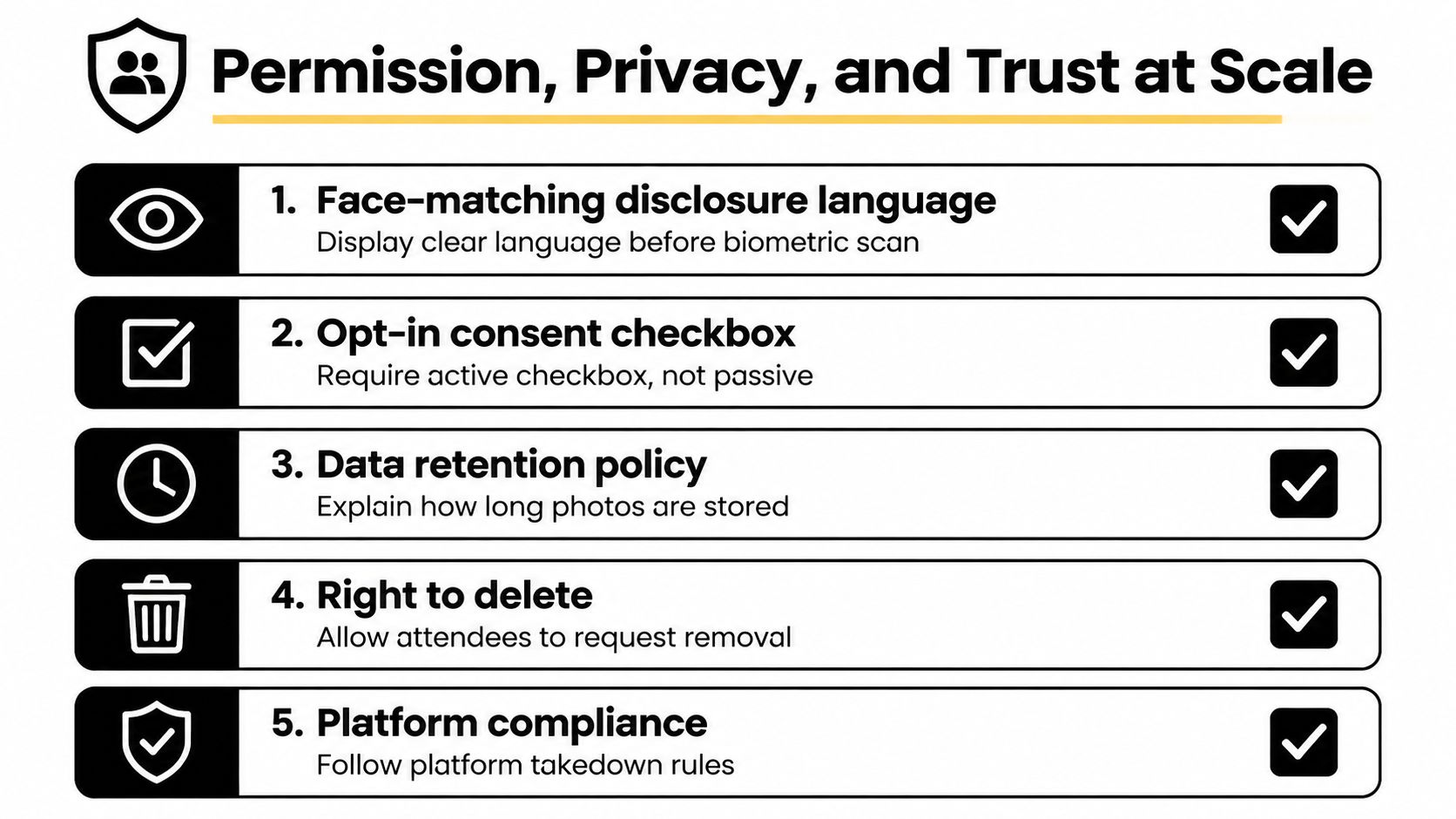
Face matching can make an event gallery dramatically easier to use, but it also creates a responsibility that a normal public folder doesn't carry. Face recognition processes biometric information, so the photographer and organizer need a transparent plan before anyone uploads a selfie or enables matching.
Independent privacy guidance for event galleries recommends opt-in use, minimal retention, and clear guest disclosure, while GDPR-style models distinguish between temporary selfie processing and stored face vectors used for retrieval. This event photo privacy guidance is a useful starting point, but it isn't a substitute for legal advice in the markets where you operate.
Put disclosure before processing
The attendee should see plain language before taking a selfie. Explain what the system does, why the selfie is being used, whether a face template is created, how long the information remains available, and how to request deletion.
An active consent checkbox is safer than a passive notice. The wording should also distinguish between ordinary gallery access and optional face matching. Someone may want to browse public event images without submitting biometric information.
Organizer agreements should cover more than permission to take photographs. They should address:
- Commercial distribution rights: Who may sell, license, or distribute the images?
- Prominent attendees: Which guests need individual releases?
- Children: Will minor photos require parent or guardian access?
- Takedowns: Where can a guest request removal, and who handles the request?
- Access controls: Will the gallery be public, PIN-protected, invite-only, or restricted by collection?
For schools, universities, and youth-focused events, many photographers choose to gate minor images behind parent-controlled access rather than publish them openly. That adds friction, but it can be the correct trade-off when safeguarding matters more than maximum reach.
Write the retention policy before shoot day
A retention policy should state what happens to unpurchased photos, purchased downloads, selfies, and any face vectors. Don't promise a window you can't enforce. Use your legal and platform requirements to determine the actual schedule, then make it easy for attendees to find.
A clear policy reduces confusion and gives support staff a consistent answer. It also signals that the gallery isn't an uncontrolled archive. If your platform offers an account and permissions layer, Saucial's authentication workflow can be part of the operational setup, but your public-facing consent language still needs to stand on its own.
Metrics That Prove Sales Lift and ROI
A gallery can attract plenty of views and still generate little income. Track per-attendee revenue first, calculated by dividing gross gallery sales by the number of checked-in attendees. This reframes photo sales as a revenue channel attached to attendance, rather than a one-off gallery fee.
The wider event photography market helps explain why this measure matters. Photography and videography account for roughly 3% of global event budgets, according to estimates summarized by MMR Statistics' event photography market data. The practical question is whether attendee purchases add value beyond the organizer's booking fee.
Sales Lift Scorecard Benchmarks
| Metric | Definition | General Event | Premium Event |
|---|---|---|---|
| Per-attendee revenue | Gross gallery sales divided by checked-in attendees | Use as the baseline comparison | Expect stronger value when images carry premium or keepsake appeal |
| Gallery open rate | QR scans or link opens divided by reachable attendees | Track by distribution channel | Compare venue signage with organizer email and social posts |
| Photo-to-purchase conversion | Buyers divided by gallery visitors | Use to diagnose discovery and offer clarity | Evaluate bundle presentation and premium positioning |
| Average order value | Gross sales divided by orders | Improve with one clear bundle | Improve with premium edits, prints, or branded sets |
| Share rate | Shares divided by gallery visitors | Indicates social usefulness | Indicates brand and community reach |
| Repeat-buyer rate | Returning buyers divided by first-time buyers | Important for recurring events | Useful for venues, promoters, and annual galas |
These are operating measures, not universal promises. A community event and a premium gala carry different buying intent, pricing tolerance, and attendee expectations. Compare similar events, then review what changed after you adjust the gallery, offer, placement, selfie-based discovery, or follow-up.
Track each QR placement with a unique short link where possible. Ask buyers in a post-event survey how they found the gallery, and preserve the campaign or source attached to each checkout. For selfie delivery, compare matched-photo views with purchases so you can see whether faster discovery increases sales, not just traffic.
Measure the next booking as part of ROI. Record whether the organizer renewed, expanded the scope, or mentioned attendee engagement during the sales conversation. A sales channel that produces modest gallery income may still justify its setup if it improves retention or adds scope to future work.
Ignore vanity metrics unless they explain a commercial result. Views matter when they lead to purchases, shares, qualified inquiries, or repeat bookings. Otherwise, they only show that a page loaded.
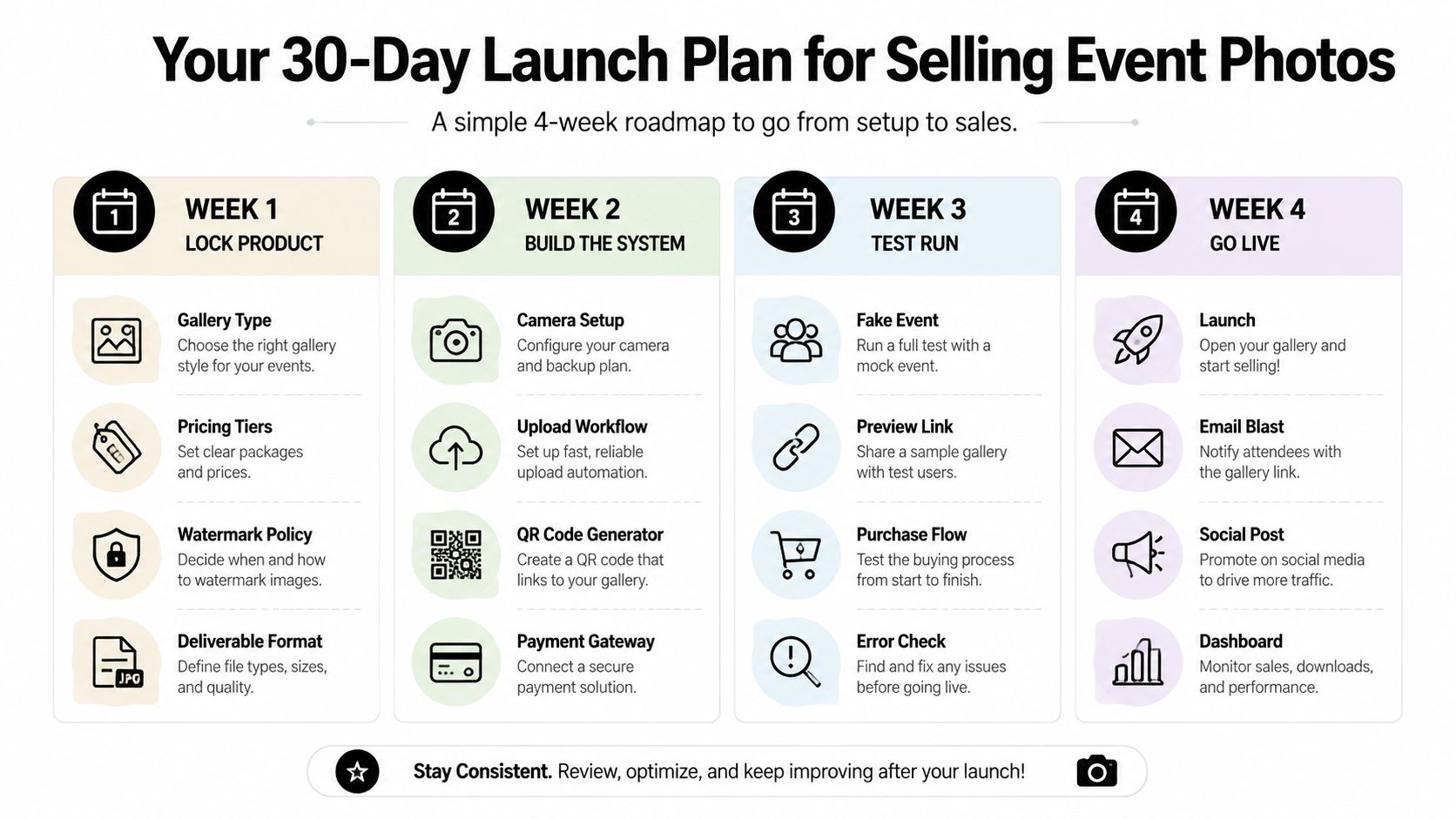
Your 30-Day Launch Plan for Selling Event Photos
A solo photographer can build the first version of this channel in a month by making one decision at a time. Don't begin with a complicated storefront. Begin with a gallery that works on a phone, a clear offer, and permission controls you can explain to an organizer.
Week one locks the product
Choose the gallery format, entry product, bundle, premium option, watermark policy, and deliverable format. Write the product names before designing the page. If you can't explain the difference between the tiers in one sentence, attendees won't understand it either.
Week two builds the delivery stack
Select the gallery platform, QR-code generator, selfie-matching integration, payment processor, and branded frame templates. Upload a test collection and run the experience as an attendee. Check the link from a phone, scan the QR code from printed material, and complete a test checkout.
Week three protects the workflow
Draft the face-match disclosure, consent language, retention explanation, takedown process, and organizer approval checklist. Decide who can access the dashboard and who responds to removal requests. You can review operational controls in Saucial's settings area, or apply the same checklist to another platform.
Week four pilots and measures
Use a small paid event rather than your most demanding production. Put the QR code where guests naturally wait, include the link in the organizer's recap message, and record gallery opens, purchases, average order value, shares, and support questions. Fix the largest point of friction before taking the system to a larger event.
Use this launch checklist before the first live sale:
- Pricing page: Show one entry product, one bundle, and one premium option.
- Gallery test: Confirm the personal discovery path works on mobile.
- QR placement: Approve signage, screens, table cards, and recap links.
- Watermark policy: Apply consistent previews and clear download permissions.
- Consent language: Display disclosure before optional face matching.
- Retention policy: Document what happens to images and biometric data.
- Payment test: Complete a real test transaction and check the receipt.
- Tracking links: Use distinct links for venue, email, and social distribution.
- Follow-up email: Give attendees a direct path back to the gallery.
- Debrief template: Record friction, sales, questions, and organizer feedback.
The business changes when every attendee has a fast path to a relevant image and every purchase teaches you something about the next event. Build the system around discovery, permission, and measurable value, then let the gallery earn beyond the original shoot fee.
Saucial gives organizers and photographers a practical way to upload event images, share an event photo sharing link or QR code photo gallery, and help attendees find their photos through selfie matching. Visit Saucial to set up a faster post-event engagement workflow and explore attendee-focused monetization options.



