QR Code Event Marketing: A Practical Playbook for 2026
The badges are ready to print, the sponsor wall has been approved, and someone asks where the photo gallery QR code should go. It's tempting to drop the same square onto every asset and call distribution finished. But an attendee still has to notice it, scan it under venue lighting, reach a useful page, and find a photo worth sharing or buying.
QR code event marketing works when you design that whole journey. For photo activations, the objective isn't a scan count. It's getting guests to their images with enough clarity and confidence that they take the next action, whether that's sharing a gala portrait, downloading a tournament photo, or purchasing a photographer's premium edit.
Why QR Codes Still Win at Live Events
A printed table card can stay with a guest throughout dinner. A sponsor display can catch someone immediately after a portrait. An exit sign can offer a useful next step while attendees are still thinking about the event. Each placement connects a physical experience to something guests can open on their phones.
That's the defensible case for QR codes: they shorten the route from interest to action. Organizers don't need to ask attendees to remember a web address or search their inbox before reaching an event photo sharing link.
Familiar technology, purposeful destination
QR codes began at DENSO WAVE in Japan as a solution for tracking automotive components. Conventional barcodes couldn't carry enough information for the manufacturing workflow, so the company developed a two-dimensional alternative with greater capacity and rapid readability.
Standardization and broadly available specifications helped the technology move beyond factories. Later, mobile phones with built-in scanning made accessing mobile websites and coupons more approachable. For event organizers, that history matters because the interaction isn't a novel behavior guests must learn from scratch.
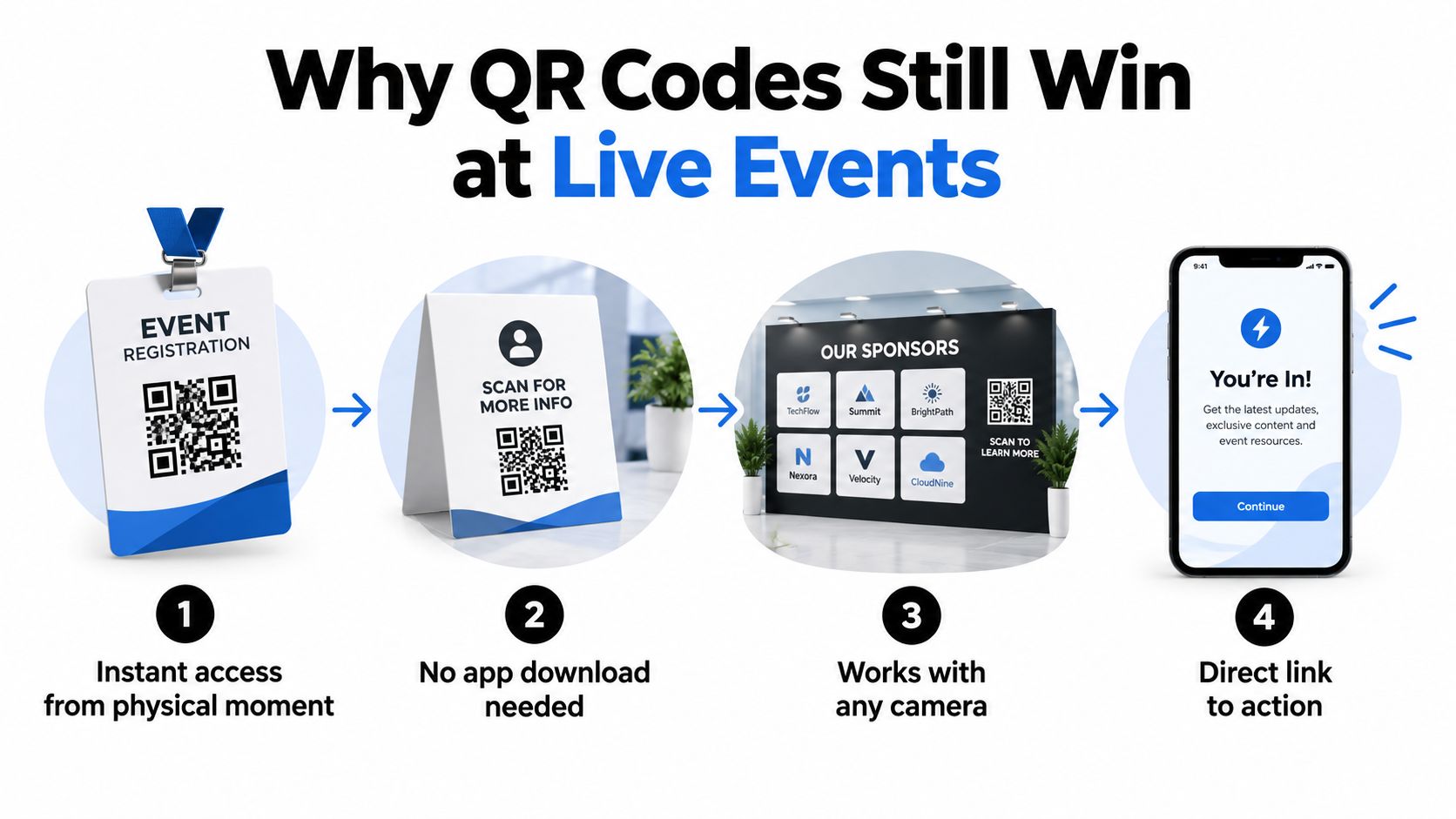
A QR code photo gallery uses that familiar interaction for a specific attendee need. Instead of advertising that photos exist somewhere, the organizer gives guests a direct route to their moments. A browser-based destination can also avoid the interruption of an app download.
Operator principle: Don't ask whether the event needs more QR codes. Ask which attendee need each placement will resolve.
Make the channel earn its place
The technology alone doesn't justify the activation. The operational case depends on reliability, placement, destination design, and measurement.
A code that scans reliably but opens an irrelevant page wastes attention. A useful gallery hidden behind a floral arrangement won't reach its audience. A successful journey with no attribution leaves the organizer unable to explain which assets contributed to engagement or sales.
Treat each printed code as an invitation with a promise. The label tells guests what they'll receive; the destination must fulfill it. That's a stronger foundation for live-event marketing than adding QR codes because there's spare space on the artwork.
Building Codes That Actually Scan On-Site
QR reliability is an environmental engineering task, not just a design approval. A pristine file on a laptop doesn't tell you whether guests can scan the finished sign beneath colored lighting, through surface glare, or from the edge of a queue.
Start with a dark pattern on a light background. Black on white is a straightforward production choice; brand colors should earn approval through physical testing, not aesthetic preference. Don't assume an attractive contrast ratio on a screen guarantees camera recognition on the printed material.
Protect the boundary before decorating the code
Preserve a uniform quiet zone of at least four modules on every side; standard error-correction levels recover roughly 7% of damaged codewords at L, 15% at M, 25% at Q, and 30% at H, but correction can't replace the missing boundary a scanner needs to detect the code, as explained in QR Code KIT's quiet-zone guidance.
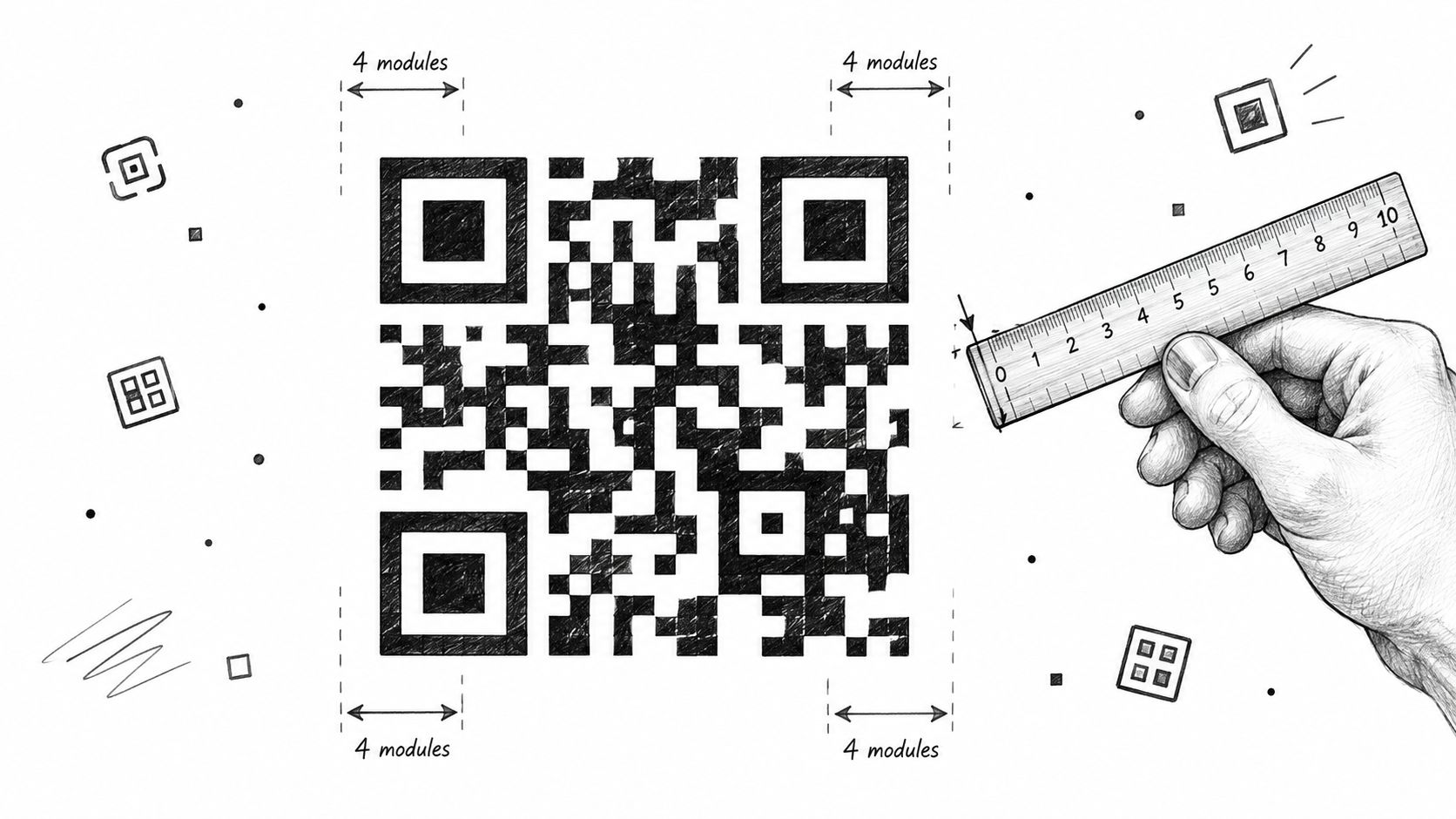
A module is an individual square in the matrix. Keep text, sponsor frames, and background artwork outside the required margin. Increasing error correction may produce a denser matrix, so selecting the highest setting automatically isn't a substitute for testing.
Use a short redirect URL rather than encoding a long campaign address directly. Keep the printed destination under organizer control so a landing-page problem can be corrected without replacing every sign. Confirm that the redirect preserves the placement's tracking parameters.
Test the asset guests will encounter
Run the preflight on the final material, including its stand, frame, laminate, or sponsor treatment.
- Device coverage: Try current and older iPhone and Android devices. Record the device and failure condition rather than accepting a single successful scan.
- Viewing conditions: Approach from the expected distance and angle, under actual venue lighting. Test where guests will stand, not where the designer held the proof.
- Surface interference: Check mild glare, fingerprints, partial obstruction, and any distortion introduced during mounting.
- Recovery decision: Fix margin, contrast, size, or lighting according to the observed failure. Don't respond to every problem by making the code larger.
Keep replacement artwork and printed backups accessible to the setup team. The production standard should be repeatable scanning in realistic conditions, not a successful demonstration with the newest phone pressed close to the sign.
Placement Strategy by Event Type
The right placement depends on when attendees have both motivation and attention. A guest seated at dinner behaves differently from an athlete heading to warm-up or an exhibitor moving between conversations. Choose locations around those differences rather than distributing codes evenly across the venue.
Recommended QR placements by event type
| Event type | Primary placement | Redundant placement | Suggested CTA |
|---|---|---|---|
| Gala or fundraiser | Table cards near seated guests | Exit signage beside the portrait-area route | Find My Gala Photos |
| Trade show | Booth display beside the photo activation | Badge lanyard card or closing session slide | Find Your Booth Photos |
| Sports tournament | Awards staging or athlete rest area | Field-side board outside active play | Find My Tournament Photos |
| Alumni or community event | Registration desk take-away card | Name badge or printed program | Find Our Event Photos |
At a gala fundraiser, table cards give guests an opportunity to act while seated, rather than during arrivals when they're juggling coats and introductions. A step-and-repeat backdrop establishes the photo context, but don't assume it's the best scanning surface. Place a separate sign beside the portrait area so guests don't need to step into another group's photograph.
For trade show photo sharing, proximity to the activation matters more than general visibility. Put the code where booth staff can explain the photo experience after the interaction. A badge or session slide can provide another route, but keep photo access visually distinct from demo booking or lead capture.
Choose the pause, not just the traffic
At a tournament, a field-side board may be visible without being convenient to use. Athletes preparing to compete shouldn't have to stop for a gallery interaction. Rest areas and awards staging offer a more suitable context for photo discovery and, where enabled, sports tournament photo sales.
Alumni and community events need a different rhythm. Registration is useful for introducing the gallery, while a program or take-away card gives guests a route they can revisit later. Make sure the photo code doesn't compete with the instructions staff need attendees to follow at check-in.
A busy walkway isn't automatically a good placement. Guests need somewhere safe to stop and a reason to take out their phones.
Assign a primary location and a redundant location with a different audience moment. Ask setup staff to walk the attendee route and check sightlines after furniture, sponsor displays, and queue barriers are in place. Placement approval on a floor plan isn't the same as visibility in an occupied room.
Designing the Post-Scan Attendee Journey
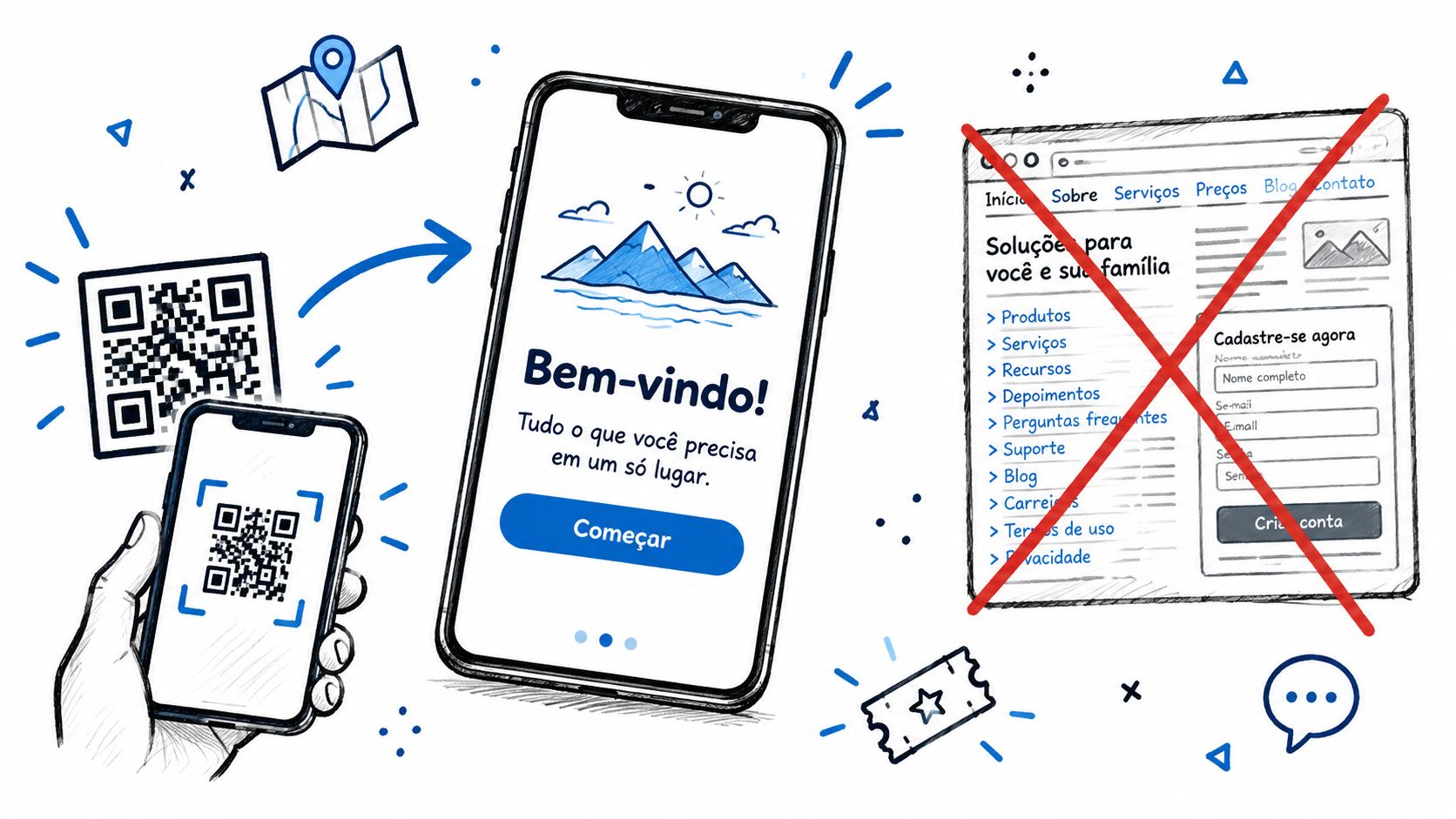
A successful scan is only the handoff. If guests land on a homepage, an unexplained folder, or a mandatory registration form, they still have work to do before finding their photos.
Immediate relevance should determine the destination. MarketingProfs reports that 84% of users are more likely to scan when the content aligns with an immediate need, a useful argument for matching the landing page to the promise beside the code in its B2B event QR engagement guidance.
Fulfill the promise before adding another request
A find my photos destination should identify the event and make the next action obvious. Keep the opening view focused on retrieval rather than presenting every sponsor message, album category, and commercial offer at once.
For a selfie-based gallery, explain the matching step before requesting a photo. The attendee submits a selfie, the system searches the available event images, and the results should focus on images featuring that person. Evaluate the complete flow on a guest device, not inside an organizer's logged-in dashboard.
- Arrival: Confirm the event identity and show whether photos are ready. Avoid decorative content that delays the useful controls.
- Retrieval: Make selfie photo matching understandable, with a clear status while the search runs.
- Results: Give guests recognizable previews and an obvious way to open an image.
- Next action: Present sharing, downloading, or an approved purchase option in context, after guests can see what they're getting.
Adapt the experience to the event
A gala gallery might emphasize portraits and branded sharing. A tournament destination should help athletes find images across the relevant games without making them browse unrelated sets. A trade show activation can place sponsor branding around useful photos and invite optional sharing as UGC from events.
The commercial trade-off is timing. An email gate before retrieval may serve a lead-capture objective, but it introduces a separate task before fulfilling the photo promise. If data capture is required, disclose that expectation on the physical sign rather than surprising guests after the scan.
For photographer upsell to attendees, show a relevant offer beside a relevant image. Premium edits, prints, or paid downloads should be clearly differentiated from any free access. Don't imply that every platform supports the same sales workflow; test the enabled checkout path and confirm who handles fulfillment.
Measuring Scans to Revenue, Not Just Scans
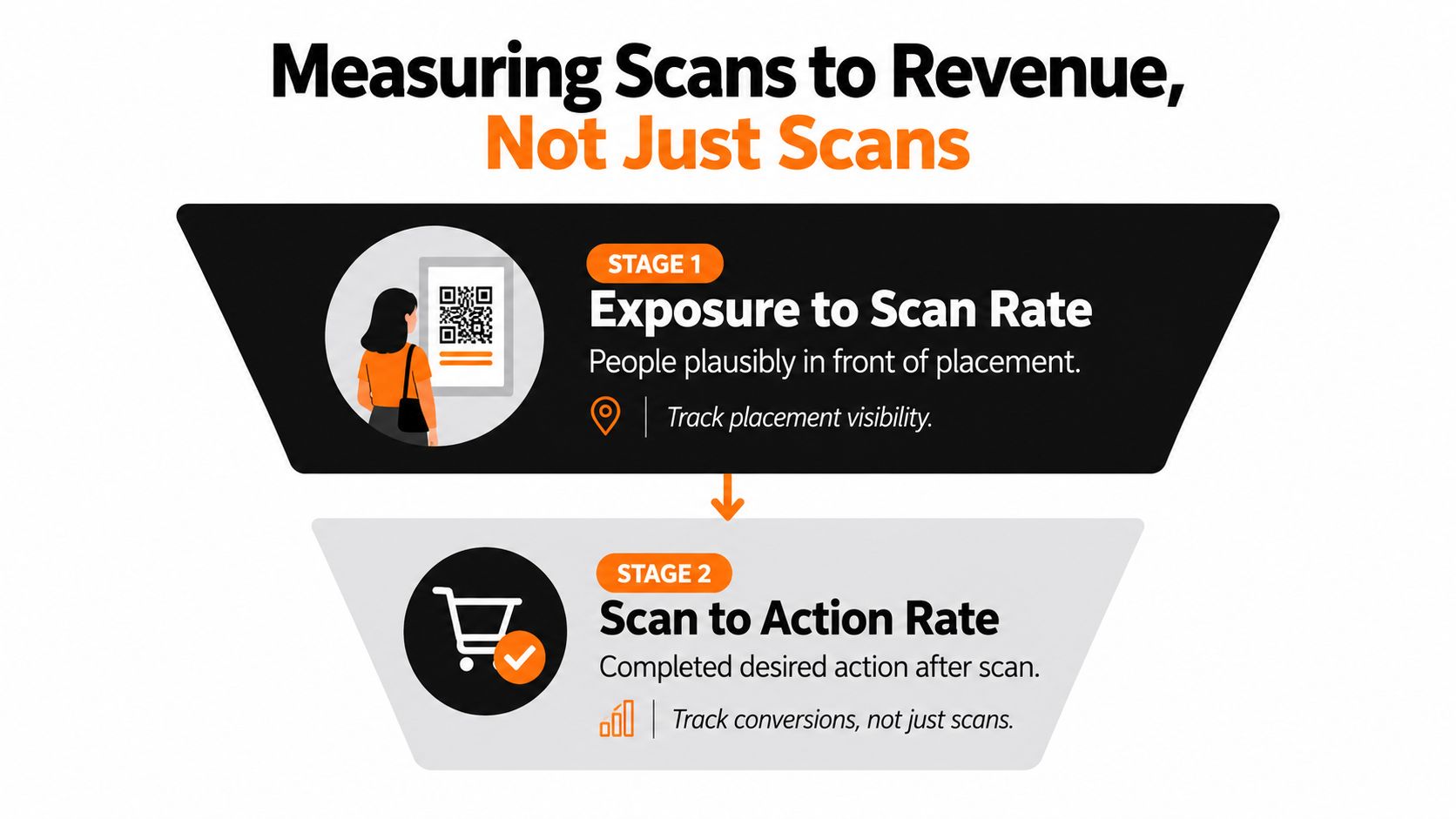
A total scan count can hide repeat visits, weak landing-page performance, and placements most attendees never saw. Measure exposure-to-scan rate and scan-to-action rate separately. Those stages answer different operational questions.
QR marketing guidance reports approximately 8–15% scan rates for event materials with engaged audiences and contextually relevant content, while distinguishing exposure, conversion, and downstream value in its QR campaign benchmark guidance. Treat that range as context, not a promised result or a target divorced from placement conditions.
Define the denominators honestly
Exposure means people who could plausibly see the code, not total event attendance. Estimate the audience passing or pausing within a placement's usable viewing area, and label estimates as estimates.
Exposure-to-scan rate = unique scanners ÷ plausible exposure.
For the next stage, define the action before launch. A completed selfie search, download, share, and purchase are different outcomes; don't combine them into an ambiguous conversion total.
Scan-to-action rate = unique scanners completing the defined action ÷ unique scanners.
Tag placements, then diagnose the journey
Give each placement a distinct UTM-tagged destination. Keep the event identifier in utm_campaign, distinguish distribution channels with utm_source and utm_medium, and use utm_content for assets such as table cards, entrance signage, or sponsor displays. Document the naming convention before anyone generates print files.
Compare placements using the same destination experience when you're testing placement performance. If the gallery, offer, and sign wording all change simultaneously, you can't confidently isolate the reason for a difference.
- Acquisition: Separate unique scanners from repeat scans, then inspect device type and time of day.
- Experience: Track landing-page loads, matching completion, gallery views, and median time from scan to the first matched image.
- Engagement: Report shares and downloads without assuming every platform button click became a completed external action.
- Commercial value: Track attributable purchases and revenue per scanner. Distinguish gross revenue from profit and avoid claiming sales lift without a comparable baseline.
Reporting test: Could the organizer use this result to change a placement, repair a workflow, or adjust an offer? If not, it probably belongs below the headline metrics.
A sponsor wall may generate fewer unique visitors but more return gallery visits. Report both behaviors without presenting repeat scanning as additional audience reach. For post-event engagement, compare useful attendee actions and attributable sales, not just the busiest code.
Privacy, Consent, and Accessibility Essentials
Photo retrieval involves people's identities, not just marketing traffic. A face recognition event gallery needs a clear operating policy before the code goes to print. Guests should understand what they're being asked to submit and what control they have afterward.
TSNN's event-marketing coverage reports that 95% of surveyed businesses use QR interactions to collect customer data, making collection practices an important consideration in its discussion of QR codes and event marketing ROI. That isn't a reason to maximize collection. It's a reason to decide what the activation needs.
Make the notice match the system
Write a short explanation of what selfie matching does, who controls the gallery, and how guests can request removal. State the actual retention policy for uploaded selfies, event images, and any face-derived templates rather than describing all of them as generic photo data.
Don't promise deletion or restricted access until the organizer has confirmed how the platform implements it. The team responsible for the gallery should know which settings it controls and which requests require provider assistance.
- Purpose limitation: Separate photo retrieval from marketing enrollment. Request only information needed for the selected experience.
- Secure access: Use HTTPS destinations and appropriate gallery permissions.
- Organizer controls: Assign role-based access so staff can perform their duties without unnecessary access to attendee information.
- Retention and removal: Publish clear retention rules and a usable request path with a named owner.
- Reporting: Prefer aggregated results for sponsors and stakeholders rather than attendee-level identity exports.
Provide a route that doesn't require scanning
Some guests won't have a suitable phone, connectivity, camera permission, or willingness to submit a selfie. Offer a short typed address, staffed assistance, and a non-face-search route where the gallery supports it. The alternative should help guests reach their photos, not merely tell them to contact someone later.
Make instructions readable, controls clearly labeled, and assistance easy to locate. Review the flow with privacy and accessibility stakeholders against the actual event audience and applicable requirements. A checklist alone doesn't establish legal compliance.
The practical trade-off is between collection ambitions and attendee choice. Mandatory accounts or opaque tracking can introduce avoidable friction; clear consent gives guests a basis for deciding whether to participate. Treat that decision as part of hospitality, not an obstacle to the campaign.
Launch-Week Checklist and Operator Workflow
Run the activation like an event deliverable with owners, dependencies, and acceptance checks. The print team, photographer, gallery operator, and marketing lead should agree on what must be ready before guests encounter the code.
Before production closes
Use a shared release checklist rather than scattered approvals in email threads.
- Asset owner: Approve the redirect, final artwork, and physical scan-test record. Keep replacement materials available.
- Floor-plan owner: Confirm primary and redundant positions, sign wording, and installation responsibility.
- Gallery owner: Test the guest retrieval journey, photo availability status, and enabled sharing or purchase paths.
- Measurement owner: Validate placement tags and dashboard events against actual test activity.
- Governance owner: Approve the notice, retention settings, assistance route, and removal-request process.
Set a photo-publication plan with the photographer. If images won't be available during the event, the destination should explain that clearly and provide an appropriate way to return. Don't advertise immediate retrieval while the gallery is empty.
During setup and live operation
Scan each installed asset after the room is dressed. Repeat checks during peak traffic and after lighting changes, especially where staff move signs or guests gather around displays.
Give the floor team a short explanation of what each code delivers and where to send exceptions. Assign someone who can correct a redirect or destination problem, and keep that contact available throughout the activation.
Afterward, review placement performance alongside the operating log. Distinguish low visibility from failed scanning, incomplete matching, unavailable images, and checkout abandonment before choosing a remedy. Use the findings to change the next activation's layout or workflow, rather than ordering more signs.
Saucial offers an event photo sharing link and QR-code gallery access, with selfie matching that helps attendees find images featuring them without an app. Visit Saucial to explore a photo activation for your next gala, tournament, or trade show, and plan the sharing and optional photographer upsell paths alongside the gallery experience.