Professional Photographer Workflow: From Shoot to Sales
The event is over, the cards are full, and your inbox is filling with variations of the same request: “Can you find my photos?” A gallery can be beautifully edited and still leave attendees scrolling through a cluttered folder while you manually search for individual shots. That's the workflow gap many photographers miss: delivery isn't finished when the client receives the files. It's finished when the people who want their photos can find them, share them, and, where appropriate, buy more.
A reliable professional photographer workflow connects preparation, capture, backup, editing, approval, and attendee distribution. The aim isn't to edit faster. It's to protect the images, deliver a consistent gallery, reduce repetitive support, and make the post-event handoff work for both the organizer and the photographer.
Why the Workflow Starts Before the First Shot
A chaotic gallery often begins with a decision that never got made before the event: who's the gallery for, what will be shared, and how will people find it? When those details are unclear, the photographer ends up answering attendee messages, untangling folders, and revisiting work that should have been settled in advance.
Post-capture work can rival the time spent planning and shooting. A 2023 workflow survey attributed to the Professional Photographers of America reported that post-capture tasks made up 49.7% of total project time. For a representative 200-image wedding assignment, that work reportedly took 23.8 hours, compared with 1,412 minutes for planning and on-site capture. The breakdown included editing, curation, file management, metadata and rights handling, and distribution and analysis, making delivery an operational priority rather than a last-minute courtesy (workflow survey breakdown).
Agree on the experience before the event
Start with the client brief, but don't stop at the shot list. Confirm the event's schedule, key people, restricted areas, sensitive moments, and who can approve images for release. Then decide what the attendee experience should look like: a link sent afterward, a QR code at the venue, or a more controlled gallery for specific groups.
Scout with both photography and distribution in mind. Notice where the light changes, where crowds gather, and whether guests will have a natural place to scan a code or receive instructions. A dependable camera plan matters, but so does knowing how people will access the finished work.
Make filenames and expectations predictable
Set a naming convention before the job. A structure based on event name and date makes it easier to keep cards, exports, backups, and galleries associated with the right booking. Preserve the camera's original filenames and metadata during ingest, then use the event naming system for folders and delivery.
Practical rule: Agree on what “delivered” means before the shoot. A client gallery and an attendee-friendly find-my-photos experience are different deliverables, even when they use the same images.
Before leaving for the venue, confirm the brief, location and lighting plan, tested gear and cards, naming convention, delivery timeline, approval contact, and attendee access method. A short pre-event check is easier than trying to reconstruct those decisions after the client has the gallery and attendees are asking where their photos went.
Shooting with Delivery in Mind
Good capture habits don't just improve individual frames. They reduce the number of inconsistent files you'll need to correct, make the gallery easier to browse, and give attendees a better chance of finding useful images. The trade-off is that consistency takes deliberate choices on site. Relying on the edit to fix every variation is slower and can make a set feel uneven.
The move from film to digital increased the volume of images photographers could make, and with that came more work selecting, storing, editing, and delivering files. A historical industry account reported an average of 1.8 frames per posed setup in a 2005 field observation, compared with 12.4 frames per setup in modern digital workflows. It also described file management, culling, metadata, backup, and delivery as foundational stages of digital work (history of the digital photography workflow).
Build consistency into your capture settings
If you're using multiple cameras, choose a consistent exposure and white balance approach for the event. When the lighting allows it, keep settings predictable across bodies and photographers. That gives you a cleaner starting point for batch adjustments and avoids spending the edit correcting unnecessary camera-to-camera variation.
Think about the final use as you shoot. A gallery meant for mobile browsing benefits from clear compositions and unobstructed faces. For a sports tournament, that may mean prioritizing readable action and identifiable players. At a gala, it could mean making sure people aren't hidden behind someone else in the group shot. If you plan to offer selfie photo matching, clear, well-lit faces can help make retrieval more useful, but the feature shouldn't replace thoughtful framing or permission controls.
Protect capture without losing the moment
Use dual-card recording when your camera supports it and the assignment warrants a second in-camera copy. That adds a layer of protection, but it doesn't replace a verified backup after the event. On the camera's rear screen, review key frames for focus, exposure, and missed moments. Don't fall into a chimping loop that distracts you from what's happening in the room.
Shooting with delivery in mind isn't the same as shooting for software. It means making choices that support the people who'll see the photographs: the client, the organizer, and the attendees. Consistent capture leaves more time for selecting meaningful moments instead of repairing avoidable inconsistencies.
Ingest and Backup Without the Panic
A gallery link can't restore a missing original. Don't publish or format cards just because the files appear on one computer. First make the copies, confirm they're readable, and keep the cards until the off-site backup has been verified.
A practical approach is the 3-2-1 backup model: maintain at least three copies, use two types of storage media, and keep one copy off-site. For example, work from a primary catalog on an SSD, make a separate local copy on another drive, and use an automated cloud or geographically separate backup. Two drives on the same desk may protect against one drive failing, but they won't protect against theft or a local disaster (photography backup strategy).
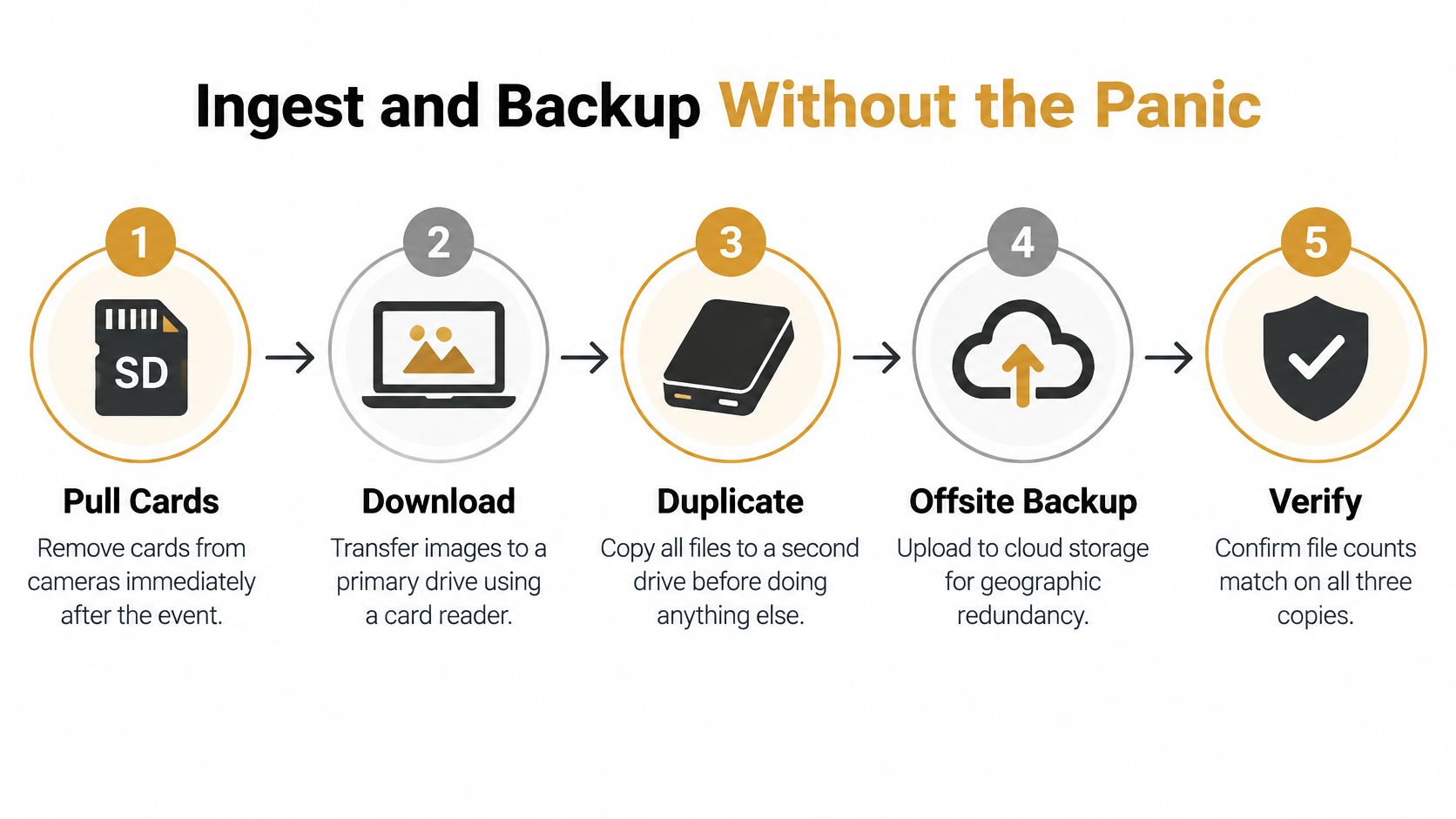
Follow the same sequence after every event
- Pull the cards: Remove them from the cameras after the event and keep them together with the job information.
- Download to the primary drive: Copy the image files without renaming the originals or discarding metadata.
- Duplicate locally: Copy the complete set to a second, separate drive before beginning the edit.
- Create the off-site copy: Upload to cloud storage or another geographically separate location.
- Verify before moving on: Check file counts or use checksum verification to confirm that the copies match and can be read.
Treat the checklist as part of the job, not as a reminder you'll follow when you have time. A file-count check can catch an incomplete transfer; checksum verification offers a stronger way to confirm copied files. If you're preparing a gallery through Saucial's event photo upload, complete your archive checks first. Distribution tools make images easier to access, but they don't replace a sound master archive.
Keep the cards until the off-site copy is confirmed. Record the backup status in the job checklist, and format cards only after you've verified the copies. The workflow might feel slower than opening the editing catalog immediately, but it avoids the far worse scenario of discovering a missing or corrupted set after the gallery is already live.
Culling and Editing That Respect Your Time
Editing gets unwieldy when each job becomes a new experiment. A repeatable order lets you make the broad decisions once, reserve individual attention for the images that need it, and keep technical review separate from distribution. The aim is a consistent gallery, not identical treatment for every frame.
A reported delivery workflow places the typical final-gallery turnaround at roughly one to two weeks, while import, copying, cloud upload, and verification alone can take time before any editing begins. The same account identifies post-production as a major bottleneck and recommends batch presets, clear naming, web-ready exports, and an early preview tier for events where quick sharing matters (event photography delivery workflow).
Work in a deliberate order
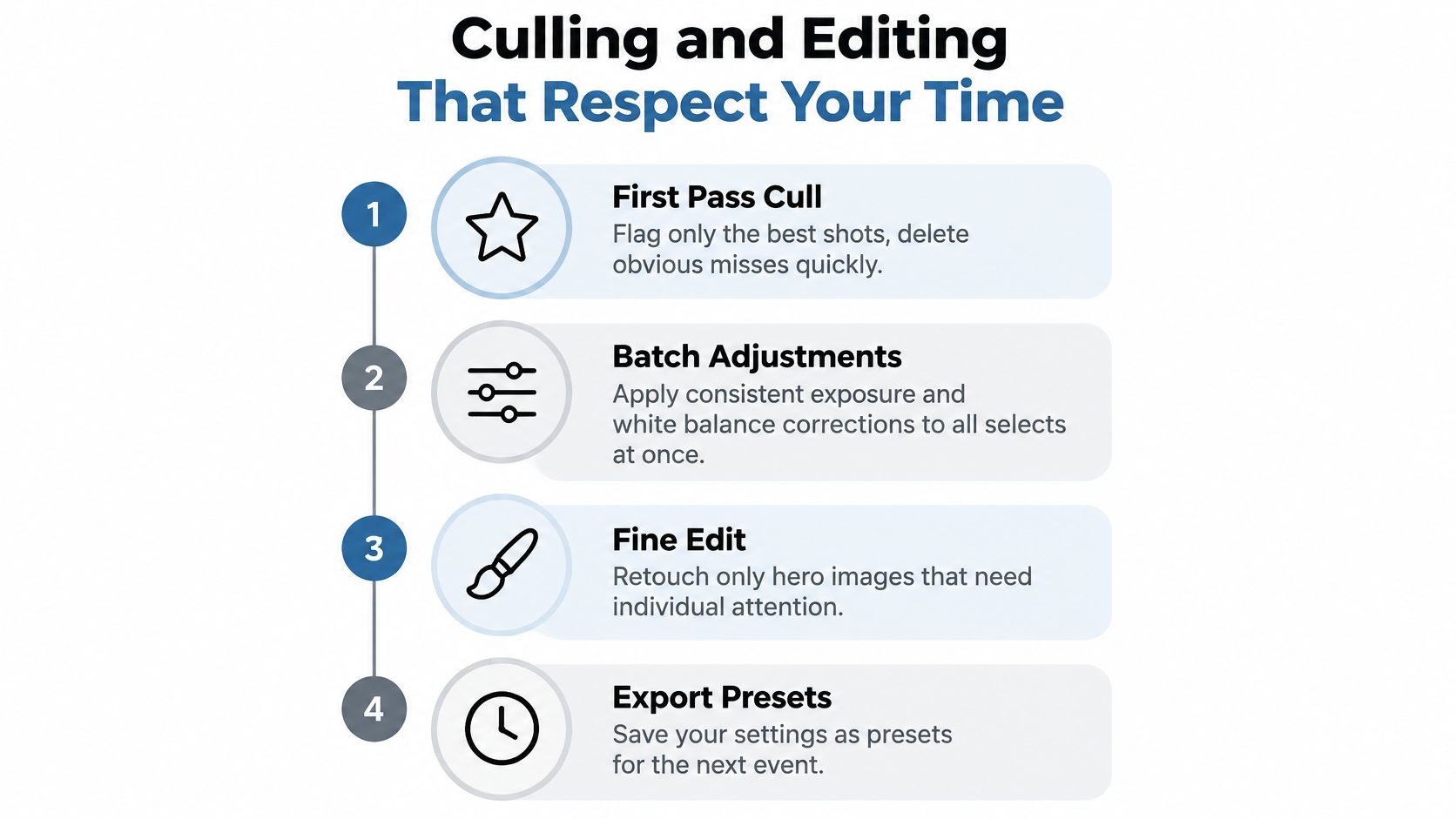
Start only after ingest and backup. Apply a consistent color and exposure preset to establish a baseline, then cull technical defects and obvious duplicates. After that, review the selects for storytelling and client needs. Batch adjustments are efficient, but they're a starting point, not a substitute for checking skin tones and mixed lighting across cameras.
For a faster first pass, tools with assisted culling features can help group similar frames or surface technical issues. The photographer still needs to make the final selection: software can flag a blurry frame, but it can't decide which expression matters most to the client.
Separate previews from final quality control
Export a small preview set when the event calls for early sharing. A rapid preview can give the organizer usable images while the full gallery continues through culling, editing, and privacy review. Keep the distinction clear so no one mistakes an early selection for the approved final set.
Before release, check for duplicate frames, inconsistent color, and images that shouldn't be public. Export web-ready JPEGs in sRGB for broad device compatibility, and keep the final gallery organized with your event naming convention. If you include a selfie photo matching experience, confirm that the images and permissions are appropriate for that use before enabling it.
This workflow saves attention where it's most valuable. Batch the repeatable adjustments, but slow down for hero images, sensitive content, and any frame where a fast automated choice could compromise the story or the client's expectations.
The video below offers another look at building a consistent culling and editing process.
Getting Photos to Attendees Fast
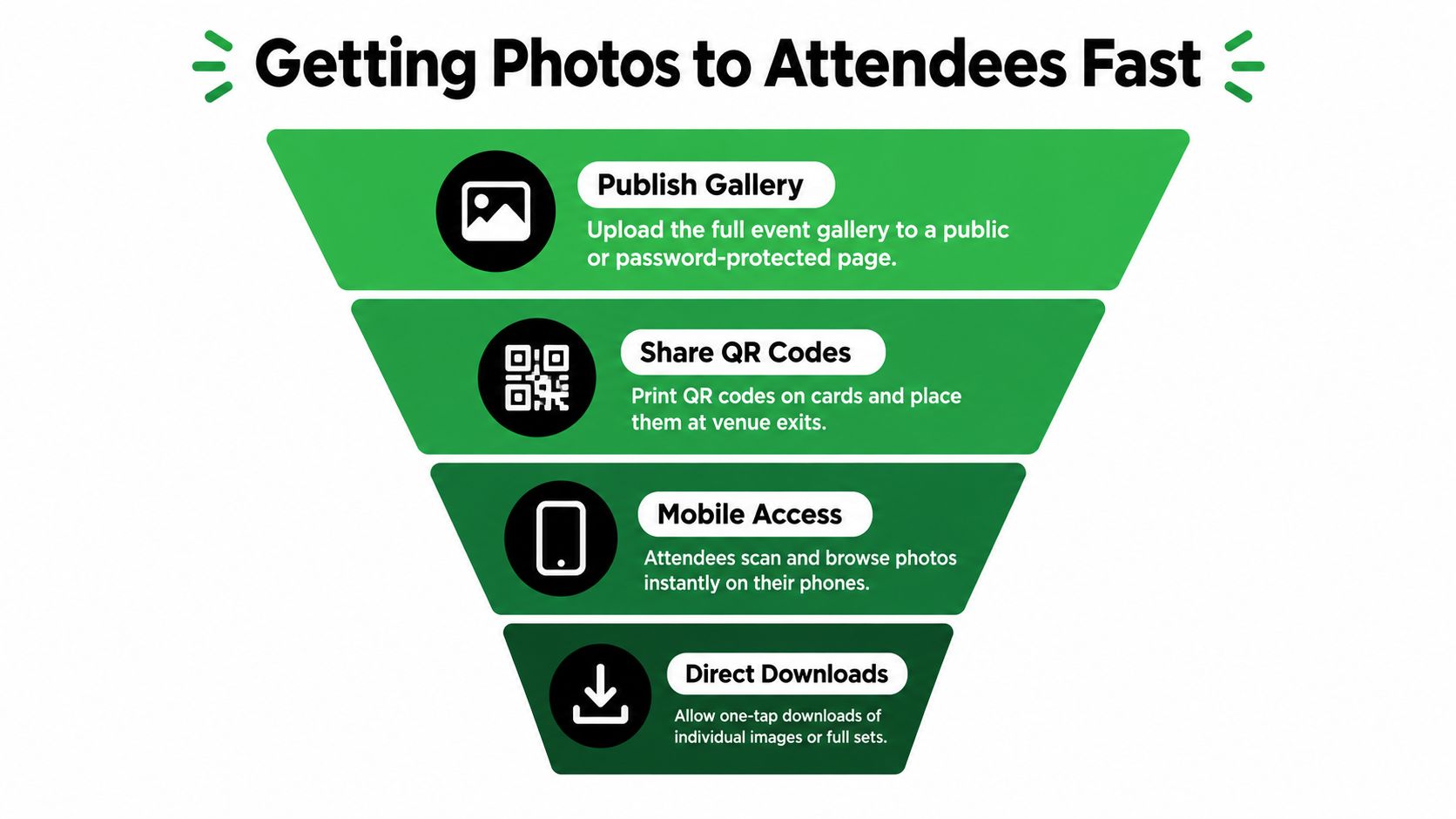
Handing the organizer a finished gallery does not mean a single attendee can find their photos. If guests have to scroll through a huge folder or message the photographer for help, delivery has pushed the search problem onto the audience. A useful attendee experience makes the next action obvious: open the event photo sharing link, scan the QR code, or follow a clearly explained find-my-photos path.
The hours after export are where the handoff breaks down. The edit is done, the gallery is live, and the individual requests keep arriving anyway. Each one is small, and each one is unbilled. Speed has a practical payoff too: the window when attendees still want to share is short, and every day of delay shrinks the crowd that will post, tag, and talk about the event.
Make discovery part of the delivery plan
Choose an access route that suits the event. A QR code photo gallery works well on signage near the exit or on a follow-up card, while a shareable link belongs in the thank-you email, the event page, or the organizer's social post. Use plain instructions and test the destination on a phone, since that is where attendees will open it.
Selfie photo matching gives guests a second route in: take a selfie, get back the frames that appear to include them, skip the scroll. Saucial's event photo sharing platform is one option for this, combining a shareable gallery link and QR code with selfie-based matching for attendee retrieval.
Reduce the manual search queue
Without a clear search path, familiar messages arrive one by one: "I was near the stage," "I wore a blue jacket," "Can you look for my team?" A searchable gallery absorbs much of that traffic, but it still needs a human plan for the exceptions. Some guests will not want to use a selfie, a match will come back unclear, or someone will simply prefer to describe what they were wearing.
Publish simple instructions alongside the gallery, explain how matching works, and give guests a clear contact route for the cases it misses.
You still review the set and support the client. The difference is that attendees do their own searching, and your inbox stops being the search bar.
The Client and Organizer Handoff
Before the gallery goes live, the photographer and organizer need to agree on what's approved, who can access it, and what the attendee experience allows. A fast link isn't automatically the right link for every event. A public gallery may suit a community celebration, while a restricted or password-protected experience may be more appropriate for a private gathering or sensitive images.
Set the rules before enabling access
Ask the organizer to confirm which images can be shared, who has approval authority, and how access should be distributed. Agree whether the gallery is open, password-protected, or limited to specific groups. Decide what to do with restricted moments, requests to remove an image, and photographs involving minors.
Selfie photo matching and face recognition event galleries add another layer of responsibility because they involve identity-related processing. Privacy obligations vary by location and context, so confirm applicable requirements with the organizer and qualified advisers. Establish clear attendee notice, informed consent, opt-in where required, limited access, defined retention periods, deletion procedures, and a non-biometric way to browse or request images.
Before publishing: Write down who controls the gallery, what attendees are told, and how someone can opt out or request deletion.
Keep matching separate from permission
A person's ability to find a photo shouldn't determine whether that photo should be shared in the first place. The organizer's approval process decides what belongs in the gallery; matching is a retrieval method for content that has already been approved. That separation makes it easier to offer convenient discovery without treating technology as a substitute for judgment.
Good distribution can create a stronger post-event experience because attendees are more likely to engage with images they can locate. But a share link, QR code, or matching feature should sit inside the organizer's rules, not expand them. Agree on those controls before the event, then test the audience journey with the organizer before sending it to guests.
Turning Delivery into Revenue
A faster edit does not automatically create a new source of income. The question is what attendees see when they open the gallery, and whether the path from viewing to buying feels like a natural next step rather than a toll booth.
I treat delivery as the start of the sales conversation, not the end of the job. If a parent finds a clean action shot within minutes, a download offer has context. If a gala guest shares a branded portrait before midnight, the sponsor's frame has value. Same files, different outcome, because the handoff was planned.
Offer choices that fit the event
An attendee-facing gallery can carry optional downloads, prints, premium retouching, featured sets, or a sponsor-backed collection. At a tournament, make player images easy to locate and price downloads for families who want more than one. At a fundraiser, agree on branded frames or a sponsored collection with the organizer before launch. These are offers to design with the client, not surprises to bolt on after delivery.
Keep free and paid paths obvious. Say what can be viewed without payment, what an upgrade includes, when files expire if they do, and where to get help. Get organizer approval for branding, sponsored elements, and any audience data used for follow-up. A sales flow that blocks viewing or makes people question legitimacy will cost more than it earns.
Measure the handoff like a channel: which sets drew clicks, which offers prompted questions, which products created support work, and which events produced repeat requests. Faster editing creates capacity. A deliberate handoff turns that capacity into attendee engagement and, when the fit is right, revenue.
Saucial gives event organizers and photographers a shareable gallery link and QR code, with a selfie-based find-my-photos experience for attendees and optional sales paths for approved downloads, prints, and upgrades. If you're planning a high-sharing event, visit Saucial to see how its attendee distribution workflow could fit your next gallery.