Post Event Engagement That Actually Works
73% of attendees are more likely to engage with follow-up content if it arrives within 48 hours, according to event industry statistics summarized by ZipDo. That number changes how I think about post event engagement. The window after a gala, fundraiser, tournament, or conference isn't cleanup time. It's the highest-intent attention you'll get from people who just had an emotional, social, or professional experience together.
Most event organizers still treat event photos like archived deliverables. Upload the folder. Send the link. Hope people dig through it. That workflow leaves attention on the table.
The better model is simpler. Treat photo delivery like a conversion funnel. Every step, from cull to gallery structure to the first CTA, should move an attendee toward one measurable action: open, find, download, share, buy, or come back next year.
Why Post Event Engagement Usually Disappoints
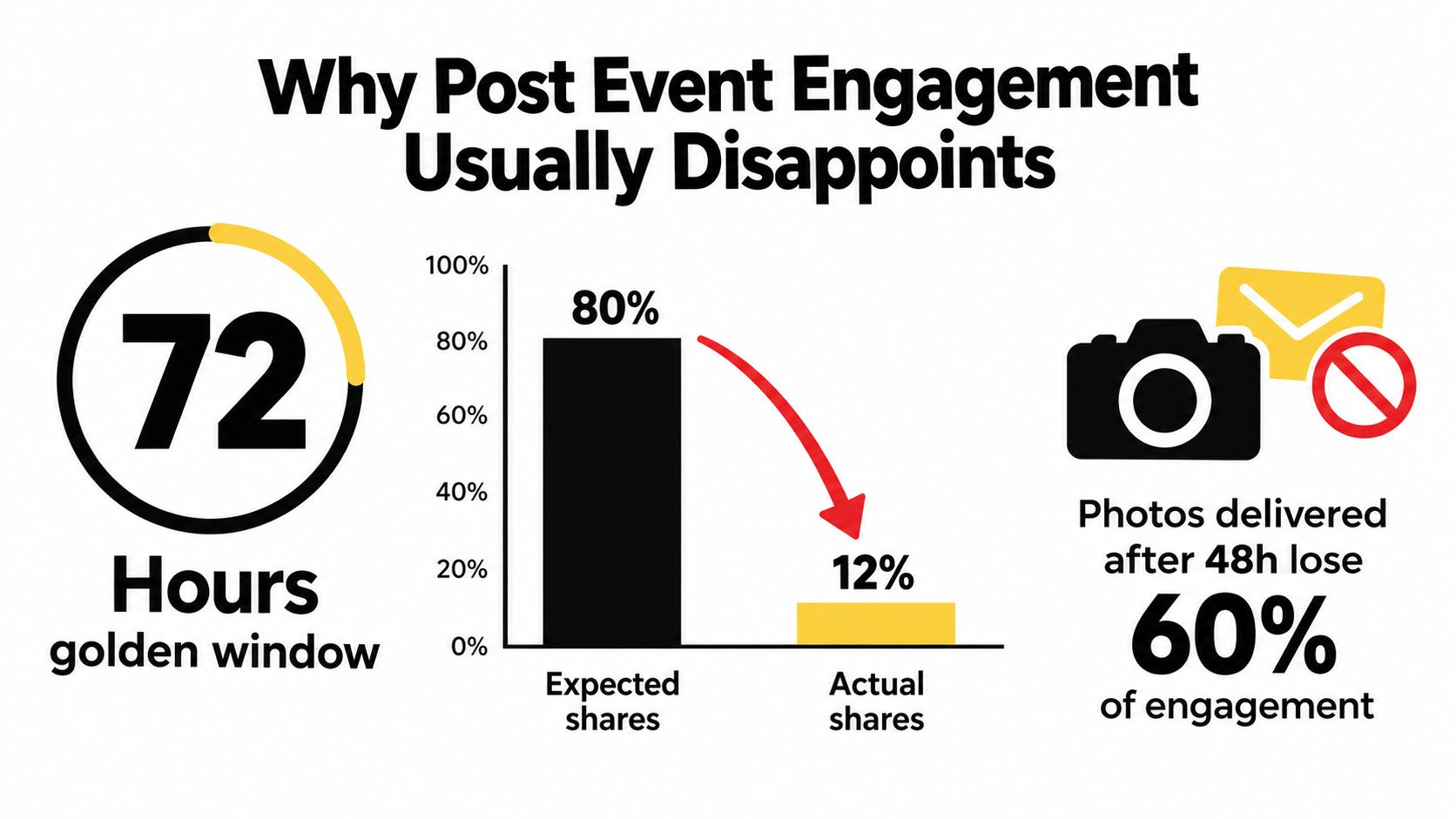
73% of attendees are more likely to engage with follow-up content if it arrives within 48 hours. The failure usually is not photo quality. It is delivery design.
I see the same pattern in gala, fundraiser, and tournament workflows all the time. The photographer finishes the edit, exports the finals, sends a gallery link, and the team treats that handoff as the end of the job. From the attendee's side, the work is just starting, and every extra tap cuts conversion.
The archive mindset kills momentum
A folder dump closes an internal task. It does not create an attendee action.
That distinction matters because post-event photos work like a funnel. The attendee has to open the message, recognize the value, find their image, choose an action, and complete it on a phone before attention drops. If any step feels slow or unclear, the session ends before it produces a share, a download, a print sale, or a return visit.
In many event workflows I review, the friction points are predictable:
- The link looks generic: It reads like admin cleanup, not personal content worth opening.
- The gallery is too broad: Sponsor wall, table candids, awards, and dance floor shots are all mixed together.
- The attendee has to hunt: Few people will scroll through 400 images to find two frames of themselves.
- The next step is missing: No clear prompt to download, post, donate, buy, or register interest for the next event.
Teams often blame weak engagement on audience behavior. In practice, the bigger problem is that the gallery was built for storage efficiency, not conversion.
What strong post-event engagement actually looks like
I judge post-event engagement by measurable actions, not by whether a gallery exists.
The useful question is simple: did photo delivery move someone to do the next thing? That next thing might be a download, a share to Instagram, a team group text, a print order, a sponsor click, a donation follow-up, or an inquiry about next year's event. If those actions are not happening, the gallery is functioning as an archive, not a channel.
This is why attendee retrieval matters so much. A tool like Saucial's photo delivery workflow for event guests supports that model by centering photo discovery instead of forcing people through a giant shared folder, but the principle applies even if you're using another platform. Delivery should shorten the path from "the event was fun" to "I found my photo and did something with it."
Practical rule: If attendees have to browse like editors, shares and sales fall off fast.
The recurring failure patterns
After enough events, the weak spots become obvious.
| Failure pattern | What attendees experience | What happens next |
|---|---|---|
| Buried follow-up link | They overlook the gallery | Opens do not turn into clicks |
| Generic cloud folder | The experience feels impersonal | Short sessions, low engagement |
| Late delivery | The emotional peak has passed | Fewer shares and replies |
| No CTA | They view a few images and leave | No measurable post-event action |
| No purchase path | Demand is present but unsupported | Missed print and download revenue |
Disappointing post-event engagement usually comes from treating photo delivery like file transfer. The teams that get better results treat it like a conversion funnel with clear drop-off points, clear actions, and KPIs they can track.
Designing the Photo-to-Attendee Workflow
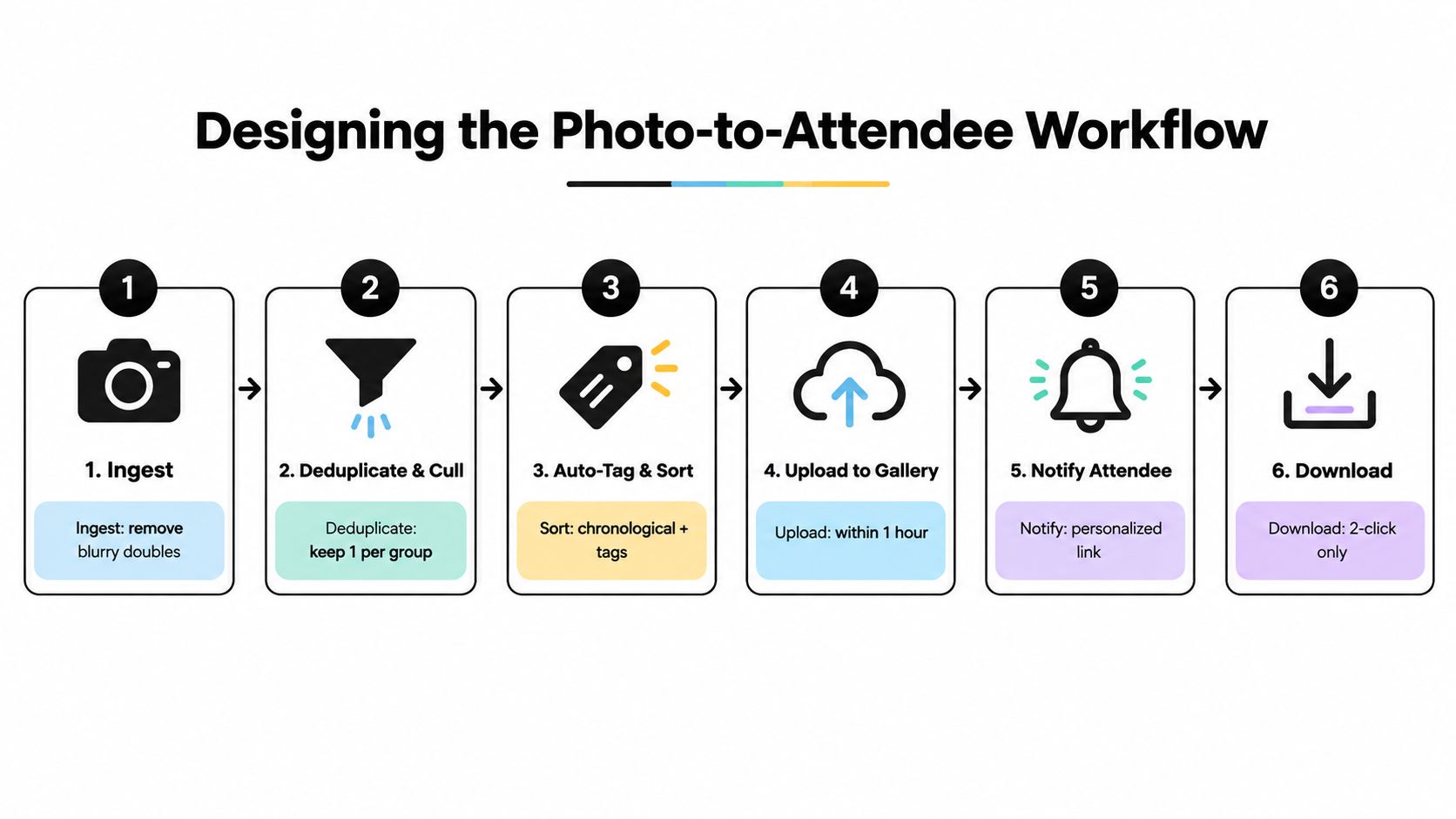
A strong workflow doesn't begin with the gallery. It begins the moment cards are ingested. Every delay and every extra click shows up later as lower sharing, fewer downloads, and more support messages from attendees asking where their photos are.
The target is simple. Reduce friction at every handoff.
Start with a fast edit pipeline
Before any attendee sees a frame, the gallery needs discipline.
- Cull hard: Near-duplicates, test exposures, and missed focus shots don't belong in the attendee experience.
- Batch by moment: Cocktail hour, awards, sponsor wall, team photos, table shots, podium, dance floor. Good grouping lowers search fatigue.
- Grade consistently: Color swings make galleries feel unfinished, especially when attendees compare their images side by side.
- Export for mobile first: Most opens happen on phones, so thumbnail quality and load speed matter more than desktop perfection.
What doesn't work is the old "upload everything and let people choose." That's efficient for the editor. It creates drag for everyone else.
Retrieval speed matters more than gallery size
A large gallery sounds valuable. A fast gallery is valuable.
The difference is whether attendees can identify their photos in seconds instead of scrolling through a full event archive. That can come from face matching, badge-linked albums, QR-coded table access, or selfie-based retrieval. For practical event work, I care less about which mechanism you use and more about whether it gets someone from link tap to "there I am" without confusion.
A workflow like Saucial Upload is built around that kind of retrieval. The attendee takes a quick selfie and sees only the photos they appear in, which is a very different experience from digging through a cluttered folder.
Here's the section of the workflow many teams skip. Watch how the retrieval layer changes the attendee experience.
Build the gallery like a landing page
A gallery should answer three questions immediately:
- Is this the right event?
- Can I find my photos fast?
- What should I do after I find them?
That means the layout needs an event-branded entry point, clear albums for broader browsing, and a personal path for people who don't want to scroll. Broken mobile layouts, tiny thumbnails, forced account creation, and manual request forms all hurt post event engagement because they interrupt intent right when it's highest.
The attendee isn't trying to admire your file structure. They're trying to grab a moment before the feeling wears off.
Design the post-open loop
The first open isn't the finish line. It's the trigger for the next action.
Good workflows usually include:
- A clean first action: Find, view, or download.
- A reminder for non-openers: Especially if the first send lands during travel or late-night wrap-up.
- A second-session nudge: Return visits often happen when attendees share with family, teammates, or coworkers.
- A path to upsell or sponsor exposure: Only after the attendee gets value first.
The test for every workflow decision is simple. Does this step move the attendee closer to sharing, downloading, or buying? If it doesn't, cut it.
Timing and Distribution Channels for Photo Links
Most post event engagement problems aren't content problems. They're delivery problems. Good photos sent late underperform average photos sent while the event still feels current.
Independent event-marketing guidance is blunt on this point. Follow-up works best within 24 to 48 hours, and one benchmark set reports 35% to 50% open rates for emails sent within 2 hours of event end, compared with 25% to 40% for typical post-event follow-ups and 22% to 28% for next-event promotion sent 5 to 7 days later, according to Glue Up's post-event follow-up guidance. The practical takeaway isn't just "send quickly." It's "send the first message while one clear action still feels easy."
Pick channels by urgency, not habit
A lot of organizers default to email because it's familiar. Email is useful, but it shouldn't always go first.
Here's the channel order I trust for event photo sharing:
- SMS: Best for immediate "find my photos" access when the audience is consumer-heavy or already opted in.
- WhatsApp or iMessage: Strong for community events, weddings, alumni groups, and tournaments where people already coordinate socially.
- Email: Best for richer context, branded hero images, and follow-up actions after the initial tap.
- Social posts: Good for broad recap energy, not precise retrieval.
If attendees need a direct path to a QR code photo gallery or personal gallery link, start with the channel they'll open fastest.
Delivery Timing and Channel Mix by Event Type
| Event Type | First Send Window | Primary Channel | Secondary Channel | Reminder Cadence |
|---|---|---|---|---|
| Gala fundraiser | Same night or next morning | SMS | One reminder to non-openers | |
| Alumni dinner | Same night | WhatsApp or SMS | One social recap after initial send | |
| Sports tournament | Daily during multi-day events | SMS | Team group chat or email | Batch each day, then final wrap |
| Trade show | Same day by segment | SMS | Follow-up by booth or session interest | |
| Community festival | Same day | QR code and SMS | Social post | Light reminder while event buzz remains |
Channel sequencing should be configured before the event, not after. That's where a settings layer matters. If you're using a system that supports branded links, delivery controls, and attendee routing, configure it before doors open. Tools such as Saucial settings are designed for that operational prep.
Match cadence to event type
Galas and weddings benefit from a teaser fast, then the full event photo sharing link while guests are still talking about outfits, speeches, and table moments. Tournaments and conferences are different. Daily drops work better because attendees are still onsite and actively sharing.
What doesn't work is a single overloaded email that tries to deliver photos, survey, sponsor links, donation ask, and next year's save-the-date at once. Decision fatigue is real. One message, one action.
CTAs and Sharing Prompts That Trigger Action
A gallery click is not the win. The win is the next action. Did the attendee find their photo, download it, send it to friends, post it, or buy something after that? Good CTAs turn photo delivery into a conversion path instead of a folder dump.
Put the primary action above the fold
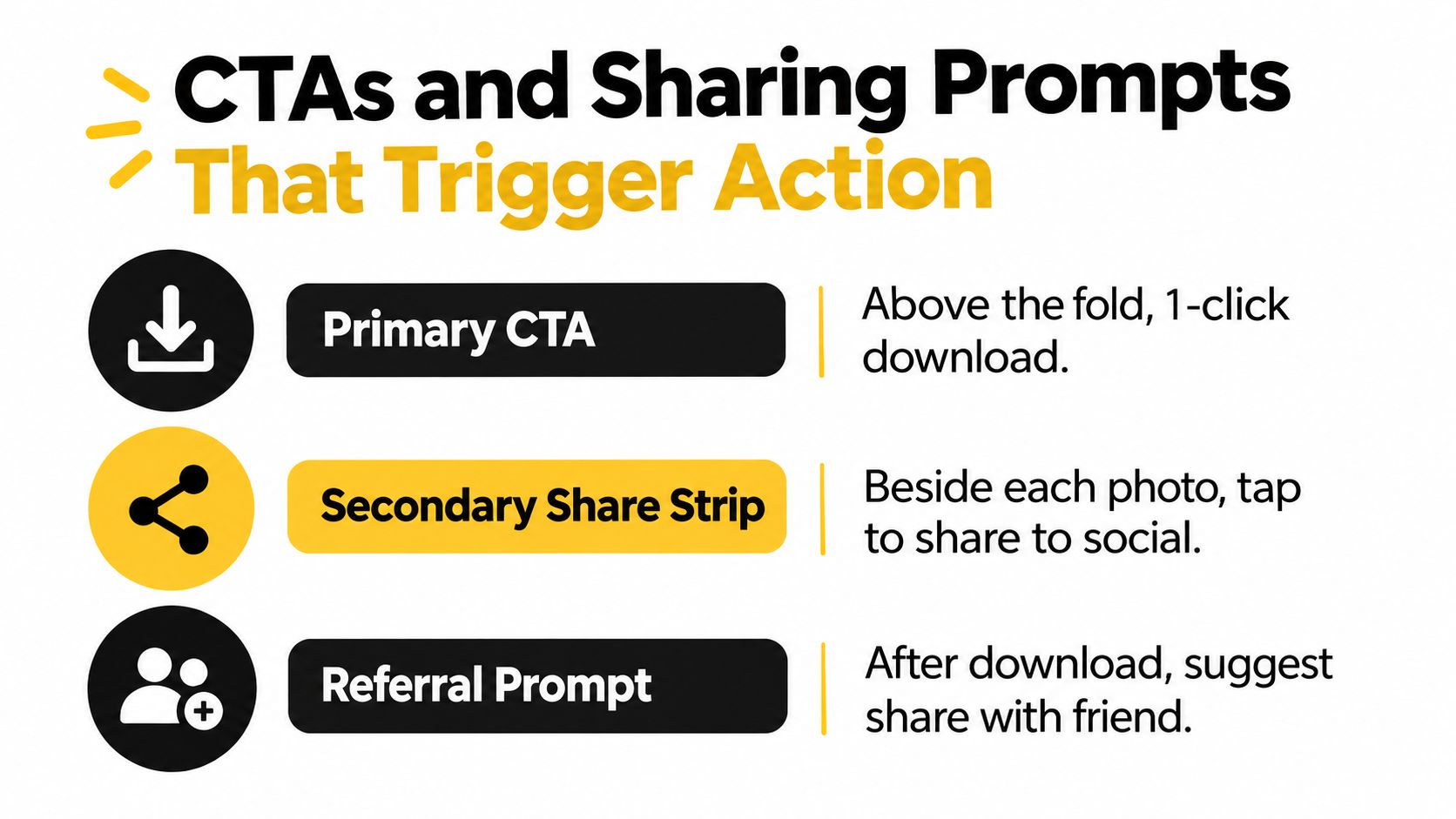
Start with the attendee's first job. They came to find themselves, their team, their table, or their sponsor moment. Put that action at the top and make it plain.
The highest-performing first CTA is usually one of these:
- Find my photos
- Download your photos
- See your table photos
- View your team's shots
That copy works because it matches intent. I see galleries lose momentum when the top of the page is doing three jobs at once. Intro text, sponsor treatment, album categories, and donation asks all compete with the one click the attendee came to make.
A photo gallery should answer one question fast. Where are my pictures?
Write prompts that match the social moment
Generic share buttons help a little. Specific prompts do more because they tell the attendee what to do with the photo they are already reacting to.
Use language tied to the event:
- Tag a friend who was there
- Post your favorite from the night
- Share your team photo
- Send this to your table
- Add this to your Instagram Story
Context matters here. "Share" is weak because it asks for effort without giving a reason. "Send this to your foursome" works because the recipient is obvious. At tournaments, "Send this to your team chat" consistently gets more action than a bare social icon. At galas, "Post your favorite from the night" tends to outperform a generic download prompt for guests who care about outfits, arrivals, and table shots.
Placement matters too. Put the prompt beside the image or directly after download. That is the moment with the most emotional pull.
Ask for the next action in the right order
Strong CTA flow follows intent:
- Primary CTA: Find or download.
- Secondary CTA: Share this photo.
- Tertiary CTA: Send the gallery to someone else from your group.
That sequence sounds simple, but it fixes a common mistake. Organizers often ask for referrals before the attendee has received anything useful. Conversion drops because the gallery is asking for work before delivering value.
I treat this like a funnel. View leads to download. Download leads to share. Share opens the door to referral or purchase. If you cannot measure those steps separately, you cannot tell which prompt improved post-event engagement.
Use incentives carefully
Incentives can raise response, especially for sponsor-backed events and team-based events, but they need tight rules and one clear benefit. Watermark-free files after a completed action, a branded Story frame, or a premium edit option can work if the attendee understands the exchange in a few seconds.
What usually underperforms:
- Vague "share to gain access" language
- Multiple offers competing on the same screen
- Prompts written like ad copy instead of attendee language
- Referral asks before the attendee has found a personal image
The practical trade-off is simple. Every extra choice lowers action rate. One clear prompt usually beats a clever stack of options. The galleries that get shared most are rarely the fanciest. They make the next click obvious, timely, and worth it.
Turning Photo Delivery Into Direct Revenue
A gallery isn't just a delivery endpoint. It's one of the few channels where the attendee arrives with clear emotional intent. They want proof they were there, proof they looked good, proof the team won, proof the night mattered.
That's a sales surface if you handle it carefully.
Revenue follows relevance
Attendees don't buy because you attached a store to a gallery. They buy when the offer matches what they're already doing.
These are the mechanics I see work most often:
| Upsell Mechanic | Typical Conversion | Best Fit |
|---|---|---|
| Print bundle after download | Qualitative, varies by audience and event style | Galas, weddings, school events |
| Premium edit upgrade | Qualitative, strongest after the attendee has selected favorites | Portrait-style coverage, VIP arrivals |
| Digital bundle for a team or table | Qualitative, good where groups want matching assets | Tournaments, alumni events, corporate dinners |
| Sponsored frame or branded overlay | Qualitative, depends on sponsor alignment | Fundraisers, brand activations, community festivals |
| Featured set placement | Qualitative, useful when sponsors want visible presence without hijacking the gallery | Trade shows, charity events |
I haven't included precise conversion figures here because they vary widely by event format, guest profile, and how the offer is presented. But the pattern is consistent. Offers tied to behavior outperform offers shoved in front of everyone at once.
Sequence the offer after the attendee wins
The right order matters more than the offer itself.
First, let the attendee retrieve the image. Second, let them enjoy it. Third, place the upsell where it feels like a natural extension of that action. A print offer after someone downloads a clean podium shot makes sense. A premium retouch offer after someone favorites a solo portrait makes sense. A sponsor-branded frame can work if it feels event-approved and visually coherent.
What doesn't work is pitching too early. If the attendee feels trapped in a checkout path before they can even access the gallery, post event engagement drops and trust drops with it.
Revenue-share needs restraint
Organizers often want a share of downstream photo sales. That's reasonable, but the attendee experience can't feel like a hidden tax.
The cleanest version is simple:
- the organizer approves which paid options exist
- the gallery delivers free core access first
- premium products stay optional
- sponsor placements are clearly part of the event experience, not random ad inventory
A good gallery upsell feels like an extra service. A bad one feels like ransom.
For photographers, "photographer upsell to attendees" becomes practical, not theoretical. You're no longer handing over files and hoping the organizer does something useful with them. You're building a direct, permission-based path from image retrieval to optional purchase.
Privacy and Consent as an Engagement Asset
Privacy isn't separate from post event engagement. It's part of why people will use the gallery at all.
Neutral event photography guidance recommends that organizers inform attendees about photography at ticket purchase or check-in, display clear signage, provide a removal contact, and avoid publishing sensitive or minor-related images without permission, as outlined in the Apache event photography privacy guide. That's not just compliance housekeeping. It's operational design.
Trust removes hesitation
Attendees engage more freely when they understand three things:
- What was photographed
- Who can access it
- How they can opt out
If any of those are fuzzy, people hesitate. They may avoid the gallery entirely, especially at school events, corporate functions, medical or advocacy events, and anything involving minors or VIP guests.
A private attendee-only gallery often creates more confidence than a public album sprayed across social channels. So does a visible removal path.
Build controls into the experience
The gallery should surface privacy in plain language, not legal fog.
Use practical controls such as:
- Attendee verification: Especially when photos shouldn't be publicly browsable.
- Controlled personal retrieval: A selfie photo matching flow or manual claim route can limit random access.
- Minor safeguards: Separate handling for youth events, with tighter download controls where needed.
- Deletion and removal ownership: One clear contact path, one internal owner, and one response process.
- Retention rules: Decide how long raw files, tagged galleries, and associated metadata stay live.
A system with attendee access controls, such as Saucial Auth, can support this kind of gated experience. The larger point is that privacy controls should be visible enough to reassure people, but light enough that they don't interrupt the gallery flow.
Sponsors don't get a free pass
One of the messier real-world issues is sponsor demand. Sponsors may want attendee images, user data, or broad repost rights. Those requests need rules before the event, not after.
Set boundaries in writing:
- which images sponsors may use
- whether attendee data is shared at all
- who handles takedown requests
- how long gallery access remains available
When organizers treat consent as a product decision instead of a legal footnote, post event engagement usually gets cleaner. People share more confidently when they trust the container.
Measuring What Actually Moved the Needle
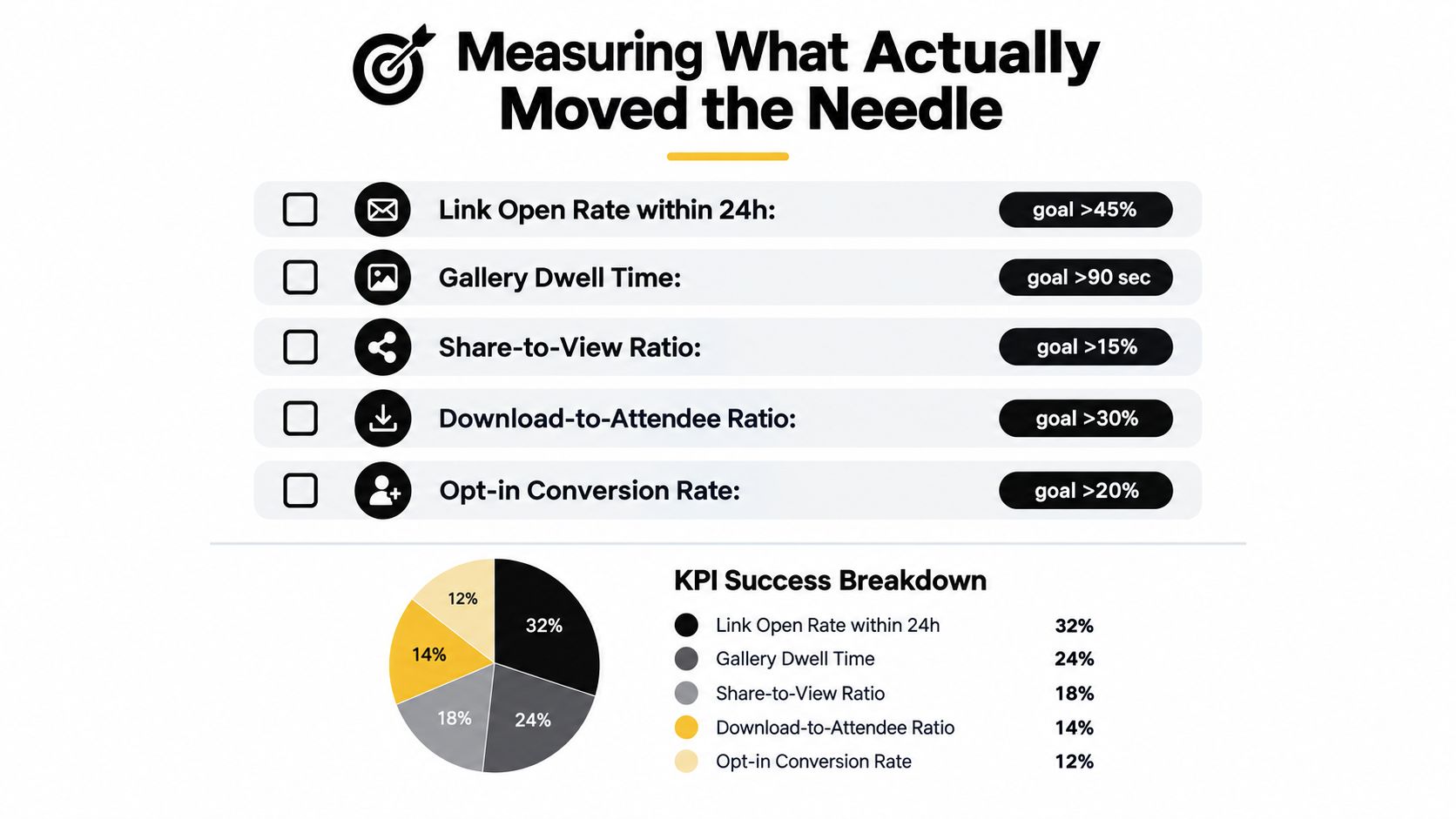
If you can't tie photo delivery to outcomes, you're guessing. Nice comments and full galleries don't tell you much. The useful question is which step produced action.
Benchmark data backs up the importance of treating follow-up as a system. One arts-and-events benchmark reports a 60.5% average open rate and 20.6% click-to-open rate for post-event email, compared with 43.4% open rate and 4.1% click-to-open rate for standard email. The same benchmark says top-performing post-event campaigns reached 77.5% open rate and 38.7% click-to-open rate. A separate benchmark set focused on event follow-up reports 42.1% open rate, 4.87% CTR, and 2.31% reply rate, according to CultureHive's summary of the 2026 Spektrix benchmark report. The takeaway is clear. Follow-up is usually strong enough to justify real instrumentation.
Separate vanity metrics from decision metrics
Some metrics look good and tell you almost nothing.
Vanity metrics include broad impressions, total gallery items, and raw traffic with no action attached. Those can signal reach, but they don't help you decide what to fix.
Decision metrics are more useful:
- Link open rate in the first day: Did the send timing work?
- Gallery entry to image-view behavior: Did people start interacting?
- Share-to-view ratio: Did the gallery create social spread?
- Download-to-attendee ratio: Did guests get enough value to keep the file?
- Opt-in or claim completion: Did the retrieval flow feel trustworthy and easy?
- Attributed revenue: Did print, digital, or sponsor offers convert?
- Referral traffic to future event pages: Did the gallery help pull demand forward?
Run a one-week review, not a vague recap
The fastest post-event teams do measurement inside the same week, while the campaign is still alive.
Pull data from three places:
| System | What to check | Why it matters |
|---|---|---|
| Gallery platform | Views, searches, downloads, shares, return visits | Shows where attendee friction appeared |
| Messaging tools | Delivery, opens, clicks, timing by channel | Reveals whether your distribution sequence worked |
| Sales or order layer | Purchases, premium selections, sponsor interaction | Connects engagement to money |
Then compare those numbers against the specific choices you made. Did SMS outperform email for the first send? Did personal retrieval outperform broad album browsing? Did the second reminder recover missed attendees or annoy them?
Use a simple diagnosis model
When the numbers come back, don't react to everything at once.
Start here:
- High opens, low clicks: Your subject line worked. The CTA or offer didn't.
- High clicks, low retrieval completion: The gallery flow is too confusing or too demanding.
- High retrieval, low sharing: The photos may be strong, but the prompts are weak or misplaced.
- High sharing, low revenue: Add a better-timed upsell after value is delivered.
- Strong engagement, low repeat-event action: Your follow-up stopped at the photo instead of routing people to a next step.
The teams that improve fastest aren't the ones with the most content. They're the ones that can point to one broken link in the chain and fix it before the next event.
Saucial gives organizers and photographers a practical way to run this whole system, from a shareable event photo gallery link and QR code photo gallery to selfie photo matching, private attendee retrieval, and post-event engagement signals like shares and downloads. If you're trying to stop sending cluttered folders and start measuring what photo delivery does for your event, visit Saucial.



