Photos from DSLR: Fast Event Gallery Workflow
The event is done. Your cards are full, your batteries are finally on charge, and your phone already has messages asking, “When will the photos be up?”
That's the part underestimated. Capturing strong photos from DSLR bodies is only half the job. The bottleneck starts after the shutter count goes up, when you need to ingest, clean, export, upload, organize, share, and protect a large pile of event images without creating a mess for yourself or a privacy problem for the client.
That post-shoot pressure is showing up at a strange point in camera history. The DSLR dominated digital photography for years, but the format is now a small slice of the market. Recent industry reporting says global DSLR shipments fell to 690,911 units in 2025, down 31% year over year, accounting for about 7.3% of total camera shipments, while mirrorless cameras now make up roughly 90% of interchangeable-lens camera units worldwide according to camera market share reporting for 2025 and 2026. Even so, older DSLR bodies and lenses are still everywhere in schools, studios, and event teams, so the phrase photos from DSLR still describes a very real working pipeline.
Rethinking the Post-Event Photo Bottleneck
At a 1,500-person conference, the cards are copied before midnight, the exports are ready, and the upload finishes by morning. The complaints still start at 8 a.m. They are rarely about missing files. They are about guests who cannot find their own photos, sponsors asking for specific attendee shots, and organizers realizing the gallery lets everyone browse everyone else.
That is the bottleneck.
A basic folder share made sense when delivery meant handing over a ZIP file to one client contact. It breaks down at events where hundreds or thousands of attendees expect a quick "find my photos" experience on their phones. The job is no longer just getting photos from DSLR bodies off the card and into the cloud. The job is building retrieval that is fast for guests, manageable for staff, and careful with identity data.
Retrieval design creates more friction than file volume
Teams handling 2,000-plus gala photos often assume upload volume is the slow part. In practice, support load usually comes from poor retrieval design. If every attendee has to search a full public gallery, staff inherit the sorting work later through DMs, email requests, and "can you send me the shots from table 14?" follow-ups.
Public browsing also creates a privacy problem. At corporate events, school functions, alumni weekends, and private celebrations, many guests are comfortable being photographed but not comfortable being displayed in a wide-open album beside strangers. Those are different permissions, and the delivery system needs to respect that difference.
Practical rule: If guests need to scroll through hundreds of unrelated images to find two usable frames, delivery is already underperforming.
Replace gallery browsing with retrieval
High-volume event delivery works better when the gallery is treated as a retrieval layer instead of a dumping ground. That shifts the workflow in a useful direction:
- Originals stay in the production archive: RAW files belong in your editing and backup system, not in attendee-facing delivery.
- Exports are built for access: JPEGs should load quickly on mobile and process cleanly in cloud systems.
- Results are individualized: Guests should land on their own matches, not on a wall of other people's photos.
- Privacy controls are part of the product: Opt-in flows, limited visibility, and deletion handling need to be available from the start.
A platform built around private event photo retrieval with selfie matching fits that model better than a generic drive link, because it treats delivery as search, identity, and consent management, not just storage.
What holds up on event night
The workable approach is boring by design. Ingest cleanly. Cut the obvious misses. Export a reliable delivery set. Upload once. Let the retrieval system process in the background while the client gets highlights and attendees start finding themselves.
I do not spend event night hand-building dozens of folders for tables, breakout rooms, or friend groups unless the client has a specific reporting need. That kind of manual organization feels productive, but it delays the part people care about most. They want a direct path to their own photos, and they want that path to feel private.
That is the shift. Post-event delivery is not a file transfer task anymore. It is a search and privacy workflow that affects guest satisfaction, support volume, and how much value the event team gets from every image captured.
Ingesting and Prepping Files for the Cloud
The fastest upload workflow starts before you touch the cloud. Most delays happen during ingest because photographers mix backup, culling, editing, and delivery into one chaotic pass.
I keep these as separate jobs. First move the files safely. Then reduce noise in the set. Then prep exports that are easy for a cloud system to process.
Start with verified ingest
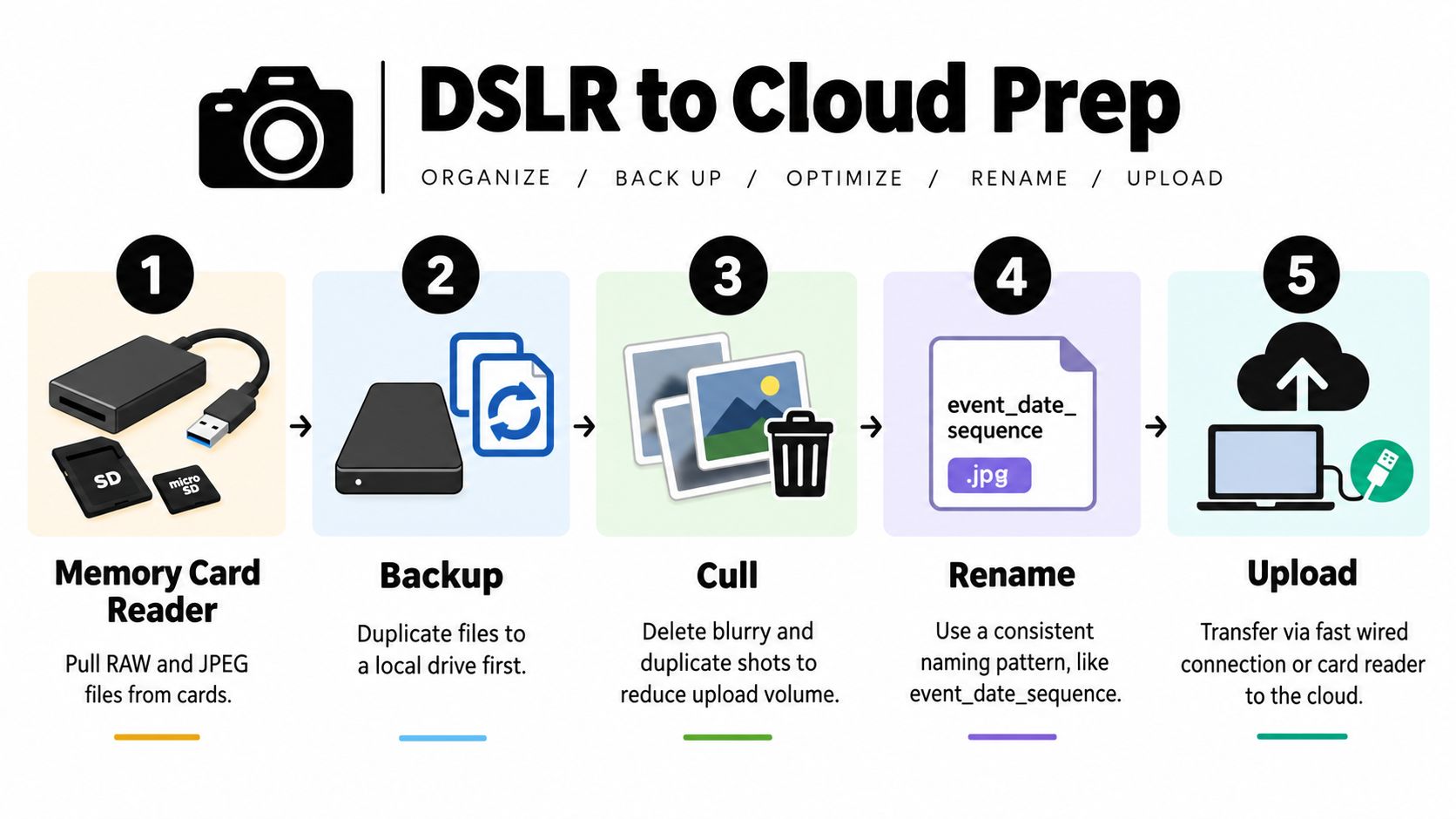
When I pull photos from DSLR cards, I never upload directly from the card. Cards are capture media, not working storage.
My base sequence looks like this:
- Copy card contents to a local working folder
- Duplicate that folder to a second local drive
- Confirm the copy completed before formatting anything
- Only then start culling and export prep
A simple folder structure prevents confusion later:
| Folder | Purpose |
|---|---|
| RAW | untouched originals from card ingest |
| SELECTS | working picks if you're editing hero images |
| EXPORTS | upload-ready JPEGs |
| DELIVERED | final delivery set after upload is confirmed |
Cull for delivery, not for your ego
Event culling isn't the same as portrait curation. You're not building a portfolio. You're removing the frames that create friction.
Cut these early:
- Test frames: exposure checks, white balance checks, floor shots
- Technical misses: closed eyes in obvious singles, motion blur, missed focus
- Near-duplicates: bursts where one frame clearly wins
- Accidental clutter: pocket shots, flash misfires, half-framed captures
Don't over-cull candid coverage. Guests often care more about being included than about whether the frame is award-worthy.
A usable candid that someone can actually find beats a perfect image buried in a folder no one will search properly.
Batch metadata before export
Apply basic IPTC and keyword metadata in bulk through Lightroom Classic, Photo Mechanic, or similar tools so the gallery isn't a nameless pile later.
Use metadata that helps operationally:
- Event name
- Venue
- Event date
- Photographer name
- Usage notes if the client has restrictions
Consistent file naming helps too. Event name, date, and sequence is enough. You don't need a clever naming convention. You need one that won't collide or confuse.
For cloud delivery, export JPEGs that look good on phones and laptops and don't choke your upload line. If your platform supports drag-and-drop ingest, a direct upload workflow for event galleries saves time, but only if your exports are already clean and consistently named.
Automating Delivery With Facial Processing
Uploading photos isn't the finish line. It's the handoff point.
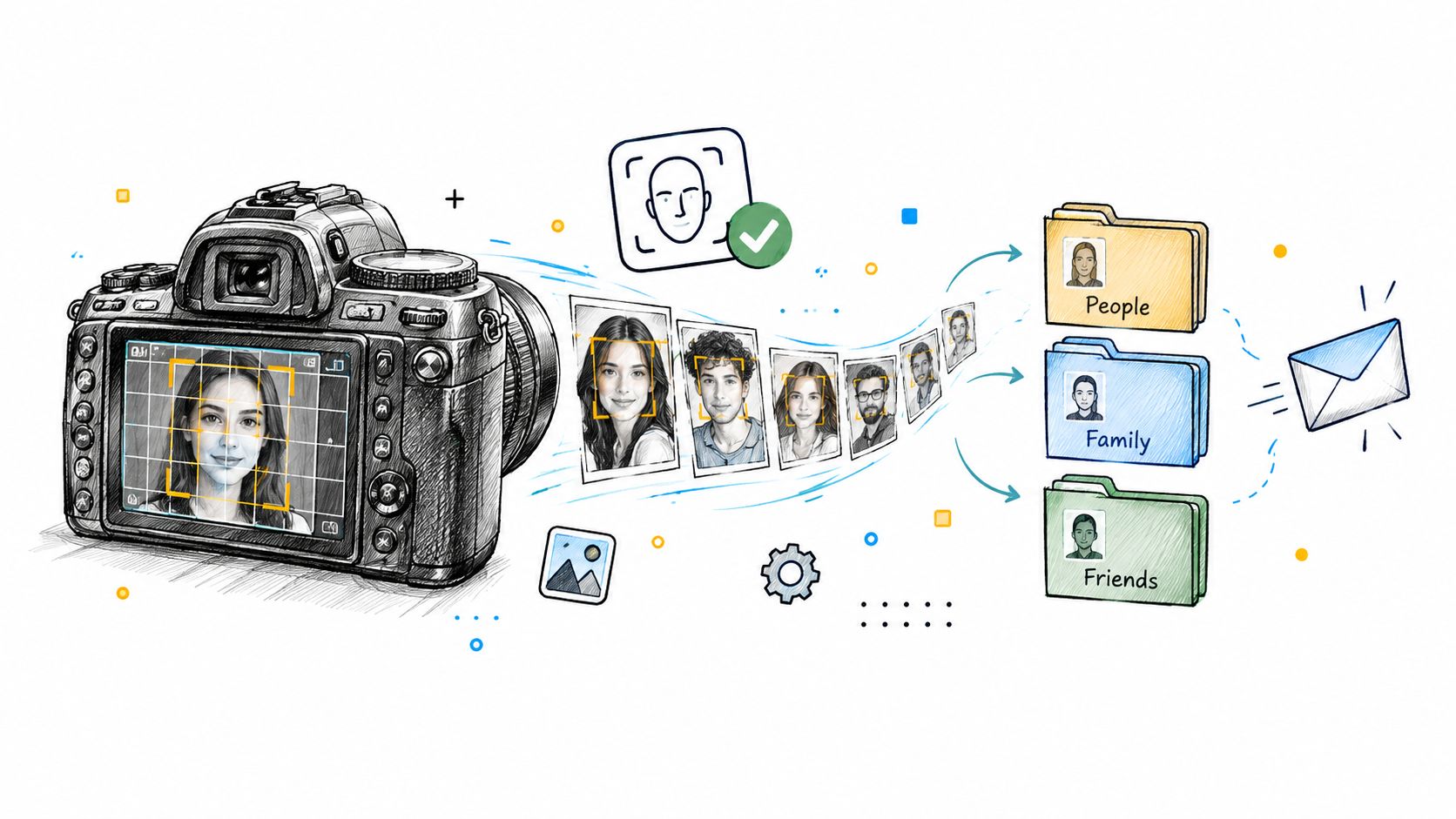
The biggest jump in attendee experience happens when the system stops asking people to browse and starts helping them retrieve. That's where face recognition event gallery tools have changed event delivery. Instead of dropping people into a public album, the platform processes faces in the background and matches attendee results from a quick selfie.
Why public folders fail at scale
Public gallery links feel simple because they reduce work for the photographer. They increase work for everyone else.
At a small dinner, that might be tolerable. At a trade show, fundraiser, tournament, or campus event, it becomes a bad search interface disguised as delivery. Guests scroll, give up, then message the organizer or photographer.
Recent event guidance has pushed in a different direction. Privacy-focused recommendations favor opt-in selfie matching, per-event isolation, short retention, and deletion on request, with the goal that attendees should only see photos they appear in rather than a cluttered public album, as described in guidance on face search replacing a public gallery link.
What the background processing should do
When I evaluate a selfie photo matching system, I care less about the marketing language and more about the operational behavior.
A useful system should:
- Process in the background during or after upload
- Keep each event isolated from other events
- Return private, person-specific results
- Allow deletion or removal handling without drama
- Avoid forcing an app install for guests
That last point matters. Friction kills participation. If a guest can open a link, take a quick selfie, and get their results on the same device, adoption is naturally stronger than any workflow that demands account creation first.
This walkthrough shows the concept well in motion:
What changes for the photographer
The hidden payoff is support reduction. A retrieval-based gallery cuts down the endless “can you find my photo?” requests because the system is doing the lookup work.
It also changes culling priorities. You stop asking, “How do I make this giant album browseable?” and start asking, “Did I preserve enough good frames of each attendee for matching and delivery?” That leads to better event coverage decisions in the field, especially when you're shooting fast candids from DSLR bodies in mixed light and crowded spaces.
Distributing the Event Photo Sharing Link
A strong gallery still dies if nobody sees the link. Distribution has to start before the event ends.
The best event photo sharing link strategy uses both physical placement and digital follow-up. People scan what's in front of them when they're leaving, and they click what's in their inbox or chat thread later. Use both.
Put the QR code where attention is highest
Venue placement matters more than design flair. I want the QR code photo gallery visible at the points where guests pause naturally.
Good placements include:
- Exit points: doors, coat check, valet stand
- Tabletop signage: especially at seated dinners and sponsor tables
- Registration or badge pickup areas: useful for conferences and trade shows
- Stage screens or closing slides: strong for galas and alumni events
Keep the call-to-action plain. “Find my photos” works better than something vague and brand-heavy. Guests need to know what happens next and that they won't need to install anything.
Put the instruction on the sign, not just the QR code. People scan faster when they know they'll get their own photos rather than a giant gallery.
Send the link through the channels people already use
After the event, I want the same gallery link to travel through the client's existing communication stack. That usually means email first, then WhatsApp, SMS, event recap pages, or social follow-up depending on the audience.
A clean distribution checklist looks like this:
| Channel | Best use |
|---|---|
| Email recap | broad post-event delivery with context |
| SMS or WhatsApp | fast response for active attendees |
| Event website | useful for conferences and multi-day programs |
| Social bio or story link | good for public-facing community events |
| Staff and sponsor outreach | gets the link into secondary networks |
If the system needs controlled attendee access, tie the distribution flow to an event access and authentication layer that matches the privacy level of the event.
Frictionless sharing creates more usable UGC
When guests can quickly find themselves, they're more likely to post. That matters for UGC from events, but only if retrieval is painless.
This is especially useful in three common scenarios:
- Trade show photo sharing: exhibitors and attendees repost branded booth moments fast.
- Gala fundraiser photo gallery delivery: guests share dressed-up social images while the event is still top of mind.
- Sports tournament photo sales and sharing: families care about individual player access, not album browsing.
The link isn't a formality. It's the distribution engine. Treat it like part of the production plan, not an afterthought sent the next day.
Managing Consent and Data Retention
Facial retrieval only works long term if the privacy workflow is stricter than the sharing workflow. Convenience isn't a defense if an attendee asks how their image was processed, how long it's stored, or how to opt out.
A lot of event teams get sloppy. They think posting a photographer notice somewhere near registration is enough. It isn't.
Consent needs an actual path
Attendees should have a clear way to say yes, a clear way to say no, and a clear way to ask for removal later. Independent event guidance on photography consent recommends a visible opt-out path and a removal request method. It also recommends deleting selfie images and facial templates within 30 days, while keeping general gallery photos only for the event period defined in the terms, according to this event photo consent guide.
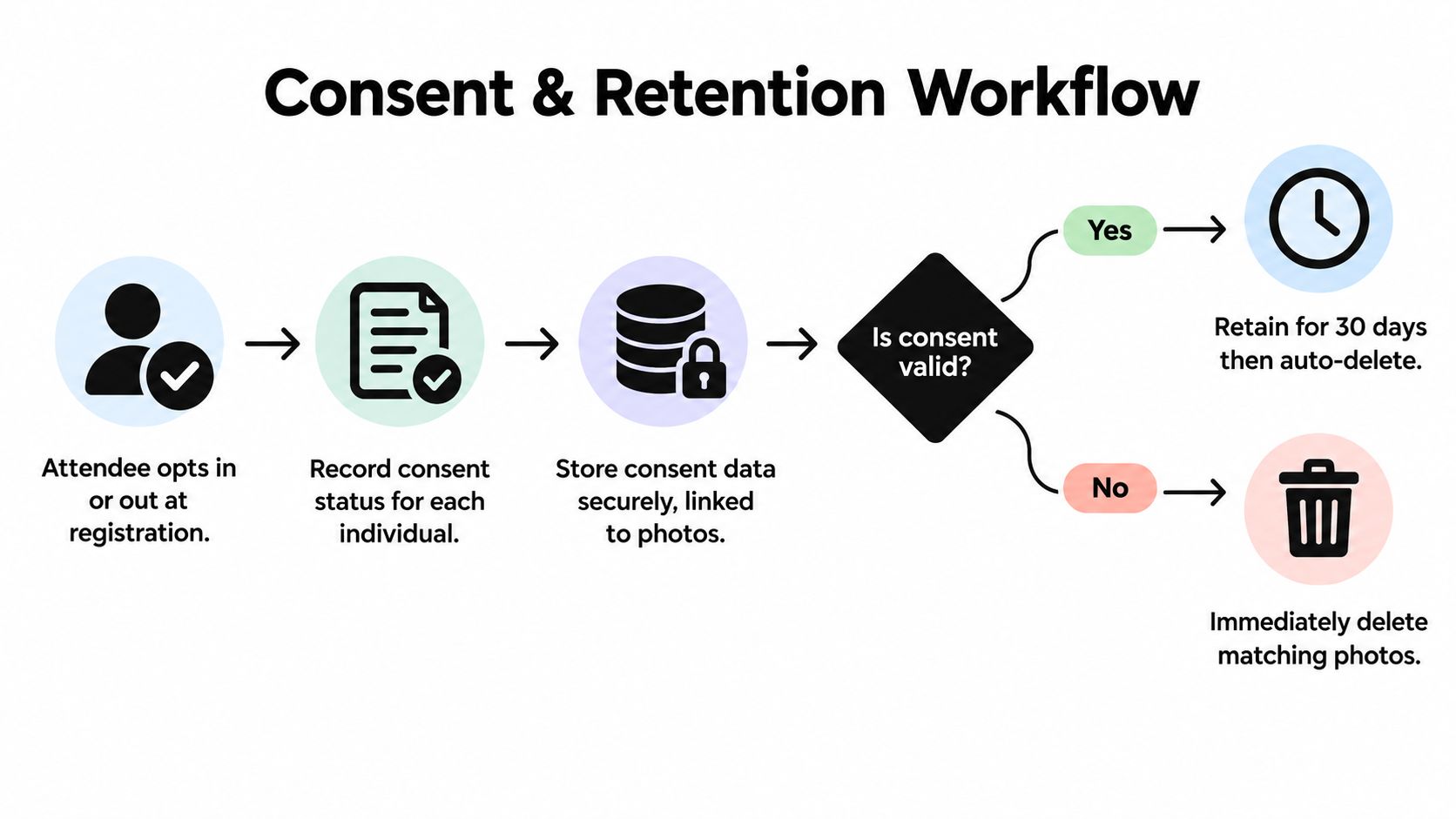
That guidance lines up with what works operationally. If you make opt-out unclear, your staff ends up improvising. If staff improvise, records get messy. If records get messy, removal requests become hard to honor cleanly.
Separate your library from attendee delivery
This separation is essential in modern workflows.
Your raw image library is your production archive. Your attendee-facing gallery is a controlled delivery surface. Those should not be the same thing, and they shouldn't have the same retention logic.
A practical setup looks like this:
- Raw archive: retained according to contract, editing needs, and client agreement
- Export gallery: visible only for the event delivery window
- Selfie and facial matching data: retained briefly, then deleted on schedule
- Removal queue: monitored so attendee requests don't get buried in inboxes
Privacy gets easier when every data type has its own rule. Problems start when one folder is expected to do everything.
Make deletion a system behavior
Deletion shouldn't depend on whether someone remembers to clean up after a busy week. It should be scheduled in the platform settings and backed by a documented policy the organizer can explain.
That means the event team should know:
- Who can submit a removal request
- Where the request is recorded
- Who confirms completion
- What gets deleted immediately
- What expires automatically
If your delivery platform supports configurable controls, use the gallery settings and retention controls to reflect the actual event policy instead of handling privacy case by case.
Clients notice this. Schools, companies, membership organizations, and private event hosts increasingly care less about whether you can upload fast and more about whether you can operate responsibly after collection. That's the standard now.
Unlocking Photographer Upsell Opportunities
Once delivery stops eating your time, the gallery becomes more than a handoff. It becomes a direct attendee channel.
That's the shift many photographers miss. They still treat event delivery as a cost center. In practice, a clean find-my-photos workflow can support selective monetization without making the experience feel pushy.
Where the revenue path opens up
When attendees can reliably locate their own images, you can offer relevant next steps around those images instead of sending everyone into the same undifferentiated album.
That can include:
- Premium edits: retouching or polished finals for keynote speakers, sponsors, couples, or VIP guests
- Digital downloads: useful for conferences, activations, and branded moments
- Print sales: still strong for schools, sports, and family-oriented events
- Featured sets: curated collections for teams, exhibitors, or social recap packages
This works especially well for sports tournament photo sales, gala fundraiser photo gallery delivery, and trade show photo sharing, where the attendee has a clear personal or professional reason to want specific photos quickly.
Time savings create selling room
The revenue isn't just in the gallery. It's in the time you get back.
If you're no longer manually answering search requests, rebuilding broken links, or reorganizing public folders, you can put that time into paid edits, sponsor packages, or a better event-day shooting plan. That's a healthier business model than spending unpaid hours doing customer service on top of the shoot itself.
The broader camera market has moved on from DSLR development in obvious ways, but the installed base is still huge, and the event use case remains practical. The Nikon F in 1959 helped define the professional 35mm SLR system, and Canon's EOS-1Ds in 2002 established an early full-frame DSLR benchmark with an 11.1MP CMOS sensor, milestones noted in digital camera history reporting. That heritage still shows up in real event work because DSLR bodies remain associated with durable handling, long battery life, and dependable coverage. The opportunity now isn't to romanticize the gear. It's to modernize what happens after capture.
If you're handling photos from DSLR cameras at events, Saucial offers a practical way to turn those files into a private “find my photos” experience with upload, selfie-based retrieval, and organizer-controlled sharing. It fits the post-shoot problem: getting the right attendee to the right photo without dumping everyone into a cluttered public gallery. See how it works at Saucial.



