How to Find a Photo Taken During an Event: A Complete Guide
You leave a gala, tournament, or trade show with one thought: where is the photo taken during the event that I want? You remember the entrance backdrop, the photographer raising a camera, and the exact moment your group smiled. Yet the image may be sitting inside a large folder, waiting for edits, or uploaded somewhere nobody explained clearly.
The problem usually isn't that the photo doesn't exist. It's that the handoff between capture and retrieval was never designed. The organizer needs to publish a clear path, the photographer needs to upload and organize files, and the attendee needs a fast way to locate a personal image without scrolling through an entire gallery.
Event photography now operates inside a very short sharing window. A 2026 industry report says 69% of guests share event photos within 24 hours, while delivery delayed by 2 to 3 days reduces that rate to below 30%. The same report says engagement falls by 80% after the first two hours, and that same-day delivery can produce 4.2 times more social shares than traditional post-production timelines. Event photography statistics and delivery timing show why retrieval is a workflow, not a lucky search.
The Photo You Want Is Already There
A guest walks out of a fundraiser and checks their phone before reaching the parking lot. They want the entrance portrait, the candid with a colleague, or the team photo taken beside the sponsor wall. The photographer may already have captured it, but the guest has no reliable route to the file.
At the same time, the photographer is moving between memory cards, previewing images, culling duplicates, and sending batches into an upload queue. The organizer may have a gallery link ready, but it might be buried in an email or printed on a wristband that the guest has already discarded. The image exists, yet it isn't findable.
That gap appears at galas, sports tournaments, alumni dinners, conferences, festivals, and trade shows. A generic shared folder technically delivers the files, but it makes the attendee do the work of identifying themselves inside a crowded collection. A better workflow connects the three people responsible for the outcome.
The organizer owns the route
The organizer decides where the gallery lives, how guests receive access, whether uploads are public or restricted, and how long files remain available. The event team also needs to repeat the access instructions during the event, because guests often forget a link as soon as they leave the venue.
The photographer owns the source
The photographer controls image quality, upload cadence, file selection, and any manual review process. A beautiful gallery still fails if the first batch arrives too late, if blurry frames remain searchable, or if no one can investigate a missed match.
The attendee owns the final action
The attendee needs a low-friction way to retrieve a personal image. That can mean a branded event photo sharing link, a QR code photo gallery, a staffed kiosk, or selfie photo matching. The right choice depends on venue layout, guest behavior, privacy requirements, and the photographer's delivery setup.
Visual sharing already happens at enormous scale. A 2025 peer-reviewed article notes that users share over 3.2 billion photographs and 720,000 hours of video per day, and reports that sharing photographs can improve recollection of event-related details shown in those images. Research on photo sharing and event memory supports a practical conclusion: attendees already expect image-rich, mobile-first communication. Your retrieval system should meet that expectation instead of sending people through an unstructured folder.
For organizers building this handoff, Saucial's event photo sharing workflow is one example of a platform that combines an upload path with attendee retrieval. The important principle applies regardless of the tool: decide how a photo becomes findable before the first guest arrives.
Setting Up the Event Photo Sharing Link
A guest scans a code after a gala, opens the gallery, and finds no clear route to the photo. That failure usually starts before doors open. The organizer, photographer, and attendee each need a defined handoff, with every access method leading to the same controlled destination.
Build the destination first
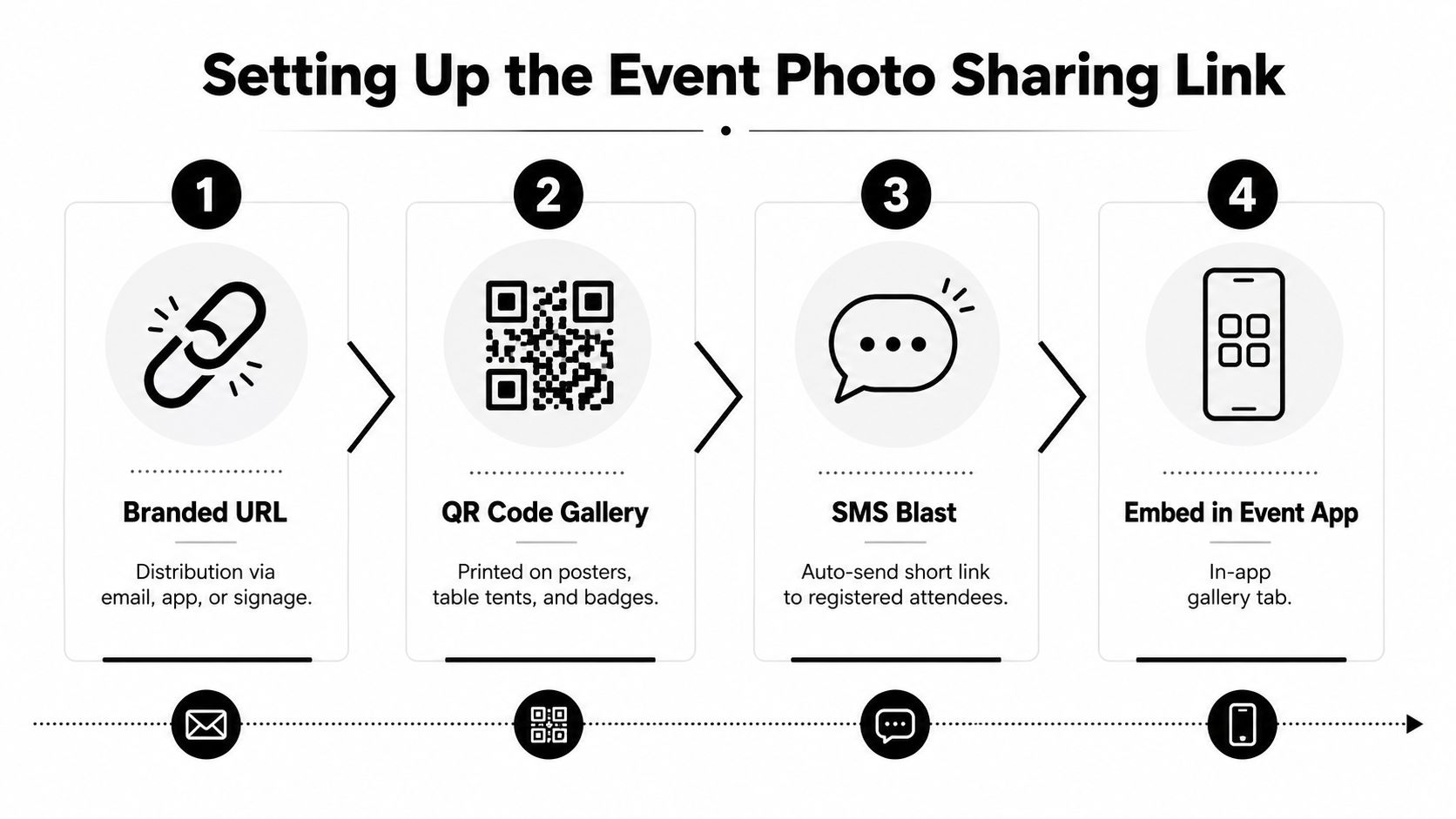
Create a short, memorable URL that guests can retype when a camera will not scan. A branded path tied to the event name is easier to repeat during a stage announcement than a long, platform-generated address.
Create the gallery and grant the photographer access before the event. Test the upload pipeline with sample images, confirm that approved files appear without manual intervention, and add a manual-search form for attendees who cannot complete a match.
Use Saucial's upload page as one possible upload destination. Keep responsibilities explicit: the organizer controls publication and access, the photographer knows where files belong, and registration staff know how to direct guests when a search or scan fails.
Put access where guests already pause
A QR code photo gallery works well at eye level near exits, registration desks, photo backdrops, sponsor displays, and refreshment areas. Add a short instruction such as “Scan to find your event photos,” then test the code on both iPhone and Android under the venue's lighting and network conditions.
NFC tap points can complement QR codes in busy areas. They remove the camera step, but some guests will not recognize the prompt, so display clear instructions and keep the QR route available.
A staffed kiosk suits events with registration or concierge personnel. Staff can help a guest enter a phone number, scan a code, or submit a manual request. Kiosks require equipment and staffing, yet they help older audiences, formal galas, and venues where phone connectivity is unreliable.
Repeat the message
Announce the gallery link during registration, after major photo moments, and near closing remarks. Place it in the event app, confirmation email, SMS message, venue screens, and follow-up email. Repetition matters more than the specific channel.
Before the event, confirm these items:
- Link ownership: Assign one organizer who can update the destination or pause access.
- Photographer permissions: Give the photographer only the upload and review access required for the assignment.
- Gallery behavior: Configure approved uploads to appear promptly, while retaining moderation where privacy requires it.
- Manual fallback: Route failed searches to a form that collects time, location, group description, and contact details.
- Device testing: Scan every QR placement under actual venue lighting and network conditions.
Guests commonly retrieve event photos on phones, so the gallery must load quickly and remain readable on a small screen. event photography device usage data reports phone use exceeding desktop and tablet use for event-photo viewing. A desktop-friendly gallery that performs poorly on mobile breaks the handoff between photographer, organizer, and attendee.
How Selfie Photo Matching Actually Works
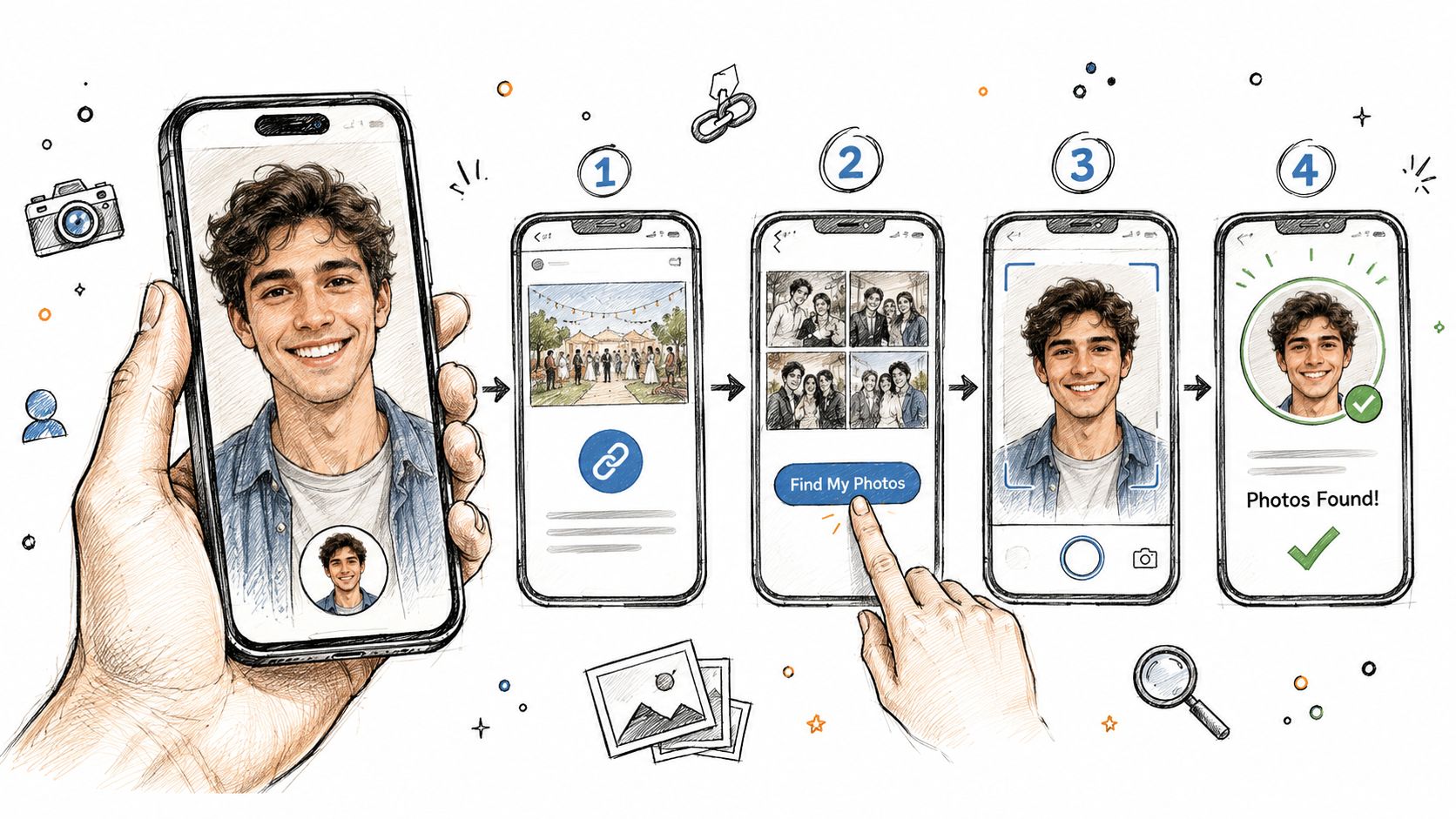
Selfie photo matching gives the attendee a personal search route instead of asking them to browse every image. On a phone, the process should feel simple:
- Open the event gallery link.
- Tap Find My Photos.
- Take a clear selfie or upload one from the device.
- Wait while the system searches the event set.
- Review the returned images and download or share the approved files.
Behind the interface, the system converts the reference selfie into a mathematical face template. It compares that template with faces detected in uploaded event photographs, ranks likely similarities, and returns the strongest candidates. The attendee shouldn't need to understand the underlying processing, but the organizer and photographer should understand that matching quality depends on both the reference image and the event files.
A front-facing, well-lit selfie gives the engine a cleaner reference. Remove sunglasses and hats where possible, avoid a strong filter, and choose a selfie that resembles your event-day appearance. If the first search misses, retake the image with a neutral expression and a direct view of the face.
Practical rule: Treat the selfie as a reference capture, not a profile picture. Clarity and resemblance matter more than polish.
The photographer's upload process also affects the result. Motion blur, extreme crops, dark frames, and faces turned away from the camera create weaker candidates. A serious workflow should cull obvious failures before matching and keep a manual route available for images that need human judgment.
What to do when no photos appear
No result doesn't always mean the photographer missed you. Try a higher-resolution selfie, remove accessories, use a neutral expression, and avoid a heavily edited image. If the system still finds nothing, browse the gallery by approximate time or location. A guest at a gala might search the entrance or sponsor wall, while a tournament attendee might start with the court, field, or award area.
The organizer should offer a manual review path. Ask the guest for the approximate time, clothing, location, and names of people in the group. That information lets the photographer narrow a batch without exposing the entire gallery.
Timing depends on the upload cadence and processing queue. A photo taken during an event can appear soon after the photographer uploads and approves the batch, but late-stage images may not be available until the photographer finishes the event set. Set that expectation clearly on the gallery page so guests know whether to search immediately or return after the final upload.
Why a Face Match Sometimes Fails
A face recognition event gallery isn't a magic index. It's a comparison system working with photographs captured in changing light, motion, crowd conditions, and camera angles. High-quality benchmarks can be very strong, with some evaluated algorithms above 99% accuracy and modern selfie-to-selfie comparisons commonly around 99.5% to 99.9%, as described in independent facial-recognition performance reporting. Those figures don't describe every event photograph, however.
Event conditions are messier than controlled verification images. A 2025 experiment found that false positives and false negatives both increase as image quality degrades, with effects that vary across demographic groups. Analysis of facial recognition under event-style image conditions recommends quality normalization before matching, including culling motion blur, avoiding extreme crops, and prioritizing frontal or near-frontal faces.
| Failure Cause | Side | Typical Impact | Fix |
|---|---|---|---|
| Face turned sharply away | Photographer | Fewer usable facial features | Browse by time or location, then request manual review |
| Sunglasses, hats, or masks | Attendee or photographer | Important facial areas are obscured | Retry without accessories where possible |
| Motion blur | Photographer | Key facial details become indistinct | Exclude weak frames from automated matching |
| Low light and image noise | Photographer | The face template becomes less reliable | Use brighter reference images and manual review |
| Low-resolution crop | Photographer | The face contains too little detail | Search nearby images or upload a clearer reference |
| Filtered selfie | Attendee | The reference no longer resembles the event image | Use an unfiltered, front-facing selfie |
| Hair, glasses, or styling change | Attendee | Similarity ranking may weaken | Try another reference that matches the event-day look |
| Look-alike confusion | System workflow | A result may belong to another guest | Require review before broad distribution |
Demographic variance deserves direct attention. If training data underrepresents certain skin tones, hairstyles, or glasses, the organizer shouldn't treat automated results as equally reliable in every situation. Quality gating, human review, and a visible fallback improve fairness as well as retrieval.
The recovery path should be designed, not improvised. First retry with better lighting and a neutral expression. Next remove accessories or use another high-resolution selfie. If that fails, search manually by event area, time, hashtag, or photographer contact form.
Privacy, Permissions, and Retention Rules
Consent, access control, and deletion aren't administrative details to solve after the gallery launches. They determine whether the organizer can responsibly offer selfie matching at all. Mainstream guidance on event galleries increasingly treats access controls, moderation, expiration dates, deletion rights, and retention as core setup decisions, as outlined in event photo privacy and security guidance.
For an event planned in 2026, the organizer should document the legal basis for processing and account for applicable regional rules, including GDPR and CCPA requirements where relevant. The compliance environment is tightening. Reporting cited in the supplied guidance says 23 U.S. states have passed or expanded laws restricting biometric data collection, while a 2025 industry guide says 13 states and 23 local jurisdictions address facial recognition specifically. Those figures make a privacy review a practical production task, not a theoretical legal exercise.
Set the permission boundary
The attendee should receive clear notice about what the gallery collects, why selfie matching is used, who can access the result, and how long the data remains available. Consent for biometric processing should be explicit where required. Secondary uses, such as marketing, should use a separate opt-in rather than being bundled into gallery access.
The photographer's contract should define whether they retain originals, whether they may use images in a portfolio, and how they handle deletion requests. The organizer remains responsible for the guest-facing promise, even if a vendor performs the technical processing.
Use role-based access:
- Attendees: View only images returned for their search or images intentionally made public.
- Photographers: Upload and review assigned event material, without unnecessary access to organizer data.
- Organizers: Manage settings, moderation, permissions, and aggregate reporting.
- Support staff: Resolve retrieval requests without receiving broad gallery privileges.
A platform login such as Saucial's authentication entry point can sit inside that access design, but the tool doesn't replace the organizer's policy decisions.
Publish the exit plan
Tell guests when the gallery closes, how they can download their images, and how to request removal. Set automatic deletion for biometric templates, search references, and event photographs according to the documented policy. A retention period in the range of 30 to 90 days can balance guest access with data minimization when the event's needs justify it, but the organizer should choose and document the period rather than copy a default blindly.
Send download reminders before expiration, preserve an audit record of administrative access, and honor opt-out requests before public launch where possible. Privacy works when each handoff is explicit: the attendee agrees to a defined use, the photographer follows the contract, and the organizer can demonstrate control.
Turning Delivery Into Revenue for Photographers
A photographer can turn the delivery step into a controlled sales channel without turning event administration into a second job. The key is to attach offers to actions guests already take, such as viewing, downloading, or sharing a photograph.
Start with a clean free experience, then offer relevant upgrades. At a gala, that might be a professionally retouched portrait or a print suitable for a donor's office. At a tournament, it could be a bundled set of action images. At a trade show, it might be a polished headshot crop for a professional profile.
Use a small number of clear offers
Print and merchandise options should appear beside the image, not in a separate sales maze. Let guests select a print size, framed product, or event-branded item while the image is already in view.
Premium edits can include retouching, color grading, background cleanup, or a tighter headshot crop. Keep the offer specific so the buyer knows what changes and when they'll receive the final file.
A curated highlight reel can remain free while the complete set uses paid access, provided the organizer has approved that structure. Another approach is to include a limited selection of downloads and charge for expanded collections. The right package depends on the event's audience and the contract, not on forcing every guest through a paywall.
Reduce disputes before they happen
Bundle related products instead of presenting a long menu. A tournament package might combine several player images, while a gala package could pair a group portrait with a retouched individual image. State the edit scope, delivery method, and refund terms at checkout, then give buyers a 48-hour satisfaction window when that fits the service agreement.
Sponsored frames and branded watermarks can create a separate commercial route. An event sponsor may fund approved branding in exchange for an agreed fee tied to impressions, but the organizer must approve placement, frequency, and visual treatment. Branding should support the event rather than make a guest's personal image feel like an advertisement.
Revenue features must follow the same consent and retention rules as free delivery. Don't use a guest's image for sponsor promotion without the required permission, and don't keep files indefinitely because they might sell later. Photographers can manage these controls in a platform settings area such as Saucial's settings page, while the contract should define who controls pricing, refunds, and commercial use.
A 72-Hour Photo Retrieval Playbook
Treat retrieval as a staffed production shift. The organizer, photographer, registration team, and support contact should each know what happens before capture, during upload, and after the event closes.
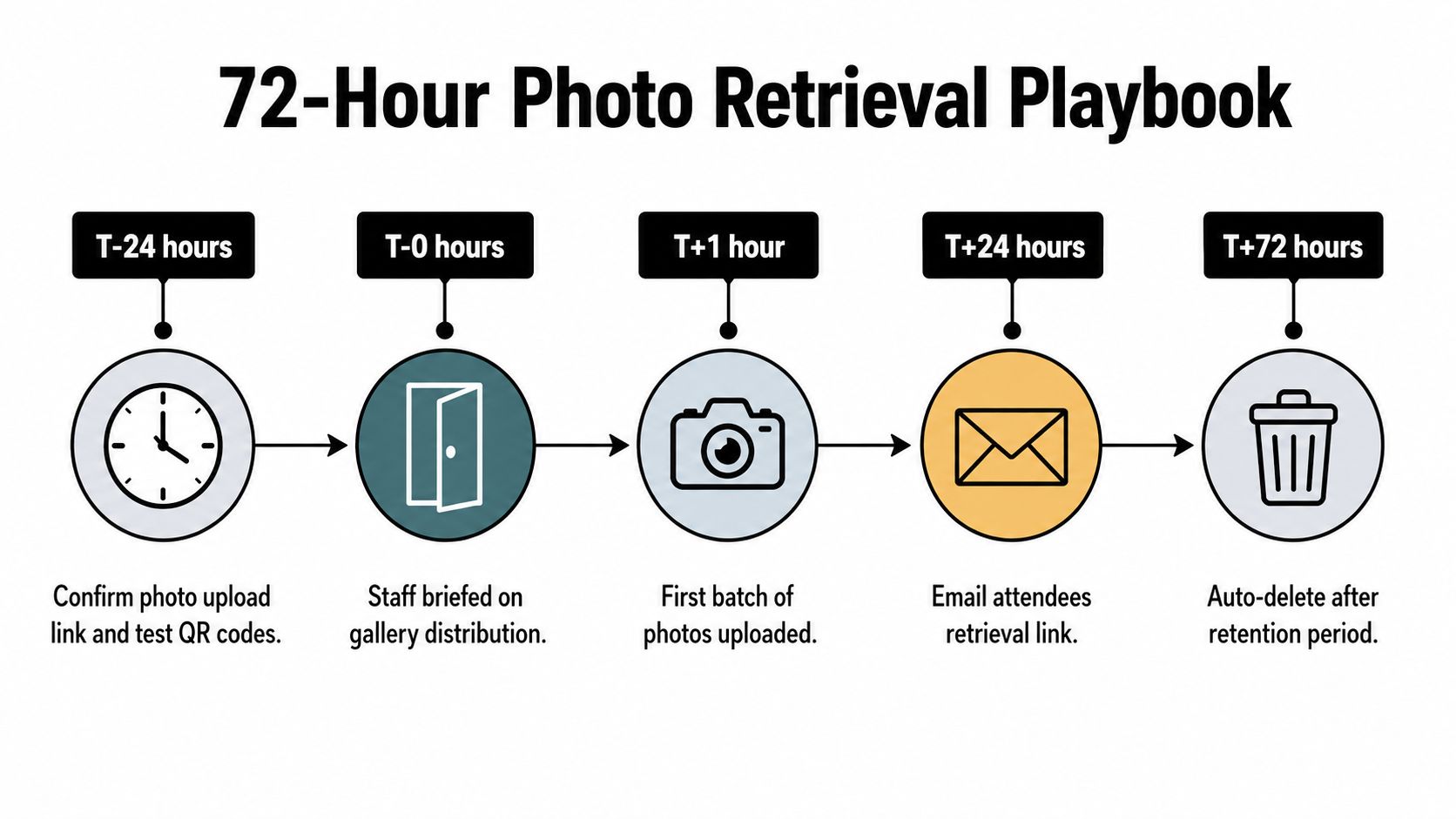
T-minus 24 hours
Confirm the upload destination and test the gallery on the venue network. Scan every QR code from printed materials and screens using both iOS and Android devices. Submit a sample selfie, verify that a test image returns, and check that the privacy notice and consent language are visible before search begins.
Brief staff on the physical route. Registration should know where guests enroll, floor staff should know where signs point, and the photographer should know which batches need priority. Keep a backup manual-search form available if the primary platform goes offline.
Event day
The photographer should upload in regular batches rather than waiting until every edit is complete. A planned cadence keeps early arrivals from waiting for the entire gallery and gives the organizer a chance to identify upload failures while staff are still present.
Place signage at the selfie enrollment booth, exits, major photo areas, and sponsor zones. Repeat the link in announcements and digital messages. If the primary gallery becomes unavailable, direct guests to the fallback form and record the affected time period so the photographer can resolve those searches later.
T-plus 48 hours and beyond
Finalize the gallery, remove rejected or sensitive images, and process opt-out requests before sending the follow-up. Email attendees the retrieval link with plain instructions and remind them how to download images before the published expiration date.
Use this troubleshooting checklist:
- Missing face: Ask for a clearer selfie, then route the request to manual review.
- Slow gallery: Check the upload queue, image sizes, and venue connection before asking guests to retry.
- Expired QR code: Replace the printed destination or redirect the existing link if the system permits it.
- No enrollment: Offer gallery browsing by time or location and explain the manual request route.
- Privacy request: Pause distribution of the affected image while the organizer verifies and processes removal.
- Incomplete batch: Record the photographer's last successful upload and publish a clear update to staff.
The event isn't finished when the camera is packed away. It's finished when the organizer can explain where the images are, the attendee can retrieve the right one, the photographer can resolve exceptions, and the retention policy closes the workflow cleanly.
Saucial gives organizers and photographers a single event photo sharing workflow with upload, shareable gallery access, QR distribution, and a Find My Photos experience powered by selfie matching. If you're planning a gala fundraiser photo gallery, sports tournament photo sales, or trade show photo sharing, visit Saucial to see how the handoff can work from camera to attendee phone.



