Photo Share Gallery Explained for Events That Scale

The event ends. Your photographer has delivered hundreds of images. Guests start asking for them before the venue staff has even finished clearing glassware.
Then the usual scramble begins.
Someone uploads everything to a Drive folder. Another person tries to sort highlights for social. Attendees open the link, scroll for a while, and give up because they can't find themselves. A few send screenshots asking, “Do you have the one of me at the table?” Others want family shots, team photos, sponsor moments, or stage pictures. What should feel like a nice post-event touch turns into a small support queue.
That's why a photo share gallery matters now. It isn't just a prettier folder. Used well, it becomes a private retrieval workflow: one place to publish event photos, one simple way to distribute them, and one attendee experience built around find my photos instead of endless scrolling.
Photo sharing has been normal online for a long time. A Pew survey summarized by Eventiere's event photography statistics page found that 54% of adult internet users posted original photos or videos, 47% reshared photos or videos found elsewhere, and 62% had done at least one of those activities. For event teams, the takeaway is straightforward. Guests don't just want photos stored somewhere. They want photos they can access and share.
Introduction Why Event Photos Get Lost After the Last Toast
The event is over, the room is being cleared, and guest messages start arriving before the photographer has even finished exporting files. A sponsor wants backdrop shots for a recap post. A parent wants the medal photo. A donor wants the table picture with friends. A speaker wants stage images for LinkedIn. The problem is rarely photo coverage. The problem is getting the right photos to the right people without turning your team into a help desk.

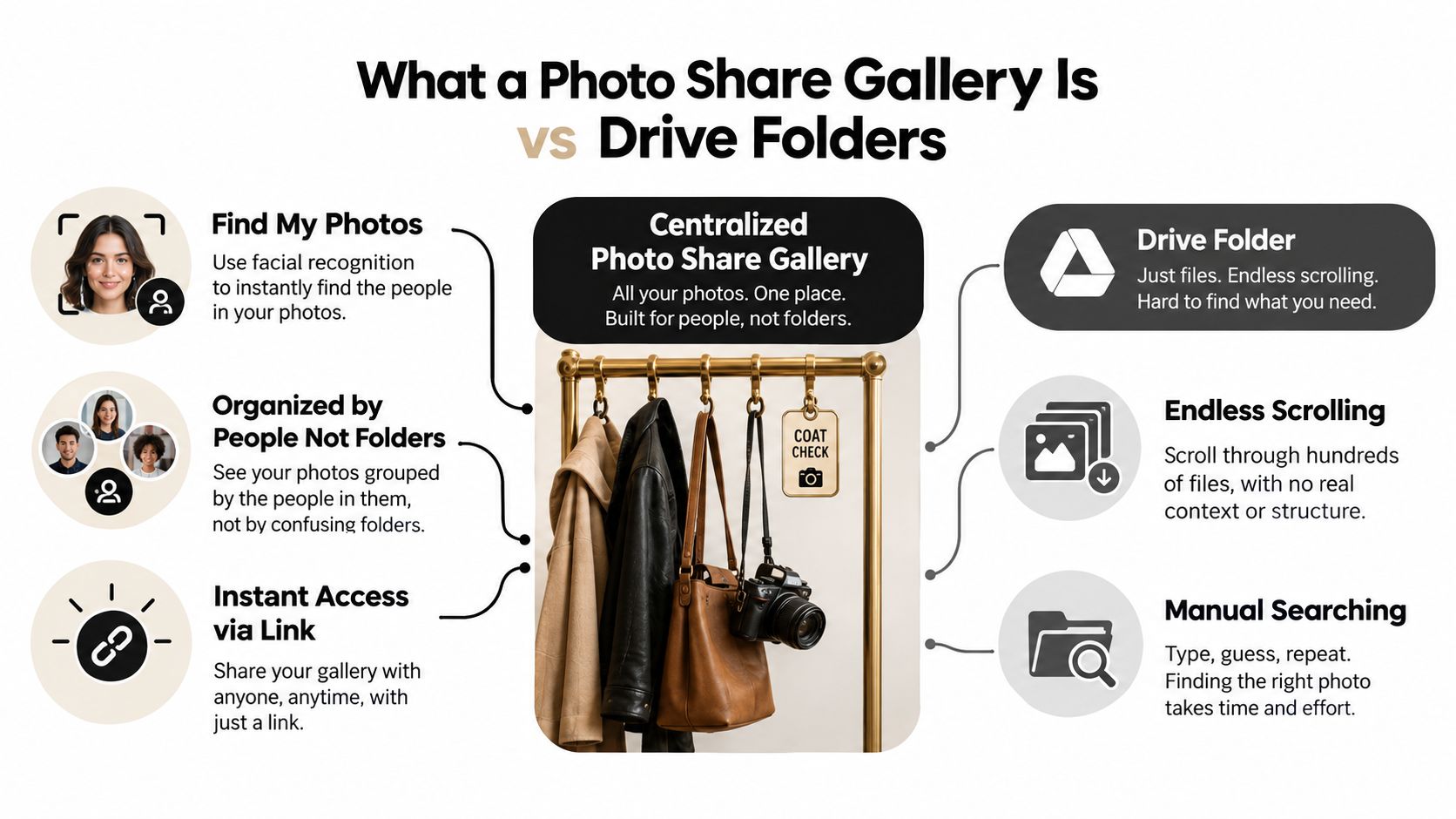
A folder gives everyone the same pile. A photo share gallery works more like private coat check for images. Guests do not want to sort through every table candid, booth shot, and dance floor frame. They want a fast way to get their photos.
That small shift changes the whole workflow. Instead of treating delivery as file storage, a gallery treats it as retrieval. The link gets people in. QR codes help people reach the gallery while the event is still fresh. Selfie matching helps each attendee pull up their own results without exposing everyone else's images. In one setup, organizers can distribute photos faster, protect privacy, and create a path for downloads or sales.
Why folders break down fast
Teams usually run into the same friction points:
- Guests search manually: They scroll through crowded thumbnails and try to spot themselves.
- Organizers field repeat requests: Staff end up answering the same "can you send mine?" message across email, text, and DMs.
- Photographers lose editing time: One-off retrieval requests pull them back into support work.
- Sharing slows down: If guests cannot find their images quickly, they are less likely to post while the event still feels current.
Public folders store files well. They do not guide each person to the photos they came for.
A cleaner setup is a private Find My Photos system. The organizer or photographer publishes one gallery, shares it with a link or QR code, and lets attendees retrieve their own images in a controlled way. That is the practical idea behind tools built for event delivery, including Saucial's event photo sharing workflow. The gallery becomes part of event operations, not one more folder someone has to explain.
What a Photo Share Gallery Is and How It Differs From Drive Folders
At 11 p.m., the event is over, guests are already checking their phones, and the organizer gets the same question from five directions at once: “Where do I find my photos?”
A photo share gallery answers that question better than a drive folder because it is built for retrieval. The goal is not to place images online. The goal is to help each attendee get to the right photos quickly, without exposing everyone else's.
Coat check is a useful comparison here. A good gallery works like a claim system. People do not sort through every item in the building. They use the right path to get their own.
The storage model and the retrieval model
A drive folder is organized around files. A photo share gallery is organized around the person trying to find them.
That sounds like a small difference until the guest list grows. In a folder, attendees have to scan thumbnails, open random images, and guess which album might include them. In a gallery, the event team sets the rules once, then guests follow a simple path to their own results.
| Workflow Type | What Guests See | What They Must Do | What the Team Manages |
|---|---|---|---|
| Drive folder | A bulk file list or thumbnail grid | Scroll, guess, open, search manually | Permissions and file organization |
| Photo share gallery | A curated viewing surface | Open a link, scan a QR code, or use a private retrieval flow | Curation, access rules, and delivery experience |
What the attendee actually feels
From an attendee's side, the difference is time and confidence.
A folder says, “Everything is in here somewhere.”
A gallery says, “Start here, and we'll help you get your photos.”
That second approach matters because people do more than download images. As noted earlier, event photos often get shared, reposted, and passed around quickly after the event. If retrieval feels slow or public in the wrong way, people give up. If retrieval feels private and easy, they act while the event still feels current.
Why “private Find My Photos” is the better mental model
Organizers often hear “gallery” and picture a public album. That framing causes confusion.
For many events, a better model is a private Find My Photos system. One gallery holds the approved event set. A link gets guests in. A QR code helps them reach it from signage, slides, or printed cards. A selfie matching step can then return each person's likely photos without turning the whole event archive into an open browsing exercise.
That one workflow solves three separate problems at once.
- Distribution: one destination instead of hundreds of manual sends
- Privacy: each attendee can retrieve their own images without seeing everyone else's
- Monetization: downloads, access tiers, or print sales can sit inside the same delivery path
Why this is different from “just send the folder”
Sending a folder sounds efficient because upload is fast. Retrieval is where the cost shows up later.
Staff answer repeat messages. Photographers get pulled into support. Guests stop looking if the album feels crowded or unclear. A gallery reduces that cleanup work by adding structure before the link goes out.
That structure can include approved image selection, branded presentation, private access rules, and person-specific retrieval. Some teams also use platforms built around that workflow, including Saucial's event photo sharing workflow, to turn a gallery into an operational handoff instead of a file dump.
A folder stores images. A photo share gallery helps the right person find, view, and act on the right images.
How Organizers and Photographers Create and Curate Galleries
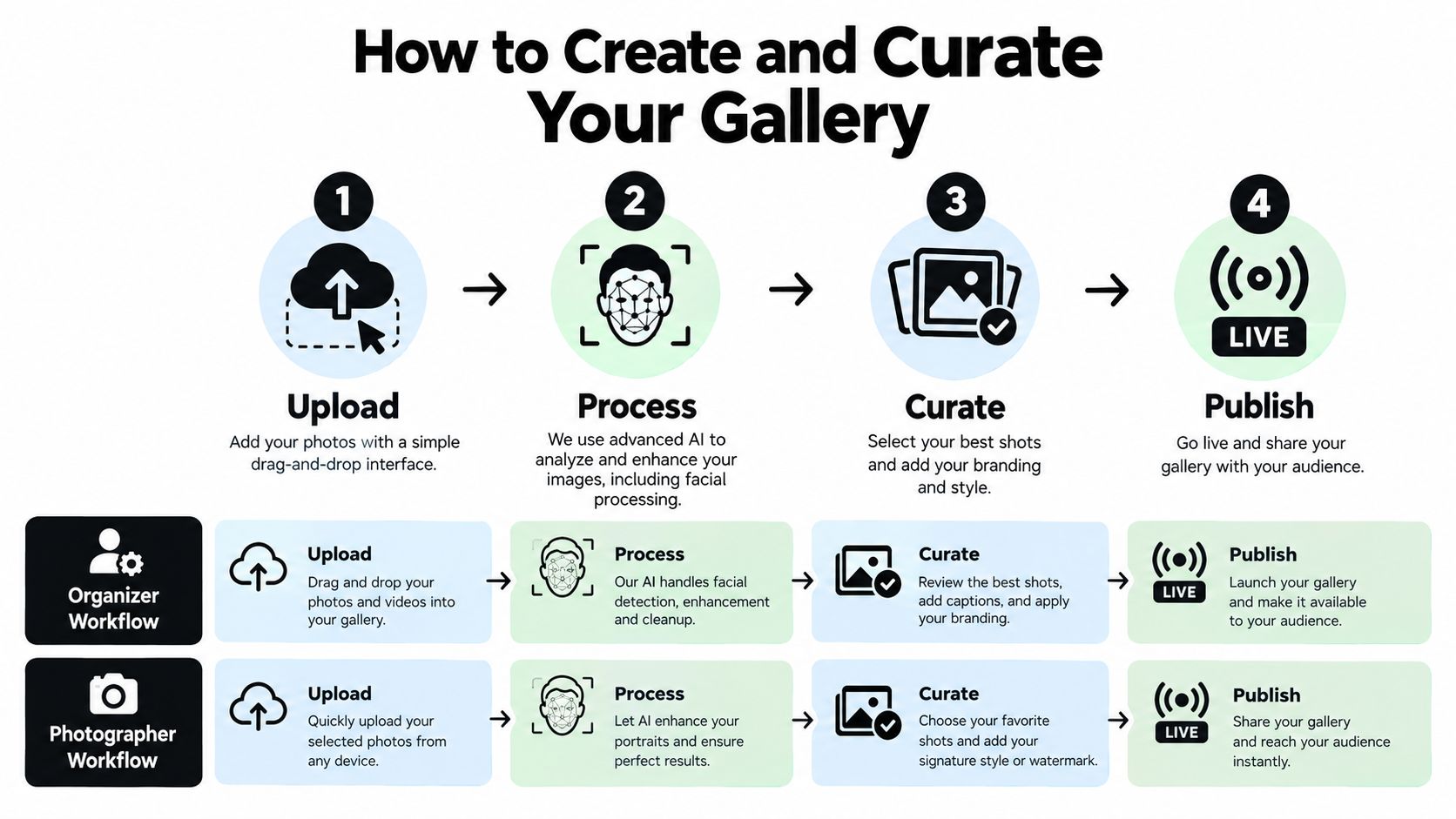
The easiest way to think about setup is this: photographers capture, organizers control, and the gallery handles delivery.
That division keeps the process clean. It also prevents a common failure point where nobody is quite sure who's approving, uploading, or publishing.
The organizer workflow
For organizers, the gallery setup usually follows four decisions.
Upload the images Start with the approved event set, not every frame ever captured. That keeps the guest experience cleaner from the start.
Decide what belongs in the public-facing gallery Not every usable image should be attendee-visible. Internal team shots, staff-only moments, minors, or sponsor-sensitive images may need separate handling.
Set access rules Decide whether people can browse, download, share externally, or retrieve only their own photos.
Publish the gallery through the channels guests already use That could be email, SMS, WhatsApp, a QR code sign, or an event website embed.
If you're using a tool with upload and processing built in, Saucial's upload flow is one example of that organizer path: drag-and-drop images in, let background processing prepare retrieval, then control what gets published.
The photographer workflow
Photographers usually care about something slightly different. They want delivery to stop eating into paid work.
A gallery helps by reducing repetitive tasks like manual sorting requests, one-off resend emails, and basic attendee tagging support. It can also create a direct attendee channel for optional sales such as prints, digital downloads, premium edits, or branded add-ons, if the event allows them.
Here's a practical handoff model many teams use:
- Photographer captures and lightly culls: Remove blinks, missed focus, and obvious duplicates.
- Organizer approves the attendee-facing set: Privacy and brand judgment usually belong here.
- Gallery handles retrieval: Guests self-serve instead of emailing the photographer one by one.
- Photographer keeps moving: Less inbox work, more editing or shooting time.
Curation matters more than people expect
A gallery only feels smart if the image set is clean.
That means checking for:
- Near-duplicates: Five versions of the same handshake create clutter.
- Contextless frames: Crowd backs, half-closed eyes, and test exposure shots slow down browsing.
- Off-brand moments: If the event has sponsors, school policies, or internal communications rules, remove anything that shouldn't circulate.
- Venue-lighting problems: Mixed lighting can make both viewing and matching harder.
One technical point is worth noting here. Face-based retrieval performs differently depending on lighting conditions. A study summarized in this gallery retrieval paper reported 93.2% accuracy in bright light, 85.4% in moderate light, and 76.3% in low light, and found that preprocessing improved performance by about 10% in difficult lighting. That's a useful reminder for event ops teams: if you want selfie photo matching to feel smooth, pair it with decent capture practices, good imports, and a review step for dim venues.
Sharing Your Gallery With Links QR Codes and Embeds
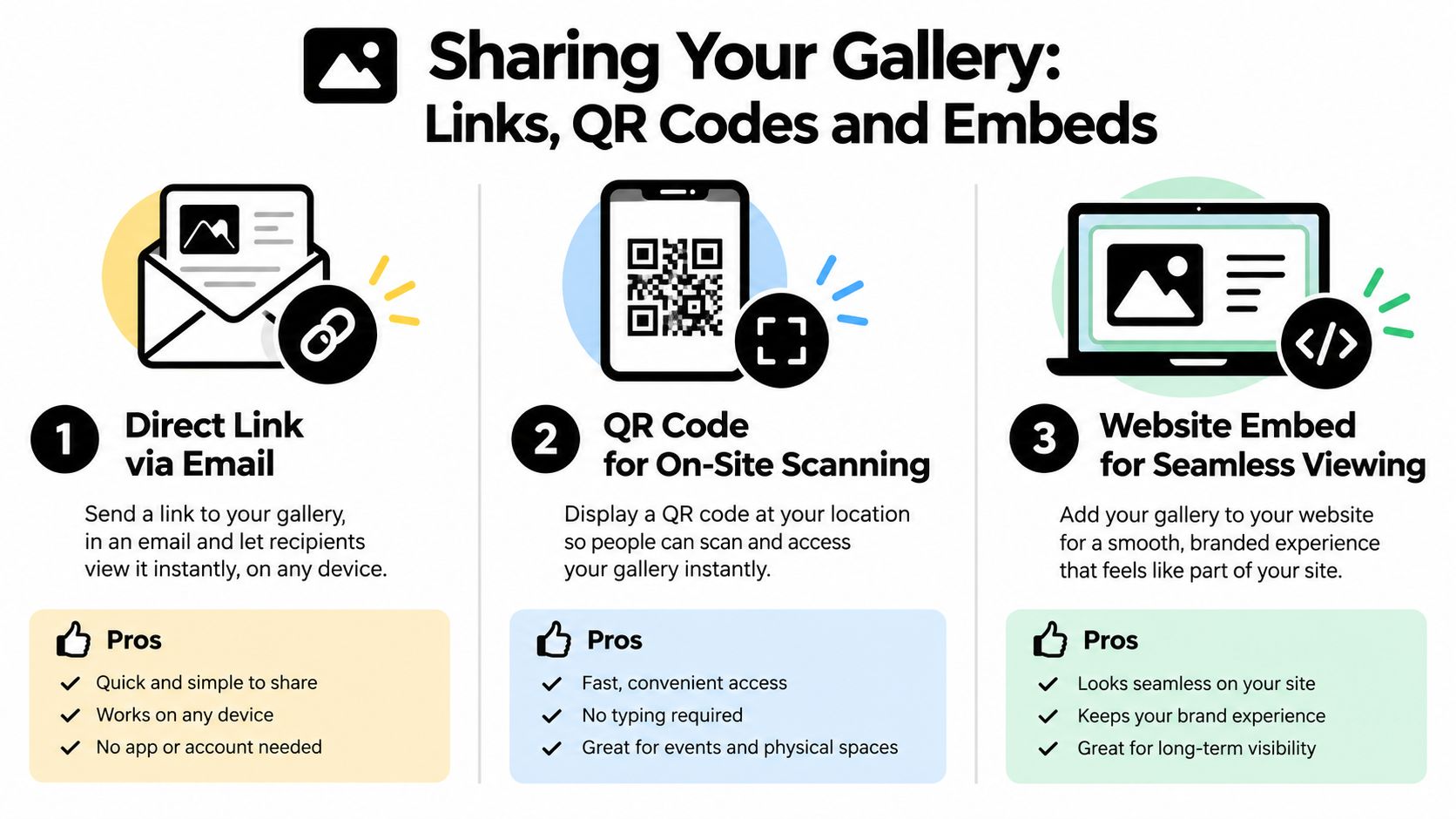
Once the gallery is ready, distribution becomes a channel decision. You don't need three separate systems. You need one gallery that can travel through different touchpoints.
That's where the event photo sharing link becomes the backbone.
Direct link for follow-up
A direct link works best after the event or in short follow-up windows during it. Put it in recap emails, text messages, attendee WhatsApp groups, or sponsor updates.
This is the lowest-friction option for people who already know the event happened and just need a fast way in.
QR code for in-room momentum
A QR code photo gallery is the physical bridge to digital access. Place it where people naturally pause: registration, table cards, step-and-repeat stations, scoreboards, lounge areas, or exit signage.
Guests don't have to remember a URL later. They scan when the event is still top of mind.
A QR code works best when it's treated like signage, not decoration. Put it where people have a reason to stop and enough light to scan.
Embed for a branded home base
An embed fits events that already have a web destination people trust. That could be an event microsite, university page, fundraiser recap page, or conference hub.
The gallery then feels like part of the event brand rather than a separate tool somebody sent afterward.
Choosing the right mix
| Distribution Method | Best Moment to Use | Attendee Effort | Reach Advantage |
|---|---|---|---|
| Direct link | Post-event emails, texts, chat groups | Low | Easy to resend across many channels |
| QR code | On-site discovery during the event | Very low | Connects physical signage to instant access |
| Website embed | Recap pages and branded event hubs | Low | Keeps photo access inside the event ecosystem |
If your gallery platform includes access and channel controls, settings usually determine whether the same destination powers all three. Saucial's gallery settings options are one example of where organizers would manage those rules.
A good setup usually combines methods. QR for discovery, direct link for follow-up, and embed for long-tail access.
The Attendee Experience From Selfie to Private Photo Results
For guests, the ideal experience feels almost boring in the best way. They open a link, do one quick action, and get relevant photos without creating work for staff.
That's what makes selfie photo matching easier to explain when you describe it as private retrieval, not surveillance. The attendee is not being asked to browse a public album and hope for the best. They're being offered a shortcut to their own moments.
What the guest actually does
A typical attendee flow looks like this:
- They scan a QR code or open the event photo sharing link.
- They choose the option to find their photos.
- They take a quick selfie in the browser.
- The system checks that selfie against photos inside that event's album.
- They see only the photos they appear in, then download or share based on the event's rules.
No app is required in a browser-first setup, and many events won't require account creation for basic retrieval. If the gallery uses an authentication step, it should feel lightweight. Saucial's attendee auth flow is one example of that kind of access pattern.
Why this feels better than a shared password
A shared password protects a gallery at the front door, but once someone gets in, they can often see everything the gallery contains. That may be fine for a casual wedding recap. It's less comfortable for school events, employee gatherings, VIP receptions, or any setting where attendees shouldn't browse each other's images freely.
A private retrieval model changes the access logic from “everyone gets the same pile” to “each guest gets their own relevant results.”
Guests usually don't want more photos. They want the right photos without extra work.
What privacy-conscious matching looks like
The safest architecture for a face recognition event gallery keeps the matching narrow and temporary. Guidance summarized by Kamero's private and secure event photo sharing resource recommends data minimization and one-to-many matching within the specific event album, rather than against a persistent identity database. The same guidance says the system should delete reference face data after matching rather than keep it.
For organizers, that translates into a few practical checks:
- Use opt-in consent: Tell attendees what the selfie is for before they submit it.
- Limit the search scope: Match only within that event's album.
- Define retention clearly: Set expectations for deletion after the retrieval window closes.
- Restrict downloads when needed: Helpful for minors, internal events, and VIP use cases.
Another privacy gap matters here too. Recent guidance summarized by SnapVeil's article on event photography and privacy notes that many event-photo guides still over-focus on public or password-protected galleries, while leaving harder questions unanswered around consent, deletion rights, and reuse of face data. The same piece highlights a higher consent bar in GDPR-style contexts, where consent should be specific, informed, and withdrawable, and should explicitly mention face matching and deletion policy.
For an event ops team, that's the standard. Make the retrieval helpful, make the consent clear, and don't retain more than you need.
Real World Examples Where Photo Share Galleries Drive Results
The same gallery workflow solves different jobs depending on the event. What changes is the distribution choice, the privacy level, and whether attendee sales are part of the plan.
Gala fundraiser photo gallery
At a gala, the gallery often does two things at once. It gives guests an easy way to retrieve table and red-carpet photos, and it gives the organizing team a fresh post-event engagement touchpoint.
The useful move here is curation. Publish donor-safe, sponsor-safe, attendee-friendly images first. Then distribute through recap email and a QR code placed near exits or thank-you signage while the night is still fresh.
Sports tournament photo sales
A tournament has a different rhythm. Families, athletes, and coaches want their own action photos, not a giant mixed archive from every field or court.
That makes a find my photos flow especially practical. It cuts down the “can you find player number…” messages photographers usually get, and it creates a cleaner path for sports tournament photo sales if the event supports paid downloads, prints, or premium edits.
Trade show photo sharing
Trade shows create a split audience. Sponsors want branded booth coverage. Attendees want networking, speaking, and activation shots they can post quickly.
A gallery helps when you treat one link as the event's photo destination and then feed it into multiple channels: exhibitor follow-up, speaker recap pages, event website embeds, and social prompts built for UGC from events. That's less about archiving and more about turning captured moments into usable post-show content.
Alumni dinners and community festivals
These events usually care about access and comfort as much as promotion. People want to find themselves, their family, or their friend group without scrolling through everyone else.
That's where the private retrieval framing works well. It respects the community feel of the event while still making sharing easy. For schools, associations, and neighborhood programs, that balance often matters more than flashy gallery design.
The main lesson across all four examples is simple. The gallery doesn't create value by existing. It creates value when it reduces attendee effort and reduces staff follow-up.
Conclusion Your Next Steps to Launch a Smarter Gallery
A strong photo share gallery doesn't start with design. It starts with the right job definition.
If your current process is “upload everything and send the folder,” guests are doing the hardest part themselves. A better model is private retrieval. Upload the approved event set, publish one destination, distribute it through the channels people already use, and let attendees get to their own moments quickly.
A simple launch checklist
Use this before your next event:
- Choose the event set: Start with culled, approved images rather than the full raw dump.
- Decide the access model: Open gallery, restricted gallery, or private find-my-photos retrieval.
- Pick your distribution mix: One direct link, one QR code, and an embed if your event site needs it.
- Write the attendee prompt: Keep it plain. Tell guests how to access photos and what to expect.
- Set privacy rules early: Consent language, download permissions, and deletion timing should be decided before publishing.
The gallery that saves the most time is usually the one that removes the most decisions for guests.
If you're planning galas, tournaments, conferences, school programs, or community events, don't think of the gallery as the final folder. Think of it as the handoff layer between captured moments and the people who want them.
Start with one link and one QR code at the next event. That alone is often enough to show where the old workflow was slowing everyone down.
Saucial gives organizers and photographers a browser-based way to upload event photos, share them through a link or QR code, and let attendees use a selfie to privately find their own pictures. If you want to replace cluttered folders with a cleaner find-my-photos workflow, visit Saucial.



