Photo Delivery for Photographers: A 2026 Workflow Guide
At 11:40 p.m., you're still in the photographer's chair after a large gala. Two laptops are copying cards, your edit queue is already full, and the inbox is filling with variations of the same message: “Where are our photos?” The cameras did their job hours ago. Delivery is now the bottleneck.
That bottleneck affects more than convenience. A widely cited event-photography benchmark puts the traditional cull, edit, and final-gallery process at roughly one to two weeks, even when the finished files are delivered digitally through a download link or USB (Eventiere's event photography benchmark). By then, guests have moved on, social posts have lost momentum, and the organizer is evaluating whether the next vendor will respond faster.
A modern workflow treats photo delivery for photographers as an attendee-facing product. You need a reliable ingest system, private retrieval, channel-specific distribution, clear consent controls, and a dashboard that connects time saved with sales.
The Real Cost of Slow Photo Delivery
The first cost is visible in your calendar. You finish the shoot, then spend the next workday sorting cards, answering individual requests, exporting files, uploading galleries, and searching for people who can't describe which frame they want. Those hours are real labor, but photographers often absorb them into the original fee instead of invoicing them separately.
The second cost is harder to recover. A gala, fundraiser, tournament, or conference creates a short period when attendees are still emotionally connected to the event. If the gallery arrives after that moment has passed, fewer people look, tag colleagues, forward images, or ask about prints and downloads. The problem isn't that the photos are weak. The problem is that the delivery experience asks every guest to search through someone else's archive.
Put a number on the delay
Track the workflow with a small set of operational measures:
- Event end to first share link: Record the time the event closes and the first attendee-facing gallery goes live.
- Early gallery activity: Measure how many recipients open the gallery within the first 72 hours.
- Attendee match rate: Count opted-in guests who successfully retrieve photos containing them.
- Revenue per attendee: Divide purchases from downloads, prints, edits, or bundles by the eligible audience.
- Manual request volume: Count “find my photos” emails and direct messages after publication.
These measures show where the money leaks. If editing is efficient but the first link goes out late, ingestion and publishing are the problem. If the link goes out quickly but few people open it, distribution or relevance is weak. If people find photos but don't buy, the offer may be poorly matched to the event.
Practical rule: Don't judge delivery by whether a gallery exists. Judge it by how quickly the right attendee reaches the right image.
The historical batch model explains why this matters. Traditional delivery is built around one finished gallery for everyone, followed by manual discovery and follow-up. A find my photos experience changes the product from “browse this archive” to “retrieve your moments.” That reduces search friction for guests and reduces repetitive support work for you.
The business relationship changes too. Organizers notice whether attendees can share branded event images while the event is still being discussed. Brand teams may not complain when a gallery is slow, but they can prefer a vendor whose process creates faster post-event engagement next time. Your delivery method therefore influences referrals, repeat bookings, and the photographer upsell to attendees.
Building the Ingest and Selfie Matching Pipeline
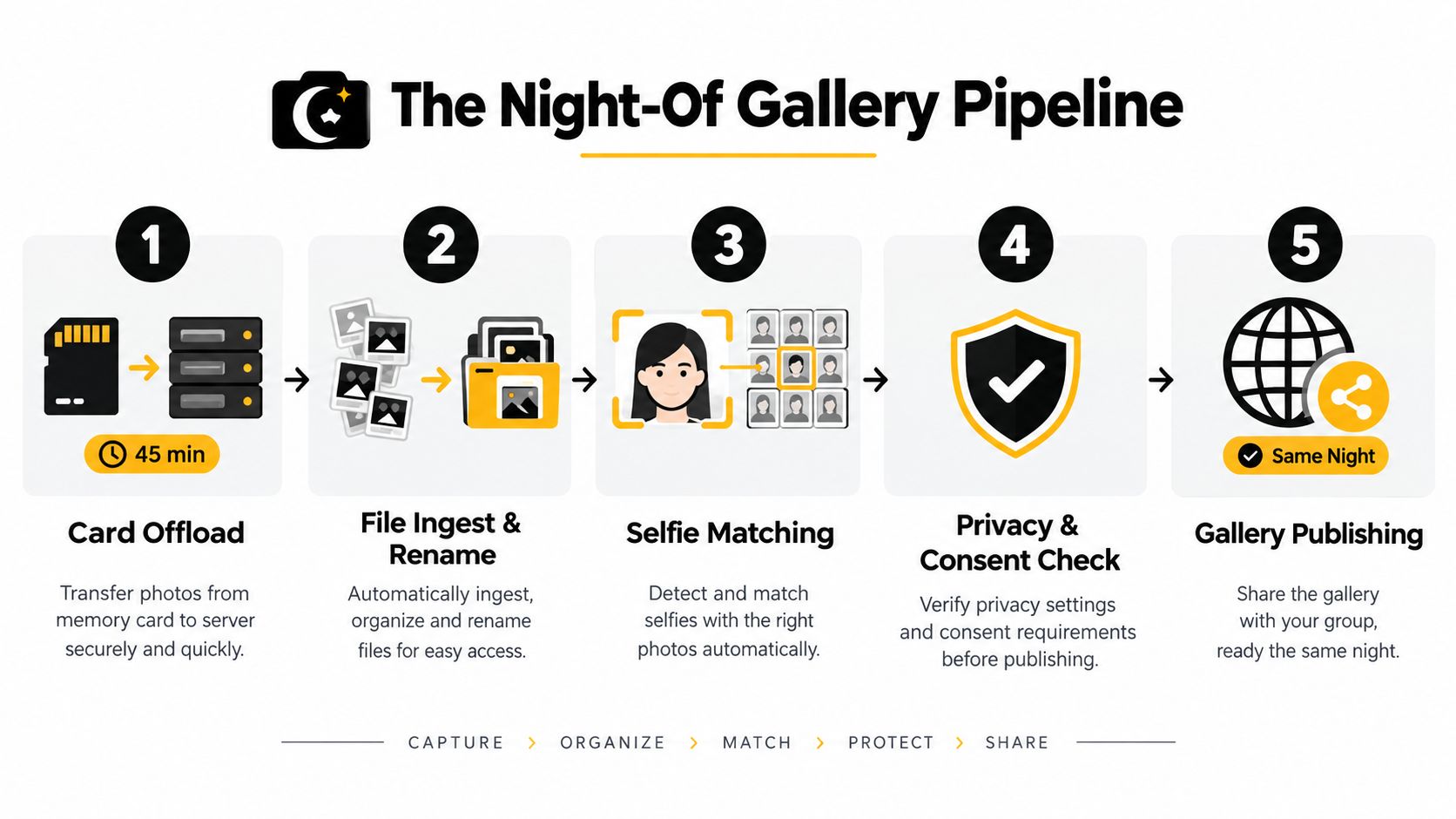
A same-night or next-day gallery starts before you leave the venue. The pipeline should move files through independent stages so uploads, previews, indexing, and editing can run in the background rather than waiting for one task to finish.
Start with safe ingest
Use two card readers in parallel when your computer and storage setup can sustain it. Copy each card to a working drive and a separate backup destination, using checksum verification rather than relying on a basic drag-and-drop copy. Rename files consistently with the event, camera, and capture sequence, but preserve the original card structure until the backup has been checked.
Duplicate culling should happen before intensive processing. Remove obvious duplicates, test frames, accidental triggers, and unusable captures, while keeping a conservative selection for moments where the same person appears across several frames. The aim isn't to make final creative decisions immediately. It's to reduce the volume that the matching system and gallery must process.
Keep processing asynchronous
Upload the selected files over wired ethernet if the venue network allows it. Generate lightweight previews as soon as the files arrive, then begin face indexing as soon as those proxies exist. You shouldn't wait for full-resolution exports before creating the attendee retrieval layer.
A selfie-based workflow needs a reference image. The attendee can upload a selfie through the gallery, or the event team can capture one during check-in with explicit permission. The matching engine then compares that reference against indexed faces in the event set. Vendor performance varies, especially with masks, side profiles, motion, crowded group shots, and low-light gala lighting, so a human review step still makes sense for high-value galleries or uncertain matches.
A practical review queue should surface low-confidence results rather than forcing you to inspect every frame. Check the first batches manually, remove obvious false matches, and make sure private galleries don't expose unrelated attendees.
Minimum viable pipeline
For a reliable delivery operation, keep this sequence visible to the whole team:
- Offload and verify: Copy cards to separate destinations and confirm file integrity.
- Cull and organize: Remove unusable duplicates and apply predictable names or metadata.
- Generate previews: Create mobile-friendly proxies while full-resolution files continue processing.
- Index faces: Start selfie photo matching as soon as previews are available.
- Review and publish: Check uncertain matches, apply privacy rules, and release the private gallery.
A photographer can upload a prepared event set through Saucial's upload workflow, then use the resulting event photo sharing link or QR code for distribution. The important benchmark isn't a particular vendor. It's whether your system can move from verified card dump to a permissioned, matched gallery within the delivery window you promise.
Why Generic Links Lose Most of the Audience
A generic gallery link creates three separate problems: reach, relevance, and timing. Independent event-photo workflow research frames engagement as Reach × Relevance × Timing and reports that shared galleries viewed by all attendees receive only 12–18% of possible views (Eventiere's analysis of low-view event galleries).
That means a gallery can be technically available while remaining practically undiscovered. A guest may open a page, see a large collection, fail to locate themselves quickly, and leave. Others never click because the message doesn't promise a personal result.
Generic public link vs. selfie-matched private gallery
| Metric | Generic public link | Selfie-matched private gallery |
|---|---|---|
| Reach | Depends on a broad announcement and forwarding | Uses direct, event-specific access points |
| Relevance | The guest searches a shared archive | The guest sees photos matched to their reference selfie |
| Timing | Often delayed until the full gallery is complete | Can publish selected sets while processing continues |
| Privacy | May expose unrelated attendees | Can restrict retrieval to the attendee's matched results |
| Sharing behavior | Guests must find a useful image first | Guests can share a relevant image or private result quickly |
| Photographer workload | High volume of search requests | Fewer manual searches when matching works reliably |
The value of selfie matching isn't visual novelty. It removes the search task. A guest who receives a private result has a reason to open the page, while a guest who receives an unfiltered archive must invest time before knowing whether the gallery contains anything useful.
Timing multiplies that relevance. A gala fundraiser photo gallery released while attendees are still discussing the speeches can feed social sharing and donor follow-up. A sports tournament gallery can support team conversations while the result is still fresh. A trade show photo-sharing link can give exhibitors usable UGC from events before their internal recap is finished.
Use the 12–18% view-share benchmark as a warning line, not a universal forecast. Your dashboard should compare generic and personalized events using the same definitions for opens, matched retrievals, shares, and purchases. Don't copy unsupported performance promises into a sales deck. Measure your own audience and identify whether the failure comes from distribution, search friction, or offer design.
Distributing the Gallery Across Every Channel That Matters
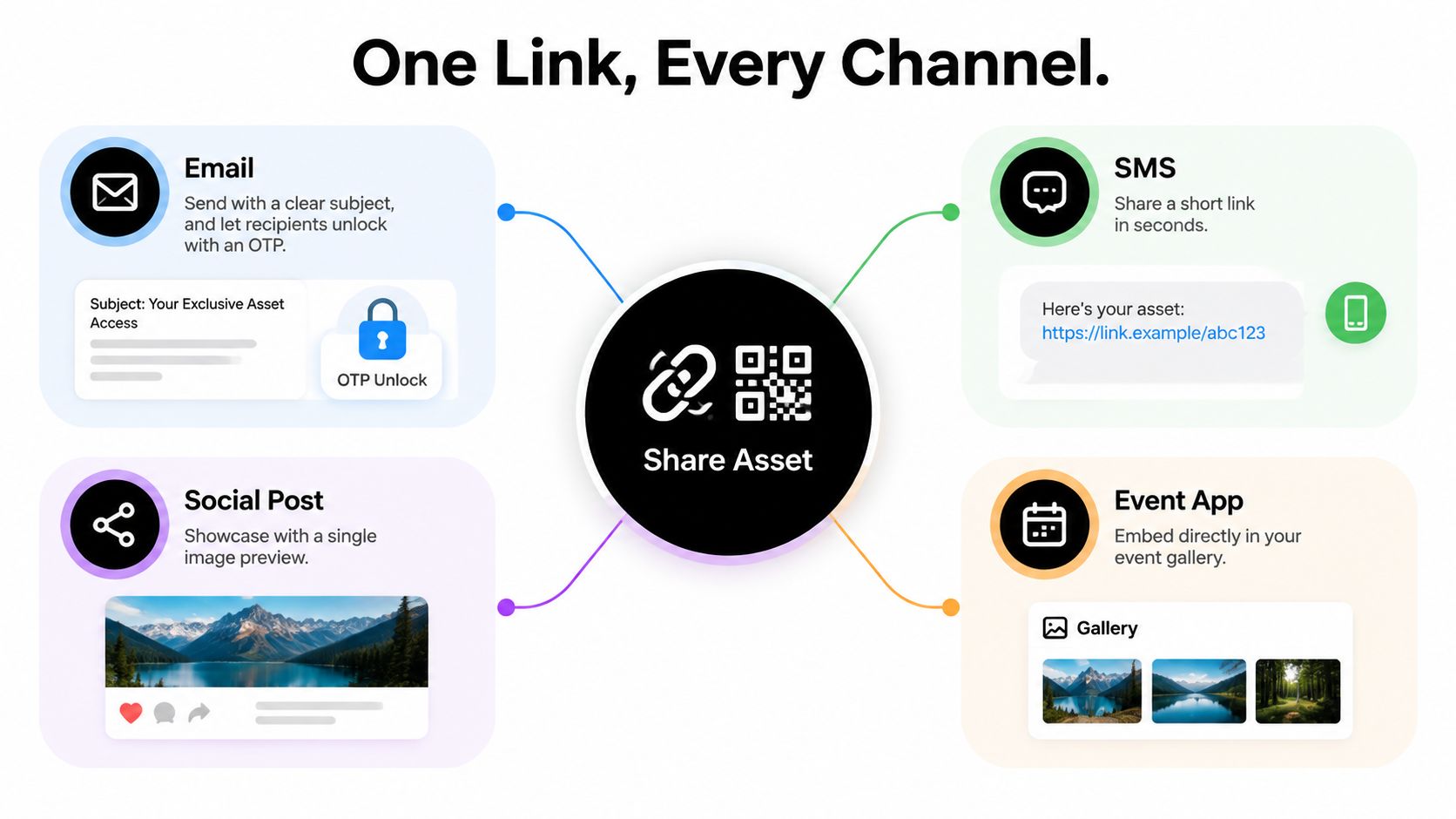
One gallery asset can travel through several channels, but each surface needs its own presentation. The link and QR code should remain consistent, while the message changes according to how people encounter it.
Email is useful for the booking list and organizer database. Keep the subject concise, show one representative preview, explain the access step, and include verification if the gallery requires an email or phone check. The email should answer three questions immediately: what event is this, why should I open it, and what happens after I click?
WhatsApp and SMS serve a different purpose. They work best when the event is still recent and the recipient recognizes the message. Name the event, use the recipient's first name where permission allows it, and place the tap-to-open link close to the action. Avoid sending a bare URL with no context, because attendees may not trust an unexpected message.
Match the surface to the moment
At the venue, signage, table tents, registration screens, and projector loops catch people who won't search their inbox later. Use a short vanity URL and a visible QR code, with a plain instruction such as “Scan to find your photos.” Place the code near exits, registration desks, sponsor areas, and other points where guests have a reason to pause.
Social posts should show a small selection, not a public dump. Use repost-ready crops, watermarked previews where appropriate, and a deep link into the private gallery. If the organizer controls an event app, an embedded gallery entry can reach attendees without asking them to remember a separate destination.
A channel plan can be simple:
- Email: Send the main announcement and a later reminder to people who haven't opened.
- SMS or WhatsApp: Use short, personal copy for timely retrieval.
- QR signage: Capture venue traffic and guests who missed registration messaging.
- Event app: Place the gallery beside the event schedule or recap content.
- Social: Publish selected previews that direct viewers to permissioned retrieval.
Each channel should carry a distinct tracking label. Record clicks, verification completions, matched results, shares, and purchases by source. The goal isn't to flood guests. It's to learn whether the event photo sharing link performs better through email, a QR code photo gallery, direct messaging, or an event-owned channel.
A platform such as Saucial can provide the upload, share-link, QR, and attendee selfie retrieval flow in one event delivery setup. Whatever tools you use, give organizers control over which channels are active and whether attendees receive free access, paid upgrades, or curated sets.
Choosing the Right Monetisation Mix for Each Event
The offer should follow the event, not the default settings of your gallery software. A wedding audience behaves differently from parents at a school sports shoot, and a corporate organizer may value licensed access more than individual print orders.
A useful mix gives guests an easy entry point without turning the gallery into a storefront. Start with free access to a limited or watermarked result where that fits the contract. Add one simple digital purchase, one physical or premium option, and a bundle for people who want more.
| Event type | Free tier | Paid digital | Print product | Bundle or upsell |
|---|---|---|---|---|
| Wedding | Selected online gallery | High-resolution downloads | Albums, parent books, or print sets | Curated couple or family collection |
| Corporate event | Attendee access to approved images | Team-access licensing or headshot packs | On-site prints where appropriate | Branded featured-speaker set |
| School or sports shoot | Watermarked matched previews | Parent downloads | Bulk print packs for a school store | Player or team package |
| Marathon or festival | Free selfie result or preview | High-resolution downloads | Framed wall prints | Featured-photo package |
| Gala or fundraiser | Approved attendee gallery | Premium edits or selected downloads | Event-approved prints | Sponsor or VIP collection |
Protect the browsing experience
A paywall should appear after a guest has found a relevant image, not before the system proves that their photos exist. Match images to verified faces where appropriate, and avoid pushing offers to casual attendees who haven't opted into the relevant experience.
For sports tournament photo sales, parents may want a complete set for one player, while teams may prefer a bulk package. At a gala fundraiser, a sponsor-branded featured set can support the organizer's campaign, but it should be clearly approved and separated from personal attendee purchases. For corporate work, licensing and speaker headshot packs may be more practical than individual consumer transactions.
Review the offer settings in Saucial's settings area or in the controls provided by your chosen platform. Keep the number of visible choices limited. A gallery that loads quickly but presents too many competing products can still lose sales because the attendee can't decide what to do next.
The 2026 workflow research cited in the brief points to a large operational gap: only 5.2% of professional photographers were reported to have a fully integrated post-shoot workflow, while the remaining 95% still bridge tools and gallery delivery manually (the HoneyBook industry study). The same report says 54% of clients expect delivery within 14 days, while 13% expect it within 48 hours. Those figures support a practical conclusion: monetisation works best when delivery removes manual work instead of adding another sales process to manage.
Privacy, Consent, and Trust as a Delivery Feature
Speed won't rescue a delivery system that makes attendees feel exposed. Event photos can be personal data, and face-based retrieval adds another layer of sensitivity. Guidance for event photography recommends clear signage, notice during registration, opt-out routes, deletion windows, and accountable ownership of attendee images (Sweap's event photo data-protection guidance).
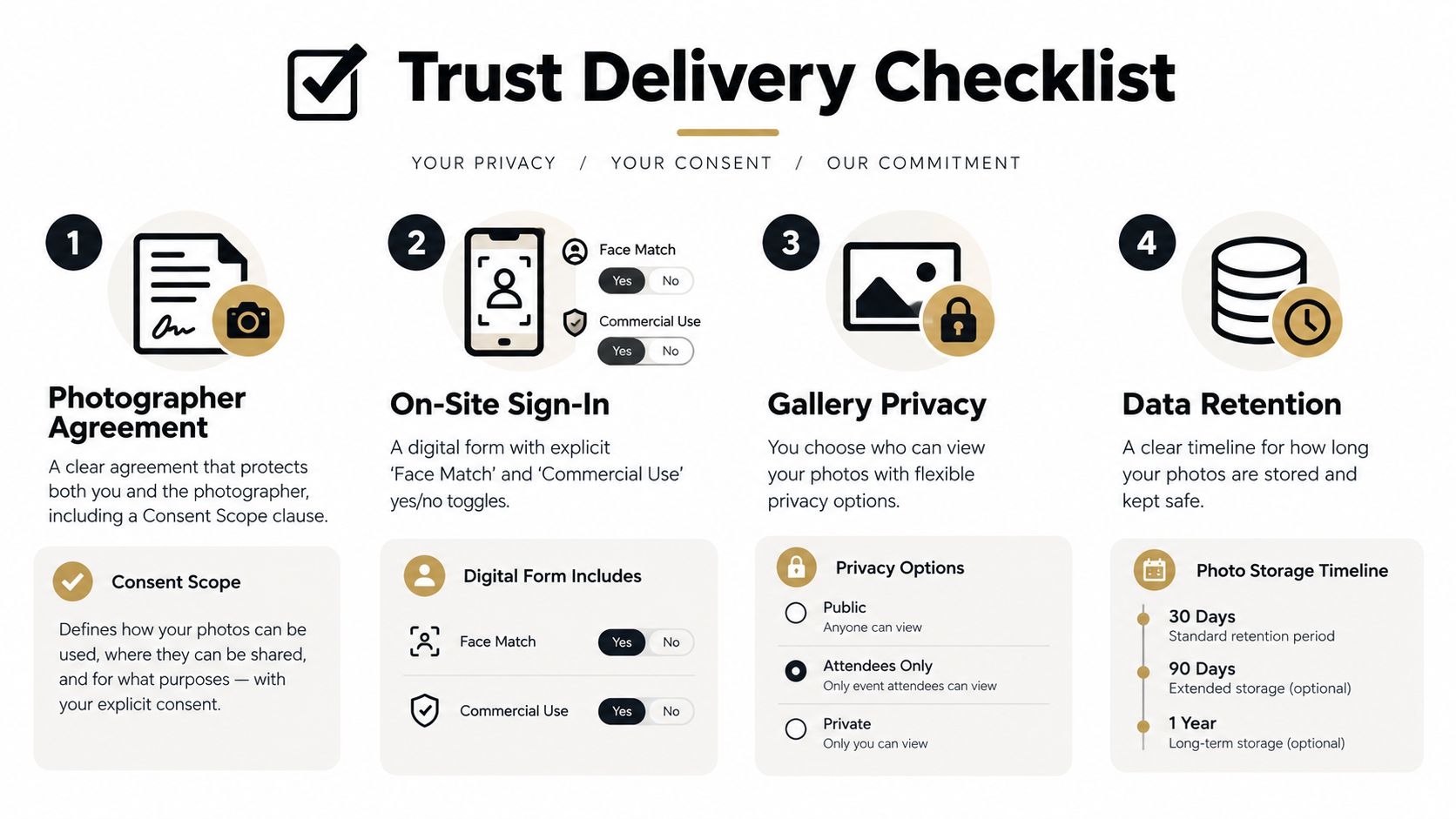
Consent needs to exist at several points. Put the intended use in the photographer agreement, explain the process at check-in, and separate consent for face matching from consent for commercial use. A guest may accept event photography but decline biometric-style matching or promotional reuse.
Build controls into the default experience
Use private access by default. Require email or phone verification when the organizer's policy calls for it, prevent public search indexing, and limit what an attendee can see to the approved result set. The landing page should include a short trust panel that explains what is collected, why it is used, and how a person can request removal.
Retention needs an owner and a schedule. Set the selfie and gallery periods according to the organizer's policy and applicable obligations, then automate deletion rather than relying on a future reminder. Paid buyers may receive a separate download archive, but that shouldn't extend retention for everyone else.
Give attendees a visible delete-my-photo route inside the gallery. They shouldn't have to locate the photographer, event organizer, or venue through a separate support chain. Log access, changes, and deletion requests so the organizer can answer questions with a clear record.
Guests share more comfortably when they understand the boundary around their images. Privacy isn't a legal footnote added after publishing. It's part of the delivery product.
A sign-in flow such as Saucial's attendee authentication can support controlled access, but the platform is only one part of the operating model. Your contract, signage, consent language, organizer instructions, retention policy, and support process must all agree. If any of them contradicts the others, the attendee experiences uncertainty exactly when you're asking for trust.
Measuring Time Saved and Sales Lift After the Event
A delivery rebuild needs a baseline. Pick one event completed with your old process and record the same measures after the new pipeline runs. Don't compare a small private gathering with a large public festival and call the difference a workflow lift. Compare similar event formats, audience permissions, image volume, and offer structure.
The core dashboard can stay compact:
| KPI | Manual workflow | Optimised workflow | Target lift |
|---|---|---|---|
| Ingest-to-gallery hours | Record actual elapsed time | Record actual elapsed time | Shorten the interval without weakening review |
| Attendee match rate | Record successful manual retrievals where possible | Record opted-in guests who find matched results | Increase successful retrievals |
| Share-link click-through | Track clicks from the main gallery announcement | Track clicks by email, SMS, QR, app, and social | Improve channel attribution and response |
| Reach within 72 hours | Record early gallery opens | Record early opens and matched retrievals | Bring more activity closer to the event |
| Revenue per attendee | Total downloads, prints, and edits divided by eligible audience | Use the same formula after the new workflow | Identify incremental sales |
| Manual support time | Log search requests and follow-ups | Log remaining requests after matching | Reduce repetitive admin |
Review the weakest stage weekly
If ingest-to-gallery time remains long, inspect card verification, culling, upload bandwidth, or proxy generation. If the attendee match rate is weak, test selfie instructions, lighting at check-in, and the face-matching review queue. If clicks are low, change the channel copy and placement instead of editing more images.
If people open matched galleries but revenue per attendee stays flat, adjust the offer. Test a clearer digital product, a more relevant print, or a bundle that fits the event. Keep the free result useful enough to create confidence, then put the paid action beside the image the attendee already wants.
The broader industry context supports this measurement discipline. The cited event-photography benchmark describes delivery as a process traditionally measured in days or weeks, while current photo-sharing behavior has made rapid access more normal. A 2026 industry summary projects about 2.1 trillion photos in a year, compared with 1.94 trillion in 2024 and 1.81 trillion in 2023, and estimates about 14 billion photos shared daily on social networks (the digital imaging fulfillment summary). Those projections don't guarantee sales for any photographer. They do show why delivery now competes with the instant visual habits attendees bring to every event.
Pull the dashboard after each event, flag one weak stage, and change one part of the workflow before the next shoot. When the first share link, match rate, channel response, and revenue per attendee sit in the same review, delivery stops being a vague admin burden. It becomes an operating system you can improve.
Build your next event around private selfie photo matching, a trackable event photo sharing link, and offers that fit the audience instead of sending everyone to a cluttered folder. Visit Saucial to see how photographers and organizers can upload event photos, publish a QR code photo gallery, and let attendees find their own images without adding manual search work.



