Online Photo Sales for Photographers: A Step-by-Step Guide
You covered the gala, exported the selects, and sent one link to the organizer. By the next morning your inbox is full of guests asking which frames are theirs, whether they can buy a print, and how long delivery takes. That pile of messages marks the true beginning of online photo sales for photographers, not the upload itself.
The gallery is both a sales counter and a privacy obligation. Price tiers, the delivery route, and the consent notice all have to be decided before anyone can open the link. If you publish first and merchandise later, guests browse, share a few frames, and never see a buy button that matches what they want.
A shared folder feels finished because the files are online. It isn't a shop. Guests on a phone won't hunt through hundreds of near-duplicates, guess a price, or wait two weeks for a reply about a small print. They'll screenshot and move on.
Price Points to Benchmark Before You List Anything
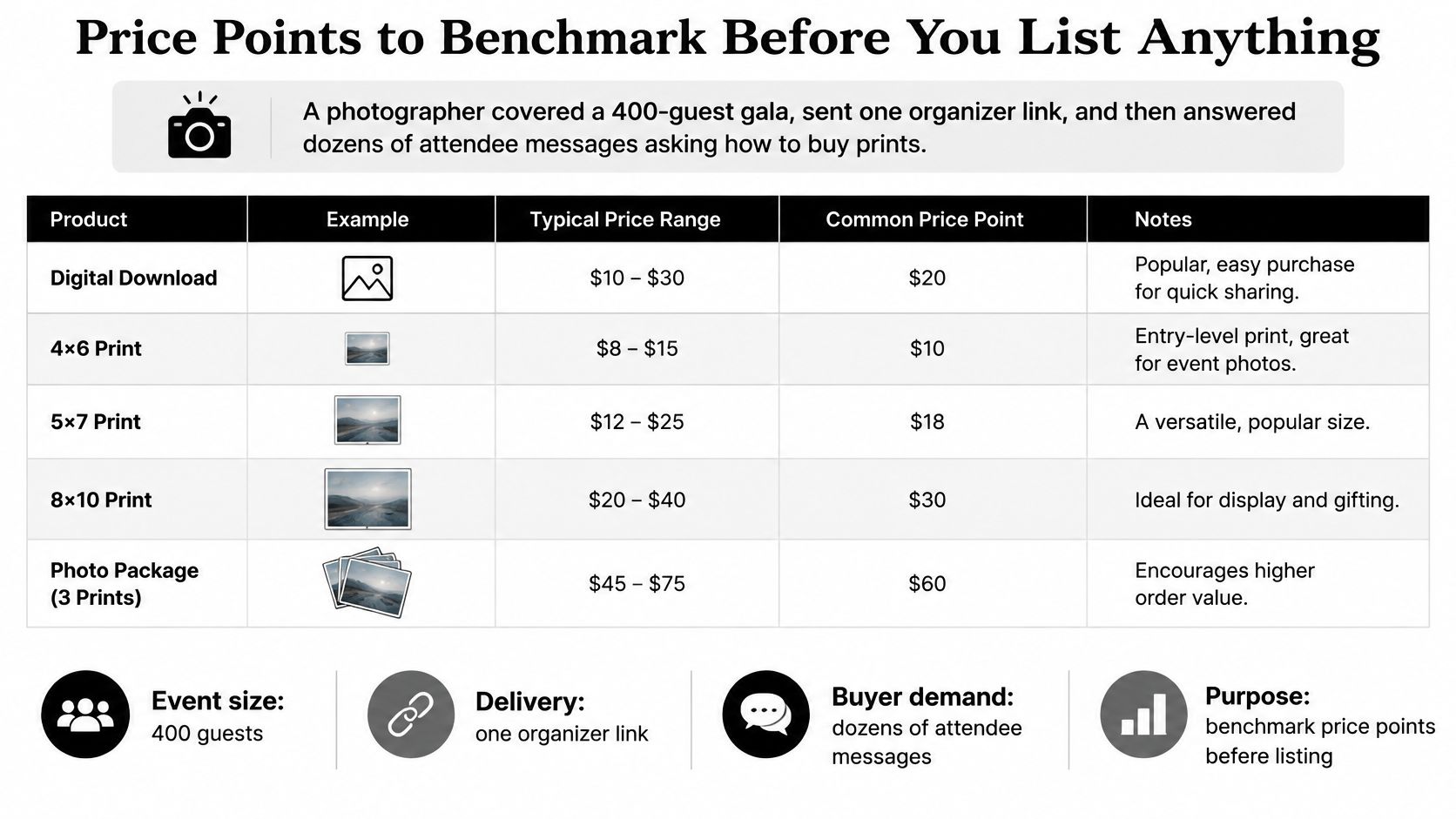
Say you shot a 400-guest gala, handed the organizer one link, and then spent the week answering dozens of messages about how to buy prints. Those messages aren't a pricing strategy. They're proof you listed photos before you listed products.
| Product or order type | Typical price | Basis for the figure |
|---|---|---|
| Gift-size individual print | $10–$20 | 2023 Format and Zenfolio survey, most prints sold in this band |
| Individual digital file | $10–$50 | 54% of surveyed photographers charged this band (2023) |
| Premium digital file | $100+ | 10% of surveyed photographers charged more than $100 (2023) |
| Print price over lab cost | 4–6× lab cost | Common markup range in an industry pricing guide |
| Wall art or premium edit | Your test price | No reliable public price band |
What each band is for
Gift-size individual prints are the entry product. In 2023, 71% of photographers surveyed by Format and Zenfolio reported selling individual prints, with most priced at $10–$20 each. That's the impulse buy after a gala or tournament, not the piece someone frames above a sofa.
Individual digital files sit in a wider band. In the same year's Format and Zenfolio survey, 54% of photographers charged $10–$50 for an individual digital file, while 10% charged more than $100. I would treat a file above $100 as a test for a tightly edited hero image, not the default download next to every frame.
Treat 4–6 times lab cost as the floor for prints, not the target. An industry pricing guide describes that range as a common print markup, and lab cost still excludes shipping, packaging, payment fees, refunds, and the time you spend on support. If a 5×7 costs the lab a few dollars and you also pay to mail it, a $12 retail price can look busy and still lose money.
Use quantity discounts with care. The same guide notes that volume-discount strategies can increase average order value by approximately 15–25%. Put that discount on a bundle of three gift prints or a small digital collection. Don't shave the single print, or every guest waits for a coupon.
Wall art, premium edits, and large bundles don't have a reliable public price band. Set one high tier, keep the offer narrow, and change it only after a real event shows what guests check out.
Practical rule: Write a three-price ladder for your next event, gift print, mid bundle, and one premium item, and check it against these bands before the gallery goes live.
Choosing a Delivery Route for Event Galleries
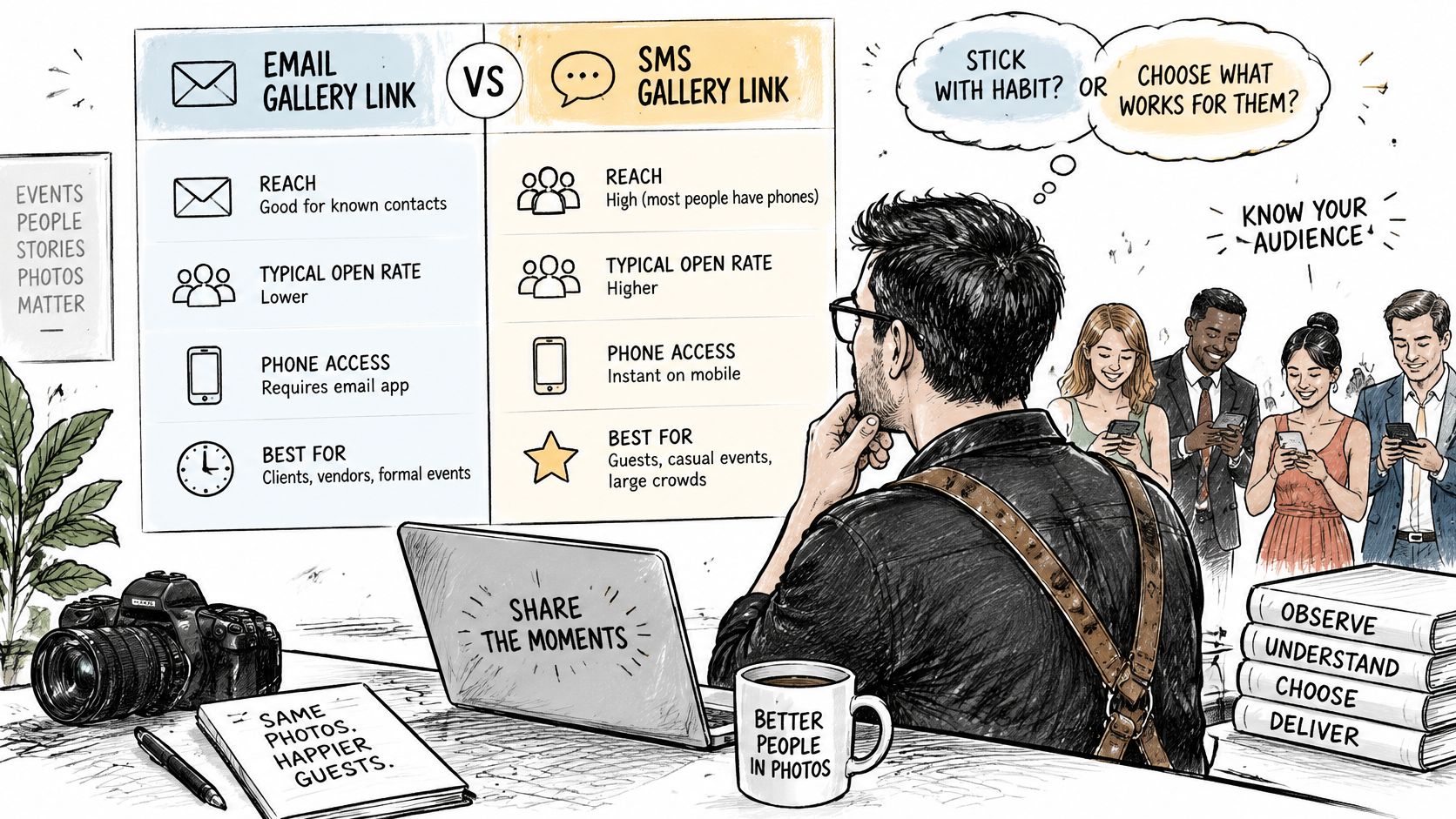
Most event photographers pick a delivery route by habit. They email a folder because that's what the last client asked for, even when guest count and phone use point somewhere else.
| Route | Best for | Attendee discovery | Upsell path | Admin load |
|---|---|---|---|---|
| Shared online gallery | Small private events, portrait sessions | Browsing through one folder | Print links inside the gallery | Medium |
| Event QR gallery | Galas, fundraisers, trade shows | Scan a code and browse a curated set | Prints, downloads, sponsor-approved frames | Low to medium |
| Selfie photo matching | Sports tournaments, conferences, large galas | Selfie shows only matching photos | Individual prints and downloads | Low after setup, plus consent work |
| Manual email delivery | Very small private jobs | You send each person their frames | Ad hoc invoices | High |
Why online-only delivery leaks
A shared link is fine when you know most of the guests. It fails when hundreds of people land in one undifferentiated folder. A 2025 survey of more than 4,500 photographers in 70 countries found that relying on online delivery alone could leave revenue untapped, while viewing appointments generated as much as 20% more revenue. Newer photographers in that survey leaned on digital files. Established photographers were more likely to profit from prints.
You can't book a viewing appointment for every guest at a tournament. You can borrow the idea. Free access gets people sharing. A personal retrieval step is the qualified moment, the point where prints, downloads, or print credits sit next to the frames that show that person.
Selfie photo matching is simple to explain to a guest. They take a selfie and instantly see all photos featuring them. That fits sports tournaments, conferences, and large galas, where scrolling a public album wastes the short window when people still care.
Organizers get a unique link that they can share with event attendees via any channel, including email, WhatsApp, SMS, a venue QR code, or the event website. Confirm which of those the organizer will send. A beautiful QR code photo gallery does nothing if the only approved channel is a newsletter that goes out ten days later.
For a dinner of twenty where you know the table, a shared gallery with print links inside it is enough. Manual email delivery only makes sense for a handful of private clients, because every "can you resend mine" message is unpaid admin. For a crowd, use the QR route or selfie retrieval, and show a curated set rather than the full dump.
A short walk-through of how guests move from a link to their own frames helps when you're choosing between email and a code on the table:
For small groups you already know, a shared gallery is enough. For a crowd, retrieval has to find the person before you ask them to buy.
How to Set Up Your Sales Workflow Step by Step
The sale is decided before the upload. A gallery built without product tiers is hard to fix once guests have started browsing, because they've already decided the folder is free.
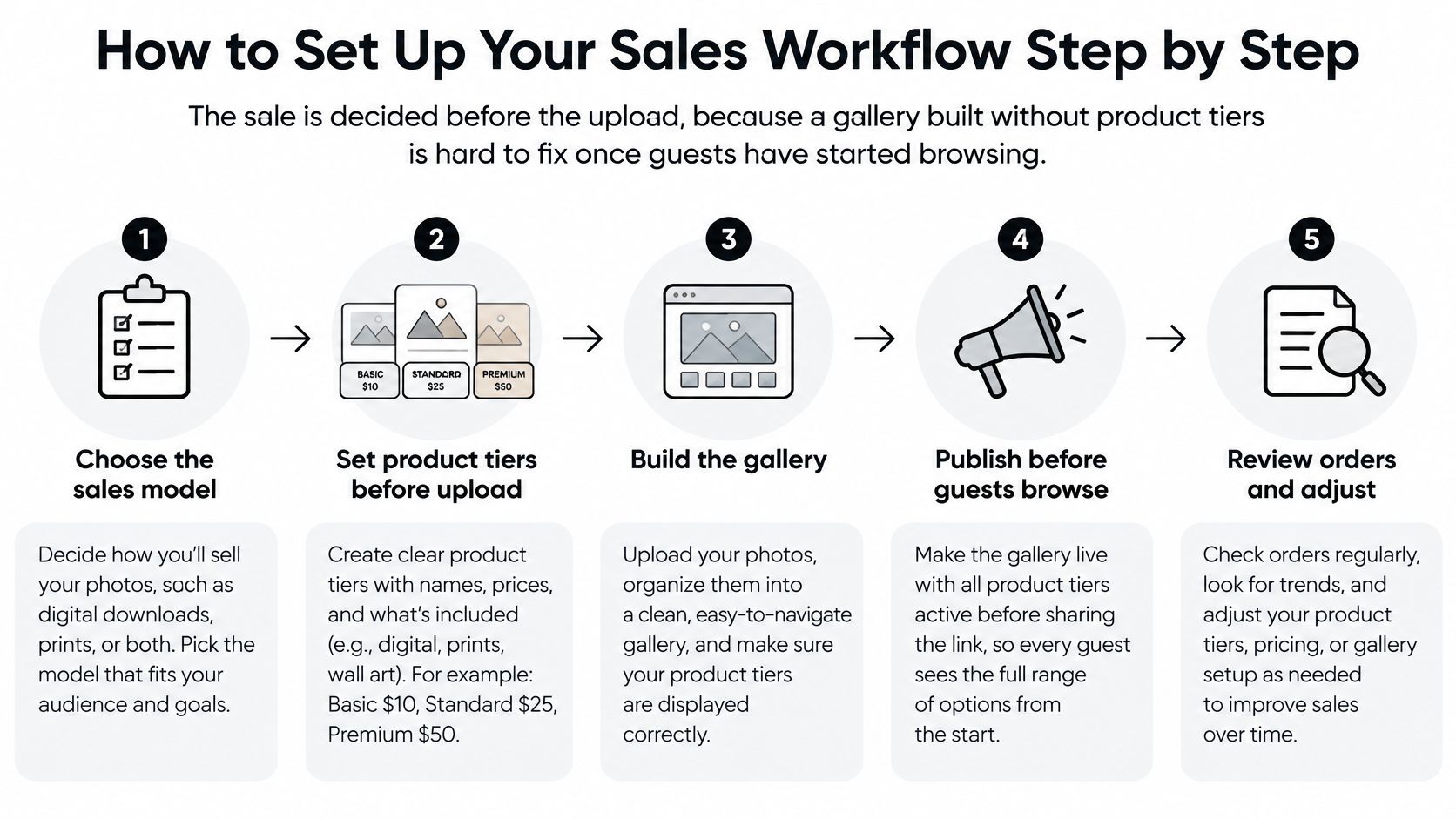
The sequence I would follow
Choose the delivery route from guest count and phones. A shared gallery, an event QR code, or selfie retrieval should match how many people will open the link on their own device. If most guests won't install anything or create an account, don't pick a path that requires either.
Upload, then cut the set hard. Event organizers upload event photos by dragging and dropping them, and Saucial's AI processes faces in the background. That background pass doesn't replace editing judgment. Publish the strongest frames, not every burst from the dance floor. A tight set is easier to price and easier for a guest to finish browsing.
Build three tiers before anyone can see the gallery. Keep a low-price gift print, a mid-price bundle or digital collection, and one high-value wall piece or premium edit. Three choices beat a menu of twelve sizes. Guests stall when every frame offers 4×6, 5×7, 8×10, canvas, and a file.
Price from fully loaded cost, not from a competitor's homepage. Add lab production, shipping, packaging, payment fees, a refund allowance, and the hours fulfillment takes. Then set retail above that total so support and a reprint don't erase the order. Competitor prices are a check, not the brief.
Put delivery time and license terms on the product itself. "Ships in 7–10 days" and "personal use, no redistribution" belong on the product page, not only in a footer nobody opens on a phone. A digital file without those words gets forwarded to a group chat the same night.
Test checkout on a phone, including the free path. Walk from the link or QR code through selfie or browse, into the cart, and out the other side. Also tap the free download if you offer one. If the free path is smoother than the paid path, guests will take the free path every time.
Publish only after the permission notice is visible at entry. The link and the QR code wait until that notice is live. Guests shouldn't meet face matching for the first time inside the gallery.
Two slips that kill the first orders
Discounting every product at once trains guests to wait. If the gift print, the bundle, and the wall piece are all on sale, nothing appears as the genuine price.
Offering too many sizes creates the same stall as too many products. Pick one gift size, one bundle, and one large format for the pilot. You can add a size after you see what people add to the cart, not before.
Licensing and Consent Rules for Attendee Galleries
A searchable gallery can find a person faster than it can explain what it did with their face. Most storefront advice covers prices and checkout and skips bystanders, minors, opt-outs, and how long the link stays up. That gap is the part guests feel first.
A 2025 study of 486 people evaluating 864 image scenarios found that comfort with online sharing varied substantially by context, and existing bystander-detection methods often missed people who weren't obvious background subjects. Face matching that works on the guest of honor can still surface someone who never agreed to be in a public album.
Frictionless discovery raises that risk unless the default is individualized access, not an open searchable album. Set the controls before the event photo sharing link goes out.
| Control | What to set | Why it matters |
|---|---|---|
| Consent notice | Shown at registration and entry, with a plain-language face processing explanation | Sets expectations before any selfie is taken |
| Opt-out option | No-photo wristband or opt-out form, checked before publishing | Stops matches for people who do not want to appear |
| Retrieval model | Private, personal-link or selfie-based retrieval, with no open browsing | Limits how far each person's photos spread |
| Access window | Link expiry set to the sales period | Reduces long-term exposure after the event |
| Removal requests | Written process with a stated response time, such as two business days | Gives attendees a clear route to deletion |
| Minors and VIP guests | Hold identifiable frames for extra review before publishing | Lowers risk in sensitive event contexts |
Licensing sits next to consent
Separate a personal-use download from any right to republish, advertise, or resell. Say whether a sponsor-branded frame will appear on prints. Put that language on the product page the guest sees at checkout, in the same place as the price.
The organizer should approve, in writing, whether attendees get free images, buy downloads, or see photographer upsells. If a sponsor frame is part of the offer, name the sponsor and where the logo sits. A guest who thinks they bought a clean print, then receives a branded one, will treat that as a product failure, not a partnership.
Why the controls protect the sale
A gallery you can explain is easier to sell from. Guests who know the link expires, who can opt out, and who can ask for a photo to come down are more willing to open a find my photos flow and then buy a print of a frame they trust. You also spend less time arguing with a venue or a parent after the fact, which is time that doesn't show up in the order total but still comes out of the job.
Write the response time for removal requests where the guest can see it, and keep minors and VIP frames in a review pile until someone on the event team has looked. Those two habits cost less than one public complaint.
Track Sales and Pilot One Event Before Scaling
A gallery that sits quiet for two weeks loses the buyers who cared on the night. Reminders have to follow the sales window, not your editing backlog.
Run the funnel as five stages, and don't skip to "we uploaded."
- Deliver the link or the QR gallery through a channel the organizer already approved.
- Show a curated set, not the full card.
- Place the call to action for a print, a download, a premium edit, or a bundle beside the frames it belongs to.
- Send timed reminders while the access window is still open.
- Track each stage separately so a busy gallery isn't mistaken for a profitable one.
Passive online galleries may convert only about 10–25% of clients, compared with roughly 60–80% for structured in-person sales sessions, according to a planning benchmark used in photography operations. The gallery won't match a sales session by itself. It needs the merchandising those sessions already have, which means a small set of products, a visible price, and a second and third chance to see the offer.
A reminder rhythm that matches the window
Day-of or next-day message. The organizer sends the link on the event day or the morning after, by email, SMS, or WhatsApp, whichever they approved.
A nudge around day three. One short note is enough. Repeat the link and name one product, such as the gift print, instead of recapping the whole night.
A final note before the link expires. Tell people the date the gallery closes. An open-ended link feels optional forever, so nobody checks out today.
Saucial uses AI-powered face recognition to find the event photos that feature each attendee, which is what makes the first message worth opening. Guests who see their own frames in one tap are the people worth reminding. A blast to a giant folder mostly produces more "which ones are mine" replies.
How to read the numbers
Track gallery visits, selfie matches or image views, add-to-cart events, purchases, and average order value. Split them by event type and by channel. Upload completion is not sales. A full card with no orders means the store never opened.
High visits and low carts usually mean the set is too large or the price isn't next to the picture. High carts and low purchases usually mean checkout friction, a surprise shipping cost, or a license line people don't understand. Fix the stage that's leaking before you change the photography.
One measured pilot
Pick the next event you already have on the calendar. Set the price tiers, the delivery route, and the consent notice the way this workflow describes, then track for 30 days after the event. Compare what you sold with your own baseline and with those conversion ranges. Ask two questions only. Did the orders cover the admin time? Did fewer people write to ask you to find their photos?
If both answers are yes, repeat the same setup on the next event of that type. If one answer is no, change one thing, the offer or the route, not both. Book the review date now, while the gallery is still the job in front of you, not a folder you'll open "when it's quiet."
Saucial gives event photographers a find-my-photos gallery where guests take a selfie and see only their frames, with room for prints, downloads, and other organizer-approved upsells. Set the price ladder, the share route, and the consent notice before the link goes live, then measure one event before you scale. Visit Saucial when you're ready to turn the next gallery into a controlled sales path instead of another shared folder.