Keeping Photos Safe at Events Without the Stress
The event ended hours ago, but the photo requests have already started. A guest wants a picture from the gala, a parent needs a sports tournament image, and a sponsor is asking for the full folder. Someone forwards a shared Drive link, attendees can browse far more than they expected, and nobody is sure whether an opt-out request can still be honored.
That's the part of event photography people often underestimate. Keeping photos safe isn't only about preventing a lost memory card. It's about protecting identifiable people, preserving original files, limiting access, removing hidden metadata, and giving organizers a way to change or revoke access after distribution.
Why Keeping Event Photos Safe Is Harder Than It Looks
A personal album usually has a clear audience. An event gallery doesn't. A gala fundraiser may include donors, staff, performers, children, sponsors, and guests who have different expectations about visibility. A sports tournament adds team identities, uniforms, locations, and moments that parents may want shared privately rather than placed in a public folder.
The familiar post-event shortcut is a single cloud folder. The photographer uploads everything, sends one link, and hopes attendees can find their own images without opening everyone else's. That approach is convenient, but it creates three separate problems at once: over-sharing, under-backing-up, and invisible metadata.
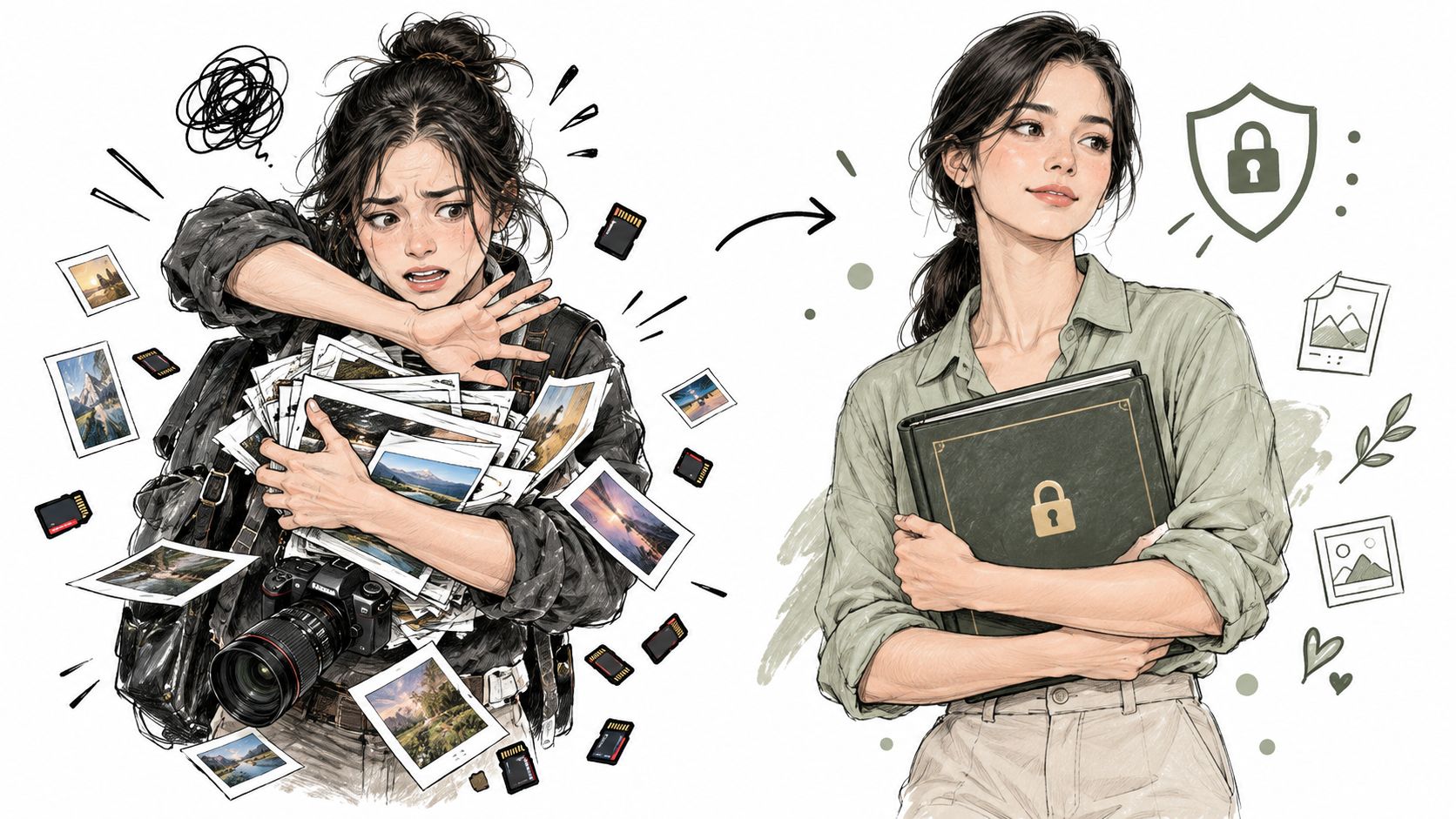
A forwardable link can travel outside the intended audience. A guest may download a full gallery, post someone else's image, or share the URL in a group chat that the organizer doesn't control. If a person withdraws consent later, the organizer may be unable to identify every copy or stop further forwarding.
The storage side fails just as often. A 2020 data recovery survey found that 63% of respondents had experienced data loss, while 70% said they made backups. The same survey found that 16% backed up only once a year, and photos were the most commonly lost file type at 89%. Backup habits can exist on paper while still failing in the moments that matter.
The event gallery has two jobs
Your workflow has to preserve the photographer's master files and deliver a useful attendee experience. Those are related, but they shouldn't be handled as the same permission layer.
- Archive access belongs to the photographer and authorized production staff.
- Organizer access should support review, moderation, and withdrawal requests.
- Attendee access should reveal only what the guest is allowed to see.
- Public promotion should use selected, approved images rather than the entire gallery.
A controlled event photo sharing platform can support an organizer permission model and a find my photos experience based on selfie photo matching. That can reduce manual searching without requiring the organizer to expose the whole gallery to every attendee.
The practical standard is simple: store broadly only where necessary, share narrowly by default, and make every permission reversible.
Getting Consent and Controlling Who Can See What
Consent needs to be designed before the photographer arrives. A sign at the entrance can help, but it shouldn't carry the entire burden for a gala, alumni dinner, community festival, or school event. People need to know who's taking photos, where the images may appear, how to opt out, and whom to contact if they change their mind.
Start with a written photography notice in registration materials and event communications. Keep the language direct. Explain the intended uses, such as the event gallery, sponsor communications, social posts, or editorial coverage. If minors may appear, define the responsible adult's permission process and give staff a practical way to flag a child who shouldn't be photographed.
Use a pre-event permission checklist
Before the first shutter click, assign one person to own consent operations. That person should be able to answer questions, record opt-outs, and communicate restrictions to the photographer.
- Publish the notice early. Put photography information in the invitation, registration flow, ticket confirmation, and venue signage.
- Create an opt-out path. Use a visible desk, wristband, badge marker, or registration flag that the photography team can recognize.
- Separate intended uses. A guest may agree to receive event photos but not want an image used in advertising or sponsor content.
- Brief the photographer and editors. Opt-out information must follow the files through culling, editing, upload, and distribution.
- Document withdrawal requests. Record the person, event, affected images, requested action, and completion status.
Access control should be just as specific. A photographer may need upload and edit rights, while a volunteer may need only moderation access. Attendees shouldn't receive administrator privileges merely because they need to download a portrait.
Replace the universal link
A single permanent URL is difficult to govern once it leaves the organizer's hands. Use an event photo sharing link with an expiration setting, invite requirement, download policy, or other restriction where the platform supports it. Put a QR code on the program or event screen, but don't assume a QR code is private. Anyone who photographs the code may be able to use it.
An organizer-controlled gallery should answer four questions:
- Who can open it?
- Which images can each person see?
- Can they download or forward the content?
- How will access be removed?
A platform such as Saucial's authentication page can be considered when the workflow needs controlled attendee retrieval rather than a public folder. The exact configuration still matters more than the brand. Privacy settings aren't a substitute for clear consent, staff training, and a real withdrawal process.
Practical rule: If you can't explain how to remove a person's access, you haven't finished designing the gallery.
Building a Backup Workflow That Actually Restores
Backup success isn't the same as recovery success. A card can copy incorrectly, a cloud sync can skip a folder, or a drive can fail just when a client needs a gallery. The workflow has to prove that files exist, open correctly, and can be restored within a timeframe the team can manage.
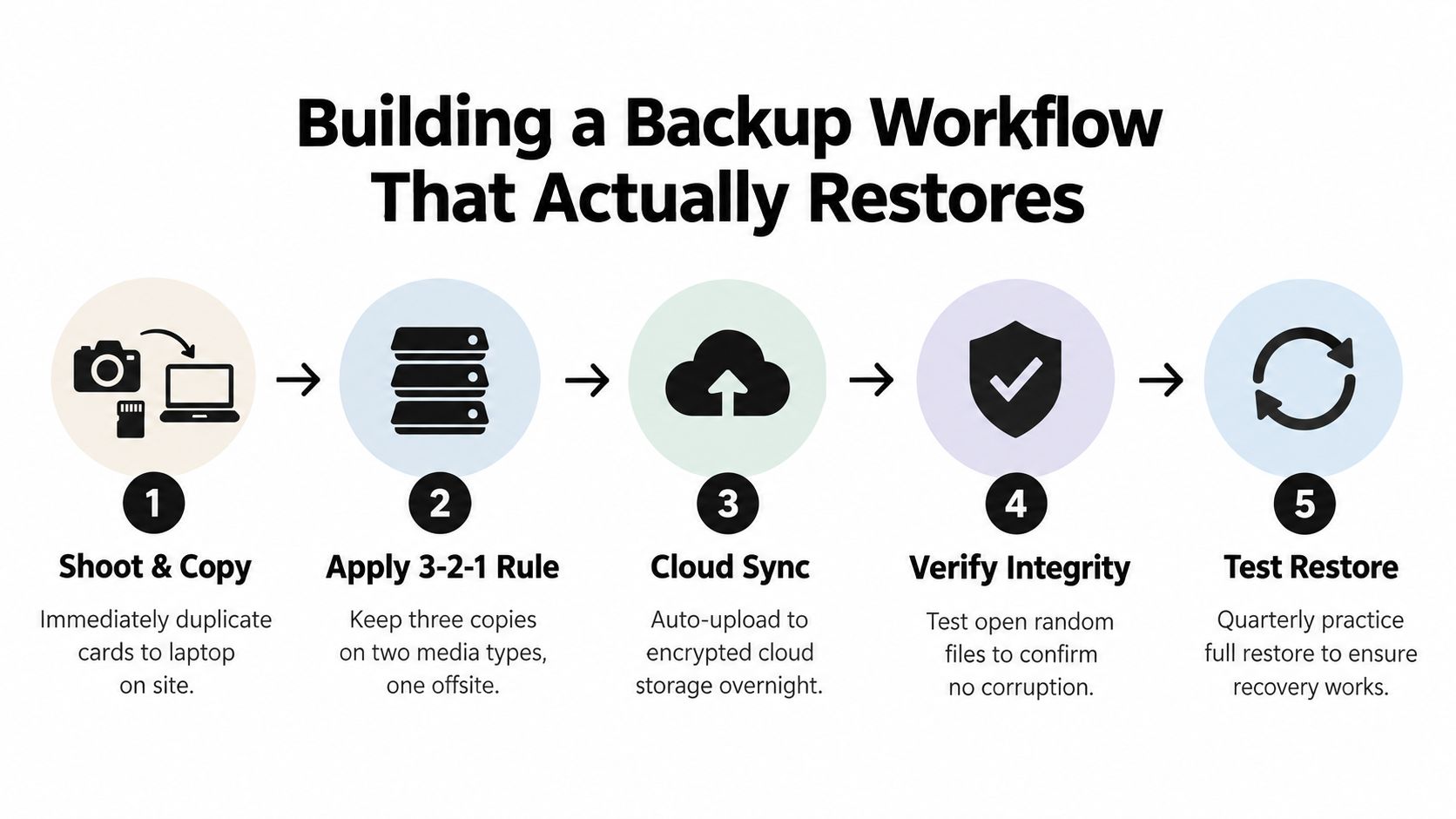
The core structure is the 3-2-1 rule. Keep three copies of each file, on two different media types, with one copy offsite. For event work, an offsite copy can be cloud-based, while an immutable repository can protect against changes or deletion. The important distinction is that the copies must be independent enough to survive a single device, location, or account failure.
Build the process around ingest
1. Copy cards on site. Keep the original cards untouched until at least two verified copies exist. Copy to a working laptop or dedicated ingest drive, then create the second local copy on a separate device.
2. Verify the transfer. Don't rely on a progress bar. Open representative RAW files, JPEGs, and video clips from the destination. Compare folder contents and use checksum or verification features when your ingest software supports them.
3. Preserve a clear structure. Use a consistent naming pattern such as event date, client, camera, and card identifier. Keep originals, selects, exports, and sharing copies in separate folders. Never overwrite the master file with a resized or retouched delivery version.
4. Create the offsite copy. Sync the verified working set to encrypted cloud storage or another location outside the venue. Uploading one folder overnight is useful, but it isn't enough if the sync status is never checked.
5. Practice a restore. Select files from different folders and restore them to a clean location. Confirm that they open, retain the expected edits, and include the required sidecar or catalog data.
The 3-2-1 backup guidance cites a 2026 backup survey in which 60% of respondents needed six or more hours for a full restore, while only 5% restored in under an hour. Those figures point to a useful operational benchmark: measure how quickly your team can recover, not just whether an automated backup reports success. The same source notes that only 32% of organizations use immutable repositories, reinforcing the need to assess whether an ordinary synced folder can be altered or deleted.
Test before the next assignment
Create a restore log with the date, source, selected folders, test result, and any missing files. A quarterly full-restore exercise is a practical rhythm for an active studio, while a smaller file-opening check should happen after every major event ingest.
You can use a dedicated upload workflow such as Saucial's upload page for the distribution copy, but keep the archival master under your own backup plan. A hosted gallery is a delivery layer, not a replacement for independent originals and restore-tested backups.
Stripping Metadata and Using Encryption the Right Way
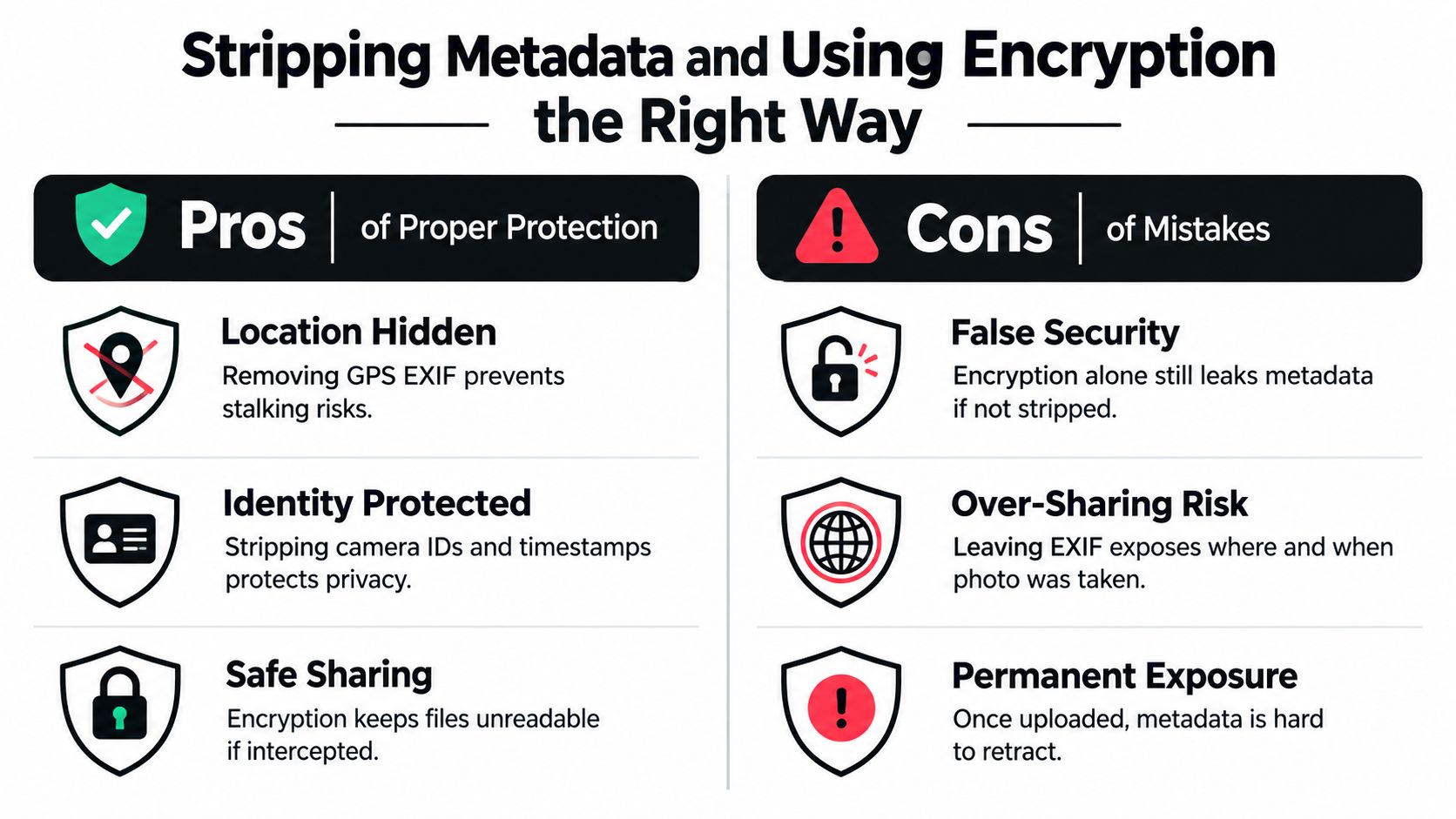
Every image can carry more information than the visible scene. EXIF metadata may include GPS coordinates, camera identifiers, and timestamps. At a private residence, school event, sports venue, or donor gathering, that information can reveal context the attendee never intended to publish.
The common mistake is to encrypt the file and assume the privacy problem is solved. Encryption protects content while the file is inside an encrypted container or being transferred through a protected system. It doesn't permanently remove metadata from the image itself.
Keep three versions with different purposes
A reliable workflow separates preservation from distribution:
- Original master: Keep the untouched camera file for editing, auditability, and future use.
- Clean sharing copy: Strip sensitive metadata before sending the file to attendees, sponsors, vendors, or social channels.
- Encrypted archive or transfer package: Encrypt the cleaned copy when access needs additional protection.
The photo encryption guidance recommends stripping metadata first, then encrypting or placing the files in an encrypted container. That sequence matters because encryption scrambles metadata inside the container, but it doesn't remove the metadata when the image is later decrypted for sharing.
Verify the output, not just the setting
After scrubbing, inspect the exported file with a metadata viewer. Check that GPS fields, device identifiers, timestamps, and other fields your policy treats as sensitive are absent. Then open the image in the same applications attendees are likely to use. A privacy-safe file that fails to display correctly will lead staff to send the original instead.
Use the cleaned copy for public posts, attendee downloads, sponsor previews, and a QR code photo gallery. Reserve the original for the photographer's controlled archive and approved professional handoffs. If a sponsor needs provenance or a publication requires technical evidence, agree on the required information before altering the file, then deliver it through a restricted channel.
Lossy recompression creates another trade-off. Independent imagery-integrity guidance warns that recompression can change or destroy provenance evidence, so don't use aggressive compression as a privacy tool. Keep the original intact, create a deliberate sharing derivative, and record which version went to which audience.
A gallery configuration area, such as Saucial's settings page, can be part of the delivery review, but metadata hygiene still belongs in the export process. Encryption and metadata removal solve different problems. Use both when the situation calls for both.
Sharing Securely and Handling Retention After the Event
Distribution is where many otherwise careful workflows lose control. An organizer may protect the archive, then publish a broad gallery because attendees need a quick way to find their photos. That trade-off isn't necessary. The better approach is to make discovery easy for the individual while keeping the underlying collection governed by the organizer.
For a gala fundraiser, the photographer can upload approved images into a controlled gallery, distribute the event photo sharing link through email or a QR code, and let attendees use selfie photo matching to locate relevant images. For a sports tournament, teams may need access to their own coverage while organizers retain authority over downloads, public promotion, and removal requests. A face recognition event gallery can be convenient, but it should operate inside a consent-aware policy, not as an invisible default.
Design for narrow discovery
Attendees shouldn't have to scroll through every face in the event to find one image. They also shouldn't receive an unrestricted folder just because the organizer wants fast delivery. Configure the experience around:
- Organizer approval: Upload first, review sensitive images, then publish.
- Restricted retrieval: Return relevant images to the requesting attendee instead of displaying the complete archive.
- Forwarding boundaries: Use invite controls, expiring links, or authentication where appropriate.
- Download decisions: Decide whether downloads are allowed, limited, watermarked, or reserved for approved purchases.
- Withdrawal handling: Provide a clear route for a guest to request removal or reduced visibility.
Biometric privacy adds a further layer. Coverage on photo privacy and the EU AI Act describes how facial recognition data can be treated as sensitive information in some jurisdictions and discusses substantive EU AI Act obligations beginning in August 2026. Requirements vary by location and use case, so organizers should obtain appropriate legal advice rather than treating a face-matching feature as automatically permissible.
Retention should have an owner
Set a review date before publishing. Decide which files remain available for attendees, which are archived privately, and which are deleted after the agreed period. Retention should account for sponsor requirements, sales fulfillment, client contracts, consent withdrawals, and legal holds.
Track post-event engagement without opening the whole gallery. Useful operational signals include link activity, retrieval requests, download activity, and approved sharing. Those signals can help a photographer plan a photographer upsell to attendees, such as prints or digital downloads, without turning every guest into a searchable entry in a public database.
A safe gallery isn't only private at launch. It stays governable after the first share.
Your Practical Checklist for Keeping Photos Safe
A dependable event workflow should fit on a page that the producer, photographer, and venue team can use. The following checklist keeps protection attached to the moments where failures usually occur.
Before the event
- Define permission: Explain photography, intended uses, opt-out handling, and withdrawal requests in registration and signage.
- Assign ownership: Name the person responsible for consent records, gallery approval, and removal decisions.
- Set access levels: Give each collaborator only the permissions needed for upload, editing, moderation, or administration.
- Plan the delivery route: Choose an event photo sharing link, QR code photo gallery, or authenticated experience before guests arrive.
During capture and ingest
- Protect the cards: Don't format or reuse cards until copies have been created and checked.
- Make verified copies: Duplicate the ingest to separate local media and confirm that representative files open.
- Separate originals: Keep camera masters distinct from edited exports and attendee-ready sharing files.
- Record exceptions: Mark opt-outs, restricted subjects, and images requiring review while the event context is fresh.
Before distribution
- Clean the derivatives: Remove sensitive EXIF data from sharing copies, especially location and device information.
- Review the gallery: Check faces, minors, private moments, sponsor restrictions, and accidental background details.
- Limit discovery: Use least-privilege access, controlled retrieval, and clear download rules instead of one unrestricted folder.
- Test the guest journey: Scan the QR code, open the link on a phone, and verify that the intended attendee experience works.
After delivery
- Test restoration: Restore sample files and periodically rehearse a broader recovery.
- Monitor requests: Keep a record of consent withdrawals, deletion requests, and access changes.
- Apply retention: Remove or archive files according to the event's stated policy, not an indefinite default.
- Review engagement: Use retrieval and sharing activity to improve future delivery without exposing more personal data than necessary.
The strongest result isn't merely a backed-up gallery. It's a system that saves staff from manual “can you find my photos?” requests, helps attendees reach their own moments quickly, and gives the organizer a clear response when someone asks for access to stop. Keeping photos safe means making the right action easier than the risky shortcut.
Saucial provides organizer-controlled event photo sharing with upload, shareable links, QR distribution, and a find my photos experience using selfie photo matching. Visit Saucial to plan a faster gallery workflow that keeps consent, access, and post-event distribution in the organizer's hands.



