AI Photo Tagging Software: A Practical Guide for Events

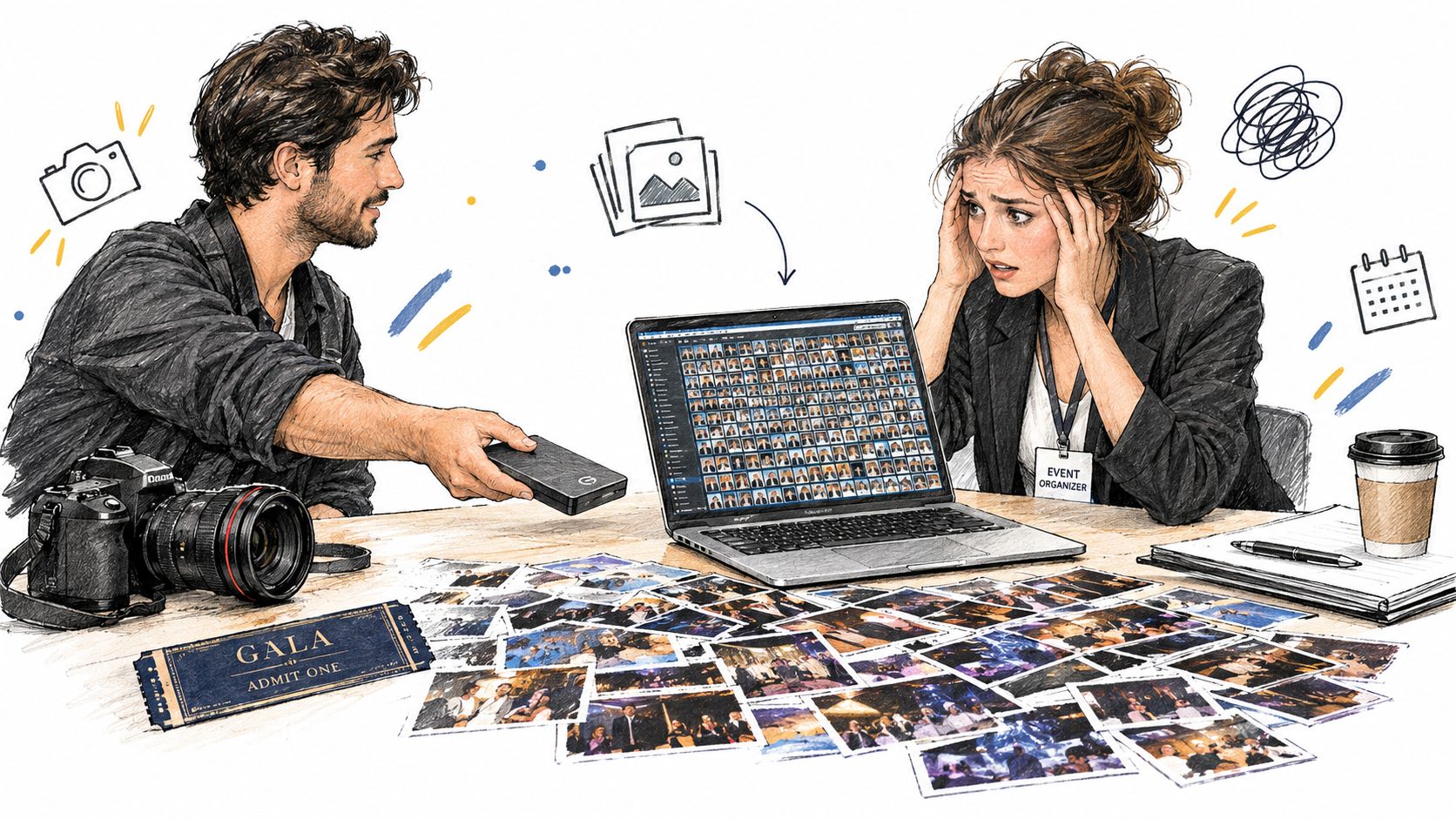
A photographer delivers a gala gallery with 4,000 edited images. The organizer sees a hard drive, a cloud folder, and a deadline to make every guest feel included. Attendees see a generic album and start scrolling, asking friends, or giving up before they find a single photo of themselves.
That gap is where AI photo tagging software earns its place in event operations. The useful question isn't whether a model can label a face. It's whether an attendee can scan a QR code, submit one selfie, find the right images, and share them while the event still feels fresh. For organizers, that changes distribution. For photographers, it changes delivery, support workload, and potential sales.
The Post-Event Photo Problem Every Organizer Faces
A 4,000-image gala gallery creates a deceptively difficult handoff. The photographer has done the creative work, but the organizer still needs to distribute portraits, table shots, sponsor moments, award photos, and candid images in a way that people can actually use.
The traditional workflow depends on folders, filenames, and human memory. Someone creates selects, uploads them to Dropbox or Drive, sends a link, and answers messages such as “Can you find the photo where I'm standing near the stage?” Manual keywording can help, but tagging thousands of frames with names and context is slow, inconsistent, and difficult to maintain when faces are partially obscured or appear in groups.
Why generic galleries lose momentum
Attendees usually don't know the photographer's folder structure. They know what they wore, who they met, or where they were standing. A gallery that requires them to search by filename makes the attendee do the cataloging work.
That friction has consequences:
- Guests stop searching: If the first scroll doesn't reveal a recognizable moment, many people won't continue.
- Photographers absorb support work: “Can you find my photos?” requests turn a completed shoot into an extended admin task.
- Sponsors lose distribution: A branded backdrop or product moment delivers less value when the people pictured can't retrieve and share it.
- Organizers lose control of the experience: A folder link feels like a file transfer, not a polished part of the event.
The pressure behind automated tagging is not new. As Facebook's photo volume rose from 1 billion images uploaded per month in July 2009 to 3 billion per month by February 2010, human-only tagging became impractical at that scale, as documented in this history of automatic photo tagging. Facebook rolled out facial recognition for photo tagging in December 2010 after testing it earlier that year.
The workflow that closes the loop
A find-my-photos experience reverses the responsibility. The organizer publishes the gallery, and each attendee requests their own results with a selfie. Instead of guessing which folder contains a portrait, the guest receives a filtered set of likely matches.
That shift matters for a gala fundraiser, a sports tournament, or a trade show because discovery becomes attendee-driven. The gallery doesn't merely store the work. It helps the right people retrieve, share, and potentially purchase it.
What AI Photo Tagging Software Actually Does
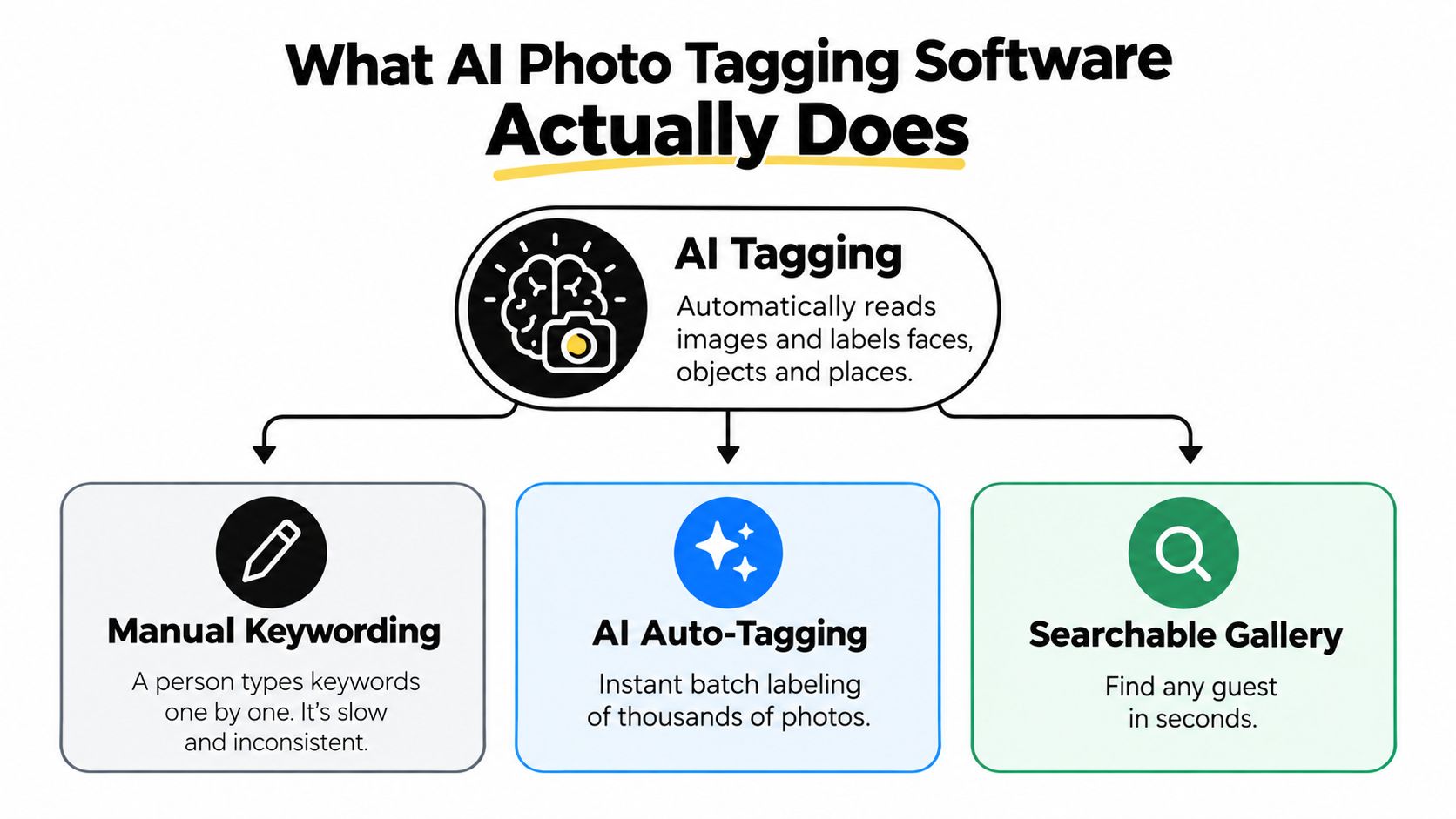
Think of AI photo tagging as a visual search layer placed over an image gallery. A person can inspect a photo and recognize a stage, a sponsor wall, a group of guests, or a familiar face. The software performs a similar first pass automatically, then turns those observations into searchable signals.
Manual keywording asks a person to write labels one image at a time. AI auto-tagging analyzes the pixels, detects visual elements, and assigns machine-generated labels or clusters. The result isn't a perfect catalog. It's a fast index that helps people find relevant images without requiring a photographer to name every frame.
Three systems often work together
Object and scene detection identifies broad visual cues. Depending on the tool, those cues can include a backdrop, stage, podium, lighting condition, crowd, or group composition. This is useful for filtering a trade show gallery by booth area or finding tournament images that contain a field or court.
Face detection locates faces inside an image. Detection answers, “Where are the faces?” It doesn't necessarily answer, “Who is this person?” That distinction matters in group photos, where a system may locate several faces but lack enough visual information to identify each one reliably.
Face recognition and selfie matching add identity retrieval. The attendee submits a selfie, and the system compares the facial representation from that selfie with indexed faces in the event gallery. Many services use a face embedding, a mathematical representation used for comparison, rather than treating the attendee's original selfie as the searchable object. Organizers still need to understand how the provider stores, protects, and deletes those representations.
The consumer pattern is established. Industry reporting citing GSMA says 68% of consumers use facial recognition on smartphones for tasks including photo tagging, while the global facial recognition market is projected to reach $16.06 billion by 2027, with a 23.5% CAGR from 2020 to 2027 from 2020 to 2027, as summarized in this industry overview of AI photo tagging software.
Library tagging and event tagging aren't the same
Library software usually processes a private archive in batches. Event tagging has a second responsibility: it must deliver a live or near-live attendee experience with clear permission controls. A tool such as Saucial's event photo upload workflow reflects that operational model, where uploaded photos are processed in the background and attendees use a selfie to retrieve matching images.
The difference is important. A private archive can tolerate a long review queue. A public-facing event gallery must handle access, consent, branding, sharing, and support at the same time.
How Find-My-Photos Workflows Replace Manual Tagging
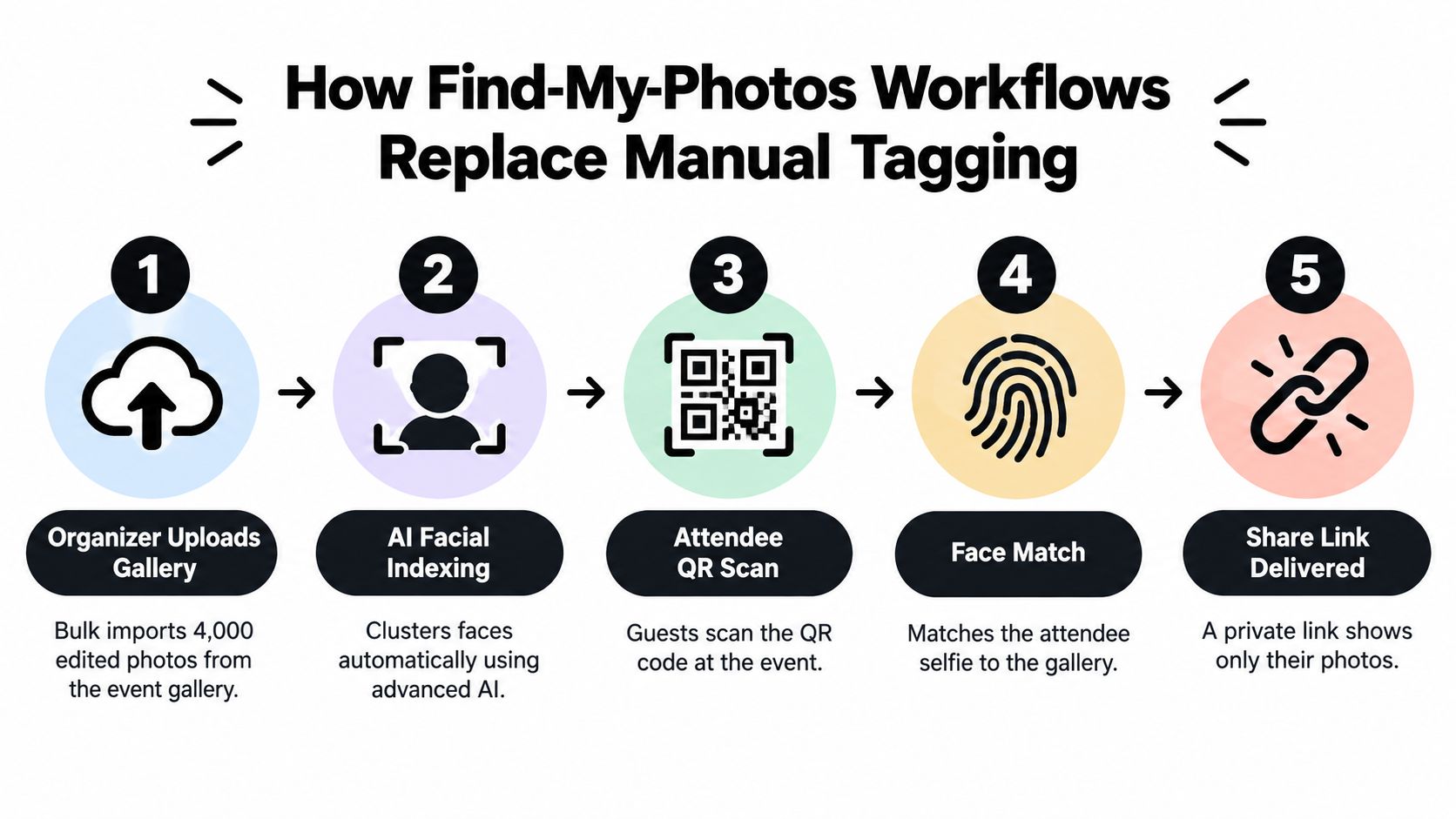
The cleanest implementation treats organizer actions and attendee actions as one connected journey. Every step should remove a manual handoff rather than just add another dashboard.
Start with the organizer setup
- Upload the complete gallery. Import the edited event images in bulk, preserving the original file organization and metadata where the platform supports it.
- Run facial indexing. The system detects faces and creates searchable clusters. Review obvious errors before publishing, especially in portraits, stage shots, and sponsor photos.
- Set the access policy. Decide whether the gallery is opt-in, gated, public with restricted matching, or limited to a specific event period. Set a deletion date for the gallery and any biometric representations.
- Publish the experience. Use a branded event photo sharing link, then generate a QR code for signage, wristbands, programs, registration desks, or table cards.
- Prepare a fallback. Keep a normal gallery search or manual contact path available for guests whose faces aren't captured clearly.
The value comes from collapsing several old tasks. There's no need to create personal folders one by one, email separate Dropbox links, or maintain a spreadsheet of guest names and image ranges.
Make the attendee path obvious
The attendee scans the QR code photo gallery entry point, takes a selfie, and waits for the system to compare that selfie with the indexed event gallery. The result should show only likely matching frames, with controls for viewing, downloading, sharing, ordering prints, or requesting help.
A printed QR code is useful because it works in the physical environment where the event happens. A short link helps with email, SMS, WhatsApp, LinkedIn, Instagram, and post-event follow-up. On-site kiosks can serve attendees who don't want to use their own phone, while VIP pre-enrollment can reduce friction for a tightly controlled guest list.
Practical rule: Test the attendee path from the same network, device types, and lighting conditions guests will use. A technically correct workflow can still fail if the QR code is hard to scan or the selfie prompt is unclear.
Measurable Benefits for Organizers and Photographers
The strongest business case for event tagging isn't a vague promise of efficiency. It's a chain of observable outcomes: less manual sorting, faster retrieval, fewer support requests, more shares, and clearer opportunities for paid upgrades.
Some benefits can be measured directly in your own operation. Time spent on manual tagging, repeated delivery requests, and gallery-related support should be tracked before and after a pilot. Purchase conversion and social sharing can also be compared, but only if the event type, gallery access rules, match threshold, and opt-in behavior remain visible in the analysis.
What changes operationally
For photographers, AI indexing moves face discovery out of the editing queue. That doesn't eliminate review. It changes the editor's job from naming every image to checking clusters, correcting obvious mismatches, and handling difficult frames.
For organizers, the main gain is distribution. A guest who can retrieve a personal set from a face recognition event gallery has a more direct reason to download or share than a guest who receives one undifferentiated folder. The same mechanism can support sponsored frames, print offers, premium edits, or branded follow-up, provided the organizer communicates those options clearly.
| Metric | Manual Tagging | AI Tagging |
|---|---|---|
| Gallery organization | Staff or photographers assign names and keywords by hand | The system creates visual labels and face clusters for review |
| Attendee retrieval | Guests browse folders, filenames, or contact the team | Guests use a selfie to request likely matches |
| Photographer workload | Tagging and search requests continue after delivery | Editors review exceptions and manage the gallery workflow |
| Sponsor distribution | Depends on attendees finding relevant images themselves | Matching can surface branded moments to people pictured |
| Monetization | Separate manual outreach or storefront steps | Downloads, prints, premium edits, or sponsored options can appear in the retrieval path |
| Reporting | Often limited to folder activity and direct messages | Can be designed around retrieval, sharing, and purchase events |
Measure the ceiling, not just the average
Opt-in rate sets the practical ceiling for reach. If guests don't authorize selfie matching, the system can't deliver the personalized experience to them. A QR code may be scanned widely, but retrieval still depends on clear consent, a usable selfie, and enough image quality for a confident match.
Accuracy also changes with gallery size. The MegaFace benchmark found that systems scoring above 95% on LFW fell to roughly 35% to 75% identification rates with 1 million distractor faces, as reported in the MegaFace benchmark paper. That result doesn't predict every event deployment, but it explains why a vendor's small demo gallery isn't enough evidence for a large tournament or multi-room conference.
Track search-to-download time, unmatched searches, manual corrections, support tickets, shares, and purchases by event. Treat the result as a planning range, not a guarantee. Lighting, crowd density, camera position, privacy gates, and attendee participation can change the outcome.
Privacy, Consent, and Permission Controls
Face recognition is not just a gallery feature. It changes how an event collects, processes, and deletes sensitive data. The right deployment depends on the audience, jurisdiction, venue policy, and purpose of the matching workflow.
Compare the processing models
Local, on-device processing keeps matching closer to the attendee's device. That can reduce the amount of facial data sent to a remote service and may improve trust, but it can place more demands on the phone and limit centralized indexing or cross-device administration.
Cloud face matching sends images or facial representations to a provider's infrastructure for processing. It can support large galleries and centralized management, but the organizer must investigate data residency, vendor access, security controls, retention, subprocessors, and the legal basis for biometric processing. The facial-recognition software evaluation guidance identifies privacy, security, consent controls, and GDPR-related biometric handling as central criteria.
Neither model is automatically compliant. A reversible event-specific match is different from creating a permanent identity profile, but the organizer still needs a documented policy.
Consent should be visible before the selfie is submitted. Explain what the selfie is used for, which gallery it will search, how long the representation remains available, and how a person can request deletion. Opt-in is generally easier to explain for a private gala or corporate summit. Public festivals may need a separate non-recognition path for people who don't participate.
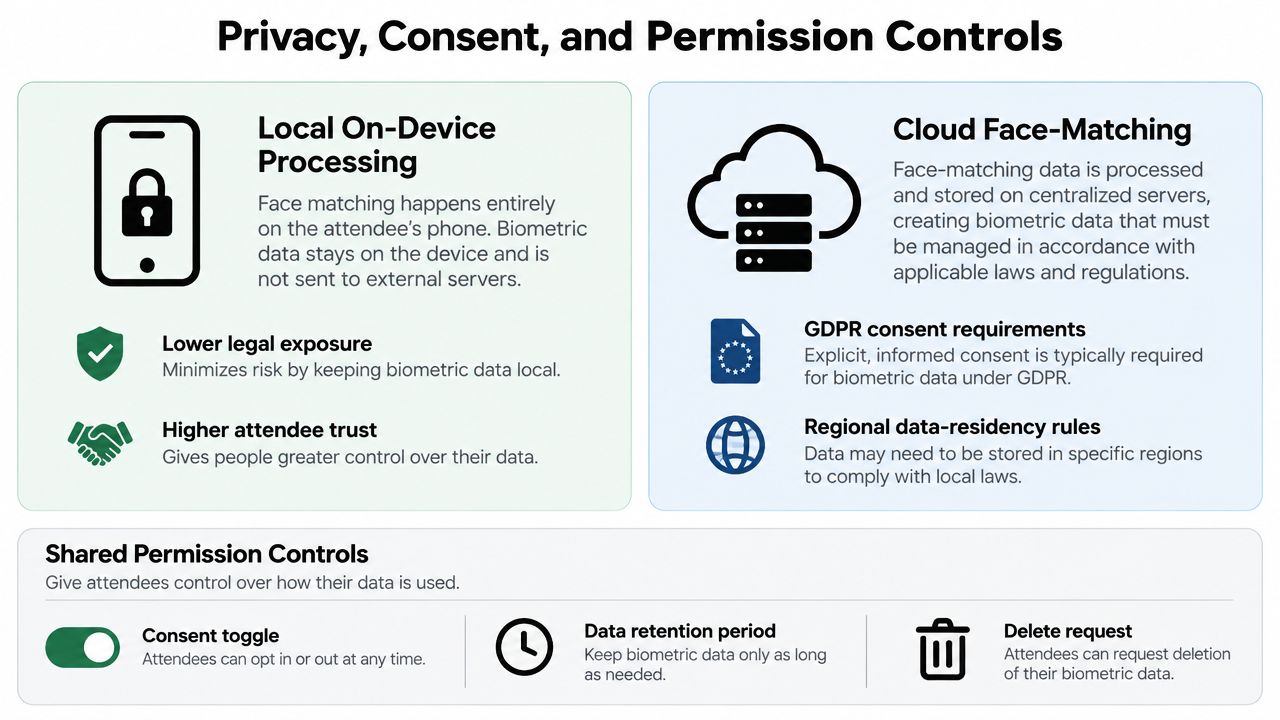
Useful controls include:
- Expiring access links: Limit how long a personal gallery remains available.
- Download and watermark settings: Protect photographer work and control redistribution.
- Face blurring: Hide unmatched or non-consenting people where appropriate.
- Recognition disablement: Turn off matching for sensitive sessions or specific areas.
- Deletion workflows: Remove selfies, embeddings, and gallery images according to policy.
- Access records: Preserve an audit trail when the platform supports it.
Schools and events involving minors require especially careful consent and guardian communication. Corporate events may require stricter controls for NDA attendees. At every event, a plain-language notice should appear where guests encounter the QR code, not only inside a legal policy page.
A short explainer on Saucial authentication and attendee access can help teams assess how a guest enters the experience, but organizers should still verify the platform's current retention and consent settings directly.
Features to Evaluate Before You Choose a Tool
A vendor demo can make every face look easy to find. An event test should do the opposite. Use real photos from dim rooms, crowded receptions, sports sidelines, trade show floors, and branded activations, then score the workflow against the moments that matter.
| Feature | Event Scenario | Question It Answers | Score (1-5) |
|---|---|---|---|
| Recognition quality | Mixed lighting, side profiles, distance, and group photos | Does the system return useful matches beyond clean portraits? | |
| Processing speed | Photos need to become searchable soon after upload | How long from upload to the first usable gallery? | |
| QR and short-link distribution | Guests arrive through signage, email, and mobile messages | Can people enter without an app or complicated account setup? | |
| Access and watermark controls | A sponsor or client needs a controlled branded gallery | Can the organizer restrict viewing, downloading, and sharing? | |
| Bulk upload and metadata | A multi-camera team delivers large batches | Does the platform preserve EXIF data, filenames, and folder logic? | |
| Integrations | The photographer sells prints or the organizer uses a CRM | Can retrieval connect to delivery, commerce, print, or marketing tools? |
Ask questions that expose the real product
Test recognition at distance rather than only with posed headshots. Ask whether a guest can see a low-confidence result, report a wrong match, or use a manual search when the system returns nothing.
Processing speed needs a workload test. Upload a representative gallery, include large files and multiple camera sources, and observe queue behavior. A fast upload with a slow indexing queue doesn't create a fast attendee experience.
Distribution should cover the whole event. Generate a controlled event sharing settings workflow and test QR placement, mobile loading, branded URLs, expiration, watermarking, and download permissions.
Cost requires the same scrutiny. Check per-image processing fees, storage charges, user-seat fees, minimum commitments, print commissions, and integration costs. A low entry price can become expensive when a gallery contains many images or several photographers need access.
Where AI Tagging Breaks Down at Events
Event photography is a hostile environment for face matching. Ballroom lighting changes across the room. Festival crowds overlap. A stage photographer may capture faces from above, below, or at sharp angles. Motion blur, sunglasses, masks, costumes, and similar-looking guests all reduce the information available to the model.
Group images deserve particular caution. Independent photo-management guidance cites a study reporting 90% accuracy for single-face recognition versus an average of 78% in group photos, with lighting and viewing angle contributing to degradation, as summarized in this facial-recognition software review. The lesson is practical: a clean portrait and a crowded dance-floor image shouldn't receive the same confidence threshold.
Detection isn't identification
A system may detect that a face is present without confidently identifying the person. False positives create a trust problem because attendees may see someone else's private images. Silent misses create a revenue problem because the right guest never sees a purchasable portrait.
Recognition quality can also vary across demographic groups if training data or testing practices don't represent the event audience well. Ask vendors for evaluation methodology, not just a single accuracy claim. You need to know how they handle low-confidence matches and whether organizers can suppress uncertain results.
Plan for queue pressure and exceptions
A QR campaign can create a sudden burst of traffic after doors open or after the post-event email lands. Providers may throttle gallery loads or delay selfie results under pressure. Test concurrency, not only a single successful search.
Use operational safeguards:
- Spot-check early batches: Review results from the first camera uploads before promoting the gallery widely.
- Tune confidence thresholds: Prefer a smaller set of reliable results over a larger set filled with questionable matches.
- Keep a manual path: Let guests search by time, photographer, location, or contact the team.
- Separate sensitive areas: Disable recognition for rooms, sessions, or people covered by stricter policy.
- Monitor the queue: Give staff a clear message for delayed processing instead of letting guests assume the system failed.
A useful event system doesn't pretend these failures don't exist. It contains them, makes uncertainty visible, and gives the attendee another way forward.
A Short Decision Checklist Before You Launch
Before signing a contract or uploading the first frame, run the decision in the order the event will experience it.
- Confirm the legal basis. Ask your counsel or privacy lead whether facial processing is permitted for this audience and jurisdiction. Treat biometric data as a governance decision, not a marketing checkbox.
- Write the retention rule. Specify how long gallery images, selfies, facial embeddings, logs, and backups remain available. Confirm how deletion requests work and who performs them.
- Test real images. Use a representative sample of 50 photos from last year's event, including group shots, stage lighting, side profiles, motion, and sponsor moments. Record false positives, missed faces, and the amount of human review required.
- Pilot the QR experience. Invite a small test group, publish the gallery, scan the code from the intended signage, and measure whether guests understand the selfie prompt without staff intervention.
- Score the vendor. Rate processing location, consent capture, recognition controls, watermarking, download permissions, analytics, print sales, and integrations on a consistent scale.
- Dry-run launch week. Have three volunteers complete the journey from QR scan to search and download on their own devices. Record the elapsed time, failed steps, and questions they ask.
- Keep the fallback ready. Prepare a conventional gallery search, a support contact, and a process for correcting an incorrect match. The fallback protects the guest experience when lighting or indexing doesn't cooperate.
Launch standard: Don't approve a tool because the demo found a face. Approve it when your team can explain what happens when the system can't find one.
The right platform should fit your consent policy, camera workflow, delivery model, and revenue plan. If you want to test a selfie-based find-my-photos experience for a gala, tournament, trade show, or community event, Saucial provides background facial processing, shareable links, QR distribution, and attendee retrieval from an uploaded event gallery. Use it to pilot the full path, from organizer upload and permission messaging to guest sharing and optional photographer upsells, before committing to a larger rollout.