How to Track QR Code Scans at Events

You're closing out a gala, and the registration-desk QR code looks far busier than the table cards. The photographer wants to know whether guests found their pictures. Your marketing lead wants a post-event engagement report. A scan counter can't answer either question on its own.
The practical answer to how to track QR code scans is to connect each placement to a measurable journey: redirect request, landing-page visit, photo search, results, and an optional share, download, or order. That lets your floor team improve the guest experience without turning an event gallery into an individual tracking system.
What a Scan Count Actually Tells You
A busy registration desk isn't automatically your best photo distribution point. Guests might scan while waiting, close the page when registration opens, then use a table card later when they have time to browse. If you report only code activity, you'll reward the interruption rather than the placement that helped them.
A tracked scan usually means a request reached a redirect endpoint. It doesn't prove that the gallery loaded, that the visitor consented to optional processing, or that anyone found a photo. A camera recognizing the pattern without opening its destination may not generate a request at all.
The scale of scan activity makes careful terminology important: QRStuff's State of QR Codes report recorded 100,470,117 dynamic QR-code scans in 2024, but that measure is scans, not confirmed people or successful gallery visits.
Build the report around outcomes
Use the following scoreboard before the artwork goes to print. Each metric needs a definition that the organizer, photographer, and analytics implementer all understand.
Event QR metrics and what each one decides
| Metric | Counts | Decision it supports | Do not use it as |
|---|---|---|---|
scan_count |
Redirect requests, including previews and reloads | Which placement was tried | Headcount or gallery success |
unique_session_count |
Analytics sessions that reached the landing page | How many visits the code actually opened | The raw scan total |
engaged_session_count |
Sessions with on-page engagement | Whether the landing page held attention | Proof a photo was found |
photo_search_started |
A consented selfie match or gallery search began | Whether guests tried to find their photos | A successful match |
share_download_or_order |
A share, download, or print action | Post-event engagement and photographer upsell | Proof the QR was popular |
Despite its name, unique_session_count is a visit-level measure, not an attendee headcount. A guest can return in another session, and analytics may not observe every visit because of consent choices or browser restrictions. Define engaged sessions explicitly rather than letting different dashboards use incompatible meanings.
Reporting rule: Call a request a request, a session a session, and a completed photo action an outcome.
Give every placement its own row
Separate the desk, dinner tables, exit sign, printed program, and next-morning WhatsApp message. Add result views beneath photo-search starts in the detailed report so the photographer can distinguish attempts from successful retrieval.
Suppose an exit sign generates plenty of requests but few landing sessions. Investigate loading, redirects, and repeated attempts before redesigning the poster. If guests arrive but don't search, inspect the instructions, consent experience, and photo availability instead.
Keep the summary compact enough for a morning production meeting. The useful question isn't which code attracted the most activity. It's where guests progressed, where they stopped, and which team member can fix the next obstacle.
Keep Tracking Useful Without Personal Profiles
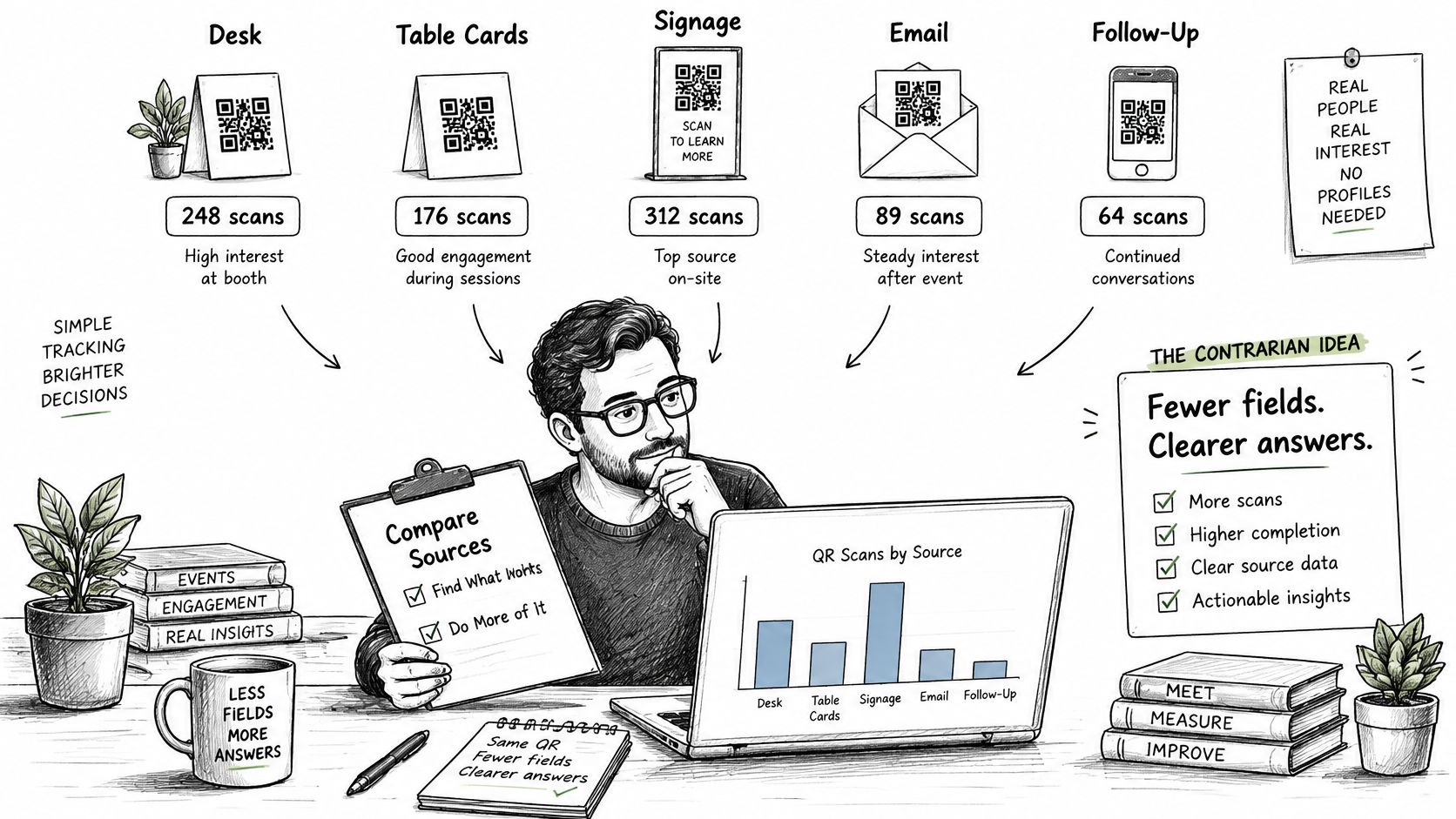
Fewer fields often answer the organizer's real question. You need to know whether badge pickup, dinner tables, or the follow-up message helped guests find photos. You usually don't need a named history of everyone who scanned.
Placement-level totals can support that decision without attendee names, email addresses, or ticket identifiers in the link. The QR Code Handbook's guidance on tracking dynamic campaigns also cautions that IP addresses, device identifiers, and coarse location can constitute personal data, while non-essential analytics and retargeting may require consent in the EU and UK.
Start with a notice guests can understand
The first screen should identify the organizer, explain what the gallery does, and distinguish essential operation from optional measurement. Don't hide face-based retrieval inside a general acceptance button.
Use wording that matches the actual implementation. A draft notice might say:
This gallery helps guests find event photos. We measure activity by distribution placement to improve access. Optional analytics and selfie matching are offered separately. Our privacy notice explains processing, retention, and how to request deletion.
That paragraph isn't a substitute for a complete privacy notice. It's a plain-language introduction that gives guests context before they choose.
Think about the report as a set of distribution routes, not a collection of personal histories.
Make consent and retention operational
Ask before optional analytics and before face-based retrieval. Keep those decisions separate, respect refusals, and don't treat a gallery visit as permission to build an advertising audience.
For a school, alumni dinner, or community festival, I would leave retargeting pixels out. They add a different purpose to a task guests understand as finding their event photos.
Give the implementation team concrete boundaries:
- Collection: Store only fields needed to diagnose distribution and gallery access.
- Retention: Set a documented deletion date for detailed redirect logs after reconciliation and troubleshooting.
- Access: Restrict raw logs to the people responsible for maintaining the service.
- Deletion: Give the organizer a clear route for handling a guest's or school's request.
- Reporting: Retain appropriate aggregate placement totals rather than indefinite visitor histories.
A trade-show team can compare photo-search activity from badge pickup against the booth banner without knowing who used either route. A festival organizer can compare sharing from WhatsApp against the printed map on the same basis.
The trade-off is deliberate: aggregate reporting won't reconstruct every attendee's cross-device journey. It will answer most placement and distribution questions with less sensitive information to manage.
Tag and Measure Each Placement
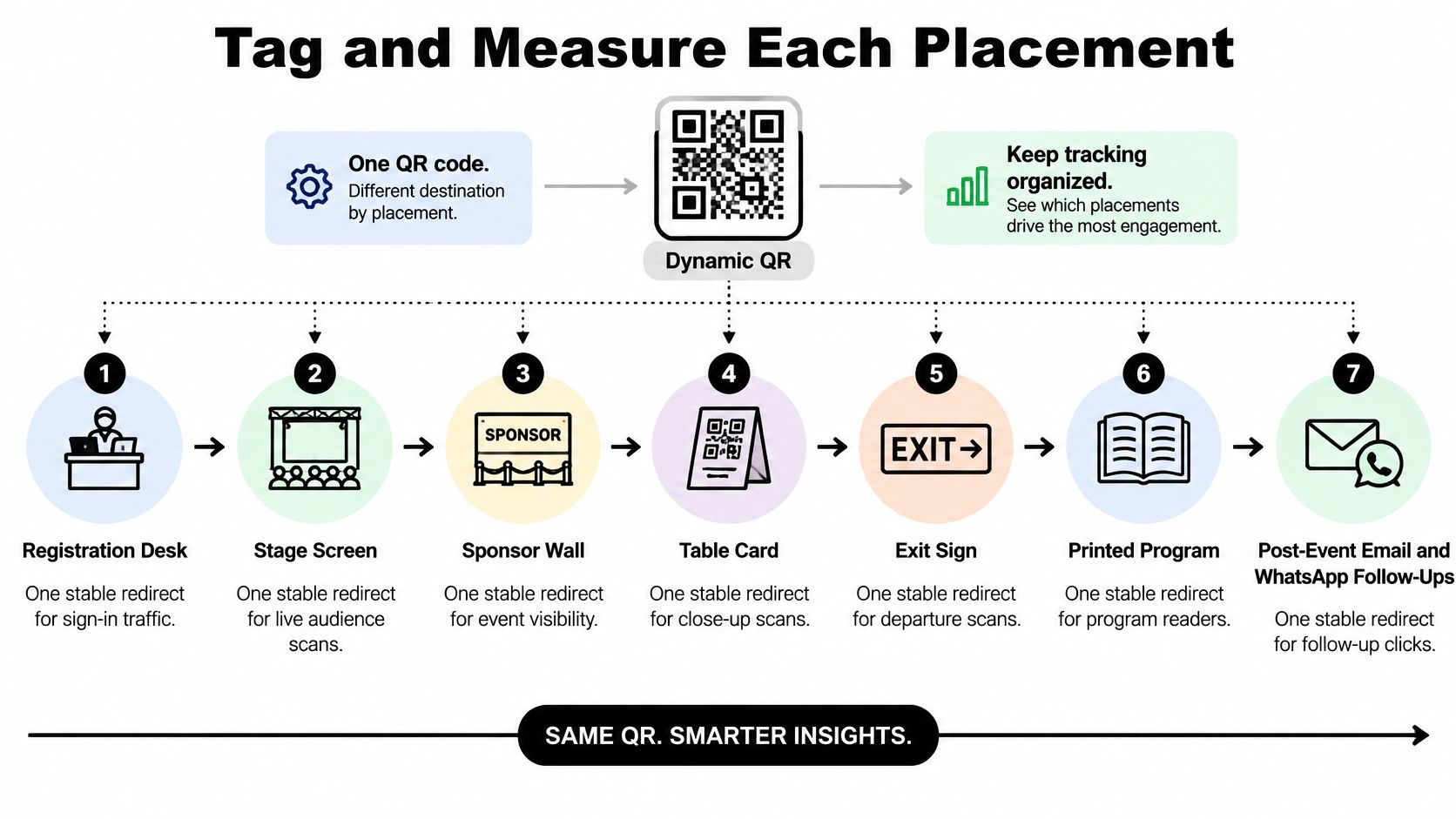
- Assign a placement ID before generating artwork. Use names such as
registration_desk,stage_screen, andtable_card. Keep the identifier stable even if you change the gallery destination. - Create a separate redirect for each distribution route. The QR image should encode that stable endpoint, not the final gallery address.
- Carry campaign attribution into the landing page. The redirect and the destination must agree on the same naming scheme.
- Instrument the guest journey. Record meaningful events after arrival, not just activity at the redirect.
- Test the complete path before releasing print files. A readable code with broken attribution is still an unfinished implementation.
The placement map should be clear enough for the floor team to identify which artwork belongs where.
Build a redirect you can maintain
A dynamic QR workflow uses an editable redirect destination while leaving the printed pattern unchanged. That gives you a repair point when a gallery address changes or a landing page needs replacing.
The pattern itself isn't what creates analytics. A fixed QR image can encode a tagged address, and the destination can measure visits. The redirect adds a request log and control over where the printed code sends guests.
Choose a redirect service or endpoint your team can administer through the event and follow-up period. Confirm who owns it, who can edit destinations, and what happens if the service becomes unavailable. Don't make the photographer's personal login the only recovery path.
For request logging, start with timestamp and placement ID. Add device category, referrer when supplied, coarse geography, and a random session identifier only where they serve a defined operational purpose and fit your privacy choices. Don't retain raw IP addresses beyond what's necessary for legitimate troubleshooting and reconciliation.
Pass a complete attribution set
For an illustrative gala campaign, the registration redirect can append utm_source=venue, utm_medium=qr, utm_campaign=gala_2026, and utm_content=registration_desk.
The Google Analytics guide to URL campaign parameters recommends utm_source, utm_medium, and utm_campaign and explains that parameter values are case-sensitive. Use lowercase values consistently, with utm_content identifying the individual surface.
Within venue placements, keep the source, medium, and campaign stable while changing the content value. Change source and medium intentionally for email and WhatsApp, because those are different distribution channels, not physical QR placements.
The Google Analytics traffic-source guidance warns that when UTM parameters are present, Analytics may derive traffic-source dimensions exclusively from them. Don't send only utm_source and assume the remaining acquisition fields will be inferred correctly.
Instrument the actions that matter
Have your developer or analytics implementer configure the funnel on the gallery or landing experience you control. Don't assume a hosted gallery exposes every event merely because it accepts campaign parameters.
Use a clear event specification:
landing_view: The destination loaded and displayed the entry experience.consent_choice: The guest made a choice, recorded only in a manner consistent with your consent design.photo_search_started: A permitted selfie match or available gallery search began.results_viewed: Matched or searched results were displayed.share,download, ororder: The corresponding action completed, with separate events where possible.
Distinguish a share-button click from a confirmed share, and an order-page visit from a completed purchase. If completion can't be observed, name the event for what you can verify.
Calculate scan-to-landing rate from landing sessions divided by redirect requests. Calculate search-start rate from sessions with a search start divided by landing sessions, and result-view rate from search sessions that displayed results divided by search-start sessions.
For share or download conversion, choose a denominator such as result-view sessions and label it. Count sessions containing the action rather than dividing repeated action totals by session totals.
A walkthrough can help the production team connect code generation with the implementation checks.
Test the printed experience and the report
Scan the actual-size artwork on phones under dim venue lighting and from an angled hold. For screen placements, test reduced brightness and the true viewing distance, not just a design file on a laptop.
Follow the journey through consent, search, results, and an available downstream action. Confirm that redirects preserve parameters and that GA4 acquisition reporting shows the expected source, medium, and campaign; use the manual ad content dimension to inspect utm_content.
Reconcile redirect logs with analytics sessions daily during the event and follow-up period. Expect differences, but investigate abrupt changes by placement rather than forcing the totals to match.
Placement ledger for one illustrative 2026 gala
| Placement | utm_source | utm_medium | utm_campaign | utm_content |
|---|---|---|---|---|
| Registration desk | venue | qr | gala_2026 | registration_desk |
| Stage screen | venue | qr | gala_2026 | stage_screen |
| Sponsor wall | venue | qr | gala_2026 | sponsor_wall |
| Table card | venue | qr | gala_2026 | table_card |
| Exit sign | venue | qr | gala_2026 | exit_sign |
| Printed program | qr | gala_2026 | program | |
| Post-event email | gala_2026 | followup_email | ||
| WhatsApp follow-up | social | gala_2026 | chat_share |
Attach the ledger to the artwork approval. Beside each row in your working file, record the redirect owner, destination, test status, and approved artwork filename so the installation crew can place the correct code.
Stop Inflated Counts and Unsafe Codes
Putting the same code on every surface is an easy production shortcut. It also leaves the organizer unable to tell whether guests used the tables, the stage screen, or the program.
Run a symptom-and-fix review before installation. Treat missing attribution and exposed identifiers as release problems, not details to tidy up after guests arrive.
QR tracking failures and the fix
| Failure | What it breaks | Fix |
|---|---|---|
| One code on every surface | No way to compare desk, tables, screen, or follow-up | Unique redirect and utm_content per placement |
Venue and venue both used |
Case-sensitive UTMs split one campaign | Lock a lowercase naming sheet |
Only utm_source is set |
Analytics may ignore other acquisition fields | Always send source, medium, and campaign |
| Final gallery URL encoded in the image | No separate scan log or redirect repair point | Encode a stable short redirect |
| Guest name, email, or token in the URL | Identifiers land in logs and analytics | Opaque short ID, authorize after redirect |
| Raw scan total reported as success | Previews, scanners, and reloads inflate activity | Reconcile daily with sessions and photo-search events |
An opaque identifier is a routing reference, not permission to access private photos. Enforce authorization after the redirect wherever restricted access is required.
If a campaign tag is wrong, inspect the redirect configuration before ordering replacement signs. If the wrong endpoint is embedded in the image itself, replace the artwork and withdraw the incorrect version from the production folder.
Separate noisy traffic from guest difficulty
A burst of redirect requests without matching gallery activity can come from previews, security scanners, or repeated reloads. It can also indicate a real guest repeatedly trying to open a slow page.
Don't delete inconvenient traffic. Mark known test activity, inspect timing and device patterns, and compare the affected placement with a controlled phone test. Maintain a raw request total alongside any filtered operational view so the team knows what was excluded.
A tracking dashboard can tell you that a destination received requests. It can't certify that the destination is trustworthy.
Give guests visible reasons to trust the code
The APWG phishing trends report for Q3 2025 records Mimecast's detection of 716,306 unique malicious QR codes in that quarter. Event signage needs recognizable provenance, not merely a polished QR graphic.
Print a human-readable branded short domain, use HTTPS, and identify the organizer next to the code. On arrival, show a preview that names the event gallery and explains whether selfie matching, facial processing, downloads, and sharing are optional.
Brief venue staff to check for stickers placed over legitimate codes, especially on unattended sponsor boards and shared signage. Scan installed materials during setup and again after third-party vendors finish placing banners.
Restrict destination-editing access and recheck the resolved page after any change. Guests should be able to recognize the organizer and purpose before providing a selfie or taking another sensitive action.
Send Guests From the Placement That Works
After the event, choose a placement based on successful photo searches and downstream actions, not the largest request total. Keep enough context to make a sensible decision: a table card available throughout dinner serves a different opportunity from a screen displayed during a brief announcement.
If the table card produces stronger search and download rates, keep it for the next gala. If the stage screen attracts attempts but guests abandon the page, change its timing or move the prompt rather than declaring the gallery unpopular.
Match the next action to the evidence
Use the report to assign work, not just rank surfaces:
- Strong arrival, weak search: Rewrite the entry instructions and confirm that guests know when photos are available.
- Strong search, weak results: Check photo coverage and retrieval before increasing promotion.
- Strong results, weak downloads: Inspect the download flow and clarify any access or purchase conditions.
- Strong follow-up performance: Prioritize a well-timed event photo sharing link rather than adding more venue signage.
For a photographer upsell to attendees, result views are a more useful starting point than poster activity. Guests need to find a relevant photo before a print or other event-approved offer makes sense.
At Saucial, we use AI-powered face recognition to find the event photos featuring each attendee. Organizers receive a unique link they can share through any channel, and attendees take a selfie to instantly see all photos featuring them.
Release the next distribution round deliberately
Point the winning placement's redirect at the intended find-my-photos experience. Keep route-specific attribution on email, SMS, and WhatsApp resends rather than copying a venue-tagged destination into every message.
Before approving the next print run, verify the gallery name on the preview, the consent sequence, the short destination, and access to the redirect account. Confirm that the photographer's upload and the organizer's promotion schedule agree, so guests aren't invited into an empty experience.
Read scan-to-search performance after distribution, then inspect shares, downloads, or completed orders. The placement worth keeping is the one that helps guests finish, not the one that gives the team the busiest-looking counter.
Saucial gives organizers a shareable event photo link and helps attendees find their photos through selfie matching. Visit Saucial to plan your event photo distribution, then use placement-specific redirects and funnel reporting to measure which routes help guests find and share their moments.