Best Photo Gallery Software for Events: Picks for 2026

Professional digital imaging once meant expensive software on a specialist's computer. Today, an event gallery succeeds or fails on a guest's phone, after the photographer's editing is finished.
The best photo gallery software isn't necessarily the platform with the prettiest cover page or the biggest storage allowance. It's the one that lets guests find, download or buy the right images while giving organizers clear control over access, consent and privacy. Judge the gallery by the guest's route from upload to photo, including whether someone who cannot or does not want to use selfie matching has another way to browse.
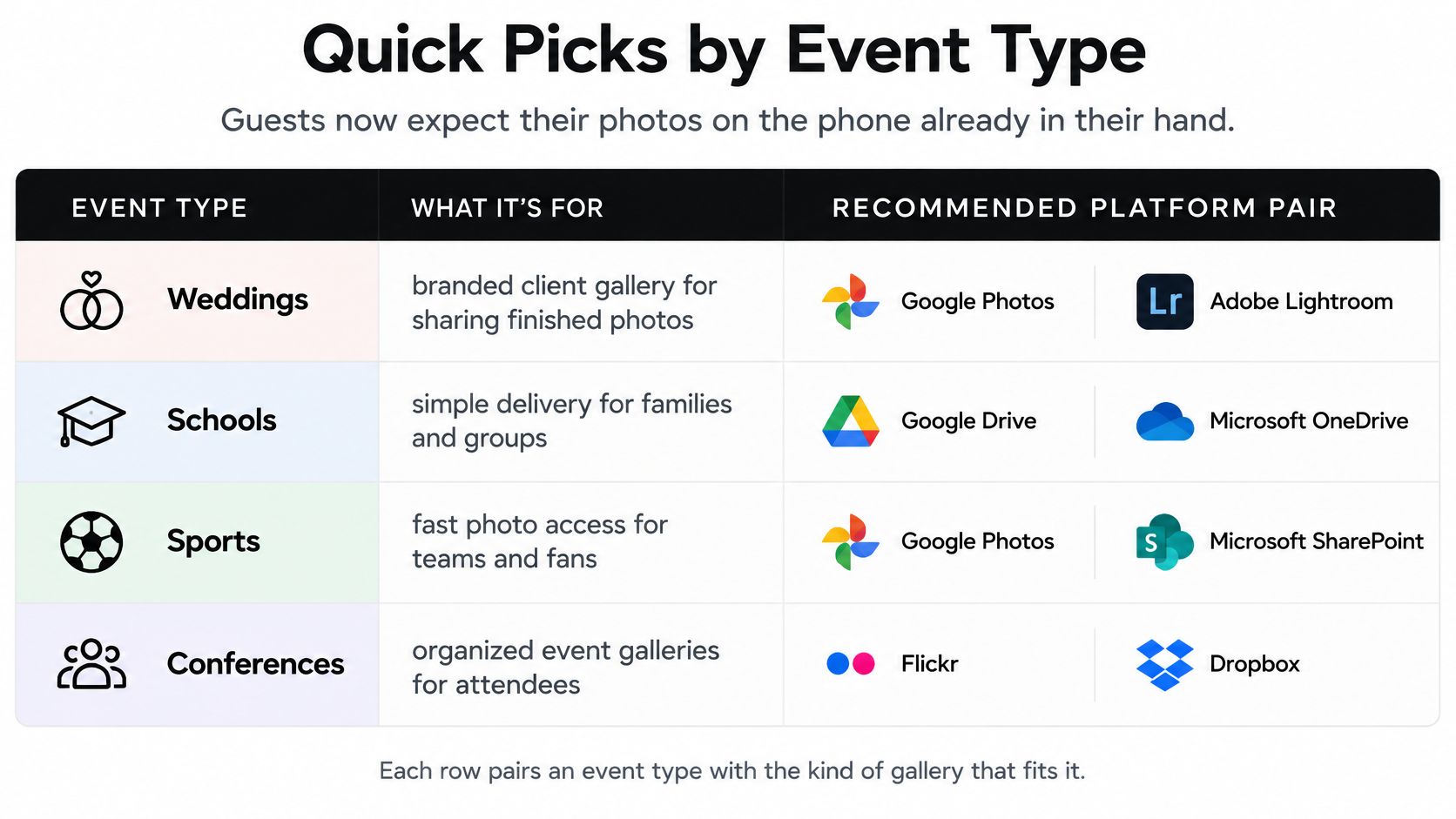
Quick Picks by Event Type
Guests expect their photos on the phone already in their hand, so start with the action your audience needs to complete.
Recommended gallery type by event
| Event type | Priority criterion | Platform category | Verify before you buy |
|---|---|---|---|
| Galas and fundraisers | Fast finding for hundreds of guests, donor-friendly sharing | Find-my-photos platform | Guest access without accounts and sponsor branding options |
| Sports tournaments | Selfie matching and per-player purchase links | Find-my-photos platform with sales | Matching accuracy in outdoor light and crowded finish lines |
| Trade shows and brand activations | QR code at the booth and branded sharing | QR code photo gallery | Link expiry settings and brand controls |
| Alumni dinners and school events | Consent flow and minors safeguards | Privacy-first gallery with opt-in matching | Retention period, deletion and guardian rules |
| Weddings and venues | Client-owned galleries and long storage | Client gallery platform | Print store setup and guest download window |
| Festivals and community events | Bulk upload and mobile access on weak signal | Link-based gallery | Mobile page speed and upload limits |
Time&Space's event photography overview describes a mobile-first distribution environment. For buying purposes, that means checking the complete journey from upload to an attendee opening a usable gallery, rather than treating storage as the finished product.
Use this visual summary to identify the appropriate gallery category.
Choose the job before the brand
A gala fundraiser photo gallery needs a different handoff from a wedding collection. Donors may want a portrait to share immediately; a couple may want to review the complete story before releasing it to guests. A school needs approval boundaries before either action happens.
Include Saucial's event photo-sharing platform in a find-my-photos shortlist when personal discovery is the main job. Don't assume that an event-focused platform automatically replaces a photographer's proofing, archive or print-fulfillment tools.
The deciding question is simple: does this audience mainly need to find their own photo, browse the whole set or buy a print? Choose the category that makes that action straightforward, then verify the controls surrounding it.
Delivery Methods Compared by Guest Experience
A shared link is the most straightforward starting point. Send it through email, SMS or WhatsApp, and guests can return through the same route without remembering where they saw a sign at the venue.
Photo delivery methods by guest experience
| Method | How guests find photos | Best for | Main limitation |
|---|---|---|---|
| Shared link (email, SMS, WhatsApp) | Opens one link and browses the set | Mixed audiences and post-event follow-up | Guests search by eye when the set is large |
| QR code photo gallery | Scans a code at the venue or on signage | Live events, booths and stages | Needs a visible code and a usable signal |
| Selfie photo matching | Takes a selfie and receives matching photos | Large events with many photos per guest | Depends on lighting, crowd density and consent |
| Event website embed | Browses a gallery on the organizer site | Brand-led communities and recurring events | Requires web team time to maintain |
| Social sharing | Downloads and posts to Instagram or LinkedIn | Brand activations and sponsor content | Resolution and image rights need checking |
| Cloud folder by email | Opens a folder and searches manually | Small private groups | Weakest engagement route when manual navigation becomes burdensome |
A QR code is an entrance, not a delivery strategy
Place a QR code where people can stop safely and read the accompanying instruction. A code beside a busy exit is less useful than a clearly labeled sign near a seated area. Print a readable website destination alongside it so scanning isn't the only route.
Selfie photo matching introduces a more personal discovery path, but it also introduces an extra decision for the attendee. Explain what the selfie does before asking someone to take it. Don't make a public gallery appear private just because its entrance uses face matching.
Practical rule: Publish one dependable event photo sharing link, then add a QR or matching route for guests who benefit from it.
Social posts should support distribution, not replace the gallery. Give attendees an approved download rather than expecting them to retrieve a usable image from a promotional post.
A cloud folder remains reasonable for a small, trusted group. It becomes awkward when filenames, duplicate exports and unrelated pictures force guests to search manually.
When testing the photo upload workflow, continue through to the guest-facing result. Upload success tells you nothing about whether a recipient understands the next step.
Client Gallery Platforms Like Pixieset and Pic-Time
Client-gallery platforms begin with the photographer's relationship to a client. The photographer delivers a finished collection, controls its presentation and may sell products after delivery. That's a different starting point from serving an event audience whose members don't know the photographer.
A wedding delivery illustrates this client-centered workflow.

Pixieset and Pic-Time are useful reference points for this category. Pixieset belongs on the shortlist when gallery delivery sits alongside a photographer's wider studio tools. Pic-Time deserves consideration when print selling and gallery marketing are central to the business. Neither positioning establishes which platform suits your event.
Compare the same requirements
| Buying question | What to test in Pixieset | What to test in Pic-Time |
|---|---|---|
| Who is the gallery for? | Client approval and wider guest access | Client delivery and audience-specific presentation |
| How do guests find themselves? | Browsing and any discovery tools in the proposed plan | Browsing and any matching tools in the proposed plan |
| How does selling work? | Store configuration, fulfillment and payout | Store configuration, promotions, fulfillment and payout |
| What remains online? | Original storage, archive rules and gallery expiry | Photo storage, archive rules and gallery expiry |
| Who controls the branding? | Photographer identity, domains and event presentation | Photographer identity, domains and event presentation |
Treat password protection, favorites, download permissions and store access as separate tests. A password controls entry; it doesn't stop an authorized viewer from capturing something visible on screen. A favorite selection isn't necessarily a paid order or an approval for public use.
Use the accompanying video as a demonstration, then reproduce the relevant actions in your trial.
Test discovery rather than the cover page
For a hypothetical trial, upload around two hundred approved images and invite a few test guests to find themselves on their phones. Include a portrait, a group photograph and an image where the guest occupies only a small part of the frame. Record where each person hesitates, not just whether they eventually succeed.
Also place a test order and follow its status through fulfillment and payout documentation. A polished storefront doesn't answer questions about delivery destinations, product margins or customer support responsibilities.
These platforms fit best when the photographer owns the client relationship and serves a known group. For a large crowd seeking individual moments, require a convincing guest-discovery demonstration before committing.
Find-My-Photos Platforms and When Selfie Matching Pays Off
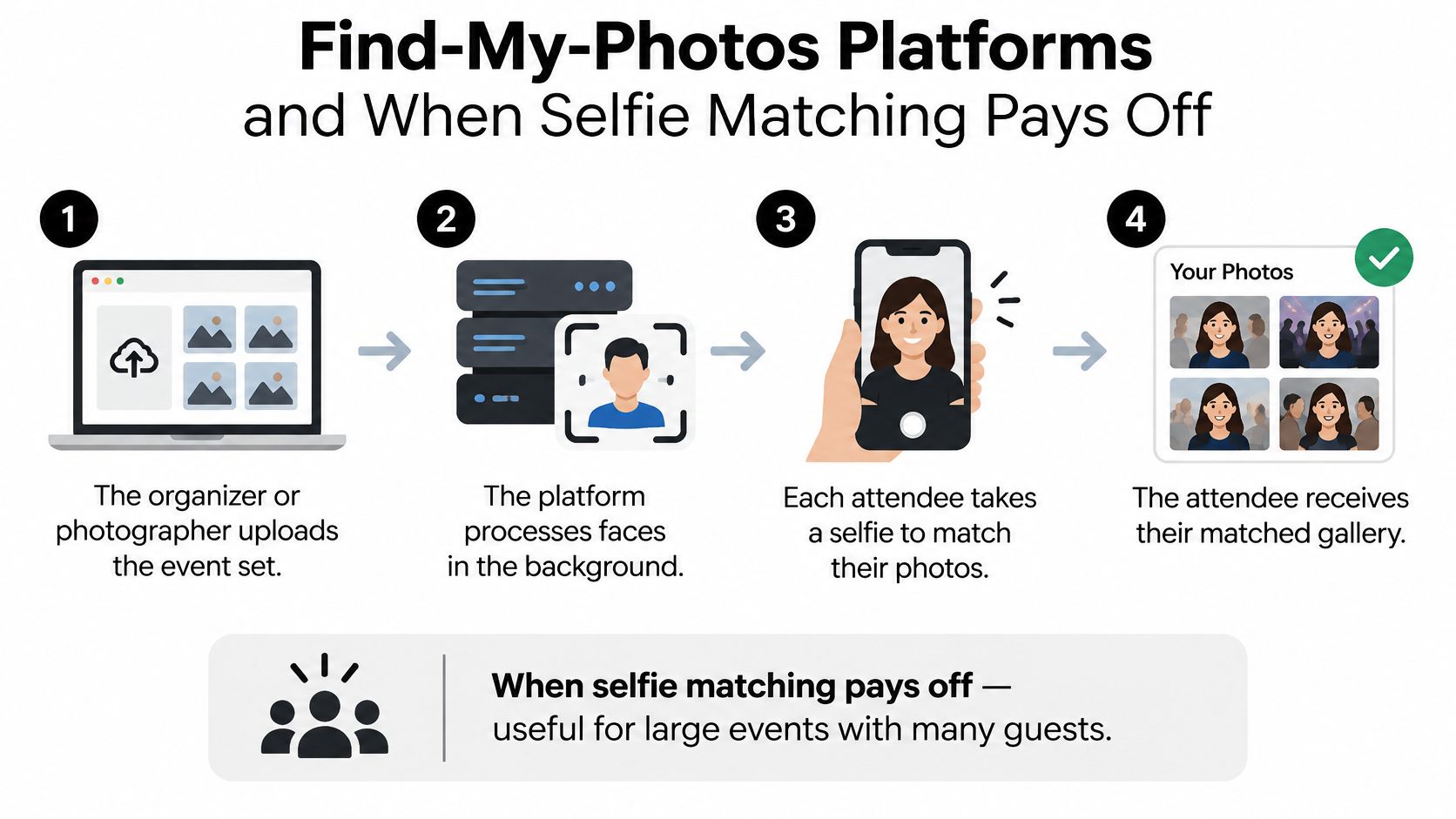
A find-my-photos platform organizes delivery around the attendee rather than the collection. The objective is to shorten the path between opening the gallery and seeing a relevant image.
- The organizer or photographer uploads the event set. At Saucial, we support drag-and-drop uploads, and our AI processes faces in the background.
- The platform processes faces in the background. In a live trial, check how processing status is displayed and whether unfinished batches are distinguishable from ready images.
- Each attendee takes a selfie on their own device and sees the photos featuring them. Our AI-powered face recognition provides this matching experience, with attendees instantly seeing their photos after taking a selfie. Test the result using representative event images rather than relying on a demonstration set.
- Guests share or download their matches. Confirm which actions are enabled for the event and whether the download is suitable for the intended use.
- The organizer sets what is shared, how it is distributed and which paid or free experiences are enabled. Configure these choices before distributing the gallery entrance.
The core discovery process looks like this.
When the extra setup earns its place
Matching is worth piloting when a substantial audience appears across a large collection and manual discovery would create repeated help requests. Sports tournament photo sales are a useful scenario: a family wants images of its player, not a long search through unrelated teams.
For a smaller dinner with a compact, carefully organized collection, ordinary browsing may be simpler. Don't introduce biometric processing merely because the option exists.
Group shots, heavy crowds, sunglasses and poor light are conditions to challenge during testing. Check missed matches as well as incorrect ones. A browse-all fallback is required, subject to the event's approval and access rules, rather than an optional convenience.
For a hypothetical pilot at a modest-sized event, record upload completion, processing readiness and each volunteer's first relevant result. Track successful matches and fallback use separately. An apparently fast system can still create work for the organizer if guests need staff assistance to finish.
Privacy, Consent and Guest Fallbacks
A gallery's privacy depends on what guests agree to, who can see their photos and how long their data remains available. The organizer sets those rules, even when a vendor provides the software.
In its 2025 survey, New Zealand's Office of the Privacy Commissioner found 47% of respondents concerned about privacy and personal-information protection. Concern about facial-recognition bias was 57% among Māori respondents, compared with 48% overall. These figures describe survey respondents, not the likely participation rate at a particular event.
Photo filtering by session or team label differs from biometric identification. Ask vendors to explain what facial characteristics are compared and whether templates are stored. A general label such as “AI-powered” does not answer those questions.
Put controls into the buying conversation
Privacy and consent controls to verify
| Control | Question to ask the vendor | Why it matters |
|---|---|---|
| Notice and opt-in | Is selfie matching off until a guest chooses it? | Guests should agree before biometric processing |
| Non-biometric path | Can guests browse all approved photos without a selfie? | Protects guests who decline or cannot use matching |
| Retention and deletion | Can the organizer delete all data after the event, and when? | Limits how long templates and photos remain |
| Access permissions | Who can see matches, downloads and exports? | Prevents misuse by staff or third parties |
| False matches | How are wrong matches reported and removed? | Protects guests from seeing photos of others |
| Minors | What safeguards apply to school and youth events? | Child photos require particular legal and ethical care |
| Data location | Where is face data processed and stored? | Helps determine which laws apply to the event |
Duties vary by event and jurisdiction, so seek qualified advice where needed. Make the vendor's answers practical requirements: staff should know how to explain them, and guests should be able to understand their choices.
At schools, permission to photograph is separate from permission to publish, sell or process images for matching. Record who can authorize each use; a general admission notice may not cover them all.
A private-looking result page isn't proof of private access. Test whether forwarding its address exposes someone else's photographs.
Make the fallback accessible
Gallery pages should conform to WCAG, ideally Level AA, so navigation and controls communicate more than an unlabeled grid of thumbnails. A usable alternative matters for guests who cannot or do not want to use selfie matching.
Test the approved browsing route:
- Screen-reader navigation: Give galleries, buttons and download options meaningful names, with relevant descriptions for images.
- Keyboard access: Follow focus through filters, dialogs and checkout without using a mouse.
- Readable presentation: Check contrast, text enlargement and whether zoom hides essential controls.
- Limited connectivity: Load thumbnails on a slow connection and confirm that guests can recover from interrupted downloads.
- Understandable choices: Keep consent, language selection and privacy settings usable without a visually complex interface.
Browse-all should show only images approved for that viewer. At a youth tournament, the fallback may need team-specific access or staff-assisted retrieval rather than public browsing.
Set a clear trial time limit and ask a volunteer who uses a screen reader to find an approved photo. Record whether they finish independently, need help or cannot complete the task. Separately, check how the alternative route works when matching fails on crowded group photographs or in difficult lighting.
Engagement and Photographer Sales Compared
Start with time from event end to first guest view. Record when the gallery becomes usable and when an invited attendee first opens it. That exposes delays in editing, approval, processing or communication without pretending they're all software problems.
Then measure share rate, return visits, downloads and sales relative to attendance. Define each measure before comparing events: a download isn't proof of a social post, and a copied link isn't necessarily a completed share.
Monetization models and who earns from them
| Model | Who earns | Attendee experience | Best event fit |
|---|---|---|---|
| Print sales | Photographer | Orders prints from matched or browsed photos | Sports tournaments and galas |
| Digital downloads | Photographer or organizer | Pays per file or per set | Weddings and sports |
| Premium edits or featured sets | Photographer | Pays for an upgraded or curated set | Galas and corporate events |
| Sponsored frames | Organizer and sponsor | Gets a free branded frame, sometimes a paid version | Trade shows and brand activations |
| Free access, organizer-paid | Organizer receives event value rather than direct sales | Downloads at no cost | Alumni events and community festivals |
Match the offer to the event promise
A photographer upsell to attendees should feel like an optional extension, not a surprise restriction. If the organizer promised free photographs, don't introduce a payment screen for the expected download. Offer a clearly different product, such as a print or an additional editing service.
For sponsored frames, agree on placement and usage rights before launch. UGC from events can support a campaign, but a guest's download doesn't grant the sponsor unrestricted advertising rights.
Commercial test: Compare retained revenue and support work, not gross checkout totals alone.
Photographers can also benefit when guests retrieve images without manual tagging or individual search requests. Record that support workload alongside sales rather than assigning an assumed saving.
Establish a baseline event, then compare the next comparable event using the same definitions and follow-up window. Audience, pricing and photography coverage can all change results. Don't credit the platform for a sales increase until you've considered those differences.
Pricing Models and Total Cost by Event Size
Request written quotes against identical delivery briefs. A client-gallery plan and a photo-matching platform may charge for different parts of the workflow, so compare the full cost rather than the headline subscription price.
Ask vendors to itemize the charges that apply:
- Flat event fee: What counts as an event, and are repeat uploads included?
- Storage and expiry: What does the live gallery period cost, and what is the rate for archiving it afterward?
- Per-photo or per-download charges: Do replacements, retries, or derived files incur fees?
- Revenue share: What commission does the platform take? List payment processing, production, and shipping separately.
- Matching setup: Is there an activation fee, usage charge, or required subscription tier?
Use identical hypothetical briefs
These scenarios are illustrative quote requests, not attendance benchmarks or published platform limits. Ask each vendor to price the same brief and state which fees are fixed, usage-based, or conditional.
| Hypothetical event | Delivery brief | Event fee to request | Sales commission to request | Storage after event to request | Matching surcharge to request |
|---|---|---|---|---|---|
| Small gala | About a hundred guests and two hundred photos | One-event fee, including repeat uploads | Commission rate and any payment fees | Included storage period and archive rate | Setup fee and any per-use charge |
| Sports day | About three hundred guests and three thousand photos | Event fee for the stated photo volume | Commission rate and any payment fees | Included storage period and archive rate | Setup fee and any per-use charge |
| Community festival | About a thousand guests with a bulk upload | Event fee for the stated file count and upload size | Commission rate and any payment fees | Included storage period and archive rate | Setup fee and any per-use charge |
For the festival, specify the file count and total upload size before requesting a final quote. “Bulk upload” alone leaves too much room for different pricing assumptions.
Use the same availability period, original-download requirements, staff permissions, and sales model in each brief. Ask what happens if you downgrade or stop paying, including whether you can export the records you need.
Compare sales revenue after platform, payment, and fulfillment costs. Then account for measured staff time. For an organizer-funded event, the return may be reliable delivery with less support work rather than direct gallery income.
Choose Your Gallery Platform Before Your Next Event
A gallery is ready only when guests can use it as intended. Test the consent screen, photo retrieval and download flow on guests' own devices before choosing a platform.
- Define the event's main guest action. Decide whether attendees should find personal photos, browse a gallery or make a purchase. Keep secondary needs separate.
- Shortlist one client-gallery platform and one find-my-photos platform. Include Saucial in the latter category when selfie matching suits the audience and photography coverage.
- Review the proposal against your requirements. Check consent controls, the browsing fallback, delivery workflow, sales process and total written cost. Treat unsupported promises as unverified.
- Run a small volunteer pilot with different phone types and an assistive-technology user. Track whether participants can retrieve photos and download them without help.
- Agree on retention and deletion in writing. Assign a staff owner to close the gallery, manage outstanding orders and request deletion at the agreed point.
Set launch conditions before distributing access
Keep internal approval separate from publication. Confirm excluded photos are hidden, test forwarded links, and complete a download in a guest-level account or browser session. Staff permissions can conceal problems guests will encounter.
Set clear reasons to delay launch: missing consent information, visible restricted images or a broken alternative retrieval route. Correct these before sharing access.
Put the guest action, consent requirement and budget ceiling on one page, then use it to assess trial proposals. The platform should demonstrate your delivery workflow, not just its own preferred demo.
Saucial supports drag-and-drop event photo uploads and uses AI-powered face recognition to find photos featuring each attendee. Attendees take a selfie to instantly see their photos. Visit Saucial to assess its find-my-photos workflow against your event's guest experience, consent requirements and delivery checklist.