How Does Photo Sharing Work for Modern Events
A wedding photographer finishes the last dance, removes the memory card, and starts an upload while guests are still gathered at the bar. Someone places a QR code near the exit. Guests scan it, take a selfie, and begin finding their own photos before the evening has lost its momentum. For an organizer, that moment can look simple. Behind it sits a carefully connected system for moving images from camera to attendee.
Understanding how photo sharing works means following that system from beginning to end. The photographer captures and transfers the files, software imports and prepares them, a gallery organizes access, and attendees retrieve or share the images through a link, QR code, message, or selfie search. Privacy decisions run through every stage, especially when a platform uses face matching.
What Modern Event Photo Sharing Actually Does
Modern event photo sharing combines four jobs that older workflows handled separately: capture, transfer, organization, and distribution. The photographer still takes the pictures, but the delivery process no longer needs to end with a memory card, a folder in Dropbox, or a long WhatsApp thread where guests ask whether anyone has a photo of them.
The people involved have different responsibilities:
- The photographer captures, selects, edits, and uploads the images.
- The organizer decides who can access the gallery, how the link is shared, and whether sales or branded collections are enabled.
- The attendee opens the gallery, searches manually or uses selfie photo matching, then downloads or shares suitable images.
- The platform processes files, indexes available images, applies access rules, and delivers the results on a phone or computer.
A practical event photo sharing system should turn those roles into a short path from shutter click to personal retrieval. The goal isn't merely to store a large archive. It's to help the right attendee find the right image while the event still feels immediate, without forcing the organizer to identify every person manually.
The shift from storage to distribution
The scale of image creation explains why delivery needs its own operating model. Smartphones now account for about 94% of photos taken worldwide, and annual photo volume reached roughly 2.1 trillion in 2025, compared with 1.94 trillion in 2024 and 1.81 trillion in 2023, according to PhotoTrend's overview of global photo creation and sharing. The same source describes daily social-platform sharing at about 14 billion images, with WhatsApp carrying around 6.9 billion images per day, Snapchat 3.8 billion, Facebook 2.1 billion, and Instagram 1.3 billion.
That environment changes the organizer's question. It's no longer “Where can we keep the photos?” It's “How can attendees reach, use, and share the relevant photos quickly and responsibly?” An event photo sharing link, QR code photo gallery, or private find-my-photos flow answers that distribution problem.
Platforms such as Saucial fit into this workflow by giving organizers an upload path, a shareable gallery, and attendee-facing retrieval tools. The important point is the connected pipeline: every guest experience depends on what happens to the file before the guest ever sees it.
The Four-Stage Pipeline Behind Every Event Gallery
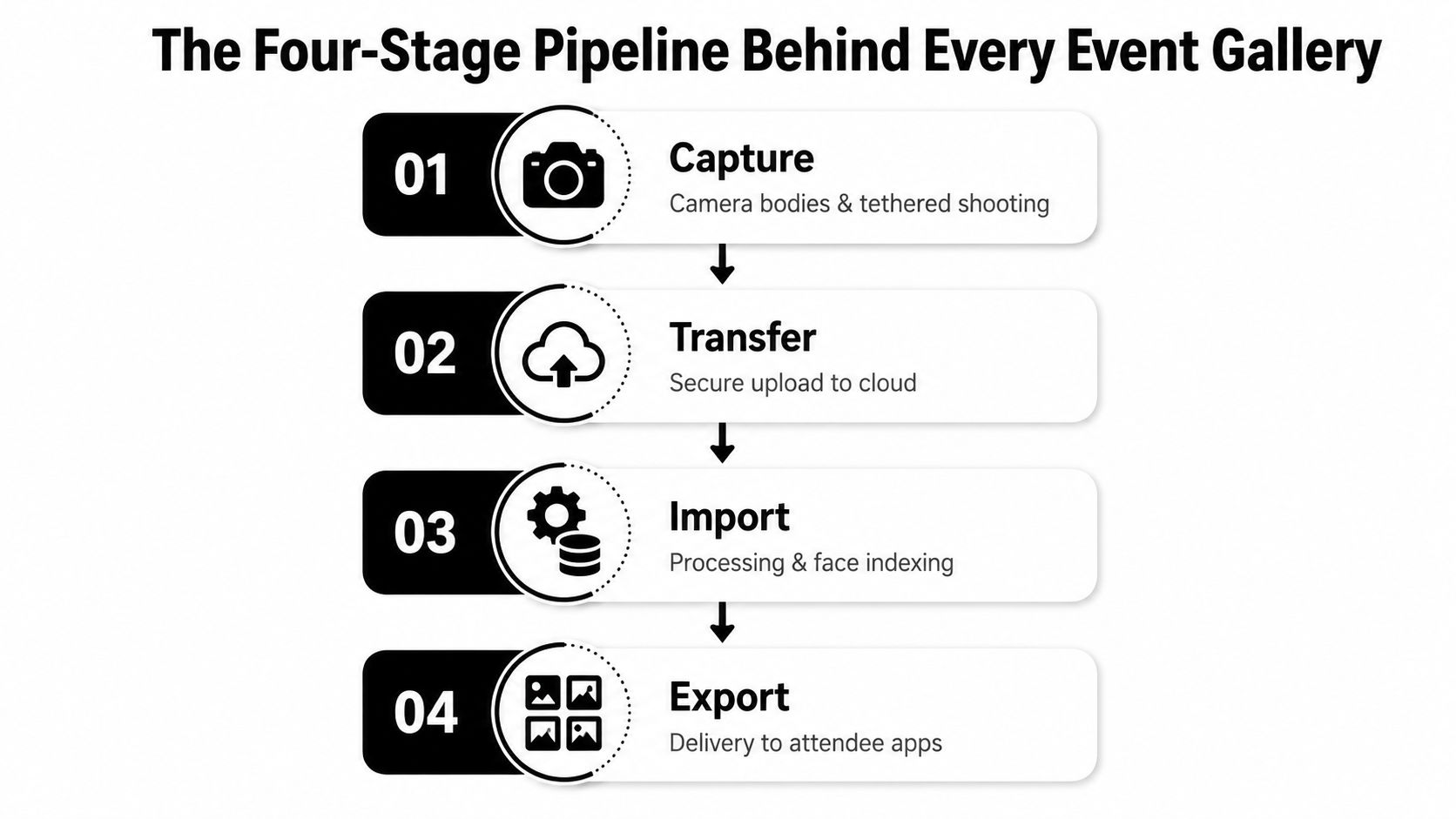
Every event gallery passes through four practical stages: capture, transfer, import, and export. The attendee sees the final gallery, but delays usually begin earlier, when files remain on a card, wait for a manual copy, or enter an editor without useful structure.
Capture starts the clock
The photographer may use mirrorless camera bodies, burst shooting, a tethered workstation, or a photo booth system. Capture choices affect file volume and delivery options. A tethered setup can send selected images to a nearby computer during the event, while a card-based workflow may wait until a photographer reaches an ingest station.
Transfer decides whether files are available
Transfer moves media from the camera to the working environment. Common routes include an SD card reader, a fast SSD, a tethering application, or direct Wi-Fi upload to a cloud service. The four-stage post-processing workflow described by Jack Nichols identifies transfer and import as common operational bottlenecks because those stages determine when files become searchable and shareable.
A photographer might create a staging folder by event block, such as arrivals, keynote, dinner, or dance floor. That structure helps the team avoid mixing separate sessions and makes it easier to release a clean first batch instead of waiting for the entire archive.
Import turns files into usable media
Import may include bringing RAW files into Lightroom, generating JPEG previews, reading EXIF data, applying event or photographer metadata, and arranging folders. An editor can then make an initial pass for exposure, cropping, color, and obvious duplicates. A face-aware system can index suitable images after import, but it still depends on correctly transferred and readable files.
Export creates the attendee experience
Export sends edited images into the gallery or distribution system. A team may apply watermarks, pricing rules, access permissions, branded frames, or download settings. The platform then generates the shareable event photo link and, when supported, a QR code.
You can use a workflow such as Saucial's photo upload page as one example of the handoff between edited media and attendee delivery. The principle applies across tools: Lightroom, Capture One, ingest software, cloud storage, and gallery platforms must pass files forward without unnecessary manual work.
Operational rule: A fast camera workflow can't rescue a slow transfer, disorganized import, or delayed export.
Event teams should test the entire chain before the doors open. If attendees expect fresh access within the first day, every stage needs an owner, a backup path, and a clear release decision.
How Selfie Matching Finds Your Photos
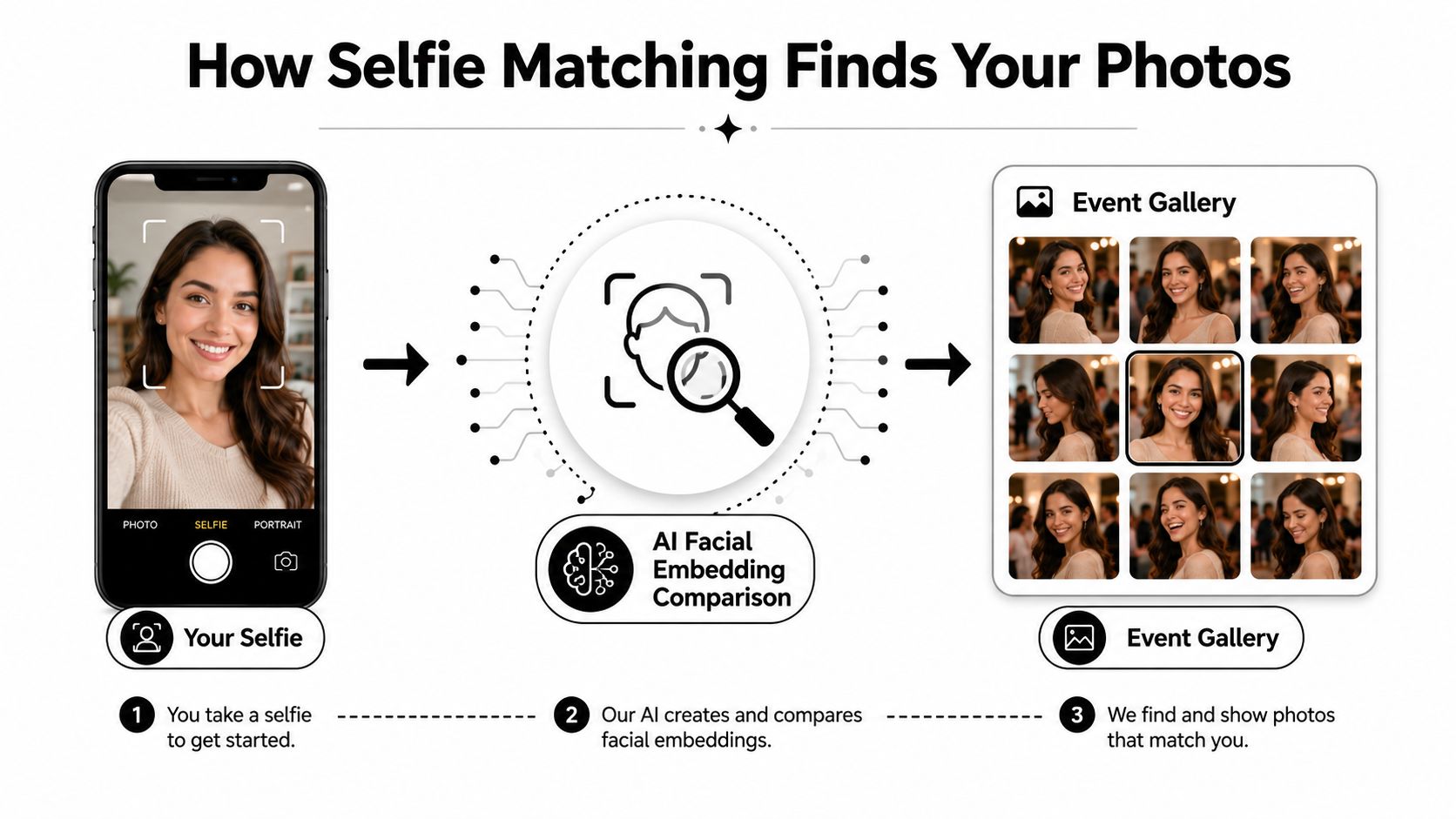
Selfie matching gives attendees a personal search layer over a shared event gallery. The flow is straightforward, but organizers should understand what happens to the selfie and the facial data behind the interface.
The attendee-facing sequence
- Entry: The guest scans a QR code, opens an event photo sharing link, or taps a message.
- Selfie: The guest takes a selfie or selects one from the phone.
- Comparison: The system compares the face in that image with faces indexed in the event gallery.
- Results: The gallery returns images in which the matching face appears.
- Action: The attendee previews, downloads, saves, shares, or purchases an available image.
Technically, the system generally creates a mathematical representation of facial features, often called an embedding, and compares that representation with indexed faces in event images. The attendee doesn't need to know the filenames or scroll through every frame. The search is based on visual similarity.
Two ways vendors can perform the match
With on-device face clustering, detection and comparison happen locally on thumbnails or cached assets. The technical discussion of local-first face matching describes this pattern as a way to avoid uploading raw facial geometry while supporting low-latency retrieval.
A server-side system uploads images or facial representations to a cloud pipeline. That approach can support centralized processing and model updates, but it creates a larger data lifecycle for the organizer to govern. The vendor needs clear rules for uploads, retention, deletion, access, and possible model-training use.
Questions to ask before choosing a vendor
Ask whether the selfie is stored, whether facial vectors are retained, where processing occurs, and how an organizer deletes the data. Also ask what happens when the system finds no match, how attendees opt out, and whether the gallery can provide manual browsing for people who don't want to use face matching.
A claim of “AI facial recognition event gallery” isn't enough. The vendor should explain the processing path in plain language and give the organizer controls that work after launch, not just during setup.
Distribution Channels That Get Photos Into Guests' Hands
A guest may leave with great memories and never see the gallery if the delivery route is unclear. Choose each channel according to when the guest encounters it, whether access requires permission, and how much follow-up the organizing team can handle.
| Channel | Speed to Guest | Friction | Best For | Key Limit |
|---|---|---|---|---|
| Shareable link | Immediate | Low | Event websites, apps, welcome slides | Can be forwarded beyond the intended audience |
| On-site QR code | Immediate | Very low | Registration desks, exits, bars, sponsor areas | Requires visible placement and a working phone camera |
| SMS invitation | Fast | Low for opted-in guests | Gated attendee lists and direct reminders | Requires consent and accurate mobile numbers |
| Email invitation | Fast to moderate | Moderate | Recaps, newsletters, archive access | Messages can be missed or delayed |
| Social or direct-message sharing | Fast for highlights | Variable | Public promotion and organizer-owned moments | Poor fit for private attendee identification |
Timing changes how guests use the gallery. One event-industry benchmark reports that 69% of guests share event photos within 24 hours, with most sharing occurring in the first two hours and engagement dropping by 80% after that early period. The same event photography benchmark reports that same-day delivery produces 4.2 times more social shares than traditional post-production timelines.
Match the channel to the moment
At the venue, a QR code works like a signpost placed along the guest journey. Put it near registration, the bar, the photo booth, or the exit, then state exactly what it opens. “Scan to find your event photos” gives the guest a clear action, while an unexplained decorative code creates hesitation.
SMS fits a known, opted-in audience and can lead directly to a gated gallery. Email suits a polished recap, a larger archive, or a follow-up containing sponsor content and print options. Social posts and direct messages are better for organizer-approved highlights, especially when the full gallery uses selfie matching or contains identifiable attendees.
The same gallery link can support all of these routes. It may appear in an event app, registration page, welcome slide, QR code, or post-event message, while the access settings remain consistent.
Practical rule: Lead with QR access during the event, follow with permission-based SMS or email, and use social channels for approved highlights.
That sequence connects delivery to the attendee experience. A guest can discover the gallery on-site, return through a direct reminder, and share selected images without turning a private identification workflow into a public album.
The Find My Photos Experience for Attendees
The attendee journey should feel shorter than the old alternative. A guest scans a QR code, opens the gallery, takes a selfie, and receives a personal result set instead of searching through an unstructured album.
The entry point might be a QR code at a gala, a link in a conference app, or an SMS invitation after a sports tournament. From there, the guest can choose between manual browsing and selfie matching. Manual browsing matters because some attendees won't want to submit a selfie, while selfie search helps people who appear in many images or don't know when they were photographed.
A generic cloud folder creates a different workload. The guest may need to scroll through thousands of images, guess filenames, or ask the organizer for help. The industry benchmark cited earlier says a third of attendees never download photos when organizers use generic cloud-folder links. That finding supports a practical conclusion: access isn't the same as retrieval.
What a good retrieval flow provides
- A private result set: The attendee sees likely matches rather than starting in a fully open album.
- A mobile-native action: Downloading or sharing should work from the phone without a desktop handoff.
- A fallback route: Manual browsing or a support contact helps when the match is incomplete.
- A clear permission boundary: The attendee should understand whether the gallery is public, gated, or invite-only.
- An optional save path: Guests may save an album, return later, or continue to a print or download offer.
An organizer can connect the entry experience to a service such as Saucial's authentication flow when the chosen setup requires attendee verification. The broader principle is simple: the guest shouldn't have to understand the platform's internal processing to find a useful photo.
Self-service also reduces repetitive requests. Instead of answering “Can you find my photos?” one person at a time, the organizer gives every attendee the same retrieval path and reserves human help for exceptions.
Privacy, Consent, and Organizer Controls
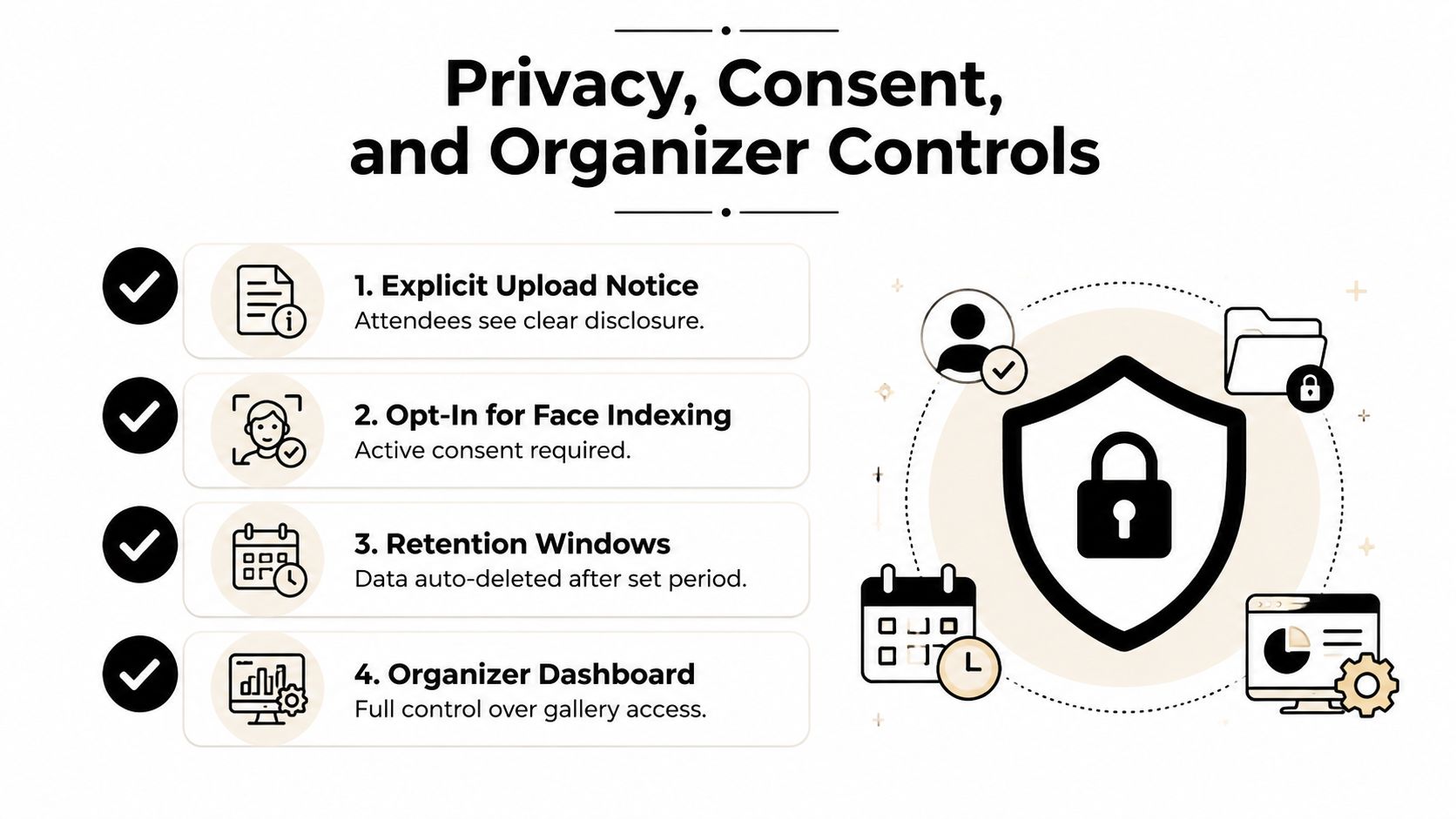
Face-aware galleries require more than a polished interface. Consent is part of the product experience, not paperwork that can be added after the upload. Attendees should know that photos are being processed, whether face matching is available, and what happens to any selfie or facial representation they provide.
Responsible systems follow a clear lifecycle:
- Upload notice: Tell attendees what the gallery contains and how access works.
- Face-matching choice: Require active opt-in before processing a selfie or indexing a face for retrieval.
- Limited use: Use the selfie for the stated matching purpose, not unrelated profiling.
- Retention control: Set a deletion point for selfies, facial vectors, and gallery data.
- Access management: Limit VIP, sponsor, staff, or private folders to the intended audience.
- Removal path: Give organizers and attendees a way to request unlisting or deletion where applicable.
The security guidance from Eventiere's security information emphasizes separating face vectors from personal details and deleting facial data after processing. Its practical privacy guidance also supports using a selfie only for matching rather than storing it unnecessarily.
On-device and server-side privacy
On-device matching computes and compares facial representations on the guest's device or another local environment. Raw selfie data and biometric representations don't need to travel to a vendor's server, which can reduce the amount of sensitive material held centrally.
Server-side matching can be useful for centralized event processing, but it demands stronger controls. The organizer should know where the files go, who can access them, how long the system retains data, and whether the vendor uses any submitted material to train models.
Before signing off, ask for a data-processing agreement, a deletion timeline, an opt-out route, watermark controls, access logs, and a privacy notice that guests can read before scanning. Your organizer settings controls should support the rules promised at registration, not leave the team dependent on a vendor's support queue.
How Photographers Turn Delivery Into Revenue
Direct attendee delivery changes the photographer's role. Instead of handing the organizer a finished archive and losing visibility after delivery, the photographer can treat the gallery as a controlled storefront for approved products and upgrades.
A wedding gallery might offer digital downloads, print fulfillment, and curated collections. A gala fundraiser could present sponsor-approved highlights. A sports tournament photographer might separate team galleries, action collections, and individual image purchases. A trade show photographer could offer branded event sets while keeping personal attendee images within the organizer's access rules.
Revenue options without inventing a price list
Because pricing depends on the photographer, lab, event contract, and audience, the right approach is to define product types and purchase triggers, not assume a universal price.
| Revenue Stream | Typical Price Point | Conversion Driver |
|---|---|---|
| Digital download | Set by photographer | Immediate access to a meaningful personal image |
| Print order | Set by photographer and lab | Physical display value and fulfillment convenience |
| Premium collection | Set by package design | Curated coverage of a ceremony, reception, or team |
| Featured edit | Set by editing scope | More polished treatment or branded presentation |
| Sponsored frame or set | Set by event agreement | Brand visibility within approved event content |
Watermarked previews can let attendees evaluate an image before purchase. A photographer may also release a first set quickly, then add curated collections after reviewing the complete archive. Notifications tied to selfie-matched results can shorten the distance between gallery discovery and a purchase decision, provided the attendee has agreed to receive those messages.
The event photography benchmark reports that same-day delivery generates 4.2 times more social shares than traditional post-production timelines. For photographers, that speed has commercial value because a fresh image is easier for an attendee to recognize, share, and consider buying than an old link buried in an inbox.
The second-order benefit is information. Product views, downloads, print requests, and popular collections can show which moments matter most. Photographers can use those signals to refine shot lists and editing priorities, while organizers can learn which event moments create the strongest post-event engagement.
A Recommended Workflow From Upload to Follow-Up
A reliable workflow starts before the event. Picture an organizer opening the gallery after the last guest leaves and finding missing consent language, untested uploads, or unclear ownership. That delay affects both the attendee experience and the photographer's ability to deliver and sell approved images. Agree on access, consent, delivery responsibilities, and ownership before displaying the gallery link.
Before the event
Set the gallery rules first. Choose open access, gated access, invite-only viewing, or separate folders for staff, sponsors, VIPs, teams, and attendees. Prepare the upload notice and face-matching disclosure in language guests can understand, including how to opt out and request removal.
Then test the media pipeline:
- Assign the capture owner: Confirm who shoots, who selects, and who handles urgent uploads.
- Prepare the transfer path: Test card readers, tethering, local storage, and network access.
- Define the first release: Decide whether the initial gallery contains highlights, all approved images, or a staged selection.
- Prepare distribution assets: Generate the event photo sharing link, QR code, registration copy, and message templates.
- Confirm privacy controls: Set retention, deletion, opt-out, unlisting, and access procedures.
The test should follow the path from camera card to staging folder, processing queue, attendee result, and organizer review. A successful test confirms more than whether files upload. It shows who can see them and what happens when a guest declines face matching.
During the event
The photographer captures images and moves selected batches into a staging folder. Staff can direct guests to browse the gallery or use Find My Photos, while making clear that a selfie is optional. That explanation matters because a fast retrieval experience should not feel like a requirement to submit biometric-related information.
Assign one person to watch transfer status, flag duplicate or unwanted images, and record incidents such as a disconnected network or mislabeled folder. This keeps operational problems from becoming attendee-facing confusion.
Immediately after
Complete the batch upload, run processing, review the first gallery release, and send the link through channels attendees already use. The first message should explain what opens, how to search, how to request help, and how to avoid face matching if preferred.
Release approved material in stages when needed. Early highlights give attendees something useful to share, while later uploads can receive stronger selection, editing, or privacy review before publication.
Later follow-up
Add approved highlights, curated collections, print options, or premium edits after the initial release. A later message can provide archive access, explain deletion timing, request feedback, or invite referrals. Keep those actions separate from the first retrieval instruction.
For a wedding, this might mean a reception gallery followed by an album collection. For a conference, it could mean attendee portraits followed by speaker highlights. School and alumni events may require tighter rules for minors, private groups, and family permissions.
Use this final checklist:
- Before: Consent, access, retention, pricing, and test uploads.
- During: Capture, transfer, guest instructions, and issue tracking.
- After: Processing, distribution, retrieval support, and approved monetization.
- Follow-up: Archive access, deletion communication, feedback, and referral requests.
Saucial provides organizers and photographers with an event photo sharing link and QR code gallery, plus selfie-based retrieval so attendees can find photos without scrolling through a crowded folder. Visit Saucial to review its upload, face processing, private retrieval, and attendee monetization workflow.



