Find Photos by Face: Event Guide

The event ended hours ago, but the photo problem is only starting. Your photographer has uploaded a crowded folder, guests are asking where the gala portraits went, and someone is already scrolling through hundreds of images looking for one team photo. By the time attendees find anything worth sharing, the excitement has faded.
A find photos by face workflow can remove that friction. But face matching isn't a magic button, and it shouldn't be treated as one. The events that benefit most are the ones that combine fast retrieval with clear consent, conservative matching, human review, and a usable alternative for guests who don't want to submit a selfie or whose photos can't be matched.
Why Manual Searching Ruins Post-Event Engagement
At a fundraising gala, the photographer may capture arrivals, sponsor backdrops, table groups, speeches, auction winners, and candid conversations. Guests want the photo where they met a donor, spoke with a colleague, or appeared beside the event chair. A generic folder gives everyone the same problem: search through an entire collection and hope the right moment appears.
The same issue shows up at sports tournaments. A parent may know their child played in a particular match, but not the file name, upload order, or exact time. A school or university event creates another version of the problem, with graduates, staff, speakers, and volunteers all trying to locate themselves in a large gallery.
Practical rule: If a guest has to understand your photographer's filing system, the distribution experience is already too difficult.
Password-protected galleries improve access control, but they don't solve discovery. A shared link can still lead to a long sequence of thumbnails, while manual tagging requires the photographer to identify people, assign labels, and respond to individual requests. That administrative work competes with editing, delivery, print sales, and the next booking.
The experience gap after the event
Guests now expect a direct route to relevant content. They're comfortable scanning a QR code, opening a mobile gallery, and using a simple “Find My Photos” prompt. They don't expect to spend their evening checking every image in a cluttered folder.
A face-based retrieval tool changes the journey from browse everything to retrieve what includes me. The attendee submits a selfie, the system compares it with faces detected in the approved event gallery, and the interface returns a ranked selection for review. This is useful for a trade show attendee searching for booth photos, a tournament participant looking for action shots, or a gala guest looking for portraits.
The practical recommendation is straightforward: stop treating photo delivery as a storage task. Use an event photo sharing link that leads to a controlled gallery, explains what guests can do, and gives them a fast path to relevant images. The technology should support the guest experience, not replace basic organization and communication.
Setting Up a Selfie Photo Matching Workflow
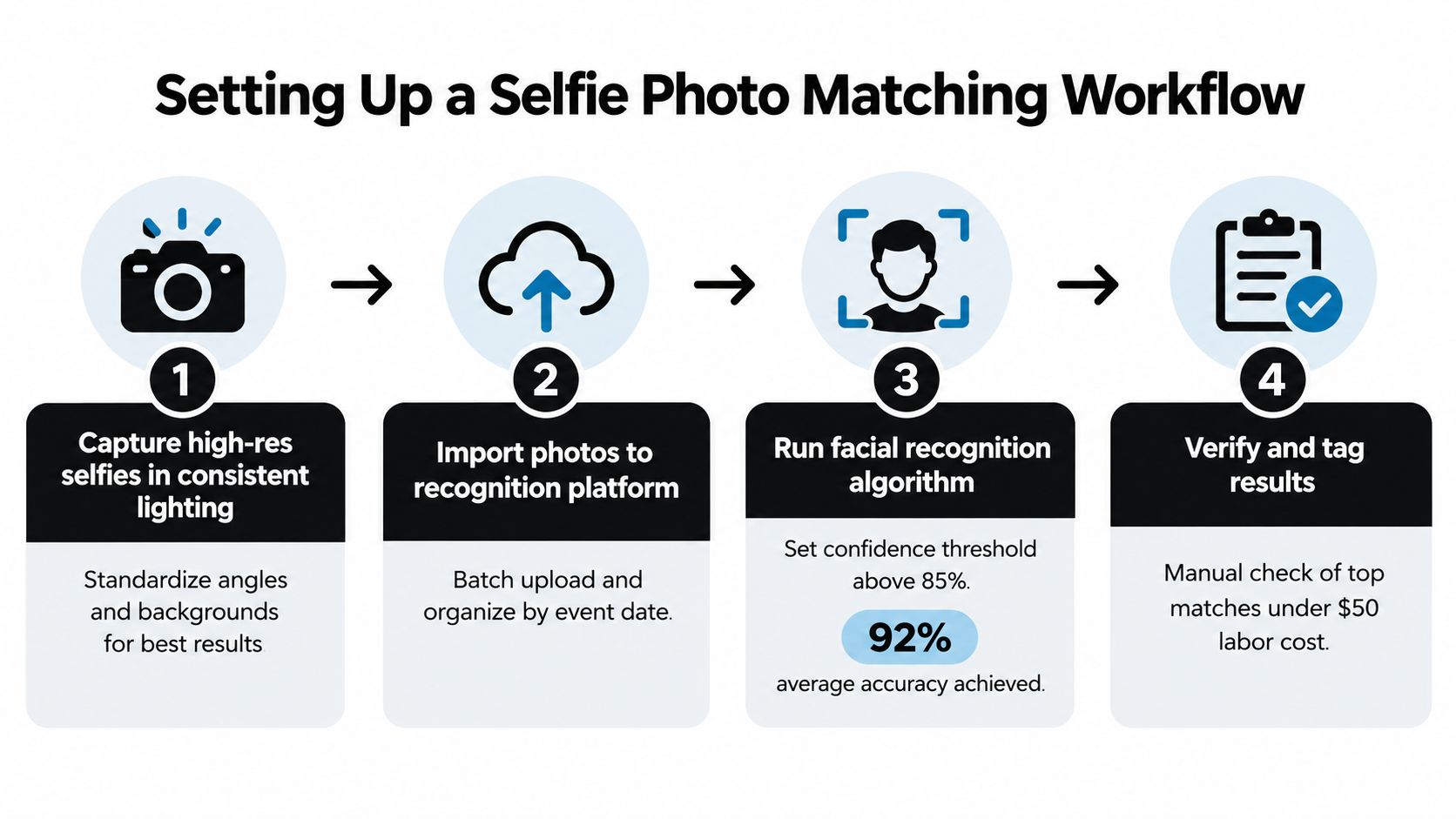
A reliable workflow starts before the first image is uploaded. Decide what the gallery contains, who can access it, how long it remains available, and what happens when matching produces an uncertain result. Then make the attendee journey simple enough to complete on a phone without assistance.
Prepare the gallery before inviting guests
Start with the approved event set. Remove test images, duplicates, accidental captures, and photographs that shouldn't be distributed. Organize the remaining files by event, date, activity, or photographer so staff can investigate a missing match without searching blindly.
Choose a platform that supports batch upload, a shareable gallery, and attendee-controlled retrieval. Saucial is one example of a service that lets organizers or photographers upload event photos, create a private retrieval experience, and share it through a link or QR code. You can begin the upload workflow through Saucial's upload page, but you should still test the resulting guest journey before publishing it.
Design the selfie step for real event conditions
Give attendees direct instructions:
- Use even light: Ask for a front-facing selfie away from harsh backlighting.
- Keep the face visible: Remove sunglasses, hats, and anything covering key facial features where practical.
- Use one person: A single face makes the retrieval request easier to interpret.
- Review before submitting: Let guests retake a blurry, dark, or heavily angled selfie.
- Explain the purpose: Tell them the selfie is used to search the event gallery, not added to a public directory without their knowledge.
The system should process the uploaded gallery first, detect and align faces, reject or flag poor-quality crops, create normalized representations for comparison, and return confidence-ranked results. It shouldn't expose every borderline result just because the algorithm found a resemblance.
Publish the route where guests already look
Use the same access path consistently. Add the event photo sharing link to the follow-up email, event website, WhatsApp message, organizer newsletter, and photographer's delivery note. A QR code photo gallery is useful at the venue, especially near registration, the exit, sponsor areas, and any printed post-event material.
Include a short explanation beside the QR code. “Scan to find photos you appear in. You can also browse the full approved gallery” is clearer than a vague “AI photo experience” label. The second sentence matters because it signals that attendees retain a non-biometric route.
Watch the retrieval experience on different phones and connections. A guest should know whether the system is still processing, whether results are ready, and how to report a wrong match. After launch, track retrieval latency, top-result precision, missed-photo reports, duplicate results, and wrong-person reports by photo type. Portraits, group scenes, sports action, and low-light images should not be treated as one uniform test set.
Understanding Accuracy Limits and Demographic Realities
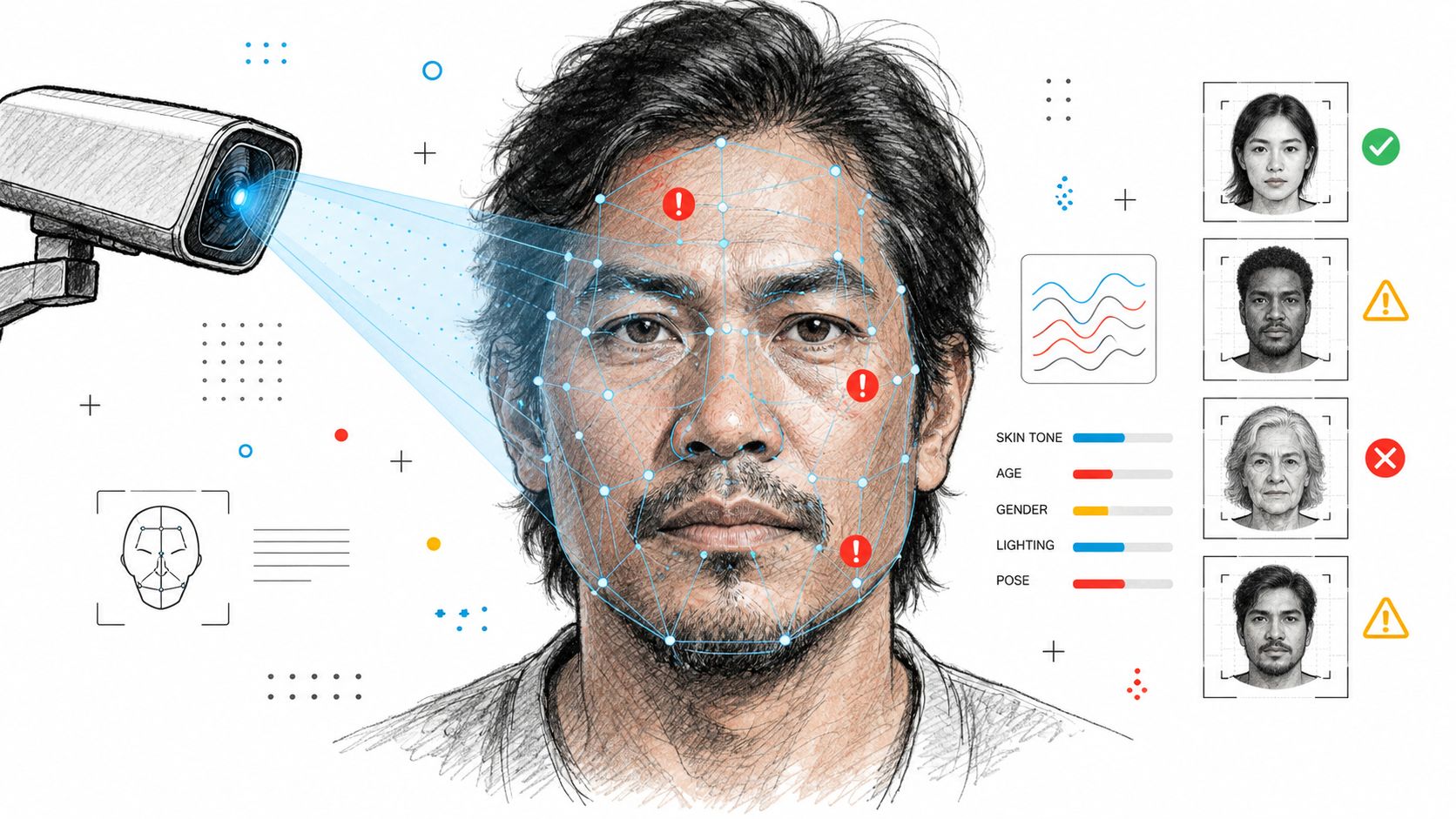
Face matching works best when the input and gallery images are clear, frontal, and well lit. Event photography rarely stays within those conditions. Guests turn away, move through uneven lighting, wear glasses or hats, appear in groups, and sometimes show only part of a face.
A face-image research review identifies pose variation, illumination, resolution, occlusion, and motion blur as major sources of recognition degradation, while extreme lighting can destroy facial information that enhancement can't recover. That means a missing result doesn't prove the attendee wasn't photographed. It may mean the face crop was too small, blurred, shadowed, or obstructed. See the practical controls available in Saucial's settings, then test them against representative event images rather than relying on ideal sample portraits.
What the NIST evaluation tells organizers
The U.S. National Institute of Standards and Technology published a major evaluation in December 2019 using images from more than 24 countries and seven global regions. NIST found demographic differences in the majority of tested algorithms, so matching accuracy varied with characteristics including race, sex, and age. For one-to-one photo matching, false-positive rates were often higher for Asian and African American faces than for Caucasian faces, with algorithm-dependent differences sometimes ranging from 10 to 100 times. NIST also reported false-positive rates generally 2 to 5 times higher for women than men, with differences varying by algorithm, country of origin, and age. Older adults and children also experienced higher false positives. NIST's evaluation is a warning against presenting one overall accuracy figure as if it describes every event.
Those results came from controlled testing and shouldn't be presented as an expected event-gallery success rate. Candid event images introduce additional variables, so calibrate thresholds using your own representative material. A conservative threshold may miss some real photos, while a permissive threshold may return images belonging to someone else.
Test the conditions that actually matter
Build a small internal test set covering:
- Portraits: Clear, frontal images with visible faces.
- Groups: Several faces at different distances and angles.
- Action: Motion, changing expressions, and sports movement.
- Low light: Dinners, receptions, stages, and indoor venues.
- Occlusion: Glasses, hats, hair, microphones, and partial profiles.
- Age and demographic variation: The people your event serves.
Measure precision among the top results, missed-photo rate, wrong-person rate, duplicate retrievals, and median response time. Don't publish a promise that every attendee will receive every image. Publish a clear recovery route instead.
Prioritizing Privacy and Consent in Event Workflows
A guest scans the QR code after your event, uploads a selfie, and expects a quick path to their photos. That moment can build trust or break it. If your consent flow is vague, hidden, or bundled with unrelated permissions, the feature stops feeling helpful and starts feeling invasive.
A selfie-matching workflow processes more than a normal gallery visit. In the EU and EEA, facial recognition used to uniquely identify a person involves special-category biometric data under GDPR. The Dutch Data Protection Authority guidance makes the practical standard clear. Organizations generally need explicit, freely given, purpose-specific consent, must explain the controller, purpose, recipients, retention period, withdrawal and deletion rights, and must offer a real non-biometric alternative.
The UK Information Commissioner's Office takes a similar position. Biometric recognition requires both a lawful basis and a separate condition for processing special-category data. Specific, informed consent is often the relevant condition, but the right setup depends on the organizer, the purpose, and the jurisdiction. Do not copy a generic checkbox and call it compliance. Get qualified privacy advice for the event you are running.
Consent must be visible and specific
Put the notice where the decision happens, beside the QR code, gallery link, or selfie upload control. Explain who controls the processing, why the selfie is needed, what data is created, who can access it, how long it will be kept, and how the attendee can withdraw consent or request deletion. If you are using Saucial, configure your consent and access settings to match that wording instead of hiding the details in a separate policy page.
Keep face-matching consent separate from marketing, sponsor outreach, and user-generated content reuse. Someone who agrees to find their event photos has not agreed to promotional emails or permission for you to reuse their selfie.
Use this as your minimum workflow standard:
- Affirmative opt-in: Silence, attendance, or a pre-ticked box is not permission.
- Equal alternative access: Let people browse an approved gallery or use another search route without biometric processing.
- Restricted access: Limit organizer and photographer permissions to the people who need them.
- Defined deletion: Set automatic deletion deadlines for selfies, embeddings, logs, and temporary processing files.
- Documented actions: Record consent, withdrawal, deletion, retrieval, and threshold decisions.
- Clear correction: Give attendees an obvious way to report “not me” results.
Trust shapes participation rates. Pew's March 2022 research found that 46% of U.S. adults said police use of facial-recognition technology was a good idea for society, while 27% called it a bad idea and 27% were unsure. The same survey recorded concerns about location tracking, heavier monitoring in Black and Hispanic neighborhoods, and false arrests. Those findings are about law enforcement, not event galleries, but they explain why guests bring real skepticism to any face-based system. Pew Research Center's survey is useful context when you design consent language, retention rules, and opt-out paths.
Call the feature what it is. Explain it plainly. Give people a genuine choice, short retention, and a clear exit. That is how you protect guest experience and the event's reputation.
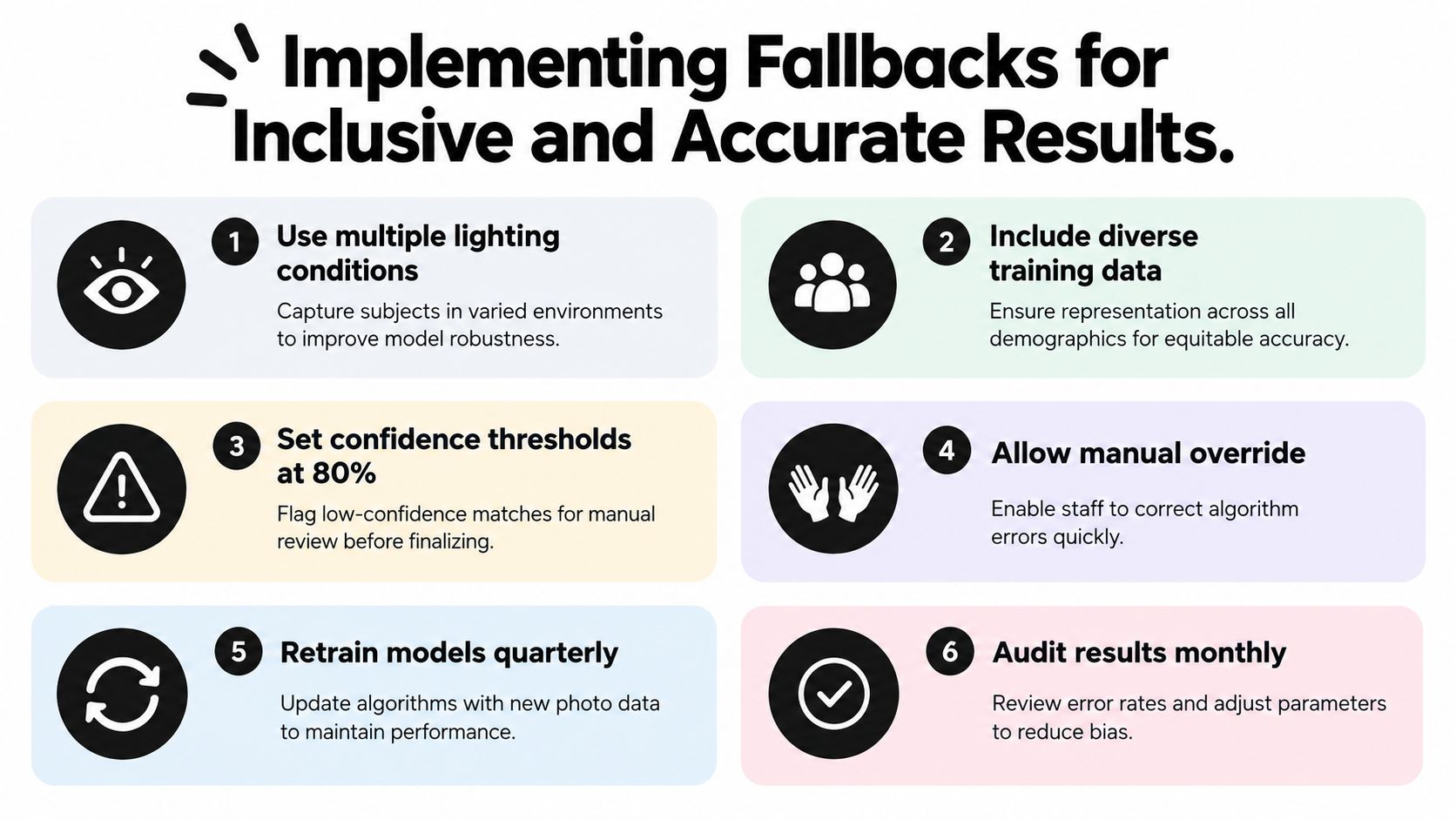
Implementing Fallbacks for Inclusive and Accurate Results
The strongest workflow assumes that some matches will fail. That isn't a defect to conceal. It's a normal consequence of candid photography, and your recovery plan determines whether the guest remembers the event as thoughtful or frustrating.
A 2025 photo-retrieval study reported 90% accuracy for single-face recognition and 78% average accuracy in group photos, with lighting and varied angles affecting results. Those figures come from the cited study, not a guarantee for your gallery, but the gap illustrates why group photos need separate testing and why “no results” must never be treated as proof that someone is absent. The study's published paper supports a more realistic expectation.
Build recovery into the interface
Offer alternatives next to the selfie control, not buried in a support page:
- Browse by activity: Separate arrivals, ceremony, matches, panels, performances, and sponsor areas.
- Search by event detail: Use a name, bib number, table, team, school, or session where appropriate.
- Request human help: Give guests a direct route to the organizer or photographer.
- Curate difficult sets: Manually review group photographs, podium images, and key sponsor activations.
- Allow “not me” reports: Remove or suppress wrong-person results quickly.
- Preserve consent choices: Never require a guest to submit repeated selfies after declining biometric search.
The fallback gallery should be equally usable, not a deliberately weakened version of the experience. A person wearing a head covering, a child whose consent requires additional care, an attendee with an obscured face, or someone who does not want face matching should still be able to access approved event photographs.
Review before monetizing attention
Photographers often want to offer downloads, prints, premium edits, or featured collections after retrieval. Those options can work, but don't place an upsell beside an unverified match. A wrong-person result is a privacy incident and a commercial failure at the same time.
Before enabling sales or public sharing, review false matches, missed images, and deletion requests. Segment the audit by lighting, photo type, age, sex, region, and skin tone where lawful and appropriate. Keep the model's output as a ranked suggestion, while a person retains control over corrections and sensitive publication decisions.
The operational standard is simple: fast retrieval, conservative exposure, and a reliable human route. That combination serves guests better than a system that claims certainty, hides its limits, and leaves unsuccessful users with nowhere to go.
Saucial provides a private event photo sharing workflow where attendees can use a selfie to retrieve matching images through a shareable link or QR code gallery. For your next gala, tournament, conference, or festival, review the consent notice, test representative photos, define the fallback route, and visit Saucial to assess whether its workflow fits your event.