Festival Photo Gallery Guide for Organizers
Festivals and concerts in the Netherlands drew 30.5 million visits in 2024, according to Respons figures commissioned by the Association of Event Makers. A crowd that size will not scroll a single unsorted folder after the headliner. They will share a photo when they can find themselves, and they will ignore the gallery when they cannot.
Treat the festival photo gallery as a permission-first retrieval system with more than one door. A selfie is one door. A stage-and-time browse is another. A person at a desk is the third. Speed still matters, but a faster dump of every frame just moves the mess from a hard drive onto a link.
Festival Photo Sharing Rates Worth Targeting
Tagkast's review of branded-photo sharing covered 2,398 live events worldwide from 1 January 2014 through 31 March 2015, from a few hundred people to hundreds of thousands. Attendees could receive a branded photo and pass it on by email or social. Averages split hard by format. Concerts and music events hit 53%, fundraisers 51%, bar events and recreational activities 50% each, cultural events and festivals 45%, sporting events 45%, auto shows 34%, and conferences and expos 22%. Fundraisers ran from about 30% to 70%.
| Event type | Average share rate | Planning read |
|---|---|---|
| Concerts and music events | 53% | Highest bar; music festivals can aim above the cultural-event line |
| Fundraisers | 51% | Loyal crowds swing widely with motivation and handoff quality |
| Bar events | 50% | Social, small-group photos travel easily |
| Recreational activities | 50% | Similar to bars; people share the group they came with |
| Cultural events and festivals | 45% | Use 45% as the festival baseline |
| Sporting events | 45% | Same baseline; participant photos outperform crowd wides |
| Auto shows | 34% | Weaker unless the attendee is in the frame |
| Conferences and expos | 22% | Do not copy a conference folder model for a festival |
Use 45% as the festival baseline, not a promise. A loyal hometown crowd can behave like those fundraisers and clear the line. A clumsy handoff, a dead QR, or a gallery that is one unscannable pile can drop you toward the conference end of the table. The gap is the work.
What 45 percent means on the ground
Say a community festival draws 4,000 people and the frames are easy to find. 45% is about 1,800 attendee posts, not 1,800 likes on the organizer account. That only lands if the person in the picture can pull it without a scavenger hunt. Wide shots of the main stage rarely do that job. A frame with the attendee and the group they came with does.
Practical rule: Set the share target before gates open, then judge the gallery against that line, not against how fast the upload bar finished.
Three levers and the target they serve
Three things sit inside that gap between a conference-style 22% and a music-event 53%.
- First publish time. A small hero set should be live during the event or the same night. Waiting until Monday trains people to post their own phone snaps and forget yours.
- Who is in the frame. Participant and small-group photos travel. Empty stages and sponsor walls do not, unless the attendee is standing in them.
- Obvious consent and branding. People share when the credit, the crop, and the permission are visible. Hidden settings create support mail, not posts.
The target for the rest of the weekend is simple. Heroes first, the full festival photo gallery in labeled batches after that, and a tracked share rate set against the 45% line. Do not start the upload steps until that target is written down where the photo lead and the marketing lead can both see it.
How to Publish a Festival Gallery in Batches
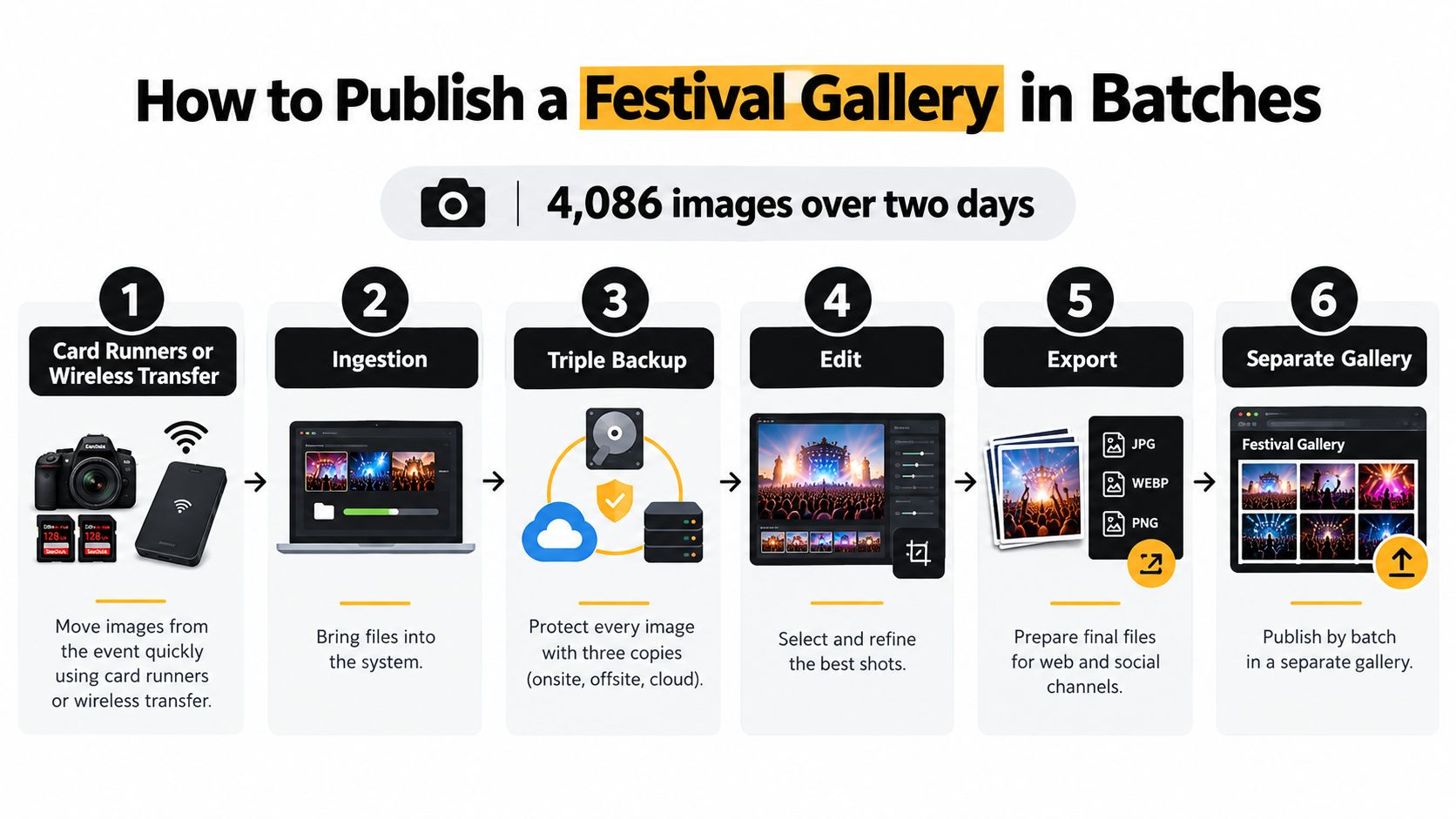
Delivery is a pipeline, not a single drop at 2 a.m. A documented event-photography workflow on Image and Film's case study processed 4,086 images over two days with card runners or wireless transfer, ingestion, a triple backup, an edit, an export, and separate gallery links. Copy that shape, then add a face pass only after the consent notice is already on the gates.
The batch path looks like this.
The on-site sequence
- Move cards continuously. A runner or a wireless transfer gets files off the camera body while the set is still going. If the card in the camera is the only copy, one lost pouch ends the night. Runners fail when nobody owns the handoff log, so name one person and a bin.
- Ingest on one machine. Use a dedicated on-site workstation, not a photographer's editing laptop that also runs livestream graphics. Confirm the file count against the card before anyone formats it. A mismatch here is how "we had more in camera" becomes a Monday argument.
- Make three backups before any delete. Two drives in the trailer and one off the site, or two local copies plus a verified offload. Uploading before that third copy checks out is the failure that ends careers, not weekends. Do not trust a progress bar you did not reopen.
- Cull, then one light grade. Kill blinks, duplicates, and unusable backs of heads. Apply one consistent grade. A hero retouch on every file will miss the midnight window. Inconsistent filenames are the quiet version of the same mistake, because the next batch cannot be sorted by stage.
- Confirm the gate notice, then publish the batch. The selfie wording and the opt-in have to be posted at every entrance before any face processing starts. After the backup check passes, drag the batch into the gallery. Organizers upload by dragging and dropping, and our AI processes faces in the background. Do not drop files that failed the backup check just to feel ahead.
- Ship a private link for that batch only. Start with 30 to 50 heroes from the opening parade or the first headliner. Web JPEGs, named by stage and time, sized for phones. Masters stay offline. Heavy full-resolution files on weak festival data are how a "live" gallery feels broken.
- Log the pipeline, not your mood. Minutes from capture to first publish, percent of files processed, failed or ambiguous matches, visits, shares, downloads, and privacy requests. If visits rise and shares do not, you got faster without getting more useful.
A short walk-through of the same handoff rhythm is worth ten minutes in the production meeting before load-in.
What actually blows the weekend
The repeats are boring and expensive. Publish before the third backup. Push unedited duplicates. Use messy filenames so batch two cannot be told from batch one. Serve huge files on a venue network. Hand out one folder nobody can scan. Any one of those will erase the share-rate target you set on paper.
If the headliner ends at 10 p.m., heroes should be live before midnight, and the rest should move overnight in labeled batches.
That clock is the standard. Total turnaround for all 4,000 frames is a vanity number if the first useful set missed the night people were still posting.
Selfie Matching With Consent and a Fallback
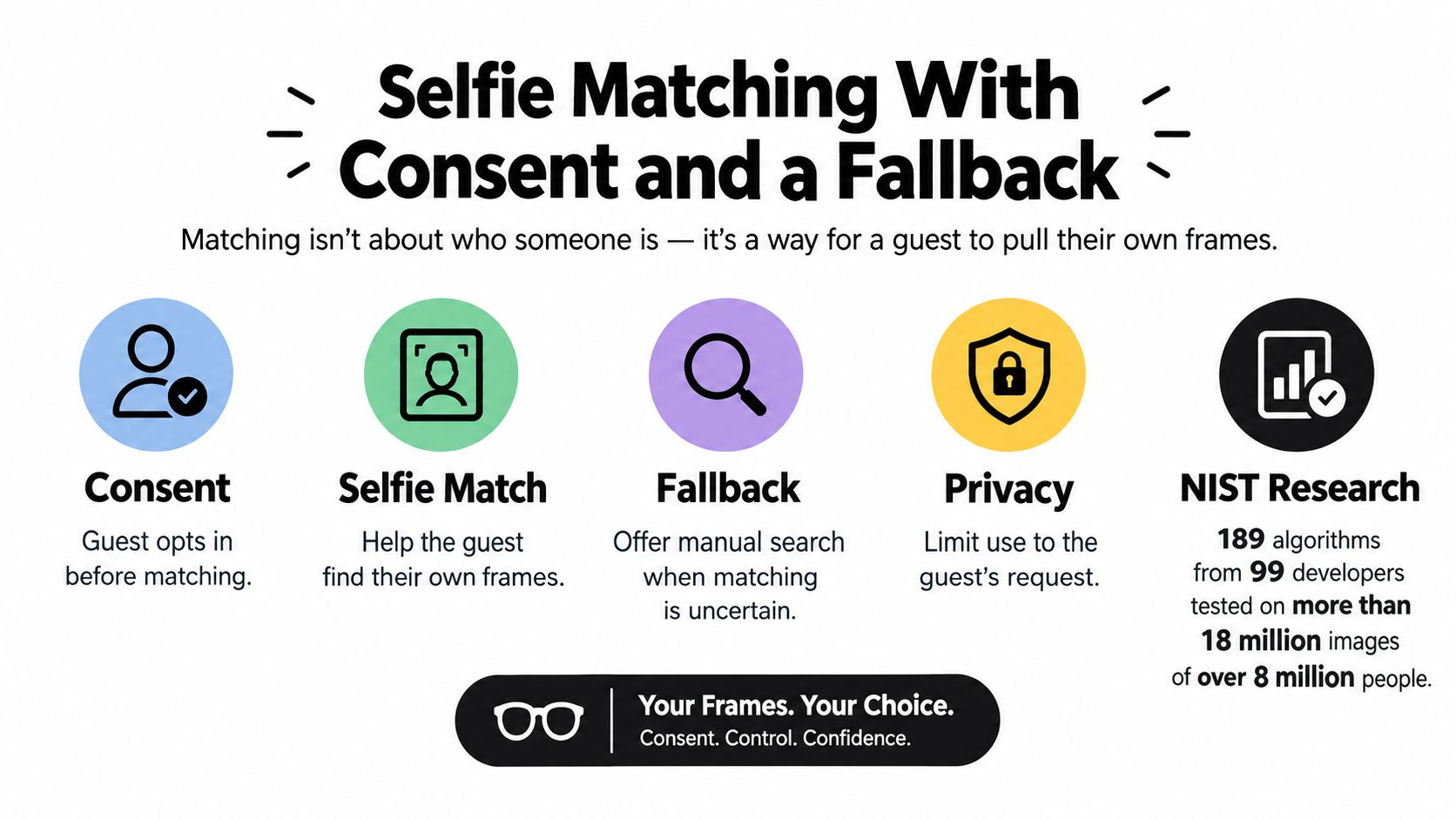
Matching is a way for a guest to pull their own frames. It is not a decision about who someone is. NIST's evaluation of face recognition software tested 189 algorithms from 99 developers on more than 18 million images of over 8 million people, and found demographic differentials in most systems. For some one-to-one matchers, false-positive rates for some Asian and African American populations were often 10 to 100 times higher than for Caucasian faces, depending on the algorithm. A festival crew that treats every hit as truth will show the wrong person someone else's night.
Set the controls before gates open
Build the guardrails in the order the crew will touch them.
- Write two permissions, not one. A photo waiver or a line on the ticket is agreement to be photographed. It is not consent to build a face template. Say that split in the pre-event email and on the entrance sign, in the same words.
- Make the selfie optional. Scanning is a convenience, not a condition of entry. People who skip the camera still get a manual browse by stage and time.
- State storage, access, and deletion. Where templates sit, which staff can open them, a written retention window (I would use 30 days after the festival unless a longer sales window was disclosed up front), and the steps to delete or withdraw. Encrypt templates in transit and at rest. Sharing permissions stay under organizer control.
- Separate children, performers, and sponsors. No commercial use of a minor without a guardian path. No branded frame on a performer set without approval. Sponsor crops do not ride along on a guest's private match.
A general photography notice does not cover a face template. If the sign is vague, do not turn matching on.
Thresholds, Not me, and a real test
Require a confidence cutoff and suppress weak hits. Put a Not me control on every result so a bad match is a tap, not a complaint thread. Guests who do opt in take a selfie and instantly see the photos they appear in. That convenience is the point. It only stays trustworthy if low-confidence frames stay hidden.
Test the full path, not the model demo. Use your festival's light, hats, sunglasses, occlusion, crowd density, and the phones people carry. Log false matches and missed matches separately, and split them by lighting, angle, and demographic group before anyone loosens the cutoff. Tune conservatively. A missed photo is a support ticket. A false photo is someone else's image on a stranger's phone.
I would rather ship a stricter cutoff and a busy manual browse than a clever match that cannot explain its misses. The crew should be able to say, in one sentence at the info tent, what the selfie is for and how to get pictures without it.
Ways to Hand the Gallery to Attendees
Five routes cover a weekend. You do not need five tutorials. You need to know which door is for whom, and which failure kills it.
| Route | Best moment | Who it reaches | Main limit |
|---|---|---|---|
| QR code on site | During the festival | People still on the grounds with a phone | Weak signal or no camera permission |
| Unique sharing link | Same night via email, site, and social bio | Ticket and mailing list | Inbox delay and link buried in a long email |
| WhatsApp or SMS | Same night | Guests who opted into messages | Message cost and people who never opted in |
| Stage, time, or troupe filters | Anytime, especially after a selfie decline | Guests who skip biometrics | Slower than a match |
| Organizer-assisted request | Desk during the event, inbox after | Failed matches, older phones, no camera access | Staff time |
Organizers get one unique link and can share it on any channel. That same link is what you turn into the QR, the email, the site button, and the Instagram bio. Do not mint a new URL per channel or you will not know which door worked.
A default stack for one weekend
Print QR codes on wristbands, the side of stage screens, and volunteer lanyards for people still on the grounds. Send the link the same night by email, and mirror it on the festival site and the social bio. Use WhatsApp or SMS only for guests who already opted into messages. Leave stage, hour, and troupe filters on for anyone who refuses a selfie. Staff an assisted desk during the event and an inbox after it, with a promise to answer within one business day.
- QR plus link during the event. Catches people while they still care, and fails when the tower is saturated or the camera permission is refused.
- One message blast that night. Three heroes and the link. A long letter buries it.
- Filters always on. Slower than a match, and that is acceptable. Equivalent access is the point.
- Assisted requests. Older phones, failed matches, and guests who cannot use a camera. Budget the staff hours or the inbox will rot.
Time and Space's gallery guidance treats contrast, large tap targets, alt text, and right-sized thumbnails as basic requirements, not a later polish pass. Serving full-resolution files first also blocks people on thin data plans. Ship compressed previews, then a deliberate full-size download. Keyboard navigation and screen-reader labels belong on the download and filter controls. Add a delayed-delivery note for guests on a weak network so a spinning page does not look like an empty gallery.
Count visits and shares by route. Next year you print fewer unused codes and you stop paying for a message channel nobody opted into. Ease of use is what gets the post out the door. Another automated door does not, if the doors you have are not equivalent.
Post-Event Sales and the Launch Decision
Most of the conversation happens while people are still on site. Eventbrite's analysis of more than 25 million event-related social posts found that 42% of event buzz occurred during the event, and 36% of total buzz was posts sharing videos, pictures, and quotes during the event. Photos were the most popular media. Only 6% of the social conversation during events had no media element. In earlier event research in the same review, 43% of people engaged with pictures of friends or colleagues, and 36% engaged with pictures of themselves.
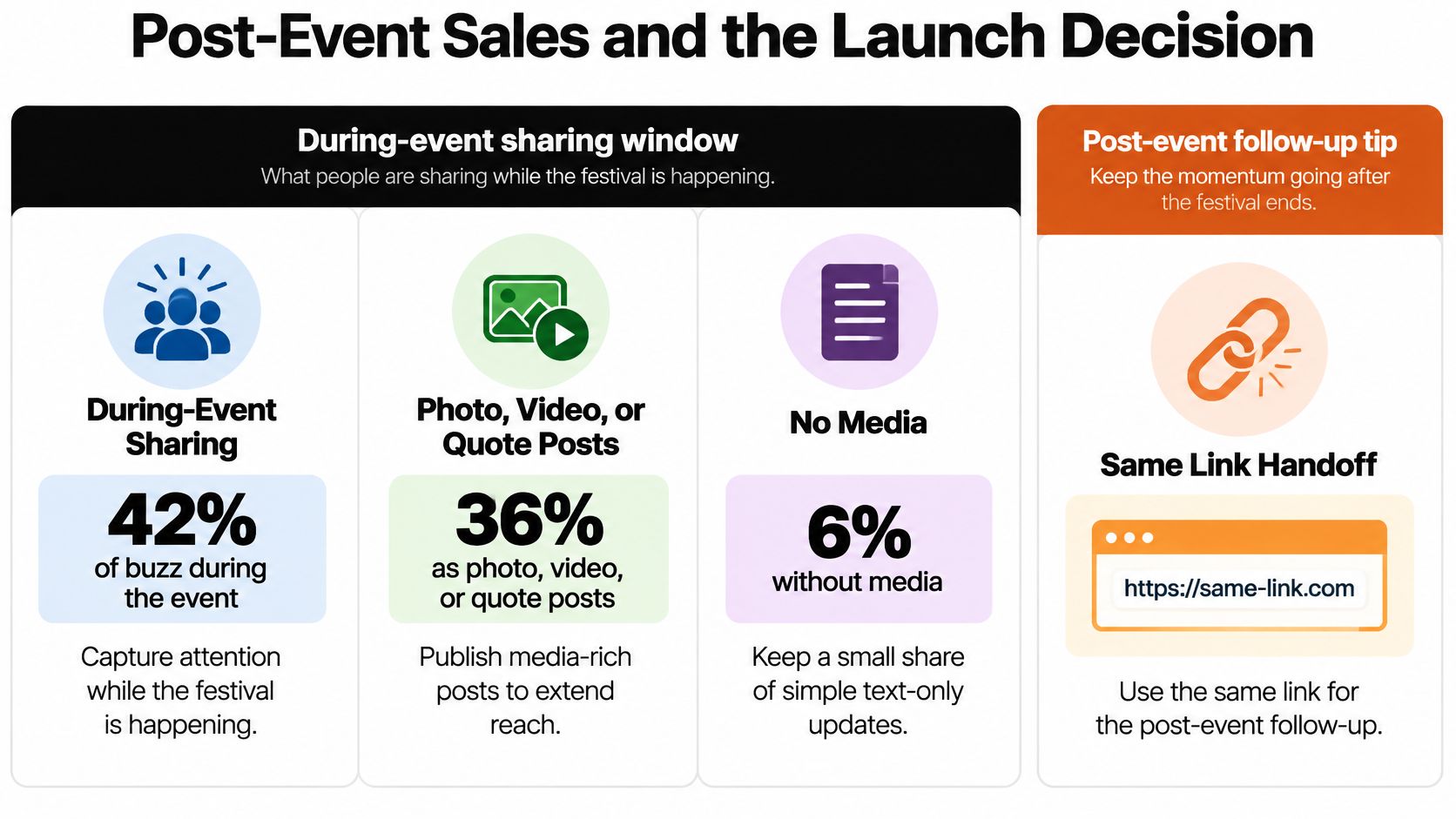
That window is why the hero batch cannot wait for a polished Monday edit. It is also why a face recognition event gallery earns its place. People interact with frames they or their group are in. A pretty empty stage does not get the repost.
One follow-up, then a short paid menu
Send one follow-up on the same link as the handoff, not a second brand of gallery. Three heroes, one line on how to pull only your own photos, and the filters for anyone who skips the camera. Our matching uses AI-powered face recognition to find the event photos that feature each attendee, and the free find has to work before any cart does.
For photographers, keep the paid menu short and off until that free find is solid.
- Full-resolution digital pack for guests who want the file, not the preview.
- One print size with a visible order deadline, not an open-ended shop.
- A retouched portrait as a clear upsell, not a surprise watermark.
- An approved sponsor frame only when the organizer already signed off.
Close the cart when the retention window you published ends. Leaving sales open after you told guests the templates would be deleted is how a tidy gallery becomes a complaint.
Score it, then decide whether to launch
For the organizer, score three numbers after the weekend. Share rate against the cultural-event baseline you set before gates. Support tickets per thousand attendees. Optional revenue per gallery visit. If shares are flat and tickets are high, the pipeline got faster and the retrieval got worse. Do not add products to fix that.
I would turn on a searchable gallery with selfie matching and a fallback only when the festival has more than a few hundred attendees, mixed lighting, and a real goal of posts or prints, and only after the consent language is locked. A 200-person supper club can live on a link and filters. A multi-stage weekend cannot.
Run a 50-image test from last year before you promise the feature on the website. Drag the files in, confirm background face processing, generate one link, make one QR, and time capture to publish. Tap Not me. Open the gallery on a cheap phone with weak data. If that path fails in the office, it will fail harder beside a generator.
Saucial gives organizers and photographers a festival photo gallery built around find my photos, with a unique event photo sharing link or QR code photo gallery and optional selfie photo matching. Guests open it in the browser, pull the frames they are in, and you keep consent, batches, and sharing settings on your side. Visit Saucial when you are ready to run the 50-image test on a real set.