Face Recognition Photo Search Explained for Events
After the event, the photos are ready, but the distribution problem has just started. Thousands of images sit in a Drive folder, a photographer receives a stream of “Can you find my photos?” messages, and attendees give up before they locate a single useful moment. The gallery exists, yet the experience still feels unfinished.
Face recognition photo search changes that workflow. Instead of asking every guest to browse a large folder, an organizer can provide a private find my photos journey: open one link, scan a QR code, take a selfie, and receive the images that appear to include them. The technology matters, but the value comes from connecting capture, indexing, permission, retrieval, and sharing into one controlled event photo delivery process.
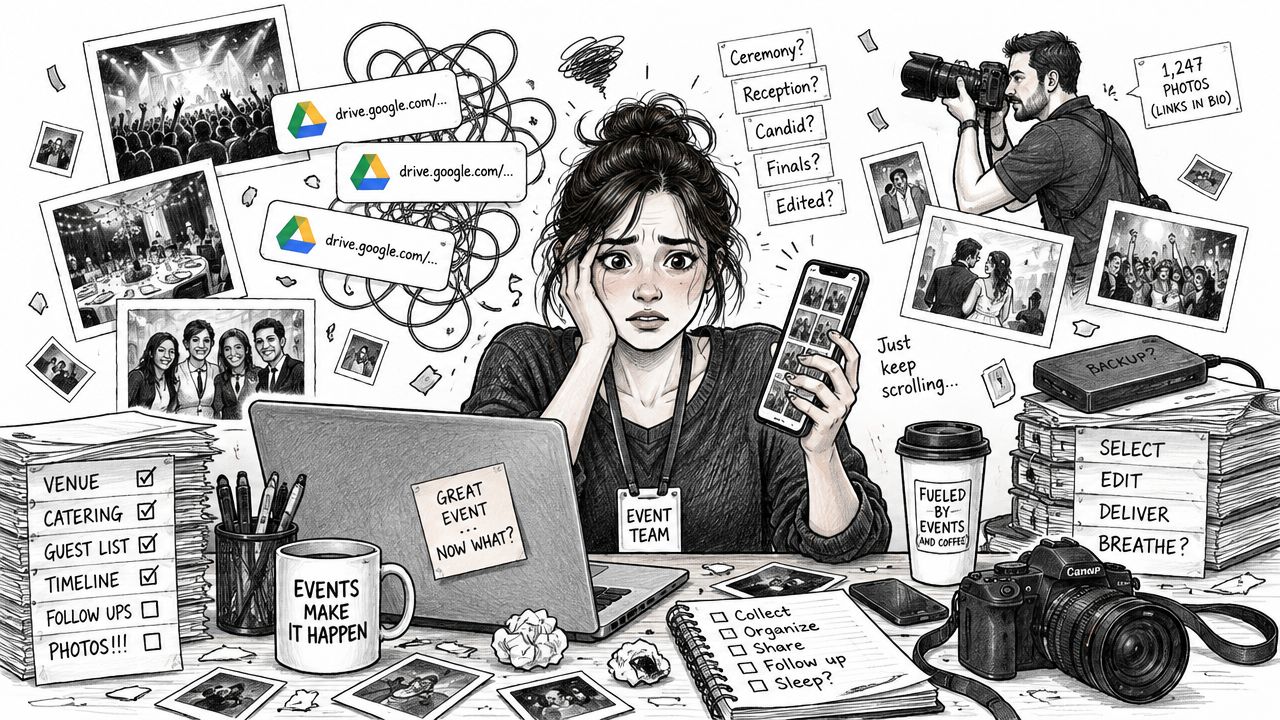
A gala team might use a QR code photo gallery near the exit. A sports photographer might let parents retrieve images without searching by bib number. A trade show team might send one event photo sharing link by email, WhatsApp, or the event website. In each case, the purpose is the same, helping the right person reach the right images with less manual work.
This guide follows that workflow from the underlying search model to selfie matching, real event conditions, privacy controls, use cases, and measurement. If you're evaluating an event distribution platform, Saucial is one example of a workflow built around attendee photo discovery rather than folder browsing.
Introduction to Smarter Event Photo Sharing
An attendee leaves a gala, opens the follow-up message, and finds a large folder of event photos. The camera work is finished, yet the path from “I was there” to “these are my images” remains unclear.
Manual delivery creates work for both sides. Organizers and photographers sort filenames, build albums, answer requests, and choose which link to place in an email, social post, or follow-up message. Guests then scroll through crowded galleries where inconsistent filenames and group shots make personal images difficult to find. Many will stop after finding the process takes too much effort.
A find my photos experience changes the distribution workflow. The attendee opens a link or scans a QR code photo gallery, takes a selfie, and receives likely matches from the indexed collection. The organizer still sets access rules, while the guest gets a direct route to retrieval.
Practical rule: Treat face search as a distribution workflow with a recognition step, not as a standalone accuracy feature.
That workflow must connect several jobs. The gallery accepts uploads, processes images in the background, creates a clear access point, returns relevant results, and protects other attendees' photos. It should also support what comes next, such as sharing, downloading, printing, or viewing sponsored content. A strong matcher cannot solve the event problem if guests cannot reach the gallery or do not understand what happens to their selfie.
No-app access can make that route easier. An organizer may place a QR code near the exit, send a link through email or WhatsApp, or add it to the event website. A sports photographer can give parents a way to retrieve images without searching by bib number. A trade show team can direct attendees to the same controlled gallery after the event. The goal is consistent: connect the right person with the right photos while reducing manual requests.
Recognition performance still shapes expectations. In 2024, NEC reported 99.88% authentication accuracy in a NIST FRTE 1:N test involving 12 million different people, as described in NEC's announcement. That benchmark concerns one-to-many identification, the same broad search pattern used when a selfie is compared with a large event gallery. It does not guarantee identical results at every event, but it helps explain why attendees expect photo delivery to feel quick and personal.
Organizers therefore need more than matching. They need understandable permissions, controlled access, and a workflow that can be configured through an event photo sharing platform.
What Face Recognition Photo Search Really Means
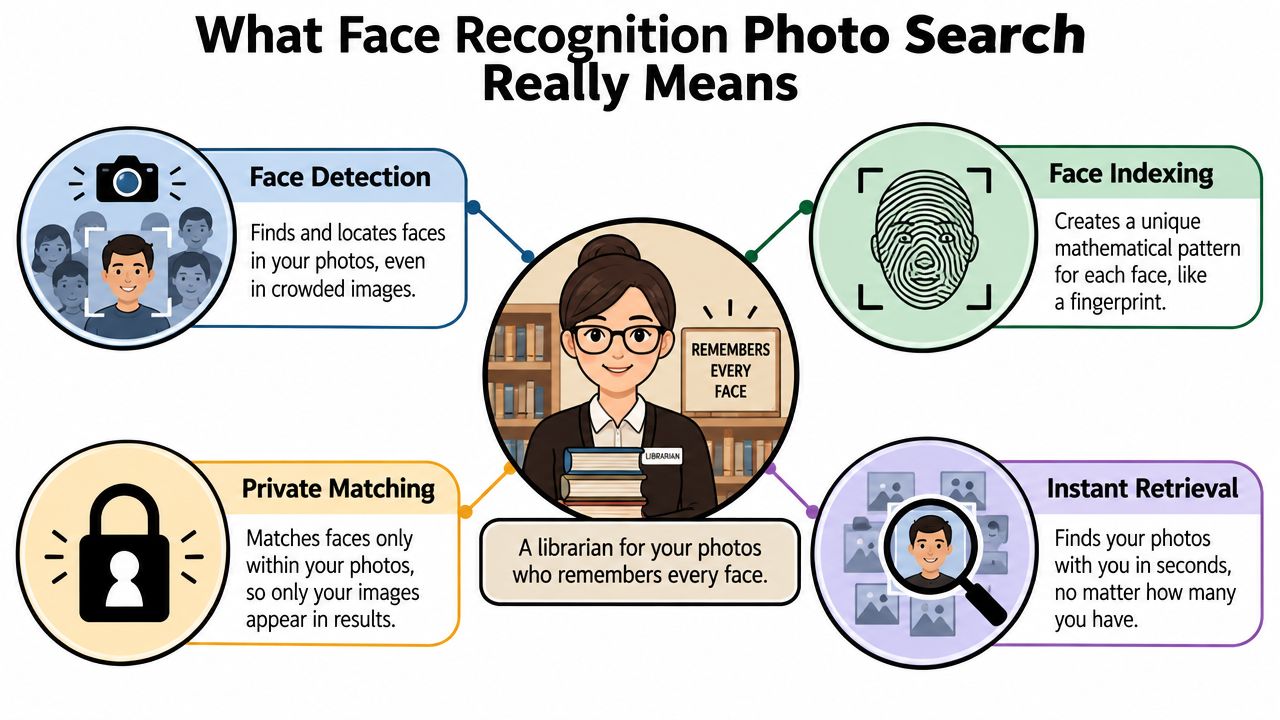
At a crowded event, an attendee may remember taking a selfie but not which photographer captured the moment or where that image sits in the gallery. Face recognition photo search addresses that distribution problem by connecting the attendee's reference image with permitted photos. A useful analogy is a library with a face-aware index. Instead of searching only shelves labeled “Friday,” “stage,” or “guests,” the system compares a new face with indexed faces throughout the collection.
The workflow has four parts:
- Face detection locates faces inside an image. It can identify several faces without knowing who they are.
- Face indexing converts facial features into a mathematical representation that can be searched. The system is not storing a human description such as “blue jacket near the stage.”
- Identification search compares one face against many indexed faces. This is the one-to-many task behind a selfie-based gallery.
- Private retrieval applies the event's access rules and returns only the results allowed for that request.
That sequence differs from keyword tagging and manual albums. Keyword search can locate a filename or label such as “dance floor,” but it cannot reliably answer, “Show me the photos where I appear.” Manual tagging may suit a small collection, yet becomes burdensome when many people appear in many images. Face detection alone also falls short. Finding a face is different from deciding whether it resembles the attendee's selfie.
One-to-one versus one-to-many search
A phone's face recognition feature usually performs one-to-one verification. It asks whether the current face matches one approved identity. Event retrieval uses a broader search. The system compares the selfie with many face representations in the gallery, ranks possible matches, and applies a selected threshold before returning results.
NIST's public benchmark program illustrates how gallery scale changes the engineering task. Its evaluation work has covered collections exceeding 18 million images of more than 8 million people, as described earlier in the linked NEC reference. An event platform therefore needs indexing, search infrastructure, and controls for false matches, not only a camera-based matching feature.
What the attendee experiences
The attendee does not need to see embeddings, confidence scores, or database operations. They encounter a browser page, a permission message, a selfie prompt, and a personal results gallery. A well-designed flow keeps the machinery out of view while making the important choices clear, including how the selfie is used, which photos can be shown, and whether another access method is available.
The result is a distribution workflow, not merely an accuracy feature. Matching finds likely images, while permissions and retrieval rules help deliver the right photos to the right attendee.
How Selfie Matching Works Behind the Scenes
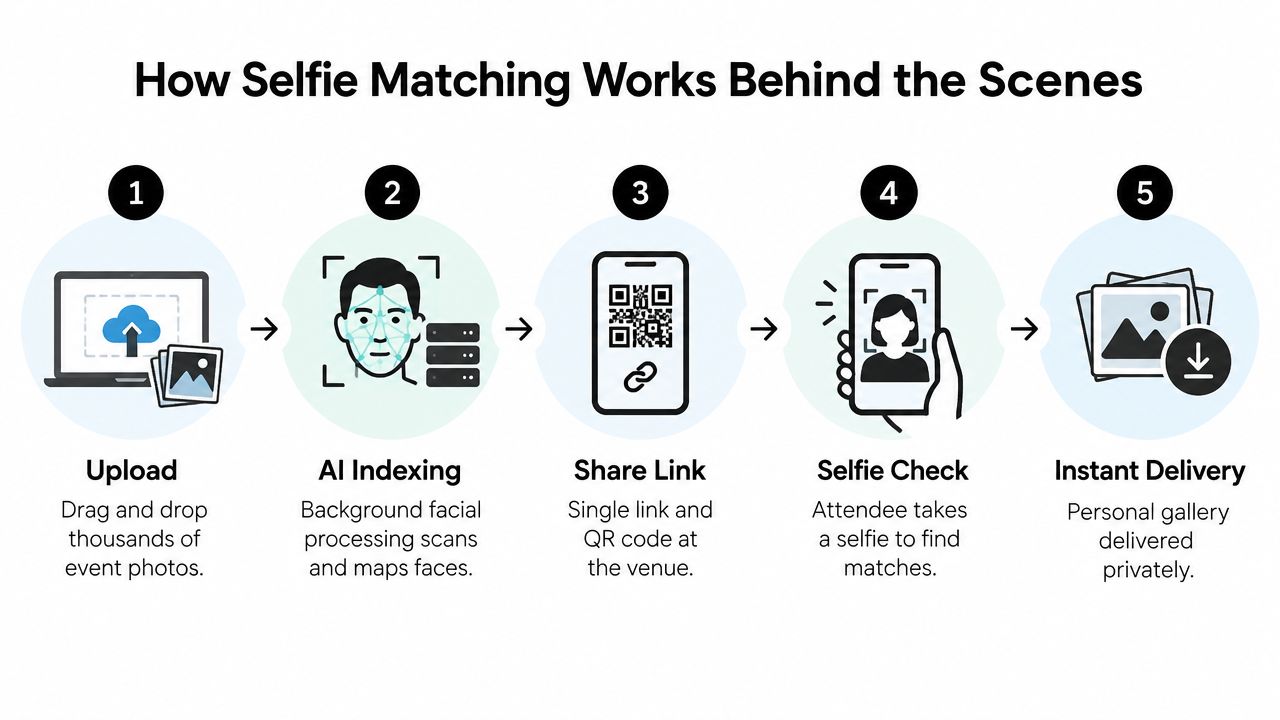
A practical selfie photo matching workflow starts before anyone scans a QR code. The organizer or photographer uploads the event images, the platform processes them, and the gallery becomes searchable in the background. Attendees should encounter a simple access path, not a technical setup project.
Step one, upload and prepare the gallery
The photographer uploads the original event set through a drag-and-drop interface. A platform such as Saucial's upload workflow can then process the collection without requiring the photographer to manually create a face tag for every image.
The system detects faces, creates searchable representations, and associates those representations with the relevant image records. Background processing matters because the organizer can continue preparing the event experience while the gallery is being indexed. The exact processing time depends on collection size, image quality, and platform capacity, so teams should test the workflow before promising a specific delivery moment.
Step two, publish one access point
Once the gallery is ready, the team shares an event photo sharing link. A QR code can appear on signage, a registration screen, a thank-you card, or a photographer's display. The same destination can also be placed in email, WhatsApp, SMS, a social post, or the event website.
A no-app flow removes a major barrier. Guests don't need to download software or learn a new interface just to retrieve a few images. They use the browser already available on their device, subject to the event's selected permission and access settings.
The video below provides another visual introduction to the attendee-facing flow.
Step three, capture a usable selfie
The attendee follows the prompt and submits a selfie, ideally showing one clear face. The system compares the selfie with indexed faces in the event collection, then returns images that pass the configured matching threshold.
Gallery conditions shape the result. NIST's flight-boarding evaluation found that the seven top-performing algorithms could identify at least 99.5% of passengers on the first attempt when the database contained one image per person. With an average of six prior images in the gallery, the best system performed error-free on 545 of 567 simulated flights, as reported in NIST's evaluation. The practical lesson for event teams is that multiple good reference images can help, but event photos aren't controlled boarding images.
Step four, tune the result instead of chasing a headline
A threshold that favors recall may show more possible images but can introduce false positives. A stricter threshold may protect precision but miss faces turned away from the camera, partly covered by hair, or captured in difficult lighting.
The MegaFace benchmark illustrates this trade-off. Systems that exceeded 95% on LFW fell to roughly 35% to 75% identification when tested with 1 million distractor faces, according to the MegaFace benchmark paper. Event teams should therefore judge performance using their own gallery conditions, especially crowded group shots, mixed lighting, and partial obstructions.
Benefits for Organizers and Photographers
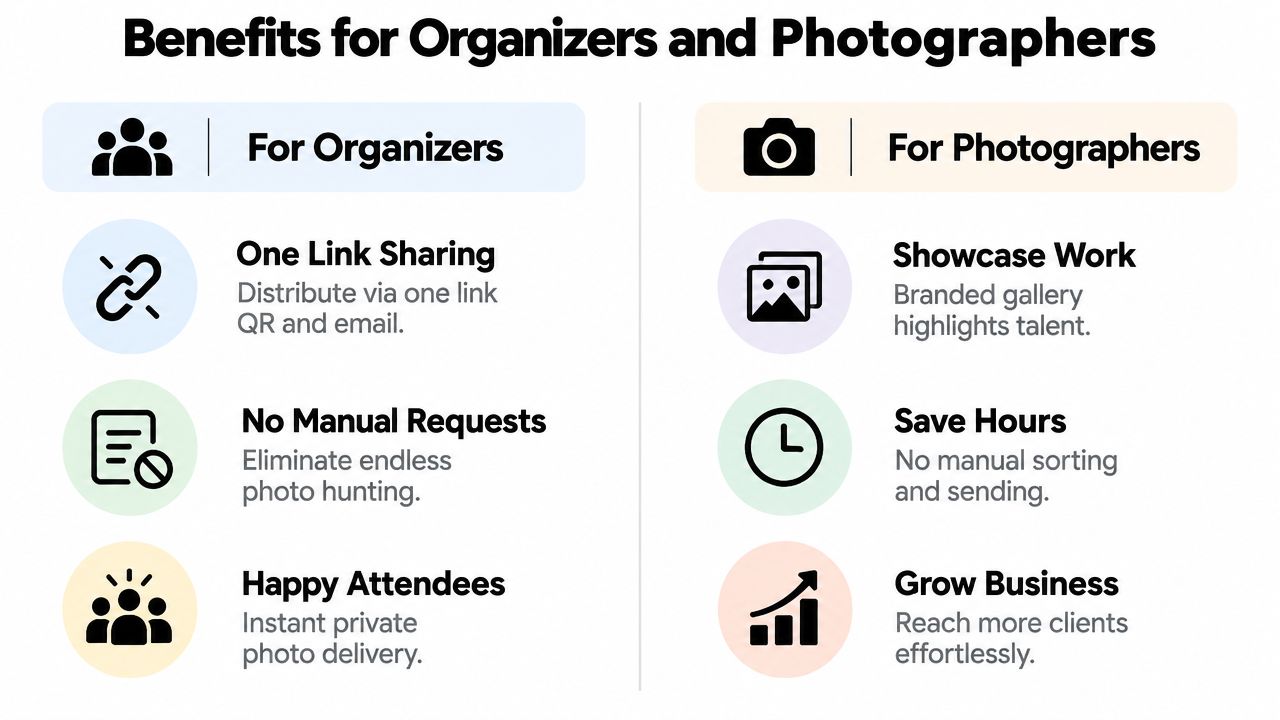
Organizers and photographers often share the same gallery but have different success criteria. An organizer wants attendees to receive and share the event's moments with minimal administration. A photographer wants a delivery channel that protects their time, presents their work well, and can support approved commercial options.
For organizers and event teams
A single link simplifies communication. Instead of maintaining separate instructions for different groups, the team can place one destination on a QR code photo gallery, post-event email, event website, or social channel. Attendees choose the route that suits them, while the organizer keeps the gallery experience consistent.
The larger benefit is reduced search friction. When guests find their own images quickly, they have a reason to open the gallery, browse related moments, and share them with friends or colleagues. That supports post-event engagement without requiring the event team to send individual albums.
Organizers can also use the gallery to extend brand context. A fundraiser may present a branded thank-you experience. A conference may group images around speakers or networking moments. A community festival may make it easier for attendees to share authentic UGC from events, provided the event's permission model allows that use.
For photographers and photo booth operators
Photographers can turn delivery into a direct-to-attendee channel rather than handing over a folder and leaving the organizer to manage every request. A branded gallery can showcase the photographer's work while giving attendees a clear route to their own images.
Optional revenue paths depend on the agreement with the organizer and the event audience. They may include print sales, digital downloads, premium edits, featured sets, or sponsored frames. The workflow also reduces repetitive manual sorting and “can you find my photos?” messages, leaving more time for shooting, editing, client service, and booked work.
A gallery earns attention only after people can locate themselves in it.
Match the workflow to the job
| Primary Goal | Best Workflow Lever | Outcome to Track |
|---|---|---|
| Reduce attendee confusion | One event photo sharing link and clear QR placement | Gallery visits and successful photo retrieval |
| Extend event visibility | Easy sharing from private results | Shares, mentions, and branded reach |
| Cut photographer administration | Background indexing and attendee-led search | Manual requests and time spent on delivery |
| Support attendee purchases | Optional prints, downloads, or premium edits | Completed purchases and average order behavior |
| Protect guest choice | Consent messaging and a non-biometric route | Opt-outs, support questions, and access completion |
The strongest setup doesn't force every event into the same distribution pattern. A private corporate gathering may prioritize restricted access, while a public activation may focus on branded sharing and rapid retrieval. The platform configuration should follow the event's purpose, audience, and permissions.
Privacy Permission and Trust Best Practices
Face search can improve access to event photos, but biometric concerns can stop adoption before the gallery launches. Organizers need to explain the experience in plain language, give guests meaningful choices, and define what happens to both images and face-related data.
Consumer sentiment makes that work necessary. One survey found that 63% of respondents had serious reservations about providing biometric data, while 91% still provided it, according to ConsumerAffairs' reporting on the survey. The same reporting discusses concerns around facial recognition, while an ICO report cited there found that 49% of respondents believed facial recognition worked less effectively for certain demographic groups.
Before the event
Write the notice before anyone encounters the selfie prompt. It should state:
- Purpose: Explain that the selfie is used to help locate the attendee's event photos.
- Choice: Say whether participation is optional and how guests can access photos without face matching.
- Access: Identify who can view the gallery, whether results are private, and whether the organizer can review or manage them.
- Retention: State how long uploaded photos, selfies, and face embeddings are kept.
- Deletion: Explain how a guest can request removal or stop using the biometric route.
- Sharing: Clarify whether attendees may download or publicly share their results.
Avoid vague language such as “your data is safe.” People need operational information, including storage duration, access permissions, and the difference between the original selfie and a derived face representation.
At the search step
Put the permission message beside the selfie action, not only in a buried policy page. Ask for a clear action, show the fallback route, and avoid making guests feel that they must submit biometric information to receive a benefit.
A fallback might use a manual gallery, a ticket or bib identifier, an organizer-issued access code, or a curated album. It won't provide the same speed, but it respects guests who don't want to use face search and helps the event avoid an all-or-nothing experience. Tools such as Saucial's authentication workflow can be assessed alongside the organizer's legal, security, and consent requirements.
After the event
Assign an owner for deletion and access requests. Review who can administer the gallery, remove unnecessary exports, and verify that retention settings match the promise made to guests. If the event involves children, employees, schools, or sensitive communities, obtain appropriate legal and organizational guidance before enabling biometric retrieval.
Real World Use Cases From Galas to Trade Shows
A gala fundraiser photo gallery benefits from speed and context. Guests may want a photograph from the reception, a donor recognition moment, or a table portrait, but they rarely want to browse every image from the evening. The organizer can display a QR code near the exit and include the same link in the thank-you message. Guests use the private search route to find relevant images, then share approved moments that extend the fundraiser's community presence.
The organizer still decides whether every image is available, whether branding appears in the gallery, and whether public sharing is encouraged. A photographer can also offer selected prints or edited portraits if that arrangement was agreed in advance. The experience works because retrieval happens before interest fades.
Sports tournaments
A tournament photographer faces a different indexing problem. Players may appear in action shots, team photos, sidelines, and awards ceremonies, while parents may search for one athlete across several parts of the day. A sports tournament photo sales workflow can combine selfie matching with team, field, bracket, or game filters.
Parents can start with a selfie or use a non-biometric alternative. The photographer can then present digital downloads, prints, or curated sets tied to the event's sales model. Group photos deserve special care because overlapping faces and changing angles can make individual retrieval less consistent than a clear portrait.
A 2025 event-photo retrieval study reported 90% accuracy for single-face recognition and 78% in group photos, noting that overlapping faces and varied angles reduced performance. The study also said accuracy is often strongest in well-lit areas and can fall into the 75% to 80% range in harder conditions, as reported in the event-photo retrieval study. These findings support a practical approach: test the gallery, label expectations clearly, and give users another way to locate important images.
Trade shows and brand activations
For trade show photo sharing, a QR code can sit at the registration desk, booth, lounge, or exit. Attendees may retrieve a networking portrait, a booth interaction, or a branded activation image without remembering a filename or waiting for a follow-up email.
Exhibitors can receive approved sets for their own channels, while the event team maintains control over access and branding. The same pattern works for alumni dinners, festivals, school events, and community gatherings. The foundation stays constant, but the permissions, distribution points, gallery organization, and monetization choices should match the audience.
Measuring Success and Improving Your Photo Workflow
A face recognition event gallery needs more than a launch announcement. Track the path from access to retrieval, then use the results to improve both the attendee experience and the photographer's workload.
Start with operational measures:
- Distribution time: Record the time spent preparing links, sorting images, answering requests, and sending follow-ups.
- Find-my-photos completion: Compare the number of people who open the gallery with the number who successfully reach a results page.
- Gallery engagement: Monitor opens, return visits, downloads, and shares without treating raw traffic as the only goal.
- Support demand: Count manual “find my photos” requests and identify whether they come from access problems, weak matches, or unclear instructions.
- Commercial activity: If enabled, track print orders, digital downloads, premium edits, and sponsored-frame interactions separately.
The most useful diagnosis comes from failure patterns. If many guests open the gallery but don't submit a selfie, the prompt or permission message may be unclear. If guests submit selfies but see too few results, review lighting, image quality, face size, and the threshold. If results contain too many unrelated people, tighten precision and consider better gallery segmentation.
Performance should be evaluated under the conditions your event creates. A small portrait set, a crowded dance floor, a sports sideline, and a dim trade show booth place different demands on the matcher. One deep-feature system reported 98.23% on LFW, but its results were lower under stricter tests, including 87.65% verification at FAR 0.1% on BLUFR, 82.0% Rank-1 retrieval in IJB-A closed-set search, and 61.7% FNIR at FPIR 1% in open-set search, as documented in the system's evaluation. Those figures aren't event guarantees. They show why teams should tune thresholds to the retrieval objective.
Use the platform's control panel, such as Saucial's settings area, to review sharing, access, and gallery choices before distribution. Then run a small internal test with clear faces, group shots, varied lighting, and partial obstructions. Keep a non-biometric route available, document the outcome, and adjust the next event based on evidence rather than a single accuracy headline.
Saucial provides an event photo sharing workflow with drag-and-drop uploads, background face processing, shareable links, QR code access, and private selfie-based retrieval for attendees. Visit Saucial to explore how a no-app “find my photos” experience can fit your next gala, tournament, trade show, or community event.



