8 Event Photography Tips for Better Event Results
Great event photos don't begin with camera technique. They begin with decisions made before guests arrive. If you only focus on exposure, lenses, and posing, you can still deliver a gallery that's hard to follow, slow to reach attendees, or unsafe to share.
A reliable event workflow covers permissions, venue access, lighting, coverage routes, equipment failures, and the final distribution experience. The strongest results come from connecting those decisions: capture authentic moments efficiently, protect the files, then give guests a fast, private way to find, download, share, or purchase approved images.
That shift matters because event photography has become a commercial category with substantial demand. One market overview projects the global event photography market at approximately USD 2.78 billion in 2025, while identifying weddings, corporate events, birthday parties, and social gatherings as important sources of demand, with North America leading and APAC growing fastest according to Eventiere's event photography market overview. Larger events also create more images and more pressure for quick access.
The practical tools are familiar, but the workflow is changing. An event photo sharing link, a QR code photo gallery, and privacy-conscious selfie photo matching can turn delivery into post-event engagement instead of a forgotten folder. For photographers, that also creates room for approved downloads, prints, premium edits, and other attendee-focused upsells.
1. Master Lighting for Large Venues and Mixed Conditions
Lighting problems become distribution problems. If faces are dark, skin tones shift between images, or harsh flash makes guests look uncomfortable, attendees are less likely to recognize themselves in the gallery and less likely to share what they find.
Scout the venue before the event whenever possible. Walk through the ballroom, auditorium, outdoor area, entrance, and any transition spaces where guests will move between different light sources. Look for green or blue LED fixtures, tungsten stage lighting, reflective walls, low ceilings, windows that create backlight, and areas where direct flash could distract speakers or performers.
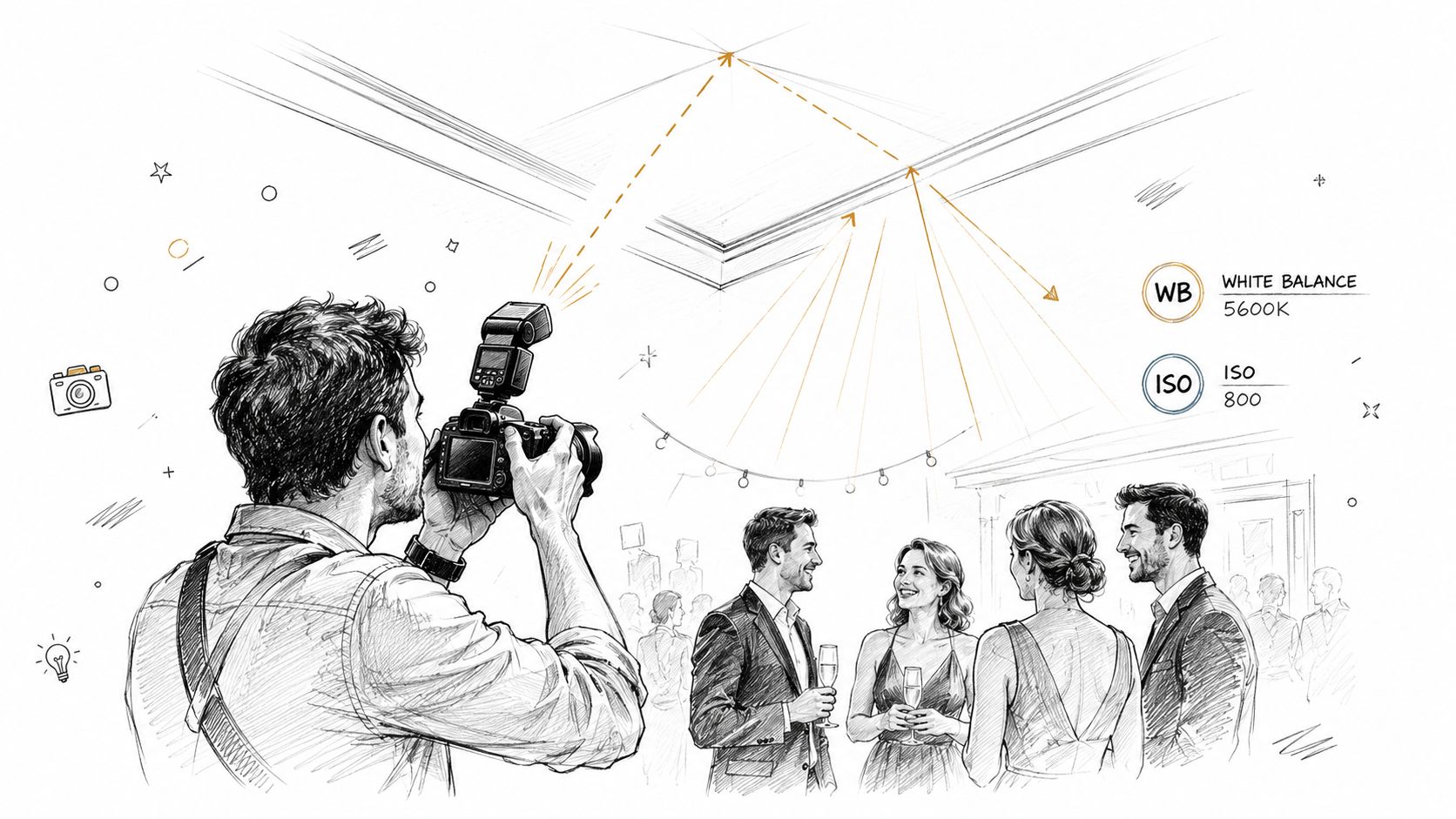
A gala photographer may find a white ceiling that supports soft bounce flash, while a conference photographer may need to balance auditorium tungsten with daylight from doors or windows. At a sports tournament, available light may be too dim for a moderate shutter speed, so a fast lens and higher ISO can be more useful than trying to force a flash into the action.
Build a repeatable lighting baseline
Use your camera's exposure meter, or a handheld light meter, to establish a starting point during setup. Test white balance on actual subjects or nearby surfaces rather than relying only on the venue's lighting description. Mixed light often requires a compromise, so consistency across a sequence may matter more than perfect neutrality in every frame.
Keep your lighting kit flexible:
- Bounce option: Use an on-camera flash when the ceiling or wall is suitable and you need to move quickly.
- Modifier option: Carry a small diffuser or bounce accessory for locations where direct flash would be too hard.
- Off-camera option: Use a remote light for portraits, sponsor areas, or planned group photos where you can control the setup.
- Ambient option: For outdoor coverage, place the sun behind or to the side of subjects and use fill light when faces fall into shadow.
Practical rule: Don't optimize for the brightest exposure. Optimize for flattering faces, consistent color, and a setup you can repeat while moving through the event.
Your delivery platform should support the same workflow discipline. A service such as Saucial for event photo sharing can help turn consistent capture into an easier attendee discovery experience, but it can't repair poorly lit faces. Lighting remains the first quality filter.
2. Capture Candid Moments and Genuine Interactions Over Posed Shots
Posed photos have a place, especially for sponsors, families, teams, speakers, and formal group records. They shouldn't dominate the assignment. Guests usually connect more strongly with images that show laughter, concentration, recognition, celebration, or an unguarded exchange.
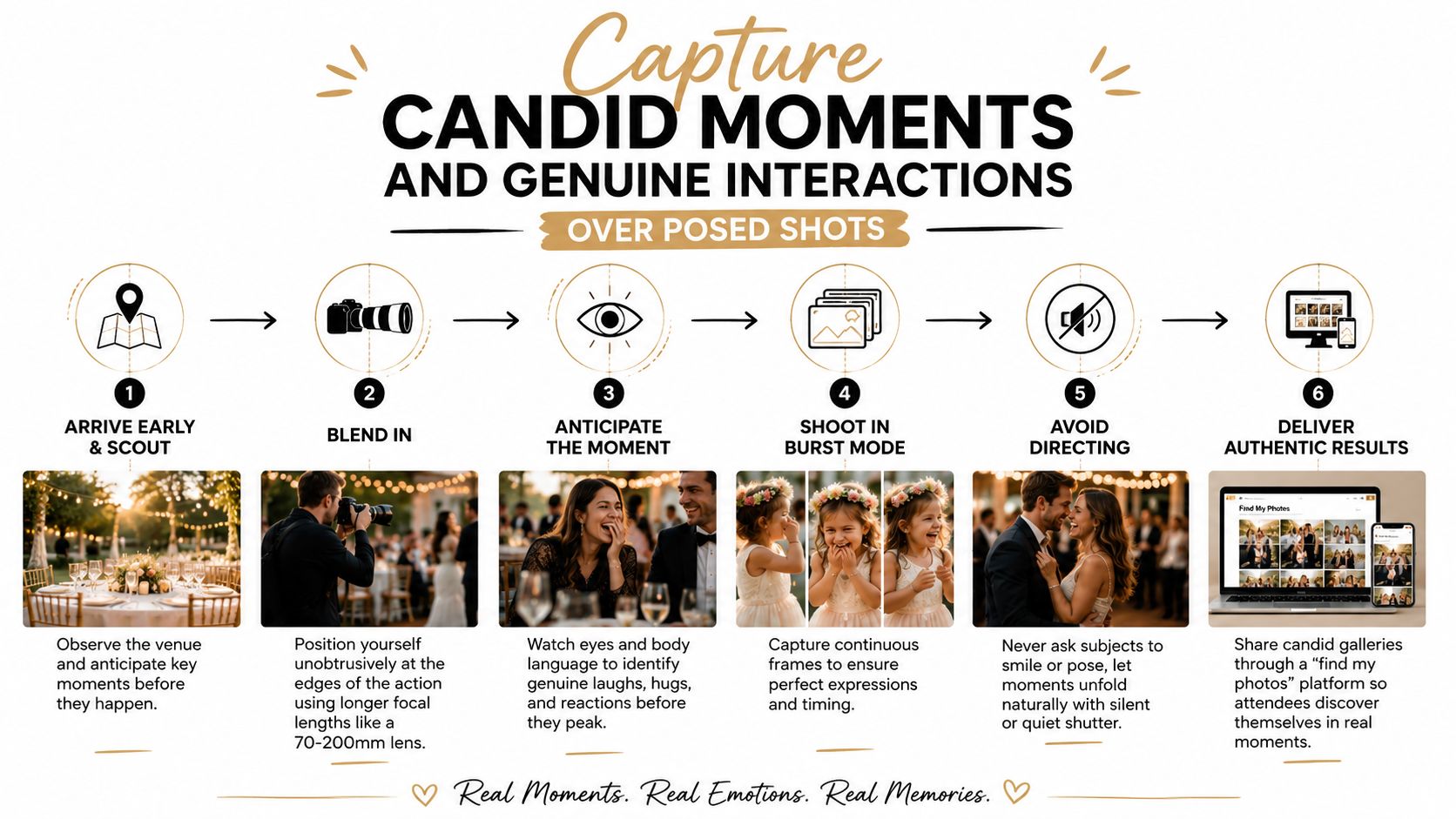
Candid coverage starts with anticipation. Arrive early enough to learn the event rhythm. Watch when people enter, where they pause, which tables attract conversation, and where organizers expect important reactions. At an alumni reunion, the strongest frame may be a hug at the entrance or an intense conversation near the lounge, not the formal group portrait.
Work from the edges of the action. A 70-200mm lens lets you observe without standing inside every conversation, while a quieter shutter mode can reduce disruption when the room is calm. Don't hide behind the lens completely, though. A friendly introduction and a clear explanation of your role can make guests more comfortable than photographing them from close range.
Look for the moment before the moment
Body language often reveals what's about to happen. A speaker turns toward a donor, teammates lean together before a celebration, or friends exchange a glance before laughing. Keep your focus on relationships and reactions, not just faces aimed at the camera.
Use a simple coverage pattern:
- Start with context: Capture the room, signage, décor, and people arriving.
- Move to interaction: Follow conversations, handshakes, hugs, and shared reactions.
- Watch the audience: Speakers and performances matter, but so do the faces responding to them.
- Protect dignity: Avoid unflattering eating moments, private conversations, or guests who clearly signal that they don't want a photo.
- Add selected poses: Make time for essential group shots without turning the entire event into a queue.
The best candid image often gives attendees a reason to use a find my photos experience. They aren't just searching for a recognizable face. They're looking for a moment they remember, which makes the discovery more meaningful and gives them a natural reason to share it.
3. Develop a Rapid Photo Workflow for Culling, Tagging, and Delivery
Event photography creates volume faster than most photographers expect. A successful shoot can leave you with many similar frames, different lighting conditions, and several groups that need quick delivery. If you wait until the end to decide how files should be organized, post-production becomes slow and inconsistent.
Create the folder structure before the first guest arrives. Use the event name and date in the parent folder, then organize by time, venue area, activity, or photographer. A naming convention such as EventName_Date_PhotoNumber makes later searches easier, especially when an organizer requests images of a keynote speaker, sponsor, team, or award recipient.
Culling should be decisive. Use ratings and rejects while reviewing in Lightroom, Capture One, or another editor. Remove closed eyes, missed focus, duplicates, accidental frames, and expressions that don't represent the event well. Apply a consistent preset or LUT to bring the gallery together, then correct important images individually.
Design the handoff before you shoot
Your post-event process should answer four questions:
- What gets delivered first: Decide whether the organizer needs a small teaser set, a social-ready collection, or the complete gallery.
- Who controls access: Confirm whether guests, staff, sponsors, or only approved attendees can retrieve images.
- How guests find images: Choose a controlled link, a QR code photo gallery, or another retrieval path before the event ends.
- How files stay safe: Back up immediately to separate storage locations, then verify that the copies open correctly.
A browser-based retrieval service can reduce manual tagging. With Saucial's upload workflow, photographers can prepare selected event images for attendee discovery through a shareable experience rather than sending a cluttered folder and answering individual search requests.
Delivery insight: Fast access isn't only a convenience. It changes whether guests see the gallery while the event is still fresh enough to share.
The trade-off is curation versus speed. Uploading everything may get files online sooner, but it can bury the strongest work in repetition. A smaller, cleaner first release often gives attendees a better experience, while the complete approved set can follow once quality control is finished.
4. Position Yourself Strategically for Maximum Coverage and Minimal Obstruction
Your position determines which stories you capture and which guests disappear from the gallery. Standing in one convenient spot may produce a polished sequence, but it often creates repetitive angles, blocked sightlines, and gaps around entrances, side conversations, or audience reactions.
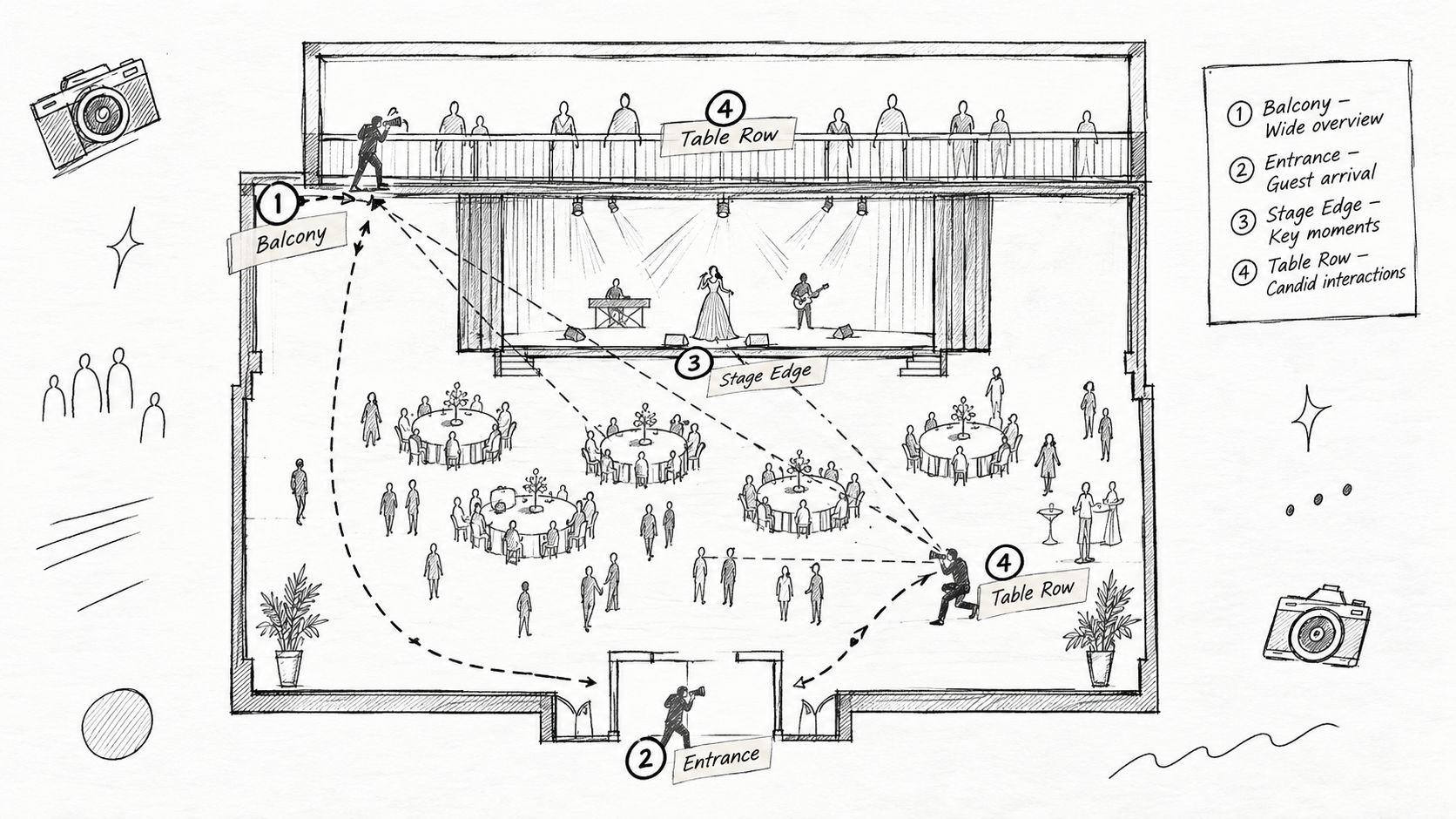
Make a simple venue map before coverage begins. Mark the stage, speeches, sponsor walls, food and drink areas, entrance, dance floor, team zones, and any location reserved for group portraits. Identify several reliable shooting positions, then plan a route that lets you circulate without crossing the same scene repeatedly.
At a gala, a balcony can provide a strong room view and useful tablescape coverage. At a trade show, standing near a booth corner may capture both the presenter and attendee interaction without blocking the display. At a reunion, the entrance, lounge, and group-photo area each serve a different purpose.
Use movement as a coverage system
Don't wander randomly. Move through the event with an intentional rhythm:
- Entrance pass: Photograph arrivals, greetings, badges, step-and-repeat portraits, and early atmosphere.
- Main-room pass: Cover tables, audience reactions, décor, speakers, and sponsor visibility.
- Activity pass: Follow the action where guests are participating rather than watching.
- Reaction pass: Return to the audience, lounge, and social areas for candid interactions.
- Closing pass: Capture final celebrations, award moments, departures, and any planned group image.
A 24-70mm lens works well when the distance to the subject changes quickly. A wider focal length helps when you can't step backward, while a longer setting can isolate a conversation without forcing you into it. Keep checking the room behind you. Don't block a projection, stage view, serving path, or videographer's position just to secure one frame.
For larger assignments, communicate the route to co-photographers and videographers. Assign zones or moments instead of assuming everyone will naturally spread out. Coverage improves when each person knows which gaps they own.
5. Use High-Speed Continuous Shooting and Fast Shutter Speeds for Action and Emotion
Peak expressions disappear quickly. A laugh turns into a neutral face, a raised trophy drops, and a celebratory hug changes shape between frames. Continuous shooting gives you more opportunities to preserve the instant when eyes are open, hands are positioned well, and the emotion reads clearly.
Use burst mode selectively, not blindly. Sports tournaments, award presentations, dances, speeches, and donation announcements justify short bursts. A quiet conversation or carefully composed detail shot usually doesn't. The trade-off is straightforward: higher capture volume can improve timing, but it increases culling time, storage needs, battery use, and the chance of filling your camera buffer.
Choose settings based on movement and light. A fast lens, such as an f/2.8 zoom or wider prime, can help maintain shutter speed in dim venues. Raise ISO when needed rather than accepting motion blur in an important moment. RAW files preserve more flexibility when stage light, shadows, or mixed color temperatures make exposure difficult.
Anticipate instead of reacting late
Before a speech reaches its emotional point, identify the speaker, the likely audience reaction, and a clean angle. Before a trophy presentation, pre-focus or choose an autofocus area that can track the subject. For a finish-line celebration, position yourself where the athlete will move into useful light rather than chasing the action after it happens.
A practical action setup may include:
- Continuous autofocus: Use a tracking mode appropriate to your camera and the subject's movement.
- Zone or single-point control: Choose the method that keeps focus on the intended face instead of a distracting background.
- Fast cards: Use reliable, fast memory cards so the camera can clear its buffer during demanding sequences.
- Extra batteries: Burst shooting, autofocus, image review, and flash all increase power consumption.
- Immediate culling: Compare similar frames side by side and keep the strongest expression, gesture, and composition.
The “perfect” frame isn't always the sharpest frame. In event work, emotional clarity and context often matter more than technical perfection. Still, deliberate shutter speed and burst timing give you a much better chance of delivering images that guests recognize and want to share.
6. Establish Clear Communication and Permissions Protocols for Photo Use and Privacy
Privacy decisions belong in the event brief, not after gallery delivery. Ask the organizer which areas are off-limits, whether particular guests need special handling, how minors will be covered, and whether images may appear in promotional material, attendee galleries, printed products, or sponsor content.
Public guidance from Apache's event photography privacy guidance recommends advance notice, clear signage, opt-out mechanisms, and prompt responses to removal requests. Apply those controls at festivals, conferences, school events, fundraisers, and corporate gatherings, where expectations about public visibility can differ.
Record the agreement before shooting. Define who owns or licenses the images, whether attendees may download and repost them, whether the organizer may use them in marketing, and whether the photographer may sell prints or premium edits directly to guests. Permission to take a photograph does not automatically cover every later use.
Make opting out practical
A privacy process works only when guests can understand it and act on it. Use plain language in registration materials and at the venue. Put signs at entrances, identify the photographer, explain where images may appear, and provide a visible opt-out method. For sensitive events, designate a no-photo area or use an agreed visual marker that the photographer can recognize during coverage.
Facial retrieval needs tighter controls than ordinary gallery search. A 2025 study reported 90% accuracy for single-face recognition and 78% average accuracy in group photos, while lighting and pose variation reduced performance, as described in the published event-photo retrieval study. Selfie photo matching can help attendees find relevant images, but it should not be treated as flawless or used to expose every image to every guest.
The study also reported that an average of 1.25 tagged photos per person enabled 56.8% correct recognition within events and 31.9% across events. Keep tagging limited to the retrieval task, retain as little biometric data as possible, document deletion procedures, and let organizers decide which images become searchable.
For a controlled attendee experience, review the Saucial authentication options alongside the consent and access plan. Authentication can limit who reaches a gallery, while permissions determine which images each person may view or retrieve. Technology should support that workflow, not replace it.
7. Optimize Post-Event Engagement and Social Sharing Through Gallery Design
A gallery can extend event value, or bury it. Sending attendees to a generic Drive folder forces them to scroll through files, interpret filenames, and identify relevant images manually. Build the experience around fast discovery, approved sharing, and clear purchase options.
Sharing behavior varies by event format. In a dataset summarized from 2,398 live events over 15 months, average social share rates ranged from 53% for concerts and music events to 22% for conferences and expos. Fundraisers reached 51%, recreational and bar events 50%, while cultural festivals and sporting events reached 45%, according to IBISWorld's event photography industry overview. Event type affects motivation, so the gallery should match how attendees are likely to use the images.
QR access can reduce friction. Another analysis of more than 15,000 weddings and private events found guests were 4.3 times more likely to upload photos when given a QR code instead of being asked to download a dedicated app. It also reported that 67% of wedding photos were uploaded within the first 24 hours, with an average of 312 guest-generated photos per wedding. Use a visible QR code at the venue and in follow-up messages, then keep the gallery usable without an app where the agreement permits it.
Build the gallery around retrieval
Create a few meaningful collections instead of dozens of folders:
- Best moments: A small, polished selection for immediate sharing.
- Candids: Natural interactions and reactions.
- Group shots: Teams, tables, families, alumni, or departments.
- Celebrations: Awards, speeches, performances, and victories.
- Branded highlights: Sponsor, booth, venue, or organizer-approved content.
A service such as Saucial's attendee photo sharing platform can support a find my photos flow through a link or QR code. Test the gallery on a phone before publishing. Confirm that captions are accurate, download permissions match the agreement, watermarks remain subtle, and sharing buttons work in the channels attendees use.
Add monetization without blocking access. Offer high-resolution downloads, prints, premium edits, featured sets, or sponsor-approved frames as optional paths. A sports tournament might use team collections and individual purchases. A gala fundraiser might offer approved donor portraits or branded highlights. Keep each option clear, voluntary, and consistent with the organizer's terms.
8. Prepare for Technical Challenges With Backup Strategies and Redundancy
Live events don't offer retakes. A dead camera, corrupted card, failed flash, drained battery, or damaged drive can remove an entire portion of coverage. Redundancy protects not only the images, but also the trust between photographer and organizer.
Use two camera bodies when the assignment justifies it, ideally with comparable controls so you can switch without slowing down. Keep a versatile backup lens available, carry spare batteries, and store lighting backups separately from your primary kit. If the main flash fails, you should be able to continue with another flash, ambient light, or a changed position rather than stop coverage.
Memory cards need a plan too. Use reliable cards, test them before the event, and avoid treating one card as the only copy of irreplaceable work. If your camera supports simultaneous recording, use it for critical assignments. After the event, copy files to separate storage locations and verify that the files open before formatting cards.
Write the contingency plan in advance
Your plan should answer specific failure questions:
- Camera failure: Which body takes over, and which lens remains usable?
- Lighting failure: Can you switch to bounce, ambient light, or a spare unit?
- Power failure: Where are the charged batteries, power banks, and charging points?
- Data failure: Where will you create the first and second backups?
- Staff absence: Who can step in if you're ill or delayed?
- Venue problem: What alternate shooting positions remain available?
Keep equipment serial numbers and photographs in a secure record for insurance and recovery purposes. Identify rental options near venues you cover frequently, and maintain a trusted backup-photographer network for high-stakes work.
Your delivery system also needs operational checks. Before publishing, verify that the approved files are in the correct gallery, access settings match the consent plan, and the attendee retrieval experience behaves as expected. Use Saucial settings to review the organizer-controlled experience rather than assuming the default configuration fits every event.
Event Photography: 8-Point Comparison
| Item | 🔄 Implementation Complexity | ⚡ Resource Requirements | ⭐📊 Expected Outcomes | 📊 Ideal Use Cases | ⭐ Key Advantages |
|---|---|---|---|---|---|
| Master Lighting for Large Venues and Mixed Conditions | High 🔄 Technical setups, practice & setup time | High ⚡ Flashes, modifiers, stands, power sources | High ⭐📊 Consistent flattering images; less post-editing | Galas, ballrooms, outdoor festivals, auditoriums | Professional look; higher engagement & upsells |
| Capture Candid Moments and Genuine Interactions | Medium 🔄 Requires anticipation, positioning, patience | Low ⚡ Telephoto lens, quiet shutter; minimal gear | High ⭐📊 Authentic, highly shareable moments | Reunions, fundraisers, social mixers, dinners | Emotional authenticity; stronger social shares |
| Develop a Rapid Photo Workflow: Culling, Tagging, Delivery | Medium-High 🔄 Setup & tooling learning curve | Medium ⚡ Fast storage, workstation, software, internet | High ⭐📊 Faster delivery; higher attendee satisfaction & sales | Sports tournaments, conferences, large events | Automates tagging; reduces admin and speeds monetization |
| Position Yourself Strategically for Maximum Coverage | Medium 🔄 Planning, mobility, permissions | Low-Medium ⚡ Venue scouting, access, 1–2 bodies | High ⭐📊 Better coverage; fewer missed attendees | Large venues, trade shows, ceremonies, sports | Maximizes variety and attendee visibility |
| Use High-Speed Continuous Shooting and Fast Shutter Speeds | Medium 🔄 Camera settings plus heavy culling | High ⚡ Fast bodies, cards, batteries, storage | High ⭐📊 More keepers; crisply frozen action & emotion | Sports, high-energy festivals, speeches | Captures peak moments and best expressions |
| Establish Clear Communication and Permissions Protocol | Medium 🔄 Policy prep, on-site communication | Low ⚡ Signage, consent forms, legal guidance | Medium-High ⭐📊 Reduced disputes; builds trust | Corporate events, VIP functions, international events | Legal protection; improved attendee confidence |
| Optimize for Post-Event Engagement and Social Sharing Through Gallery Design | Medium 🔄 Curation, UX and marketing coordination | Medium ⚡ Platform features, design assets, analytics | High ⭐📊 Increased shares, brand reach, revenue | All events; especially marketing-driven & public events | Drives social amplification and upsell conversions |
| Prepare for Technical Challenges: Backup & Contingency Plans | High 🔄 Ongoing maintenance, contingency coordination | High ⚡ Dual bodies, backup drives, spare lenses, insurance | High ⭐📊 Ensures delivery; prevents catastrophic loss | High-stakes events, sports, large-scale productions | Risk mitigation; preserves reputation and delivery |
Turn Every Event Into a Complete Photo Experience
Strong event photography connects four jobs that are often treated separately. You need to protect the assignment with permissions, clear usage terms, and equipment redundancy. You need to improve the images through deliberate lighting, strategic positioning, candid observation, and controlled burst capture. Then you need to deliver the approved work quickly through a private event photo sharing link, a QR code photo gallery, or another retrieval method that attendees can use without unnecessary friction.
The business case is practical. A market overview projects the global event photography market at approximately USD 2.78 billion in 2025, and a U.S. industry report includes historical data and forecasts covering revenue, establishments, employment, and wages, as documented by Eventiere's event photography statistics overview. As event volumes and expectations grow, photographers compete on more than image quality. They also compete on turnaround, organization, privacy, and the usefulness of the attendee experience.
Measure the workflow after delivery. Track how long it took to publish the first approved set, how many gallery visits occurred, how often attendees used selfie photo matching, how many images were shared or downloaded, how much approved UGC from events appeared in social channels, and whether prints, premium edits, digital downloads, or sponsored sets generated revenue. These measures help you decide where to invest time. If guests can't find images, better culling may matter more than another lens. If they find images but don't share them, gallery design and permissions may need attention.
Use this sequence for your next assignment:
- Confirm organizer controls: Record no-photo areas, opt-out procedures, consent language, usage rights, retention, and deletion requests.
- Map the venue: Mark light sources, sightlines, entrances, activity zones, audience positions, and alternate shooting locations.
- Test capture and backup: Check bodies, lenses, flashes, cards, batteries, wireless gear, file naming, and dual-storage procedures.
- Prepare distribution: Build the approved gallery structure, test the event photo sharing link, generate the QR code, and review the selfie retrieval experience.
- Review outcomes: Compare delivery time, visits, shares, downloads, approved UGC, and photographer upsell results against your next event plan.
Saucial can fit this workflow as an organizer-controlled platform for uploading event photos, creating a shareable link or QR code, and letting attendees find images featuring them through selfie photo matching. Use it only within a clearly communicated consent and access plan, then review the engagement and sales results after delivery.
Saucial helps organizers and photographers create a faster “find my photos” experience through an event photo sharing link, QR code gallery, and attendee selfie retrieval. If you're planning a gala, fundraiser, sports tournament, trade show, or community event, visit Saucial to see how a privacy-conscious delivery workflow can support sharing and photographer upsells.



