Event Photography Software: What It Is and How It Works
A photographer has just delivered 1,200 gala images to a shared Drive folder. The organizer sends a generic email, then watches the gallery sit while attendees struggle to locate themselves among hundreds of files. The photographer still receives the familiar follow-up messages: “Can you find the photos I'm in?”
That situation captures why event photography software has become a distinct category. The challenge isn't only storing images. It's delivering the right photos to the right people while interest is still fresh, without giving up control over privacy, branding, downloads, or the attendee experience.
The Problem Event Photography Software Solves
A shared folder treats every attendee the same. It gives everyone access to the same collection and expects each person to search manually. That approach may work for a small private shoot, but it becomes frustrating at a gala, sports tournament, trade show, festival, or alumni event where guests appear in candid photographs, group frames, stage images, and sponsor activities.
Two failures happen at once.
The first is a delivery failure. Attendees may receive a link, but the link doesn't guide them toward their own images. They must open the folder, wait for previews, scroll through unrelated files, and decide which images are worth saving.
The second is a matching failure. Even after someone reaches the gallery, they may not recognize themselves in every frame. A person can appear from the side, in a crowd, under changing event lighting, or beside several other guests. File names and folder labels rarely solve that problem.
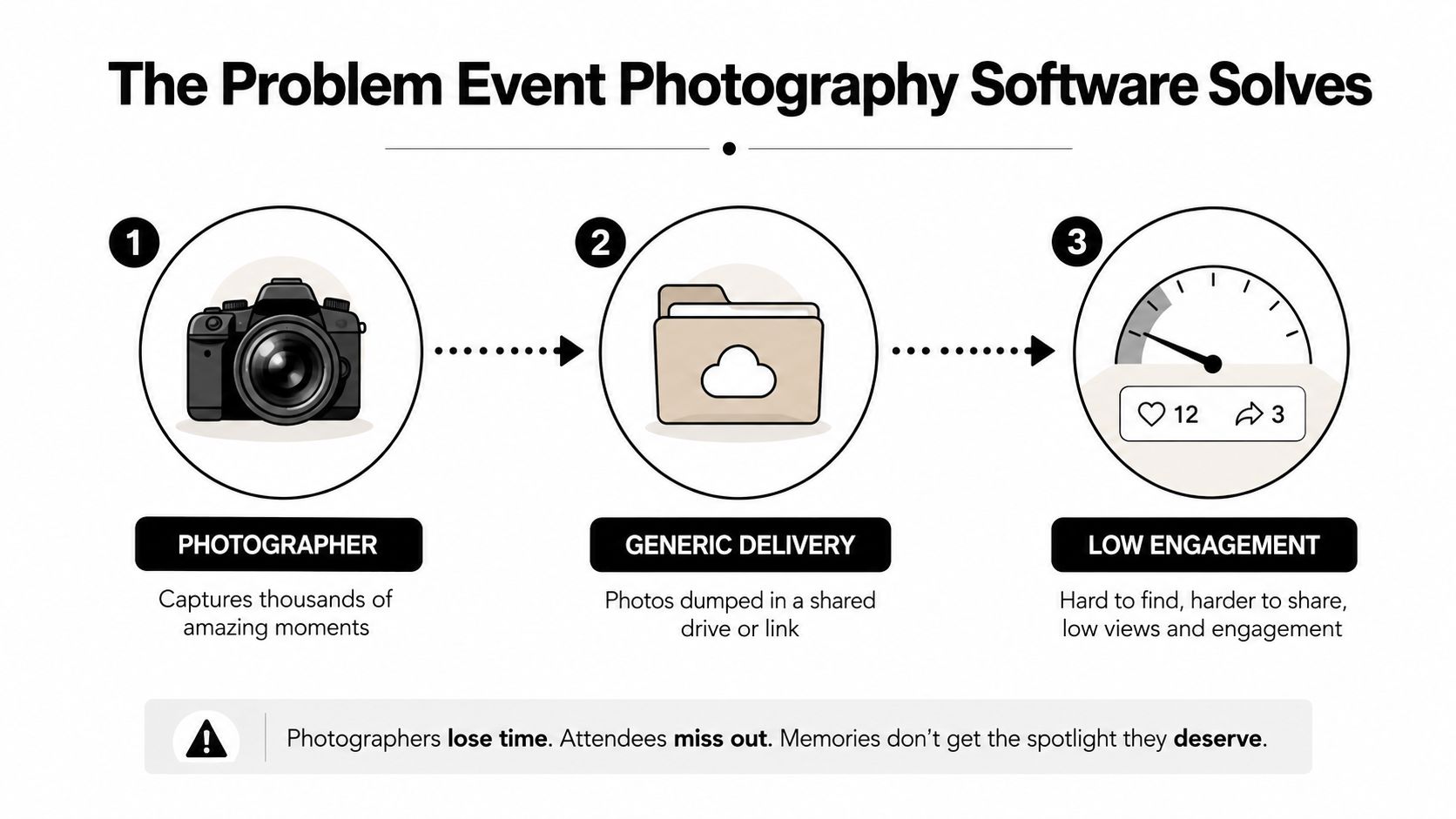
The timing matters because the strongest sharing opportunity arrives soon after the event. One industry source reports that 69% of guests share event photos on social media within 24 hours, while engagement can fall by 80% after the first two hours. The same event photo sharing research reports that same-day delivery produces 4.2 times more social sharing than traditional post-production timelines, and that more than 80% of guests view event photos on a phone.
Practical rule: Treat photo delivery as an attendee journey, not a storage task. Every extra search step reduces the chance that a guest will view, download, or share an image.
Event photography software compresses the distance between capture and discovery. A photographer uploads the images, the platform organizes the event gallery, and attendees enter through a browser link or QR code photo gallery. With selfie photo matching, a guest can submit a quick selfie and receive a private view of images in which they appear.
The organizer also gets decision-making tools. They can choose whether images appear instantly or only after review, whether downloads are enabled, how long the gallery remains available, and whether guests see a public event collection or only matched photographs. That combination, faster retrieval and stronger control, defines the category.
What Event Photography Software Actually Is
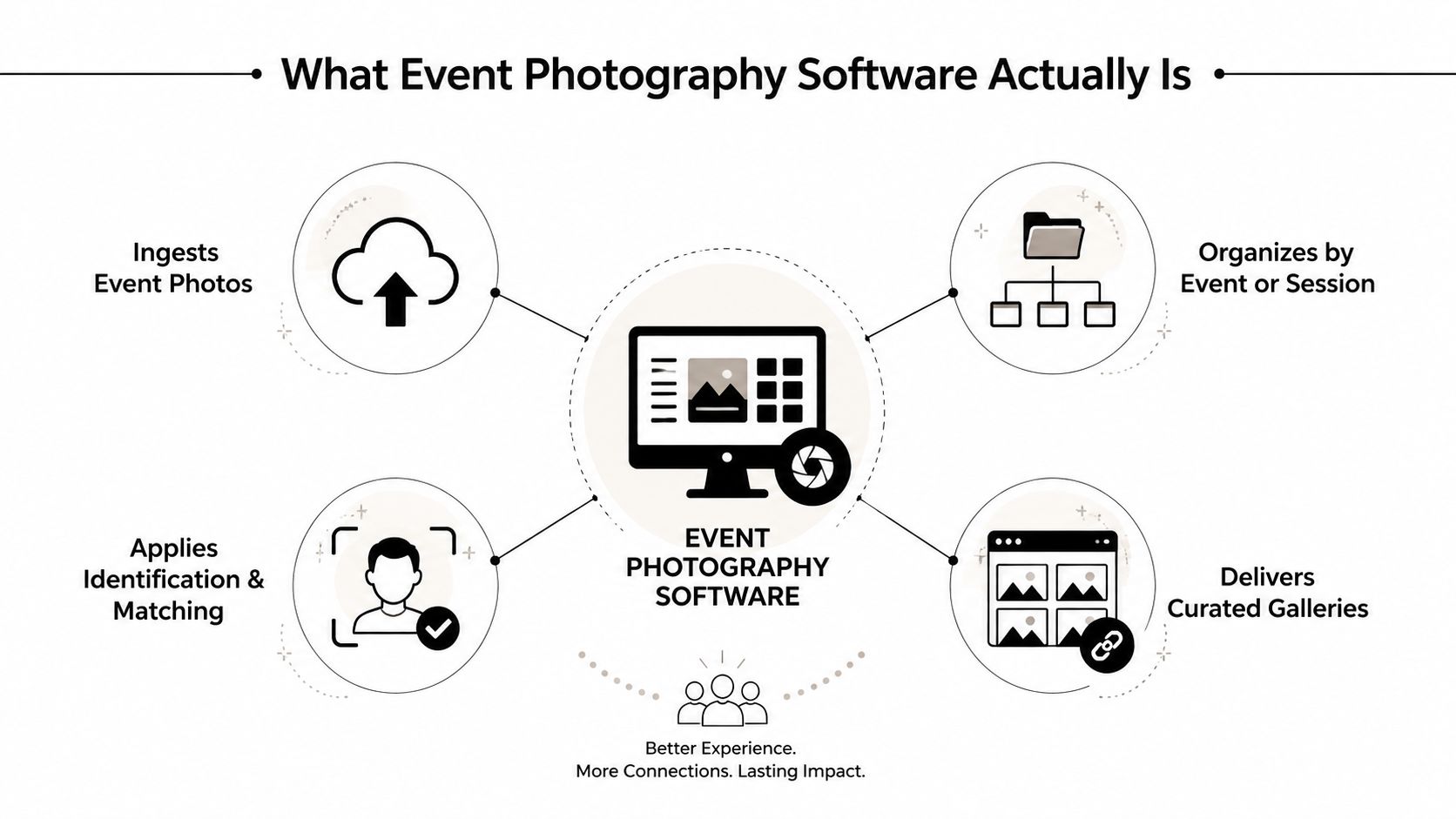
Event photography software is a workflow platform for ingesting, organizing, identifying, and delivering event images. It sits between the photographer's camera workflow and the attendee's phone. The platform may accept a batch upload after the event, a live feed during the event, or both, depending on the setup.
A useful definition follows the image through four stages:
- Ingest: The photographer uploads images into an event workspace rather than a general storage folder.
- Organize: The platform groups content by event, session, gallery, photographer, or collection.
- Identify: Face indexing, selfie photo matching, tags, or other retrieval methods help attendees locate relevant images.
- Deliver: Guests open a browser gallery, event link, or QR entry point to view and download approved photographs.
The category has clear boundaries. Adobe Lightroom is a raw editing and cataloging tool, not primarily an attendee retrieval system. A digital asset management platform built for a brand library may manage campaigns, logos, and approved assets, but it isn't necessarily designed for a guest to find personal event images. Google Drive, Dropbox, and similar services provide storage and sharing, but they generally don't provide event-specific matching, attendee-facing discovery, or organizer controls built around a live audience.
The people in the workflow
The photographer controls capture, upload, selection, and often the first release decision. The organizer defines the event rules, including branding, access, visibility, and retention. Attendees use the retrieval experience, usually from their own phones, without needing to understand the underlying image-processing system. An administrator may review analytics, handle support requests, and coordinate photographers or venue staff.
The category exists because attendees have a limited retrieval window, the short period after an event when they're most willing to look for and share their images. A platform that stores photographs beautifully but makes personal discovery difficult misses the central requirement.
The right evaluation question isn't “How many features does this tool have?” Ask instead: Can my attendees find their photos quickly, and can my team control exactly what gets released?
Core Features That Define the Category
Features matter only when they support a real event decision. A gala organizer needs controlled portrait and candid delivery. A tournament photographer needs athlete and team retrieval. A trade show team needs branded distribution that doesn't expose every image to everyone.
Instant gallery distribution
Purpose: Put an event photo sharing link in front of attendees without making them install an app.
The photographer uploads selected images, and the organizer publishes a browser gallery through email, text, WhatsApp, an event website, or signage. For a gala, the organizer might release approved red-carpet portraits during the evening while holding candid reception images for review.
Face recognition event galleries
Purpose: Turn faces in the gallery into searchable retrieval points.
During processing, the platform detects and indexes faces so a guest doesn't have to browse every image. Large benchmark datasets show that face-recognition evaluation is technically viable at substantial scale. MegaFace contains one million photos of more than 690,000 people, while WebFace260M includes 260 million face images and four million identities, as documented in the large-scale face recognition benchmark.
That doesn't mean an event platform can ignore quality controls. The same benchmark work reported 82.2% rank-1 retrieval in IJB-A closed-set search and 61.5% FNIR at 1% FAR in open-set search. Those results reinforce the need for thresholds, manual alternatives, and a way to report or correct a mistaken match.
Selfie photo matching
Purpose: Let an attendee request a personal gallery using a familiar action.
A guest scans the event link, takes a selfie, and receives matching images. At a sports tournament, this can reduce the need for an athlete or parent to search through team-wide galleries. At a trade show, it can surface booth portraits without requiring the attendee to remember which photographer captured them.
QR code photo gallery
Purpose: Remove typing and navigation from the first step.
A QR code on a registration desk, sponsor wall, printed card, or venue screen opens the scoped event experience. The code shouldn't automatically mean public access. Organizers may pair it with a consent screen, access code, invite link, or selfie flow.
Organizer controls
Purpose: Decide who sees what, when, and under which conditions.
Useful controls include event scoping, access gates, watermark settings, download permissions, gallery expiry, and visibility by collection. A fundraiser may want sponsor-branded images available to everyone but donor portraits restricted to matched attendees. A tournament may need separate team galleries. A trade show may give exhibitors access to their booth collection while keeping other booths private.
You can review the kind of event and gallery configuration expected in a dedicated workflow through Saucial's settings area.
| Feature | Primary Purpose | When It Shows Up at an Event |
|---|---|---|
| Instant gallery distribution | Share approved images quickly | A gala team releases portraits through a link during the reception |
| Face recognition event gallery | Index faces for retrieval | A tournament gallery organizes images around athletes and teams |
| Selfie photo matching | Return images featuring one attendee | A trade show visitor finds booth photos without browsing the full collection |
| QR code photo gallery | Create a low-friction entry point | Guests scan signage near registration or the exit |
| Organizer controls | Govern visibility and downloads | A sponsor event separates public highlights from private attendee images |
A Typical Event Workflow From Upload to Delivery
A well-designed workflow starts before the first gallery link is shared. The photographer and organizer agree on the event structure, privacy settings, release timing, and who will operate the system during the event.
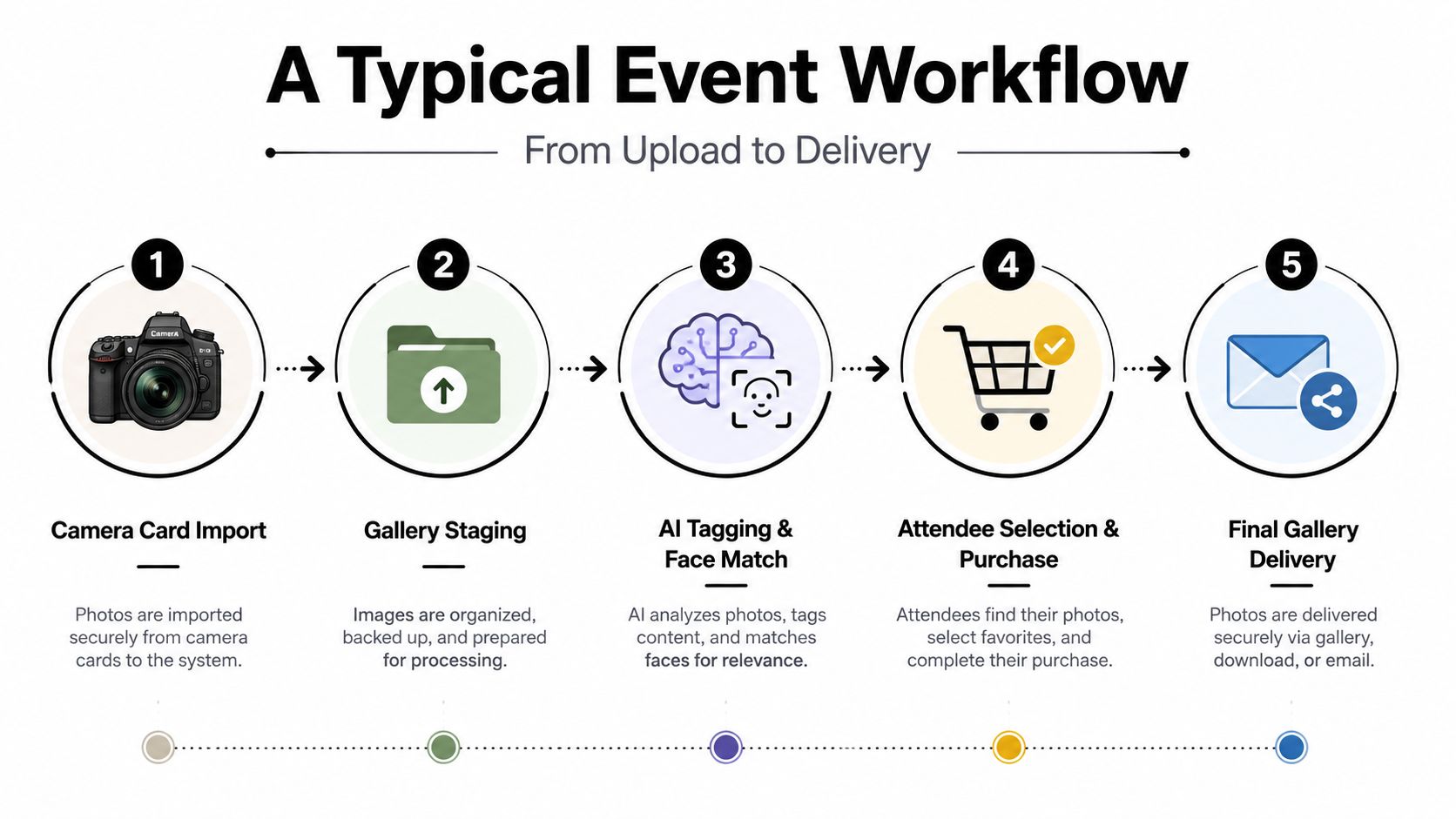
The photographer imports images from camera cards into the platform's staging area. If several photographers are working, each person may upload into the same event workspace or a designated session. The upload stage should preserve the event structure so the team can distinguish keynote photographs from networking, portraits, sports heats, or sponsor activations.
Staging and review
The photographer or editor culls unusable frames. The organizer, communications lead, or assigned reviewer then decides which collections become visible. The team can apply watermarks, adjust download permissions, hide sensitive images, and choose between live release and post-event approval.
For a fast gala workflow, the team might release selected portraits immediately and hold images that include private conversations. For a corporate event, the organizer may require a review before any image reaches attendees.
Matching and live distribution
Once the gallery is ready, the platform indexes faces and prepares the attendee retrieval route. The organizer places QR signage at suitable locations, while venue staff can explain the process at registration or a photo station. If the event uses an onsite kiosk, staff can help attendees provide a selfie and understand the consent choice.
The photographer keeps uploading as coverage continues. The organizer decides whether new images appear automatically or wait in review. Attendees then use the event upload workflow to start the gallery process, depending on the chosen platform and configuration.
The embedded walkthrough below offers another visual reference for the upload-to-delivery process.
Download and closeout
After the event, the organizer can keep attendee-only access open for an approved period, export the full gallery for internal records, and close access according to the retention policy. Attendees should be able to download their permitted images without gaining access to the full event archive.
The staffing map is simple. The photographer owns capture and upload. The reviewer owns release quality. The organizer owns permissions and communication. Venue staff owns attendee guidance. An administrator owns support, exports, and closure.
Privacy, Permissions, and Attendee Consent
A guest scans a QR code at a gala, submits a selfie, and expects to find the photographs quickly. The organizer must make a separate decision: what data the matching process may use, who can see the results, and when access ends. Face recognition creates a biometric privacy question because the system may convert facial features into a reusable representation for matching. Risks include inaccurate identification, normalized surveillance, and unclear data handling, which is why the biometric privacy literature emphasizes oversight, technical standards, transparency, and explicit consent controls.
The organizer should identify where matching occurs. With server-side processing, the selfie and derived face representation travel to the provider's infrastructure. With on-device processing, more work may remain on the attendee's phone, potentially reducing central exposure. The actual privacy profile still depends on the implementation, storage design, and access rules.
Controls the organizer should configure
Consent belongs at the retrieval window, before the selfie is submitted. The gallery should state what the selfie does, whether it is retained, who can access matched images, and how an attendee can withdraw. A short explanation beside the consent choice is easier to understand than a buried reference in a privacy policy.
The organizer should configure:
- Consent mode: Offer explicit opt-in where appropriate, rather than treating gallery entry as consent to facial matching.
- Opt-out path: Provide a non-biometric route, such as limited gallery browsing, staff assistance, or a manually selected collection.
- Visibility rules: Restrict galleries by event, team, booth, collection, or attendee.
- Download settings: Separate viewing from full-resolution downloads, especially for sponsor, school, or corporate events.
- Retention policy: Set when selfies, embeddings, and event images are deleted or archived.
- Deletion requests: Give attendees a clear way to request removal of their selfie, matched data, or accessible images.
Privacy principle: The platform should know enough to complete the requested match, but it should not expose more event or biometric data than the workflow requires.
Processing choices affect both privacy and operating cost. Resizing images before analysis can reduce computation, but smaller files may affect image quality and matching reliability. Ask the vendor how preprocessing is tested, how false matches are handled, and whether the original image remains protected throughout the process.
Questions to ask vendors
Ask where selfies and embeddings are stored, whether biometric data is isolated per event, whether encryption protects data in transit and at rest, and whether the provider uses it to train unrelated systems. Confirm deletion procedures, regional data handling, consent records, the attendee opt-out experience, and support for false matches.
A live trial can include Saucial's authentication workflow. Treat that test as a workflow check, then verify the provider's current privacy terms, retention commitments, and organizer controls separately.
Choosing Software by Event Type
A feature checklist can hide the operating differences between events. The right priorities change depending on whether attendees are dressed for a gala, arriving as athletes and families, or moving between exhibitor booths.
Galas
A gala usually needs polished portraits, candid coverage, sponsor visibility, and controlled release. Guests may want to share a red-carpet image quickly, while the organizer may need to protect private donor interactions or hold back photographs until communications staff approve them.
The workflow that fails without purpose-built tooling is the generic folder handoff. A broad gallery makes it difficult for a guest to locate a personal portrait and difficult for the organizer to separate sponsor content from private event moments.
Sports tournaments
Sports events produce repeated appearances across matches, heats, ceremonies, and team photographs. Matching may combine selfies with bib numbers, jersey numbers, team labels, or event-session metadata. Parents need a simple browser experience, and teams may need separate access from the general audience.
The failure point is manual sorting. Without team-level organization and fast bulk distribution, the photographer or tournament staff spends too much time answering requests for one athlete's images.
Trade shows
Trade shows add a business layer. Exhibitors may want booth-specific galleries, branded frames, lead capture, and self-service access to approved images. The event organizer may need a shared visual archive, while each exhibitor needs control over its own content.
The workflow that breaks down is the all-in-one public gallery. It can mix brands, reveal unrelated booth activity, and force exhibitors to depend on the central organizer for every retrieval request.
| Event Type | Top Priority | Matching Method | Distribution Speed | Organizer Control |
|---|---|---|---|---|
| Gala | Portrait retrieval and brand presentation | Selfie matching with curated collections | Fast release for approved highlights | Strong privacy and sponsor controls |
| Sports tournament | Athlete, team, and session organization | Selfie plus bib, jersey, or team metadata | Bulk delivery across active sessions | Team-level access and download rules |
| Trade show | Booth engagement and exhibitor self-service | Selfie, booth, or registration context | Near-live sharing for lead and social use | Booth-specific visibility and branding |
Choose the event type that resembles your hardest workflow, not the event type with the most attractive demo. A gala may need fewer matching structures but tighter release controls. A tournament may value speed and grouping above visual polish. A trade show may judge the platform by whether exhibitors can retrieve and use approved content without creating administrative work.
Evaluating Tools and Where Saucial Fits
An organizer can evaluate a shortlist quickly by testing the complete attendee journey, not by reading a long feature page.
- Gallery delivery: Check whether guests can enter through a browser link, QR code photo gallery, email, or messaging channel. Test the flow on a phone that isn't logged into the organizer account.
- Matching and consent: Confirm whether selfie photo matching is optional, how consent is recorded, and what happens when the system returns a wrong or incomplete match.
- Organizer controls: Look for event scoping, release windows, collection visibility, watermarking, download permissions, and expiry settings.
- Attendee friction: Count the actions required to reach “find my photos.” App installs, forced accounts, and confusing registration screens deserve scrutiny.
- Pricing clarity: Identify what the price covers, including storage, processing, galleries, downloads, guests, support, and additional events.
During a trial, upload a representative gallery rather than a perfect demo set. Include group photographs, motion, varied lighting, and images from every event zone. Then ask a colleague unfamiliar with the system to complete the attendee journey without coaching.
Saucial can be evaluated against the same framework. Its workflow uses uploaded event photos, shareable links, QR access, selfie-based retrieval, and organizer decisions around what becomes available to attendees. The relevant questions remain the same as with any vendor: whether its matching and consent flow fits the event, whether release settings are sufficiently granular, and whether downloads and retention work for the organizer's policy.
Before signing up, confirm data residency, selfie and face-embedding retention, event-image expiry, deletion handling, export options, and support availability. Ask whether the vendor will run a live test event with your actual staffing and attendee flow. That test will reveal more than a feature list because it exposes the point where real guests either find their images or abandon the process.
Saucial gives organizers and photographers a practical way to share event galleries through links or QR codes and help attendees find their own images with selfie matching. If you're planning a gala, sports tournament, trade show, or community event, visit Saucial to explore an attendee retrieval workflow built around faster access and organizer control.



