Event Photo Gallery: Smart Privacy & Sharing
Monday after a 300-person conference, the photographer sends over 2,400 edited images. The organizer posts one Google Drive link on LinkedIn, then moves on to the next event. By Wednesday, only a few people have opened it. Downloads trickle in for a while, attendees ask whether anyone has a photo of them, and most of the gallery becomes a forgotten archive.
That failure isn't a storage problem. The files exist. It's a retrieval and activation problem. Guests need a fast way to find relevant photos, understand who can access them, and receive the gallery while the event still feels fresh. An effective event photo gallery combines distribution, find-my-photos search, consent controls, and measurement into one operating system.
The Post-Event Photo Problem You Already Know
The traditional handoff rewards completion, not usage. Once the photographer delivers a folder, the organizer can mark the task finished, but attendees still have to open an unfamiliar link, browse a large set of images, recognize themselves manually, download the right files, and decide whether to share them. Every extra step reduces the chance that the gallery becomes part of the event's ongoing conversation.
Timing makes that weakness more expensive. A 2026 event photography statistics roundup reported that 69% of guests share event photos on social media within 24 hours, while engagement from event photos can fall by 80% after the first two hours. The same source reported that same-day delivery produces 4.2 times more social shares than traditional post-production timelines, while delivery delayed by two to three days can reduce sharing below 30%. Those figures support a practical conclusion, the gallery needs to reach attendees while they're still checking messages, tagging colleagues, and reliving the event.
Storage doesn't create discovery
A Drive or Dropbox folder is useful for transferring files between professionals. It usually isn't designed for attendee retrieval. A generic folder has limited context, weak filtering, and no built-in answer to the question every guest asks: “Which photos include me?”
The same roundup noted that a third of attendees never download photos when galleries arrive through generic Drive or Dropbox links. The issue isn't that attendees don't value the images. The issue is that the delivery method asks them to do the sorting work.
Practical rule: If a guest needs to scroll through hundreds of images to locate one usable photo, you've delivered files, not an attendee experience.
The operating system that works
A modern workflow starts with four decisions:
- Distribution: Put the gallery in front of attendees through the channels they already use.
- Retrieval: Offer search by person, group, time, or event context instead of forcing manual browsing.
- Consent: Make face-matched search optional, understandable, and reversible.
- Measurement: Track opens, views, shares, and photographer outcomes separately.
This matters for a gala fundraiser, a sports tournament, a trade show, or an alumni dinner. The event type changes the access rules and the audience, but the underlying question stays the same: can the right person find the right image quickly enough to use it?
What an Event Photo Gallery Actually Is
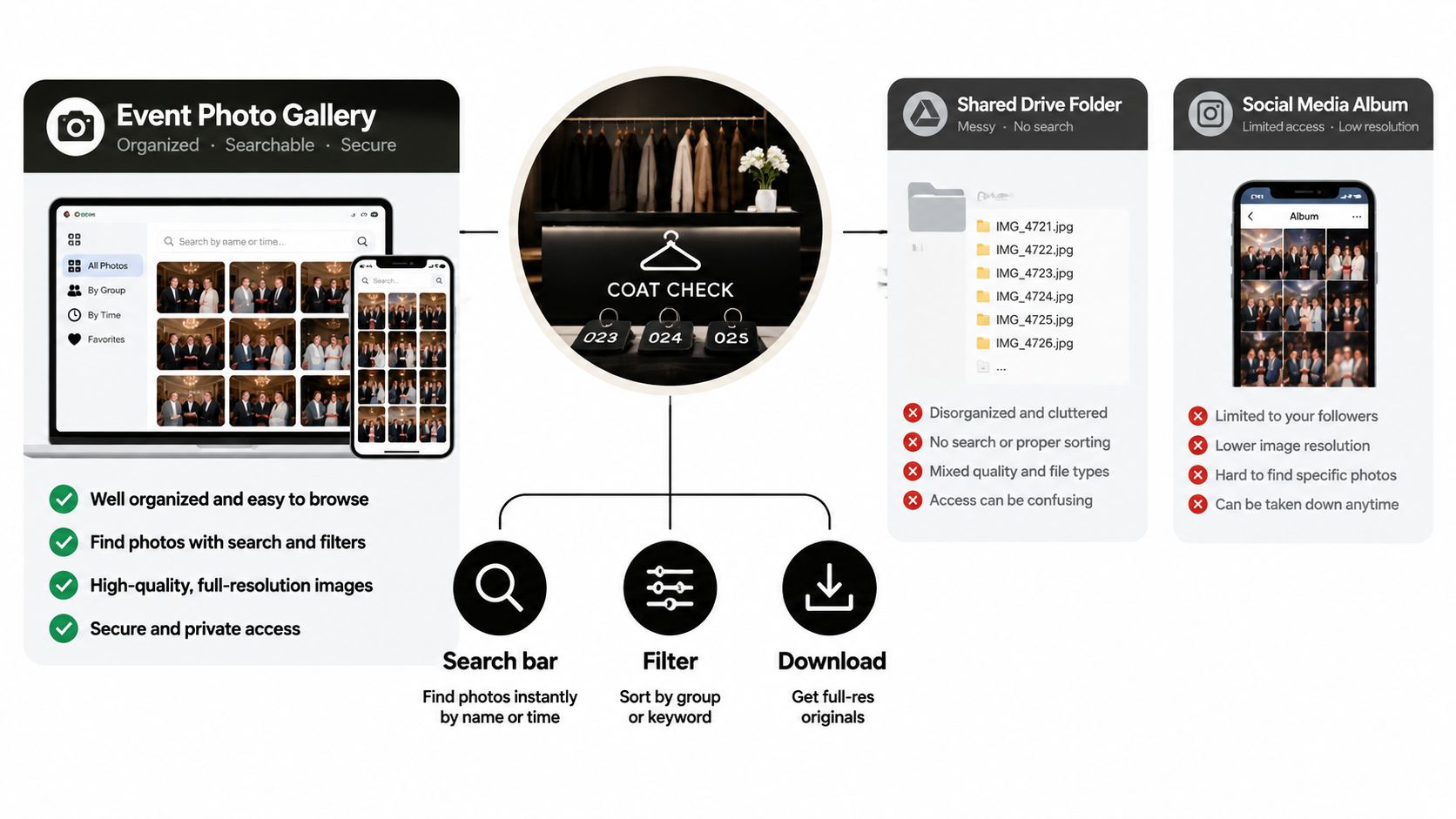
An event photo gallery is a hosted, organized surface for event images. It isn't just a folder with a nicer color scheme. A useful comparison is a coat check. The photographer brings in the items, the system sorts and labels them, and each guest gets a practical way to claim the belongings that matter to them.
A shared folder is closer to leaving every coat in one room. It may hold the files, but it doesn't provide a strong retrieval experience. A social media album offers discoverability and public reach, yet it may expose images too broadly, compress the files, or make private attendee access difficult.
Capabilities that define the category
When evaluating a vendor or internal tool, look for capabilities that affect actual use:
- Event-level access control: Organizers can separate one event from another instead of placing every image in a permanent searchable archive.
- Attendee-level retrieval: Guests can use a name, keyword, group filter, or selfie photo matching workflow to locate relevant images.
- Expiration controls: The organizer can define how long the gallery and any face templates remain available.
- Branded presentation: The gallery can carry the event, sponsor, venue, or photographer identity without turning the page into an advertisement.
- Low-friction delivery: Guests can open a link, scan a QR code photo gallery, or download a selected image without creating an unnecessary account.
- Controlled actions: Organizers can decide whether attendees can download, share, request prints, or access premium edits.
A platform such as Saucial illustrates this model by combining an uploaded event gallery, a shareable link or QR code, and selfie-based retrieval inside the event experience.
What a gallery isn't
A gallery isn't a backup repository, an unmanaged file-transfer link, or a public album by default. It should give organizers control over who sees what, how guests find it, and when the access expires.
That vocabulary helps during vendor selection. Ask whether the product supports retrieval, not just hosting. Ask how it handles opt-in face matching, not just whether it has artificial intelligence. Ask what the guest sees after scanning, not just whether the organizer receives a URL.
Gallery Types and Which Events They Fit
The right gallery type depends on the event's audience, sensitivity, and distribution goal. Public access can help a community festival spread its visual identity, while a private gallery makes more sense for a wedding or corporate summit. QR-linked access sits between the two, because the organizer can place the entry point inside the venue, on a lanyard, or inside an event app.
| Event Type | Recommended Gallery | Why It Fits |
|---|---|---|
| Community run or public festival | Public gallery | Makes discovery and social sharing easy for a broad audience |
| Wedding or private celebration | Private gallery | Protects personal images and keeps access limited to invited guests |
| Corporate summit or ticketed experience | Private gallery with controlled sharing | Supports attendee retrieval while preserving event and participant privacy |
| Conference or trade show | QR-linked gallery | Connects access to signage, badges, lanyards, or event credentials |
| Sports tournament | QR-linked or private gallery | Helps teams and families locate relevant action shots without exposing the entire archive |
| Alumni dinner or school event | Private gallery with optional matching | Gives organizers tighter consent controls for a mixed audience |
Public galleries favor reach
A public gallery works when visibility is part of the event's purpose. Community races, festivals, and brand activations often benefit from easy access because attendees can share moments without requesting permission from an organizer.
The trade-off is control. Public access can expose people who didn't expect to appear in a searchable collection, so the organizer needs a clear publication policy and a straightforward removal path. Curated albums may work better than publishing every frame.
Private galleries favor trust
Private galleries fit weddings, fundraisers with sensitive guests, corporate gatherings, and ticketed experiences. Access can be distributed through a controlled link, an attendee email, or a protected event page.
The downside is discoverability. If access requires a complex login or a manual approval process, guests may abandon the journey. Privacy should narrow the audience, not create unnecessary friction for people who are already authorized.
QR-linked galleries favor speed
A QR code placed at registration, near the exit, on a lanyard, or in the event program turns retrieval into an immediate action. It works especially well when guests are still on site and want to check whether the photographer captured them.
Verification can be lighter or stricter depending on the event. A general QR code prioritizes speed, while a badge-linked or credential-based route provides stronger control. The decision should follow the sensitivity of the images, not the convenience of the technology.
Distribution Workflows That Get Photos Opened
The workflow should be designed backward from the attendee's first tap. Start with the image set, then decide how guests will discover it, how they'll search, and which reminder will reach anyone who missed the initial message.
Build the delivery path
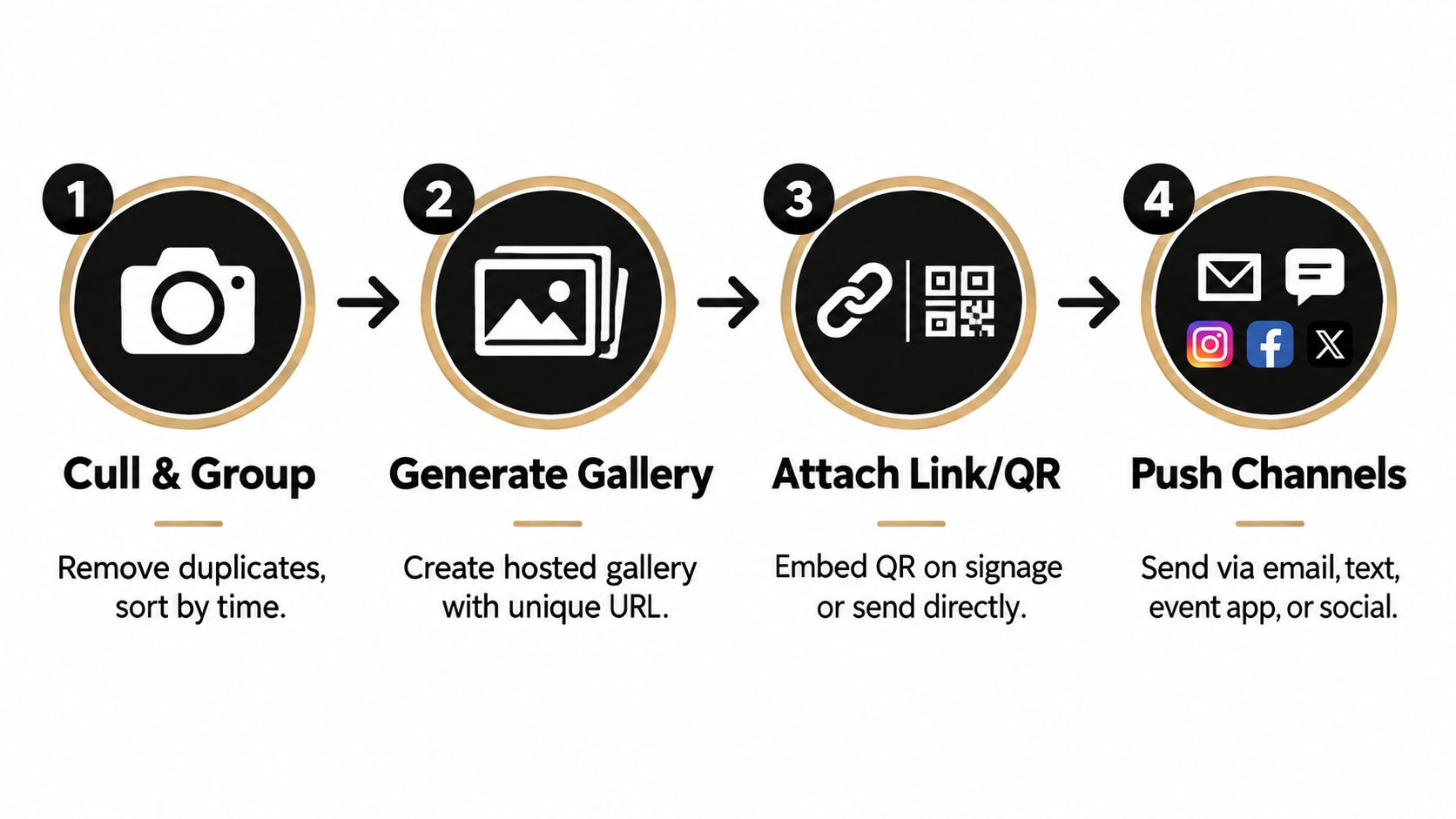
- Cull and group the images. Remove duplicates, obvious misses, and unusable frames. Group by time, session, team, sponsor activation, or location so the gallery has useful structure.
- Generate the hosted gallery. Create the event page, confirm the access rules, and test downloads on a phone. The organizer should know exactly what an attendee sees before the link goes live.
- Attach the entry point. Create a unique event photo sharing link and, where appropriate, a QR code photo gallery. Put both in the channels that match the audience.
- Push through multiple channels. One channel rarely reaches everyone. Use the attendee list, on-site signage, direct messages, and partner communications together.
Match each channel to a job
- QR codes: Place them on registration desks, exit signage, lanyards, table cards, or event programs for immediate on-site pickup.
- Email: Send the full attendee list a direct link after the event, with a clear explanation of what guests can find.
- SMS and WhatsApp: Use direct delivery when the audience has opted into those channels and the message needs to be seen quickly.
- Social posts: Use selected previews for public reach, sponsor visibility, and community momentum. Don't treat a social post as the only access route.
- Embeds: Give sponsors, venues, partners, and speakers a controlled gallery module or link for follow-up sharing.
- Event apps: Add the gallery where attendees already check schedules, maps, and announcements.
The Saucial upload workflow is one example of a tool built around uploading event photos and distributing them through a link or QR code. The important principle is broader than any one product. The attendee should reach the gallery in one or two taps, without a folder request or a scavenger hunt.
Timing and friction decide usage
The cited industry roundup found that the first post-event period is especially valuable for sharing. That makes a fast preview or same-day set useful even if the complete edited gallery arrives later. A practical compromise is to publish a curated first release, then add the remaining images as they clear the editing workflow.
Use a branded preview image, a personal greeting where possible, and a subject line that says exactly what the recipient will get. Send a reminder to people who haven't viewed the gallery, but don't repeatedly message people who have already opted out or completed their retrieval.
A QR code is only an entry point. The page behind it has to load quickly, explain the next action, and make the first successful photo easy to find.
How Selfie Photo Matching Really Works
Selfie photo matching turns the question “Where am I?” into a direct retrieval workflow. The attendee opens the gallery, submits a selfie, acknowledges the relevant consent notice, and receives a set of event images that appear to include them.
The system doesn't need to show the entire archive first. It can compare the submitted face template with the event's indexed photos and return likely matches above a configured confidence threshold. That makes the feature useful as both a search tool and a privacy filter, because the attendee can begin with a person-specific result rather than browsing everyone else's images.
The workflow in plain language
First, the attendee submits a selfie. The gallery should explain why the image is requested and ask for explicit permission before matching begins.
Next, the system detects and encodes facial features. It creates a mathematical representation, often called an embedding or face template, rather than relying on a plain-text name.
Then, the matching engine compares the template with the event index. It ranks candidate images according to similarity and applies a threshold to reduce weak or misleading results.
Finally, the attendee receives the results. They can review, download, or share the photos allowed by the organizer's settings.
The technical history behind this workflow is substantial. Early computer face-recognition work began in the mid-1960s, according to a historical overview based on a National Academies chapter on automated face recognition. That overview also describes the 2007 release of the Labeled Faces in the Wild dataset and reports that Facebook's DeepFace reached 97.35% accuracy on that benchmark in 2014, compared with a reported 97.53% human benchmark. These milestones explain why face recognition event gallery features are now feasible, but they don't remove the need for careful consent design.
Think of it as a control panel
A responsible system has dials, not a single hidden switch. The organizer controls the confidence threshold, event scope, opt-in state, retention period, and deletion process. Selfie matching shouldn't identify strangers for the organizer, publish a person's location, or push someone's photo outward without a permitted sharing action.
The best implementation is event-specific. It indexes the photos for one event, returns results to the querying attendee, and avoids treating the gallery as a cross-event identity database.
Privacy and Consent Practices That Earn Trust
Face-matched retrieval should be treated as sensitive biometric processing, not as an ordinary upload feature. The convenience is real, but the organizer has to explain what happens before asking an attendee to submit a selfie.
Use this checklist before enabling a face recognition event gallery:
- Notice: Add plain-language text at the upload or sign-up point. Explain what the selfie is used for, who can see the resulting matches, and how long the relevant data remains.
- Separate opt-in: Don't bundle face matching into general gallery access. An attendee should be able to view permitted event photos without consenting to biometric matching.
- Withdrawal: Provide a practical way to revoke permission and request deletion later. The process shouldn't require a long support exchange.
- Retention limit: Set a short, documented period for face templates and selfie inputs. Independent privacy guidance suggests retaining face encodings only through the event and a short buffer, with 30 days offered as an example for delayed access in event photography privacy guidance.
- Deletion workflow: Define what happens when someone asks for removal, including the selfie, face template, search results, and any associated records.
- Restricted access: Limit biometric data to the matching function and the staff who need to administer it. Don't reuse it for unrelated event analytics or cross-event linking.
Design for partial consent
Mixed audiences create the hard cases. At an alumni dinner, some guests may want a fast find-my-photos experience while others may prefer ordinary browsing. At a conference, a speaker may approve publication but decline face matching. At a school event, minors may require a guardian-controlled process or a safer feature switch-off.
A privacy guide for event photography identifies explicit informed opt-in, clear retention rules, and deletion rights as central concerns for face-recognition use. In practice, the gallery should continue working when consent is partial. Provide non-biometric browsing or organizer-curated access for people who decline.
Make the policy visible
Don't bury the notice in a general privacy page. Put it beside the selfie action, use straightforward language, and name a contact for questions. Review access permissions periodically, publish the retention rule, and record when the system is disabled or purged.
The authentication settings for a gallery workflow should support user control rather than forcing every attendee into the same identity and consent path. A trustworthy experience gives people a choice without punishing them with unusable access.
Measuring Outcomes That Matter to Organizers and Photographers
A gallery report should answer two different questions. The organizer wants to know whether the event created usable brand and community momentum. The photographer wants to know whether the workflow reduced manual work and created a direct route to attendee value.
Start with the organizer-facing dashboard. Track how many invited people opened the gallery, how many images they viewed, how often they shared back to social channels, and how many opted into future event communications. These metrics help explain whether the gallery supported post-event engagement or merely stored deliverables.
Photographers need a different view. Measure how many deliverables were handled per event hour, how many views were shareable versus private, how many attendees became qualified leads, and whether participants granted repost rights. If the photographer sells prints, premium edits, or digital downloads, the gallery should distinguish those actions from free browsing.
| Metric | Primary Lever | Report To |
|---|---|---|
| Gallery open rate | Email timing, QR placement, direct link wording | Organizer and sponsor |
| Photos viewed per attendee | Find-my-photos prompt, filters, gallery structure | Organizer and photographer |
| Share-back rate | Download permissions, preview quality, social prompts | Organizer and sponsor |
| Face-match opt-in rate | Notice clarity, separate consent, prompt placement | Organizer and privacy lead |
| Deliverables per event hour | Culling process, automated indexing, hosted delivery | Photographer |
| Lead conversions | Download flow, contact permission, curated offers | Photographer |
| Repost rights captured | Permission language and sharing controls | Organizer and photographer |
Separate brand lift from throughput
A sponsor report should emphasize reach, shares, branded frames, and the number of attendees who interacted with sponsor-related images. A photographer's internal review should emphasize turnaround effort, search-related support requests, downloads, and revenue opportunities.
Don't present every metric as proof of success. A high open rate with few views may indicate that the landing page doesn't help people search. Many views with little sharing may point to weak download permissions, unclear rights, or images that aren't easy to repost.
Optimize the levers you control
QR placement matters because people are more likely to scan at an exit moment than during a crowded session. Send timing matters because a message delivered while attendees are still discussing the event has more relevance than a buried follow-up. The visibility of the selfie-match prompt matters because guests can't use a retrieval feature they don't notice.
A useful debrief includes the metric, the likely lever, and the next test. Keep privacy metrics beside engagement metrics. A gallery that drives activity by ignoring consent isn't an operational success.
Putting the Whole Event Photo Gallery Workflow Together
Run the workflow as five connected stages, with a clear artifact produced at each point:
- Capture: Photograph the event and preserve the original RAW exports or approved source files.
- Ingest: Cull and organize the usable images, then create the hosted gallery URL.
- Index: Apply event-specific search and, only where approved, build the face index for opt-in selfie retrieval.
- Distribute: Place the QR code at relevant venue touchpoints, send the event photo sharing link through email or messaging, and publish selected social previews.
- Measure: Produce a report covering opens, views, shares, opt-ins, deletion requests, and photographer outcomes.
Three decisions determine whether most guests will ever open the gallery. Choose the gallery type that matches the audience and sensitivity level. Deploy the first distribution channel while the event is still relevant, with the cited industry data supporting delivery within the immediate post-event window. Explain selfie matching clearly and keep it optional.
Before the next major event, use the gallery settings workspace to review access, retention, download, and sharing controls. Then test the full journey on a phone, including the QR scan, the consent notice, the selfie submission, the result screen, and the deletion request path.
Start with one upcoming event. Select public, private, or QR-linked access using the decision logic above, send a test link to a small internal group, and fix every point of confusion before adding advanced retrieval or monetization. A gallery becomes valuable when attendees can find and use their moments, not when the organizer has successfully uploaded another folder.
Saucial helps organizers and photographers create an event photo gallery with a shareable link or QR code and a find my photos experience based on selfie photo matching. Visit Saucial to see how you can connect faster delivery, attendee retrieval, consent controls, and post-event engagement in one workflow.



