Event Photo Booth Workflow Guide for 2026
Most event teams still buy an event photo booth as if the camera were the product: add a ring light, print a few strips, scatter some props, and call the activation finished. That approach captures plenty of images and delivers surprisingly little value. The actual job is getting each guest to the right photo quickly, privately, and while the event still matters.
The history of the category makes that clear. In 1925, Anatol Josepho's Broadway booth charged 25 cents, produced 8 photos, and completed the process in about 10 minutes. Roughly 280,000 people used it during its first six months, with peak demand reportedly reaching 7,500 people per day. The original promise was immediate output, not delayed archiving, and that promise still determines whether a modern booth feels useful or forgettable. The history of the photo booth shows why speed and social participation remain central to the format.
The camera is now the easy part. Distribution is the product.
Why the Event Photo Booth Has Become a Delivery Problem
A photo booth succeeds only when the guest receives, opens, saves, and shares the image. Capture is the first step in that chain, not the outcome. If the workflow ends with photos sitting on an SD card or inside a folder that someone may email later, the activation has stopped before the guest gets anything valuable.
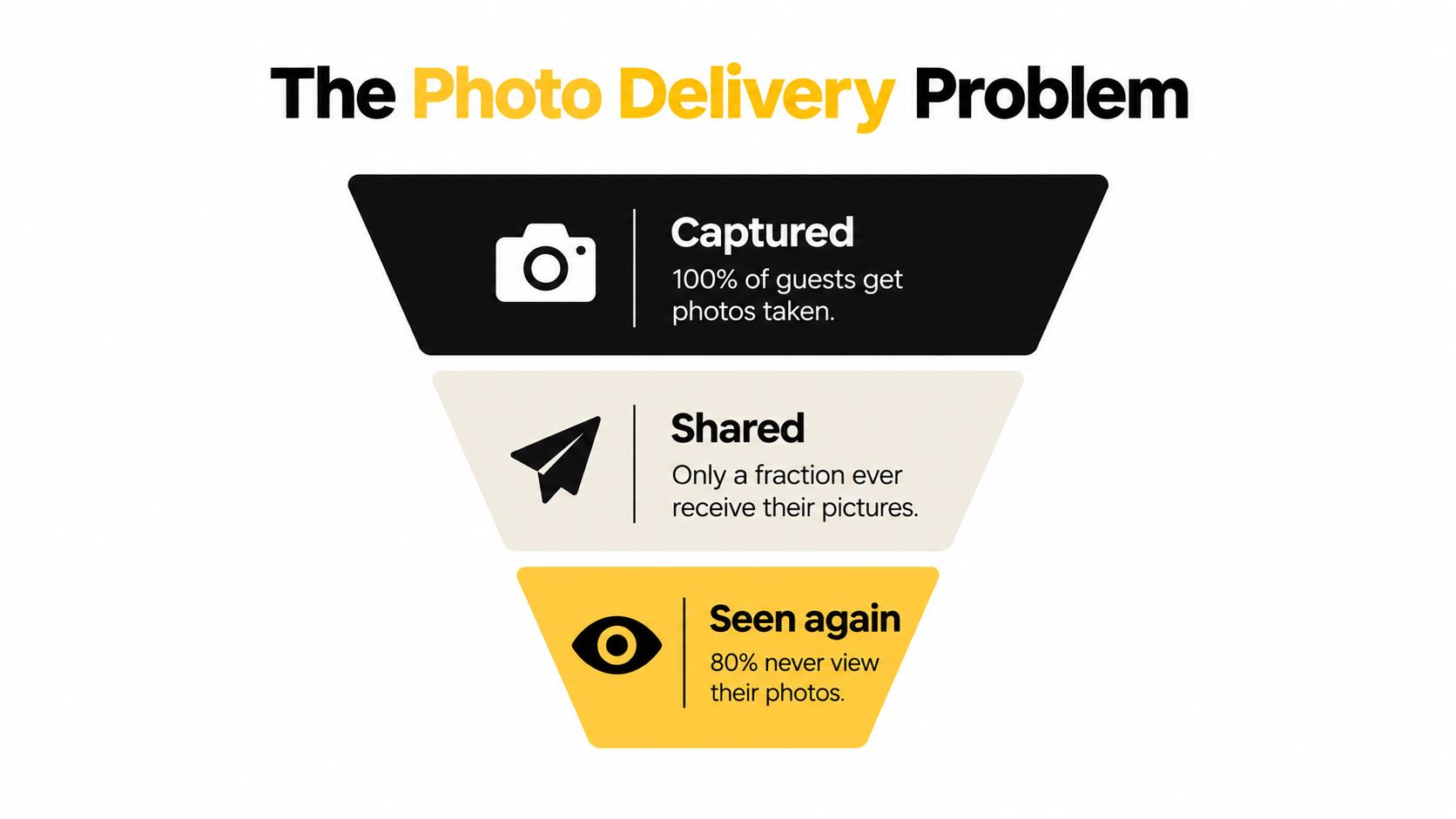
The recurring failure is familiar. An organizer hires a vendor, the vendor captures attractive images, and guests receive a generic Dropbox or Google Drive link long after the room has emptied. Guests have to search through unrelated files, identify themselves in crowded group shots, and remember which folder belongs to which event. By then, the sponsor logo has lost its context and the attendee's social-sharing impulse has disappeared.
Design the handoff before the camera
A delivery-first event photo booth answers four questions before the first guest arrives:
- What does the guest receive? A private gallery, a QR code, a text message, or a combination.
- When does the guest receive it? Ideally during the event or immediately after the session, not during a later administrative cycle.
- How does the guest find the right image? Through a session-specific link, a searchable gallery, or an opt-in selfie photo matching flow.
- What can the guest do next? Save, share, download, request deletion, or respond to a relevant event prompt.
The global category has moved well beyond printed souvenirs. Industry estimates place the global photo booth market at USD 818.2 million in 2024, with projected growth at an 8.8% CAGR from 2025 to 2034, while another forecast places the market above USD 2.0 billion by 2034. These are projections and estimates, not guarantees for an individual operator, but they point to a clear commercial shift toward digital sharing and hybrid event experiences. Global photo booth market estimates support treating the booth as an engagement channel rather than a decorative rental.
Practical rule: If the guest can't access a usable photo before leaving the experience, you haven't finished the activation.
The strongest workflow connects capture, delivery, branding, consent, and measurement as one system. The booth creates the asset. The gallery creates the relationship. The follow-up determines whether the event produced a keepsake, a share, a qualified lead, or just another unused file.
Building the Capture and On-Site Experience
Start with the physical experience, but don't confuse production quality with hardware quantity. A modern mirrorless camera paired with a 24 to 35mm equivalent wide prime lens usually gives you a slimmer, more flexible setup than a purpose-built booth camera. It also gives the operator more control over focus, exposure, and framing when guests arrive in groups.
Lighting has a larger effect on perceived quality than most prop packages. Use one large softbox as the key light, placed roughly 45 degrees from the subjects, and use a fill card to soften shadows. Avoid overhead fluorescent light. A ring light can be convenient, but it often produces flatter skin tones and an obvious catchlight that makes the image feel like a device test rather than a designed portrait.
Build for confident participation
Choose a collapsible magnetic backdrop in a solid color when the display area is compact. Printed step-and-repeats can work for large brand activations, but dense logos and busy patterns compete with faces in small frames. Keep sponsor treatment in the frame, gallery, or delivery page where it can remain visible without making the portrait look like an advertisement.
Place the booth just off the main traffic lane. Guests should notice it without forcing a queue through the entrance, registration desk, or bar line. During the busiest period, one attendant can solve problems, invite participation, reset props, and keep guests from abandoning the flow when a prompt isn't obvious.
A 7 to 10 inch confidence monitor helps guests understand their position before the shutter. Use a physical button, a tablet tap, or a short countdown. Gesture triggers look clever in a product demonstration and become unreliable in loud rooms, crowded scenes, and low-light venues.
Capture for later delivery
Capture two frames per cycle, one wider and one tighter. The wider frame preserves group context, while the tighter frame gives you a useful crop for a phone gallery or social asset. This is a better use of processing capacity than forcing guests through repeated retakes because the first composition was too narrow.
The on-site screen should explain the next action in plain language: pose, capture, scan, save. Don't bury the QR code behind a menu. Don't make guests create an account just to see a portrait. Every additional decision creates a point where the guest can walk away before delivery begins.
Distributing Photos with QR Codes and Shareable Links
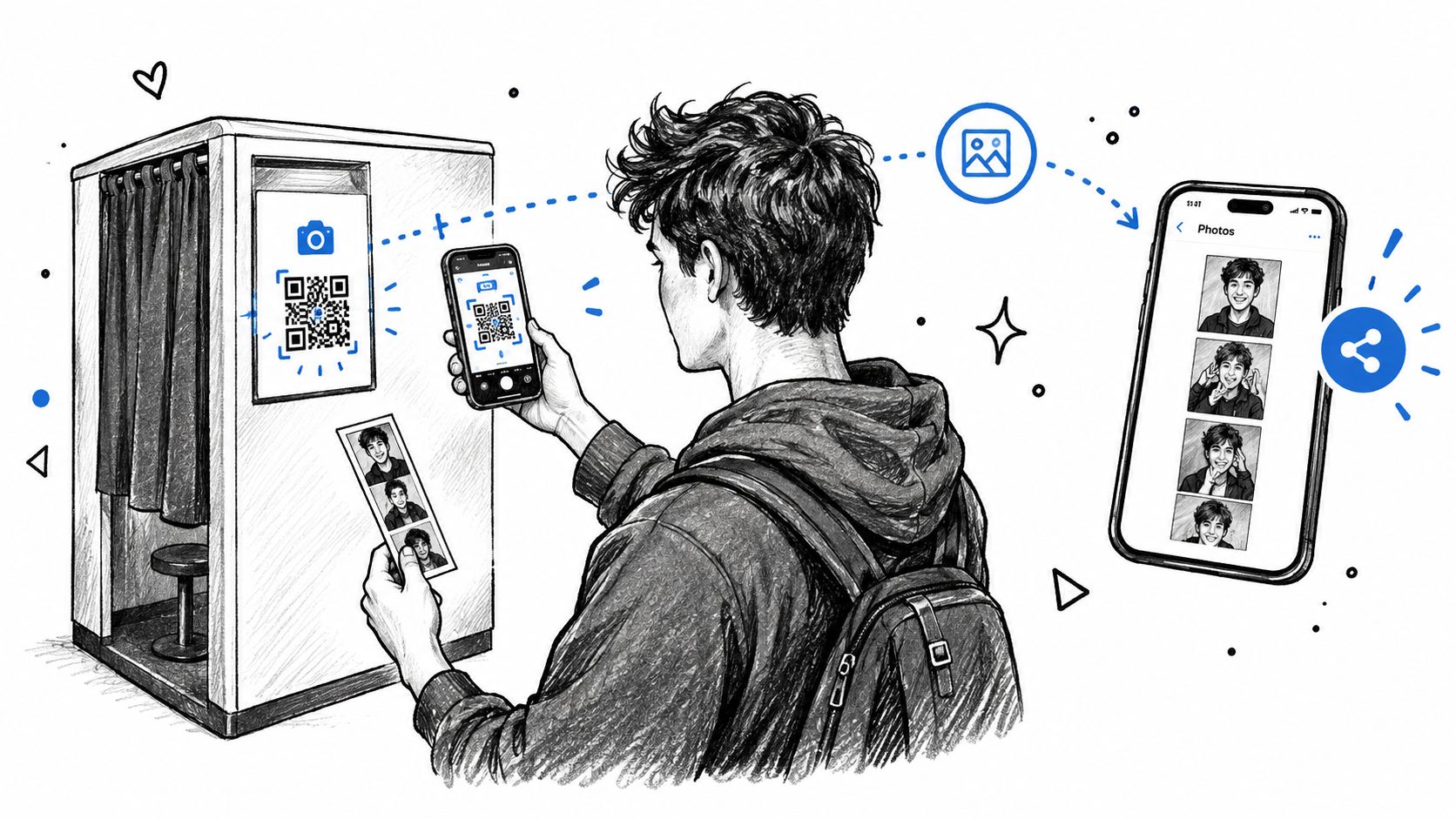
The QR code should appear immediately after the session, not at a distant registration table and not only in the post-event email. Print it on the receipt, show it on the booth screen, or display it on a nearby card tied to the specific session. If an attendant manages the flow, they can also send the link by text or email while the guest is still standing there.
The code should resolve to a private gallery scoped to the event and, where possible, the guest's session. That avoids the familiar problem of asking attendees to scroll through a large folder containing strangers, duplicate frames, and unrelated moments. The landing page should carry the event logo, an approved sponsor mark, and one clear instruction: tap to view, save, and share.
Remove friction from the phone experience
Put the one-tap save action above the download button. On iOS, guide guests toward Add to Photos. On Android, make long-press saving obvious and keep the image large enough to use without opening a secondary viewer. A download control still matters, but most guests first want to see the image and share it from the device already in their hand.
Use SMS or email as a fallback. Guests often pocket a QR card, close the browser, or decide to scan later and then forget. A short automated message with the same private gallery link gives them another route without forcing staff to answer individual requests.
A platform such as Saucial's event photo upload workflow can support an upload-to-gallery process where organizers distribute a shareable link or QR code instead of handing over a generic folder. The tool choice matters less than the workflow: the image must be identifiable, accessible, and ready to share while the event remains fresh.
Measure the handoff, not the shutter
Track gallery opens, QR scans, saves, shares, and delivery failures. Raw capture count is a production metric. It tells you how much the booth worked. It doesn't tell you whether guests received anything.
Operational guidance for event photo-booth analytics recommends tracking sessions per hour, total sessions, and share or capture rates. It also cites 200 to 500 sessions per day from a single booth as strong trade-show performance, identifies a peak hour above 30% of daily volume as a signal to consider a second kiosk, and recommends exporting data within 24 hours while monitoring queue, connectivity, and email-delivery telemetry. Event photo-booth analytics guidance is useful because it treats throughput and conversion as operational concerns rather than vanity reporting.
How Selfie Photo Matching Actually Works
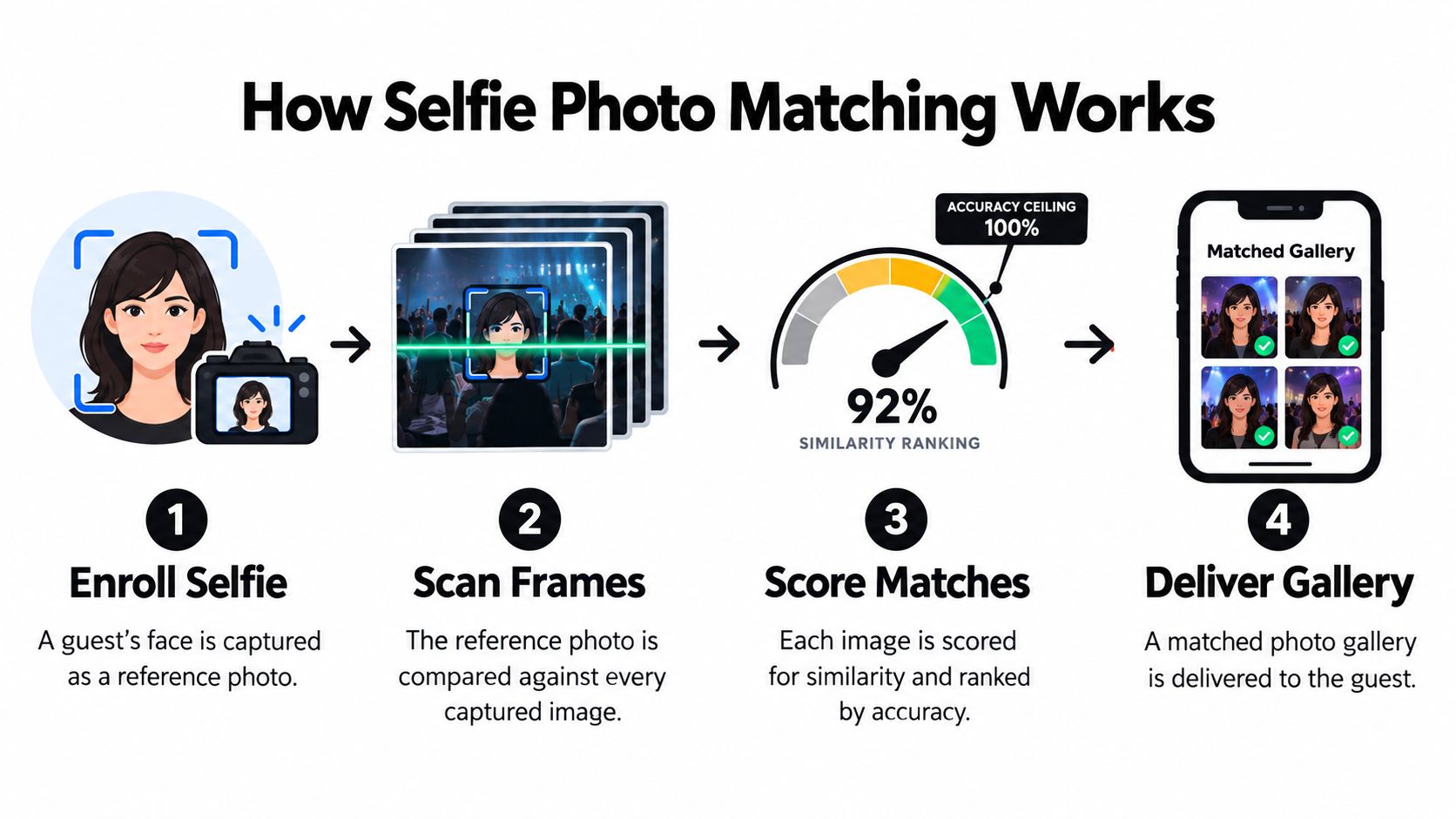
Selfie photo matching isn't magic and it isn't a guarantee that every gallery search will be correct. It's a ranking system. The guest provides a reference selfie, the system compares that face with captured frames, similarity scores determine the order, and the interface returns matches that clear a selected threshold.
The quality ceiling depends on the reference selfie, the event images, and the gallery size. A frontal reference image with even lighting, visible eyes, and no sunglasses gives the system a stronger starting point. A moving subject, an off-angle face, heavy glasses, a hat, or a crowded frame makes the comparison harder. As the gallery grows, the system also has more look-alike faces to distinguish.
Set standards for the reference selfie
Give guests simple instructions instead of presenting matching as an invisible technical process:
- Hold the phone around chest height and face the camera directly.
- Remove hats and heavy glasses where practical.
- Use even light and keep both eyes visible.
- Retake the selfie if the preview shows motion blur.
- Keep the face centered without extreme cropping.
The event-management research available on face matching reports 90% accuracy for single-face recognition but 78% average accuracy in group photos, with overlap and off-angle faces reducing performance. Another summary places accuracy between 75% and 80%, with stronger results in well-lit areas. Peer-reviewed event face-recognition research supports a practical conclusion: standardize capture conditions and expect group photos to be more difficult than clear portraits.
Ship useful fallbacks
A responsible gallery doesn't display one result and leave the guest stranded when it's wrong. Show the top match alongside a ranked set of alternatives, include a manual search by approximate capture time, and provide an obvious way to report a mistaken match. That feedback can improve the matching workflow, but it shouldn't expose other guests' galleries by default.
Selfie matching works best as a convenience layer after a clear distribution choice. A session QR code remains the most direct way to connect a guest with a specific booth interaction. Matching becomes more valuable when a photographer has uploaded a large event gallery, such as a conference, gala, tournament, or trade show, and attendees need a practical find my photos experience.
Human review still wins when the stakes are high, the lighting is inconsistent, or the event includes many crowded group shots. Give the operator a way to remove unusable images before indexing and to correct an obvious misclassification without making the guest submit a support ticket.
Privacy, Consent, and Data Handling at Events
Privacy isn't a footer on the gallery page. It determines whether guests trust the booth, whether organizers can defend the workflow, and whether a vendor's system is suitable for the audience. Mixed public events, school functions, fundraisers, and corporate gatherings may include minors, employees, invited guests, and people who don't want their face stored or linked to a searchable gallery.
Start with visible notice at the booth entrance. Explain that photos will be captured and may be shared through a QR code or gallery. Require a positive opt-in on the kiosk before capture, then collect separate, explicit consent for biometric processing when selfie matching is enabled. A guest who agrees to receive a photo hasn't automatically agreed to face recognition.
Make privacy the default state
A workable policy should define:
- Access: Limit each guest's gallery to the photos they're authorized to view, rather than exposing a public indexed album.
- Search visibility: Prevent third-party search engines from indexing gallery pages.
- Deletion: Place a clear deletion request inside the gallery, not behind a support maze.
- Retention: Set a written schedule for raw images and derived face data before the event launches.
- Opt-out: Give guests a route to participate in the event without using selfie matching.
The brief's proposed operational defaults are 30 to 90 days for raw images and deletion of biometric templates within 24 hours of event close. Treat those as design targets to validate with counsel for the applicable jurisdiction, not as a universal legal safe harbor. Consent, notice, retention, and deletion duties vary with the audience, location, and processing purpose.
Give the operator a paper trail
Publish a plain-language data-processing summary on the event page. Provide a contact route for data-subject requests, agree with any biometric-processing vendor that secondary use is prohibited, and document what happens if an SD card is misplaced or a gallery link leaks.
The organizer should also test the deletion path before guests arrive. Use a separate Saucial account access point or the chosen platform's equivalent to confirm that authorized staff can manage permissions, respond to requests, and disable access without deleting unrelated event assets.
Privacy makes monetization possible because guests are more willing to save and share when they understand the boundaries. A checkbox added after launch is not a workflow.
Turning Photo Delivery into Engagement and Revenue
Delivery is the moment an event photo booth earns its keep. The gallery link is often the only artifact that travels home with the guest, so it should do more than display an image. It should make the next action obvious while preserving the event's identity and the guest's control.
Send the first delivery close to the capture moment. One 2026 event-photography summary reports that 69% of guests share event photos on social media within 24 hours, with most sharing occurring the same day. A separate 2026 analysis reports that a third of attendees never download photos from generic Google Drive or Dropbox links. Event photography sharing data reinforces the practical point: a gallery that makes retrieval difficult loses attention before the organizer can use it.
Build the gallery around the individual
Useful delivery features include:
- Per-guest galleries: Show only the images relevant to the attendee when the workflow supports reliable matching or session scoping.
- Branded delivery: Use the event logo and sponsor treatment in the email, SMS, gallery, or approved frame.
- Share-ready assets: Provide appropriately cropped images for Instagram, TikTok, LinkedIn, and direct messaging.
- Post-download prompts: Ask for a short survey, next-event RSVP, or approved follow-up only after the guest has received the image.
- Exportable reporting: Give organizers data on opens, saves, shares, and delivery errors without exposing unnecessary personal information.
Revenue should sit downstream of trust. Sponsor-branded frames, gallery takeovers, printable products, premium edits, digital downloads, and event-approved featured sets can all fit the workflow. A photographer can also offer a photographer upsell to attendees, while a tournament operator can route sports tournament photo sales through the gallery instead of asking families to search a general archive.
| Lever | Expected Impact | Best For |
|---|---|---|
| Branded frames and gallery treatment | Keeps sponsor or event branding attached to shared images | Brand activations and fundraisers |
| Print and premium product offers | Creates an optional purchase after the guest receives the digital image | Weddings, galas, and family events |
| Opt-in lead capture | Extends the relationship without making access conditional | Conferences and trade shows |
| White-label galleries and analytics | Gives enterprise clients control over presentation and reporting | Corporate event programs |
| Curated featured sets | Turns selected moments into a follow-up content asset | Community events and alumni programs |
Tools such as Saucial fit this model by supporting uploads, shareable event links, QR distribution, and selfie-based retrieval. The platform choice isn't the strategy. The strategy is to make delivery useful first, then offer relevant actions that guests have actively chosen.
A Practical Event Photo Booth Workflow Checklist
Hand this runbook to the venue lead, photographer, and booth attendant. Every phase should answer one question: what does the guest receive, and when?
Pre-event setup
- Hardware: Confirm camera, lens, lighting, monitor, trigger, power, storage, backup cables, and printer if prints are part of the experience.
- Visual test: Photograph a real person under venue lighting. Check skin tone, background separation, group framing, and reflections.
- Brand assets: Load the event logo, sponsor treatment, approved templates, gallery copy, and share prompts.
- Consent: Place the capture notice, opt-in screen, biometric notice if applicable, deletion instructions, and privacy contact where guests can see them.
- Gallery: Publish and test the gallery microsite, QR flow, session links, delivery message, and mobile save behavior.
On-site capture
Put the booth off the main traffic lane, keep props orderly, and assign an attendant during peak demand. The attendant should explain the trigger, watch for poor framing, and prompt guests to scan or save immediately after the session.
Place the QR code at the exact point where the guest sees the finished image. Don't make people remember a code from registration. If the event uses a photographer handoff, establish who owns the delivery conversation so the guest doesn't hear two conflicting instructions.
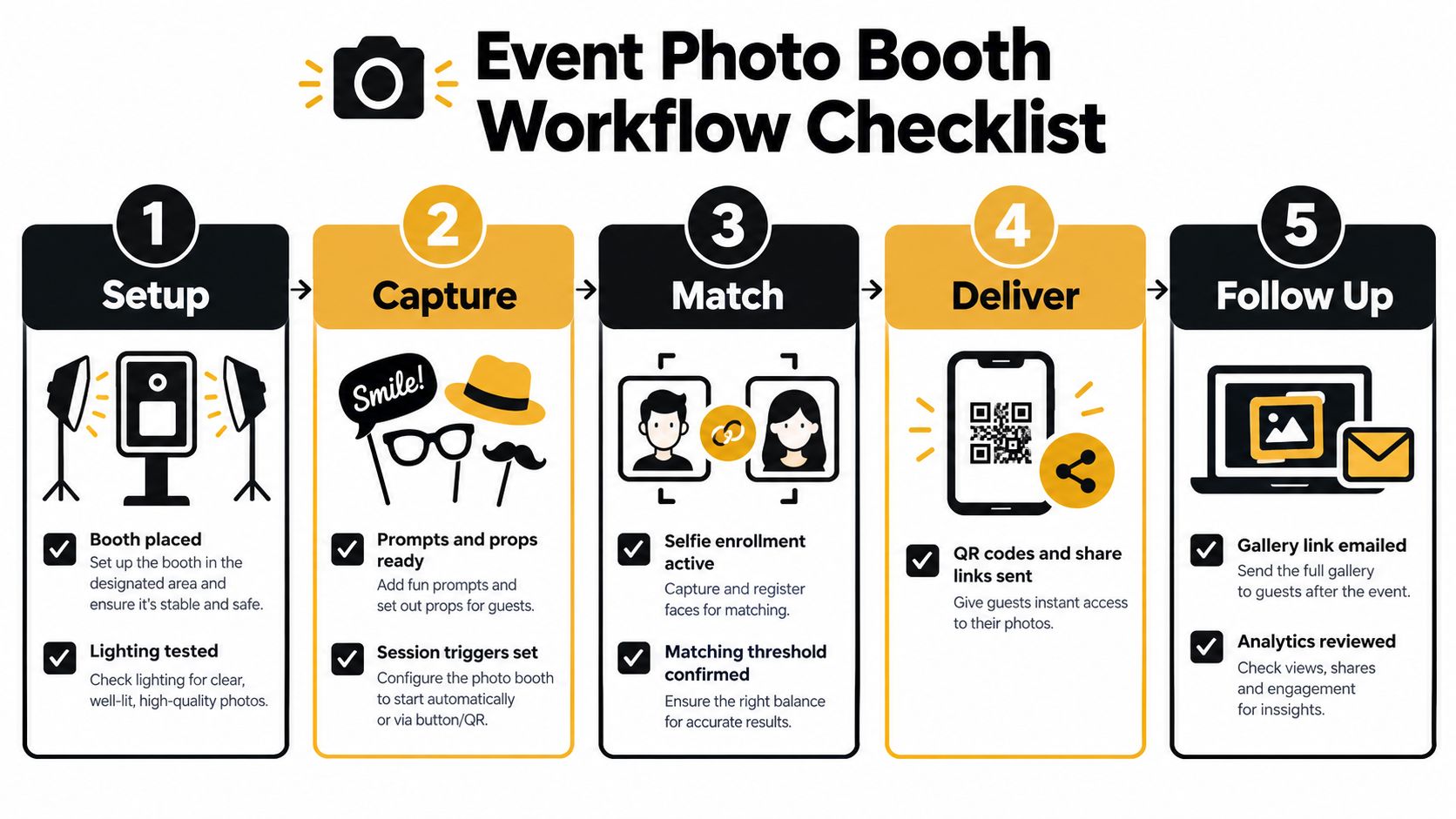
Processing and quality control
- Upload: Move captured files into the approved gallery workflow while preserving event and session identifiers.
- Index: Run face matching only for guests who have opted in, and keep the gallery private.
- Review: Remove blurred, duplicated, accidental, or unusable frames before guests receive them.
- Test delivery: Scan a fresh QR code on both major mobile operating systems and verify that the correct images appear.
- Watch telemetry: Monitor connectivity, queue length, processing status, and message delivery rather than waiting for complaints.
Privacy enforcement
Start the retention timer when the event closes. Run the deletion script, process opt-outs, preserve DSAR-ready logs, and confirm that biometric templates follow the documented deletion schedule. If a gallery link is shared incorrectly, disable it quickly and record the response.
Use the platform's administrative controls, such as Saucial settings, to review event access and privacy configuration before the gallery goes live. The exact controls vary by vendor, but the responsibility stays with the organizer and processor.
Post-event follow-up
Send the gallery while the event is still relevant. Then produce sponsor cutdowns, approved social assets, a recap for stakeholders, and a report covering opens, saves, shares, delivery failures, and opted-in follow-up actions.
If you skip one thing, don't skip delivery. A beautifully lit booth with no immediate, private, usable handoff is a content-production expense, not a complete guest experience.
The best event photo booth workflow doesn't chase every new feature. It connects solid capture, clear consent, reliable matching, immediate retrieval, and measured follow-up. That is how a printed souvenir becomes a searchable gallery, a shared moment, and a durable post-event engagement channel.
Saucial gives organizers and photographers a practical way to upload event photos, create an event photo sharing link or QR code photo gallery, and let attendees use selfie photo matching to find their moments without digging through a generic folder. Visit Saucial to build a delivery-first workflow for your next event photo booth activation.



