Event Management Software: Compare Top Platforms for 2026
Does your event management software prove what happened after guests left, or does its usefulness end when the check-in desk closes? Registration and attendance matter, but they don't tell you whether attendees found their photos, shared a branded gallery, responded to a photographer's offer, or stayed connected to your organization.
Event management software should support both event operations and measurable follow-through. That doesn't mean buying the largest suite. It means choosing tools around the jobs your team must perform, then testing the handoffs between registration, onsite delivery, photo access, and reporting before you sign a contract.
Event Management Software Categories at a Glance
| Category | Core strength | Best fit | Main trade-off |
|---|---|---|---|
| All-in-one event suites | Registration, ticketing, agendas, check-in and reporting in one system | Conferences and multi-day events with many sessions | Longer setup and potentially higher overall cost |
| Ticketing and registration tools | Sales, payments and attendee records | Ticketed concerts, workshops and community events | Limited onsite and session tools |
| Check-in and badge tools | Fast onsite entry and badge printing | Large trade shows and conferences with high entry volume | Needs a registration source to pull data from |
| Photo and content distribution tools | Sharing event photos through links, QR codes and selfie matching | Galas, alumni dinners, sports tournaments and brand activations | Covers distribution, not registration |
The category is your first filter because each type of software starts with a different job. A polished registration page doesn't prove that badge printing will work smoothly, and a strong gallery experience doesn't replace payment collection.
All-in-one suites make sense when your team must coordinate connected activities. Conference organizers need registration rules, agendas, session access, attendee communications, surveys, and reporting to agree with each other. The trade-off is configuration work: someone must set permissions, map records, build workflows, and train staff.
Ticketing and registration tools concentrate on getting people booked and paid. For a workshop or concert, that may be the right scope. Don't mistake a successful ticket sale for complete event coverage, though. Ask what happens when staff need to change a guest's details, manage session access, or record engagement after arrival.
Choose around the operational bottleneck
Check-in and badge tools focus on the entrance. Their value comes from the workflow between scanning a ticket, finding a record, resolving an exception, and producing the correct badge. They still need dependable upstream records, so an import process deserves as much scrutiny as the scanner.
Photo distribution tools solve a different problem: getting the right images to the right guests without making everyone browse an undifferentiated folder. They suit events where memories, community identity, sponsor visibility, or photographer sales are important outcomes. Their limitation is clear: they aren't registration systems.
Practical rule: Buy for the job your team can't afford to perform manually, not for the longest feature list.
Combining categories can be more sensible than forcing everything into a suite. The operational cost is not just the number of tools; it includes the work required to keep their records and permissions aligned.
Before comparing brands, write down the essential jobs your event must perform on the day. Match those jobs to categories, name the staff member responsible for each, and identify every handoff that would otherwise require a spreadsheet.
Core Modules Across the Event Lifecycle
Judge event management software as an end-to-end data pipeline, not a registration form with a dashboard. Oniva's event software guide supports evaluating connected modules, shared attendee identifiers, usable exports, and reporting across events rather than treating each activity as a separate record.
The following table is a category-level shortlist aid, not a guarantee about an individual product. Yes means a core function; Limited means basic coverage or manual steps; Partial means only some elements are covered; Add-on means separately sold or configured.
| Core module | All-in-one suite | Ticketing tool | Check-in tool | Photo distribution tool |
|---|---|---|---|---|
| Registration and ticketing | Yes | Yes | Limited | No |
| Attendee records | Yes | Partial | Limited | Limited |
| Agenda and sessions | Yes | No | No | No |
| Onsite check-in and badges | Yes | Limited | Yes | No |
| Surveys and feedback | Yes | Limited | No | No |
| Analytics and reporting | Yes | Limited | Limited | Engagement only |
| Attendee photo access | Add-on | No | No | Yes |
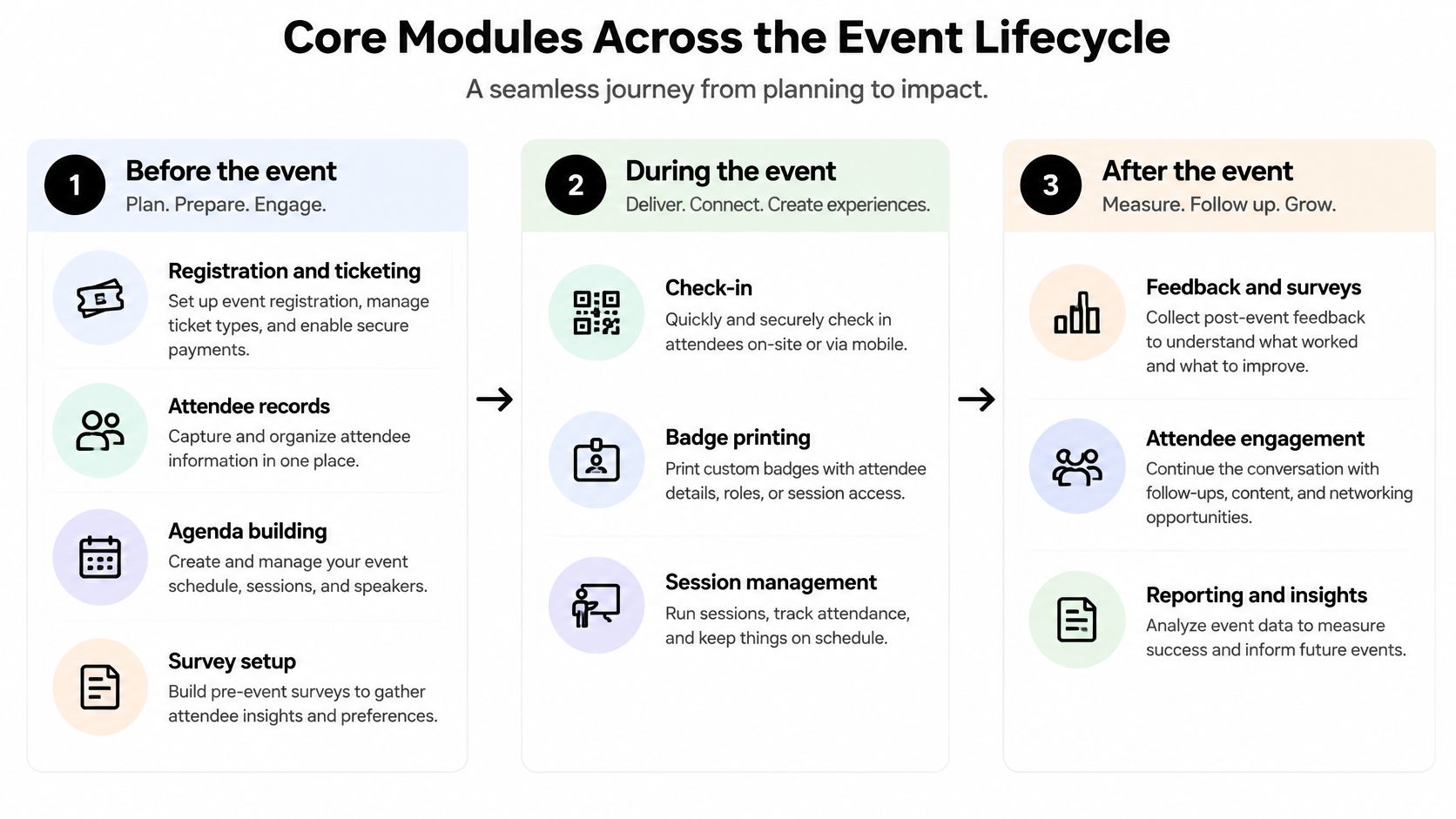
Before the event
Start with registration and ticketing, then test what those transactions create. Can staff distinguish the purchaser from the attendee? Can they correct a name without breaking the payment record? Does changing a ticket update the confirmation and any access permissions?
Compare pricing tiers, discount codes, refund handling, waitlists, and guest substitutions through actual tasks. Ticketing-focused tools deserve attention when sales rules are complex, but don't assume that category alone guarantees flexibility.
Build the agenda around the decisions attendees and staff need to make. Session capacity, overlapping selections, speaker changes, and access restrictions should be understandable without an administrator explaining them. Prepare surveys before launch so the feedback you collect can answer the questions stakeholders will ask afterward.
During the event
Check-in is an operational workflow, not a checkbox. Run it on the phone, tablet, scanner, and printer your staff will use, with an authorized attendee list rather than a vendor's clean demo account.
Test difficult records deliberately. Include a renamed attendee, a duplicate registration, a missing confirmation, a replacement badge, and a guest whose ticket doesn't permit entry to a particular session. Check what staff can resolve themselves and what requires administrator access.
A suite may cover badging adequately, while a dedicated tool may offer a better entrance workflow. Neither claim matters until your team tests the complete sequence under realistic conditions.
- Entry performance: Observe the whole interaction, including exceptions and printing, rather than scan recognition alone.
- Session records: Confirm that leaving a room, rescanning, or changing sessions doesn't create misleading attendance.
- Onsite reporting: Check whether staff can distinguish checked-in guests, expected arrivals, and unresolved records without exporting data.
After the event
The shared attendee ID should follow a person through registration, payment, check-in, session participation, engagement, and feedback. Names and email addresses alone aren't a reliable reconciliation strategy because people correct details, share purchasing accounts, and register for different events.
Define no-shows as eligible registrations without a qualifying check-in, then decide how cancellations, complimentary tickets, and staff records are handled. A dashboard is only useful when its denominator matches the organizer's definition.
Photo access belongs in this lifecycle too. At Saucial, organizers drag and drop event photos, and our AI processes faces in the background. Treat that upload as a planned operational task with an owner, approved photo set, and distribution trigger, not an informal favor after teardown.
During the trial, export attendee and activity records in a common format such as CSV. Inspect the actual columns, confirm that the CRM connection preserves identifiers, and compare reports across separate events and audience segments. A report that works only inside a single event isn't enough for an ongoing program.
How Photo Distribution and Selfie Matching Differ
| Method | How attendees get photos | Attendee needs | What you can measure |
|---|---|---|---|
| Shared gallery link | Open a link sent by email, SMS, WhatsApp or social | A link and a browser | Gallery visits and shares, where tracked |
| QR code photo gallery | Scan a code at the venue | A phone camera | Tracked scans and gallery visits |
| Selfie photo matching | Take a selfie to retrieve photos featuring them | A selfie and a browser, with consent | Matching attempts, successful matches and downloads, where available |
| Shared folder handoff | Organizer shares a folder of all photos | Folder access | Little beyond folder opens unless additional tracking is configured |
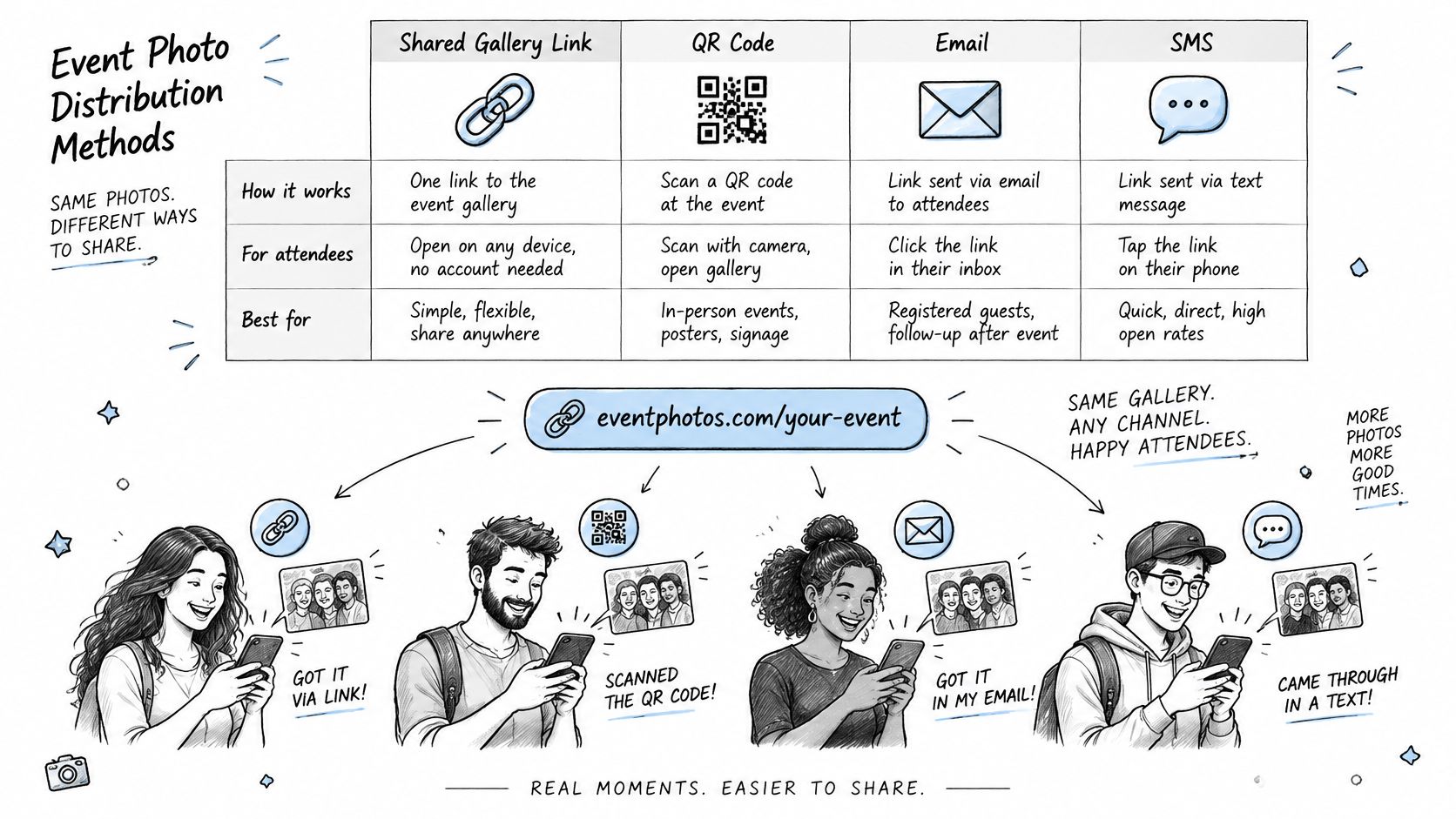
A distribution method determines how guests arrive. A retrieval method determines what they can find once they're there. A QR code and selfie matching aren't competing features: the code can open the gallery, and the selfie can help someone locate their pictures.
A shared gallery link is useful for remote guests and post-event messages. Attendees open the message, select the link, and enter the gallery through their browser. Use a stable destination so staff don't have to replace links across invitations, event pages, and follow-up communications.
A QR code photo gallery puts that destination within reach at the venue. Guests scan signage or a badge, open the gallery, and follow the access instructions. Test the printed code at its intended size and location, especially where glare, distance, or poor reception could interfere.
What the attendee actually does
With selfie photo matching, the attendee opens the gallery experience and takes a selfie. At Saucial, we use AI-powered face recognition to find the event photos featuring that attendee, who instantly sees their matching photos. Organizers receive a unique event photo sharing link they can distribute through any channel.
That changes the task from searching a whole collection to reviewing relevant results. It doesn't mean the organizer should promise that every possible image will be found under every shooting condition.
A shared folder handoff remains appropriate when an organizer needs the complete edited collection. For guest delivery, however, attendees must browse and identify themselves manually. Folder access also shouldn't be confused with permission to publish or reuse every image inside it.
Run a retrieval test, not just an upload test
Use the photo upload workflow to prepare an approved test collection with varied lighting, camera angles, and group compositions. Give consenting participants the same instructions you'd send to guests, without coaching them through each screen.
- Observe discovery: Record whether participants understand where to start and how to retrieve their photos.
- Inspect difficult images: Include dark scenes, partially obscured faces, and crowded groups. Treat missed or incorrect matches as issues to investigate, not exceptions to ignore.
- Check the alternative: Confirm how someone who declines selfie processing can access permitted photos.
- Review sharing controls: Establish which images guests can download, share, or purchase before publishing the gallery.
For photographers, delivery can also support organizer-approved print sales, digital downloads, or featured sets. A photographer upsell to attendees needs clear product descriptions, fulfillment ownership, and permission from the organizer, not just a purchase button.
Use QR codes for guests onsite and links for remote guests. Keep the consent explanation visible before selfie submission, and make the next action obvious.
Security and Privacy Checks Before You Sign
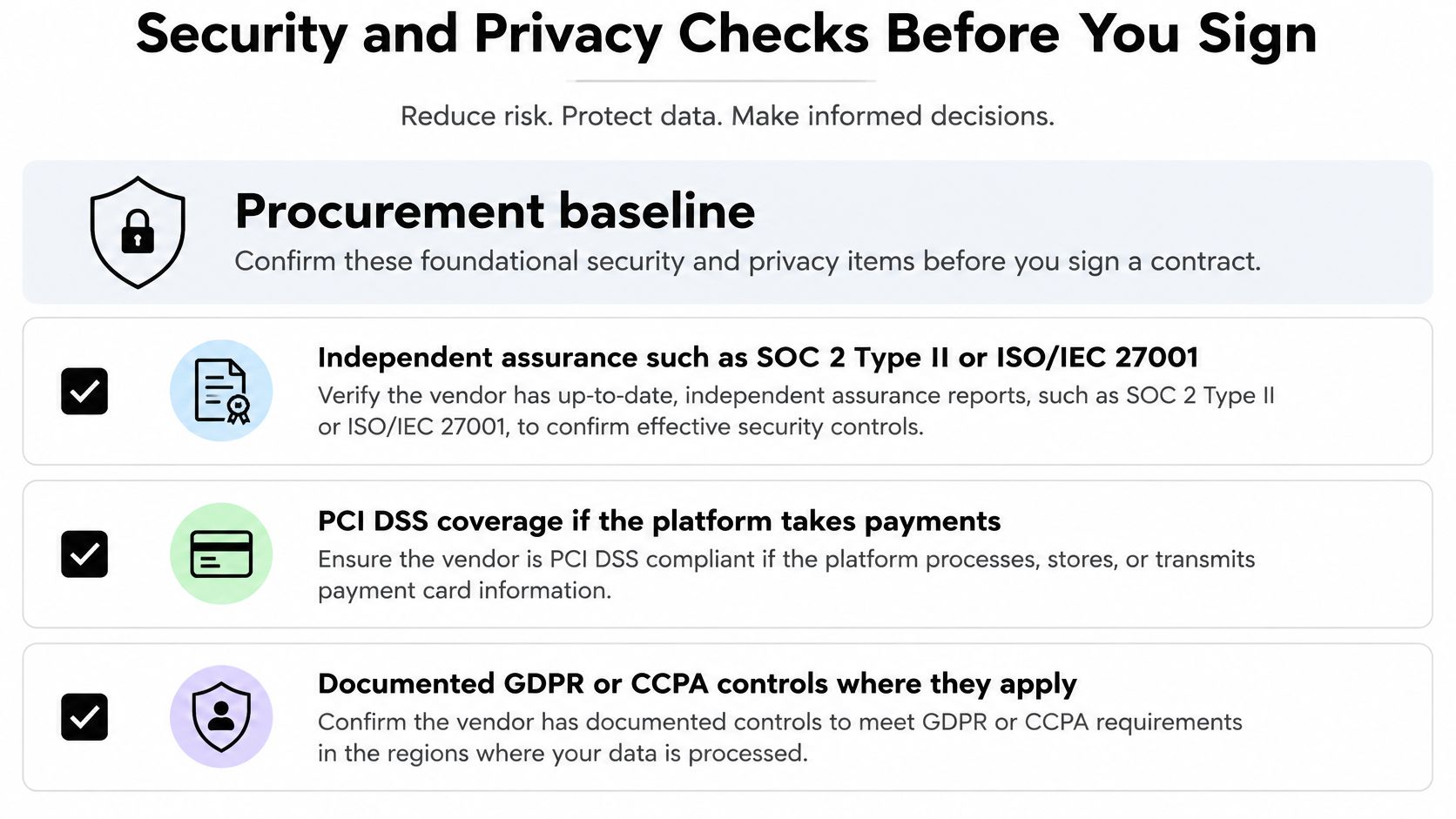
Begin procurement with evidence, not a security badge in a sales presentation. vFairs' event software security guide identifies independent assurance such as SOC 2 Type II or ISO/IEC 27001, PCI DSS coverage for payment data, and documented GDPR or CCPA controls where applicable as a defensible baseline.
Ask which product, infrastructure, and processing activities the evidence covers. A payment processor's controls don't automatically describe the event platform's handling of attendee records, and a compliance statement doesn't explain your responsibilities as organizer.
Inspect access and facial processing separately
Verify role-based access, encryption in transit and at rest, multifactor authentication, audit logs, retention periods, deletion workflows, data locations, and a data-processing agreement. Give temporary staff only the permissions their jobs require, then confirm that those permissions can be revoked without disrupting the event.
A face recognition event gallery needs additional questions. Does the provider create facial templates? Where are they processed, how long do they persist, and can processing be disabled? Can guests retrieve permitted photos without creating an account?
Don't equate a guest-facing privacy notice with complete privacy governance. The organizer still needs to understand which information is collected, why it's needed, who receives it, and what happens when someone withdraws permission.
Consent adds a deliberate action for guests. Removing that action isn't a sound shortcut for a sensitive photo workflow.
Make deletion an acceptance test
Create a test attendee, generate activity, and request deletion. Require confirmation covering search indexes, derived facial data, connected tools, and backup removal according to the documented schedule.
Don't accept a disappearing profile screen as proof of complete deletion. Ask what remains in operational logs or legally retained transaction records, why it remains, and who can access it.
Contracts should identify subprocessors, breach notification obligations, export rights, and written deletion confirmation after cancellation. Have your privacy or legal owner review the arrangement where appropriate, especially for school events or audiences requiring additional safeguards.
Put these items in every vendor questionnaire:
- Assurance scope: Supply current evidence and identify the services it covers.
- Access controls: Demonstrate permissions, authentication, encryption, and audit history.
- Facial processing: Explain templates, consent, alternatives, and disabling options.
- Data lifecycle: Document locations, retention, deletion, backups, and integration handling.
- Contract exit: Confirm usable exports, subprocessors, incident obligations, and cancellation cleanup.
A provider's willingness to demonstrate these controls matters more than a broad promise that the platform is secure.
Measuring Post-Event Value Before the Event
In a 2025 survey of 500 event organizers, 50% considered demonstrating ROI a top stressor, while 44% didn't connect their event platform to a CRM, according to Swoogo's event trends survey. Those findings identify a practical procurement question: can your team connect event activity to the systems where relationships and outcomes are recorded?
Registration and attendance show participation, not necessarily value. A gallery visit can show interest, a completed photo match can show successful retrieval, and a purchase can show a transaction. None of those, by itself, proves that the event caused a donation, renewed membership, or sale.
Define the outcome and its evidence
Choose metrics according to the stakeholder's decision. A sponsor may want evidence of exposure and attributable visits. A fundraising team may care about opt-ins, donor follow-up, and approved photo purchases. A photographer may need to distinguish gallery browsing from completed orders.
Useful post-event engagement measures include gallery visits, photo-match completions, shares, click-throughs, repeat visits, opt-ins, sponsor exposure, print or download conversions, and downstream CRM activity. Only promise measures that your selected tools can record and export.
Set up the reporting workflow before invitations go out:
- Name the metric and owner: Specify the recording tool, responsible person, and definition of success.
- Tag the distribution channel: Distinguish email, venue signage, social posts, and partner communications without putting personal details into public URLs.
- Map approved CRM activity: Decide which events become contact-level records and which remain aggregate reporting.
- Set reporting windows: Schedule an initial review and a later follow-up that match your fundraising, membership, or sales cycle.
- Agree on the stakeholder view: Decide which outcome the sponsor or board will see, including its denominator and limitations.
Report engagement without overstating ROI
For a hypothetical fundraiser, compare completed print orders with identifiable gallery visitors if you want a visitor-to-purchase conversion measure. Don't divide orders by email opens and call it gallery conversion. If anonymous browsing prevents person-level attribution, report the aggregate result accurately.
Separate revenue, engagement, and financial return. Photo sales are revenue; gallery visits are engagement. A return calculation also needs agreed costs and attribution rules.
Photo distribution becomes a reporting asset when the organizer defines an outcome before publishing the gallery.
Build the report around a compact template:
| Report field | What to record |
|---|---|
| Intended outcome | The relationship, sponsorship, fundraising or sales objective |
| Activity | The measured action and its definition |
| Evidence | Recording tool, channel tag and reporting window |
| Result | Actual outcome against the agreed target |
| Limitation | Missing attribution, anonymous activity or incomplete coverage |
| Next action | Named owner and follow-up decision |
This gives post-event photo delivery a place in the business report without pretending every download represents financial value.
Choosing the Right Platform for Your Event Type
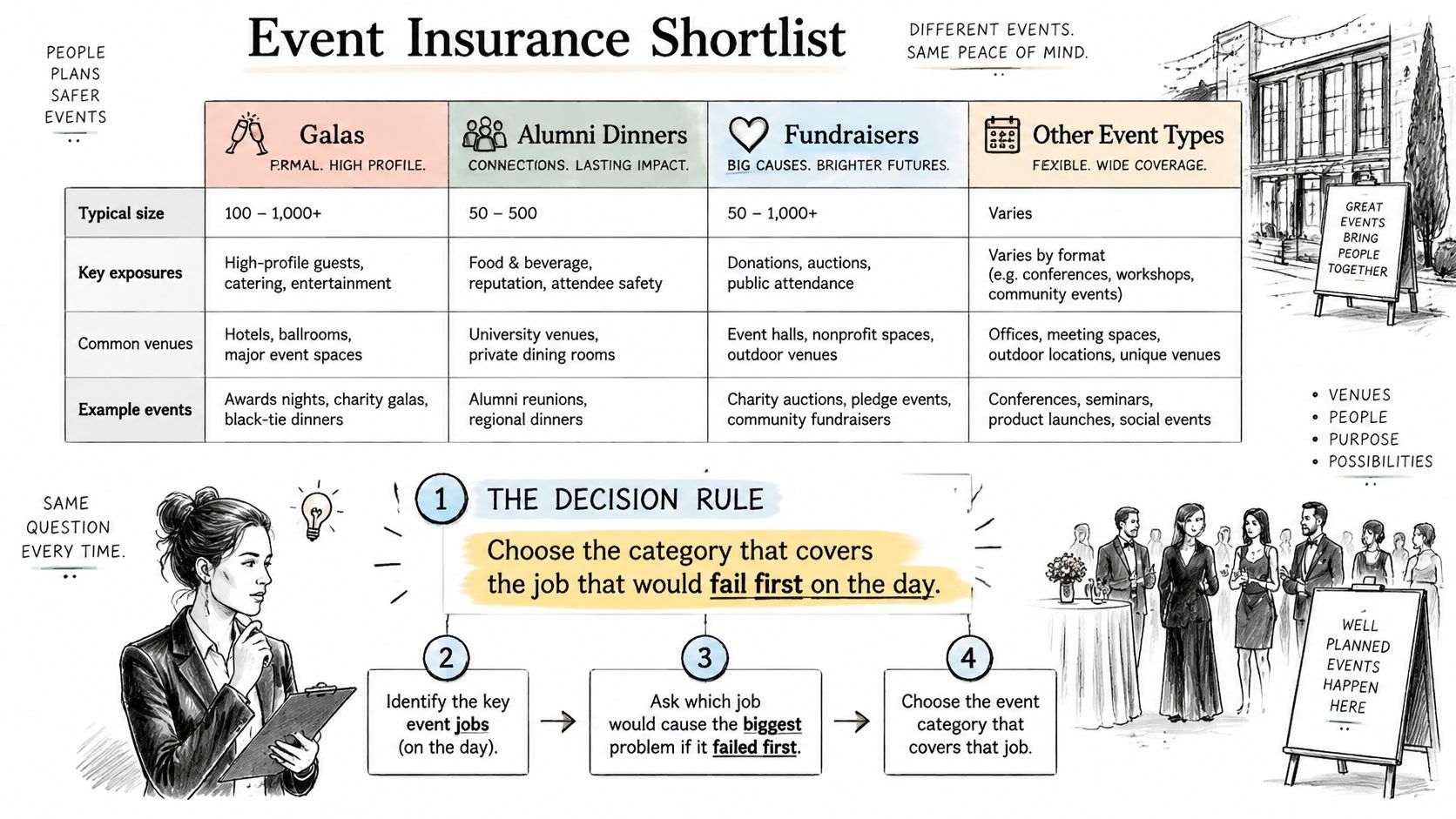
| Event type | Priority | Category to shortlist first |
|---|---|---|
| Galas, alumni dinners and fundraisers | Guest experience and photo sharing | Photo distribution tool, plus ticketing if seats are sold |
| Conferences and trade shows | Sessions, check-in and attendee data | All-in-one suite, with a photo tool as an add-on |
| Sports tournaments and festivals | High entry volume and fast photo delivery | Check-in tool paired with a photo distribution tool |
| Weddings and venue events | Simple guest access and low admin | Photo distribution tool or ticketing tool |
| Schools, universities and alumni associations | Clean records and long-term engagement | All-in-one suite or ticketing tool with strong attendee records |
Choose the category most likely to fail first on the day. Use the table as a starting point, then change the shortlist when your operating requirements justify it.
For a gala or alumni dinner, a complicated event app may add little if guests mainly need a smooth arrival and an accessible photo experience. Start with the distribution requirement, then add ticketing if you're selling seats. A gala fundraiser photo gallery should have a named publishing owner rather than depend on whoever remembers to send the pictures.
Conferences and trade shows need a different starting point. Session access, badge exceptions, and usable attendee records justify evaluating a suite first. Treat trade show photo sharing as an additional delivery workflow, not a reason to compromise the conference's core operations.
Match the combination to the workload
For tournaments and festivals, separate entry management from photo delivery when different teams own those jobs. Sports tournament photo sales also require a clear way to organize approved collections, handle orders, and explain who fulfills purchases.
Wedding couples and venue coordinators should resist unnecessary administration. If guests don't need ticket sales or session selection, don't make them use those features just because they're included.
Schools, universities, and alumni associations should prioritize record ownership and continuity between events. Keep sensitive audience requirements visible during selection rather than leaving them for the final contract review.
Compare the complete cost before the trial
Give every shortlisted vendor the same event specification and ask for a written quote. Include expected attendance, staff accounts, event frequency, payment needs, hardware, support coverage, integrations, photo distribution, and retention requirements.
Compare per-attendee charges, flat subscriptions, setup work, and add-ons on the same basis. Mark unconfirmed charges as awaiting quote, not zero. Don't compare headline totals while a vendor still has unpriced dependencies.
Use a short decision sequence:
- Identify the essential jobs: Describe the outcome staff must deliver, including the exception cases.
- Shortlist against those jobs: Select tools that cover the workload without unnecessary configuration.
- Run an acceptance trial: Use an authorized guest list, actual devices, approved photos, and written pass-or-fail criteria.
Before signing, have consenting guests attempt photo retrieval without staff coaching. Have your operations lead reconcile the report against the source records and your privacy owner review the deletion result. Choose the platform your team can operate and verify, not the one whose demonstration looked easiest.
Saucial offers drag-and-drop event photo uploads, a shareable gallery link, and selfie matching so attendees can find the photos featuring them. Visit Saucial to evaluate photo distribution alongside your event management software, using an approved photo collection and a clear plan for guest access and post-event measurement.