Easiest Way to Share Photos for Events
Most event guides call a shared cloud folder the easiest way to share photos. That advice makes the organizer's job look simple, but it often transfers the work to every attendee. A link that opens onto a wall of untagged images still leaves guests searching, scrolling, downloading, and asking someone else to find the picture they really want.
The better definition of easy photo sharing starts at the other end. Guests should be able to open the gallery on the device they already have, find their own moments quickly, and decide what to view or download without surrendering control of their personal information. Uploading is only half the workflow. Fast, private retrieval is what determines whether people engage after the event.
Redefining Easy Photo Sharing for Modern Events
A shared folder is convenient when the audience is small and already organized. It becomes frustrating when a wedding, gala, alumni dinner, or sports tournament produces a large collection of images and nobody has time to label every file. Guests don't want to study filenames or browse hundreds of near-identical frames. They want to find my photos, save the best ones, and share them while the event still feels fresh.
That expectation developed alongside mobile photo behavior. In a Pew Research summary of early social photo sharing, 54% of adult internet users had posted original photos or videos online in 2013, while 47% had shared photos or videos created by someone else. The same survey found that 62% of internet users were doing at least one of those activities, up from 56% the year before. Mobile apps helped normalize the habit, with 18% of cell owners using Instagram and 9% using Snapchat at the time.
That history matters because guests already understand instant image access. They scan, tap, preview, and share without expecting a tutorial. An event workflow that sends them to a login screen or an unfamiliar app breaks that learned behavior.
The organizer's shortcut can become the guest's chore
Uploading one folder and copying a link may take little effort. It doesn't mean the distribution method works. A guest opening a generic drive folder must usually perform several tasks:
- Identify the relevant collection: Determine which files belong to their event, session, team, or table.
- Search manually: Scroll through thumbnails or filenames without knowing whether their images are grouped.
- Handle access friction: Sign in, accept permissions, or install an app if the folder requires it.
- Choose and download: Decide which images matter, often from a mobile interface that wasn't designed for event retrieval.
The workflow is especially weak when photographers deliver a large gallery after a busy event. A professional photographer may have sorted images by time or camera card, but attendees think in people and moments. They remember who was standing beside them, not the sequence in which the camera stored the files.
Practical rule: Judge an event photo workflow by how quickly an attendee can reach a relevant image, not by how quickly the organizer can upload a folder.
A modern event photo platform, such as Saucial's event photo sharing experience, can shift the interaction from “browse everything” to “retrieve what belongs to me.” That distinction is important for corporate events and private celebrations alike. The simplest public link isn't always the easiest experience if it exposes more content than a guest needs.
Privacy belongs inside the definition of easy
A public album may reduce access friction, but it creates a different problem. Guests may not want colleagues, clients, or strangers browsing every image in which they appear. Organizers also need control over who can upload, who can view, and whether a gallery remains open after delivery.
The easiest way to share photos therefore combines three qualities: browser access, targeted retrieval, and clear permissions. If one of those is missing, the workflow may be technically simple while remaining operationally poor. A gallery that helps guests reach their images privately will usually earn more attention than a folder that merely contains them.
Comparing Traditional and Smart Distribution Methods
No single channel works equally well for every event. A family group chat may be fine for a handful of informal snapshots, while a corporate gala needs branded access, reliable image quality, and restrictions on who can view the gallery. The right decision depends on what guests must do after receiving the link.
| Method | Guest Friction | Privacy Control | Image Quality |
|---|---|---|---|
| Messaging app group | Low to start, high when searching old messages | Depends on group membership and forwarding behavior | Often reduced by compression or platform settings |
| Cloud storage folder | Moderate to high, especially on mobile | Folder permissions can be difficult for guests to manage | Usually suitable for originals, depending on upload settings |
| Social media group or album | Low for active members, high for guests outside the network | Public or group visibility can expose more than intended | Platform processing may alter files |
| Shared event gallery | Low when the link opens directly in a browser | Organizer can define viewing and upload permissions | Designed for gallery viewing and controlled downloads |
| QR code gallery | Low at a live event when the code is visible | Access can be limited to the event experience | Depends on the gallery platform and upload configuration |
| Selfie-based retrieval | Low after the initial selfie, provided matching works well | Requires explicit handling of face data and gallery scope | Guests receive selected images rather than a compressed chat stream |
Messaging apps win on familiarity. People already have the conversation open, so adding a picture feels effortless. The trouble starts when the gallery becomes a long stream of reactions, unrelated messages, duplicate uploads, and compressed previews. Guests can see that images exist, but finding a particular group portrait later becomes a search exercise.
Cloud folders preserve a more useful file structure, yet they often ask too much from a mobile visitor. A guest may encounter account requirements, permission prompts, awkward browser layouts, or a request to open the provider's app. Those steps are manageable for an internal team. They're poorly suited to a mixed audience at a wedding or festival, where guests use different phones and don't share the same accounts.
Match the channel to the event
A private social group can work for a small community that already has a trusted membership. It becomes less appropriate when the guest list includes clients, sponsors, children, public figures, or people who don't want their attendance connected to a social profile. Public albums also encourage broad circulation before the organizer has reviewed uploads.
A browser-based event gallery offers a stronger middle ground. One link can be sent by email, SMS, WhatsApp, an event website, or a printed card. A QR code adds a physical entry point for people who are already standing in the venue, while a smart retrieval feature can reduce the need to browse the full collection.
Industry summaries estimate that users share roughly 14 billion images per day across social media, including about 6.9 billion on WhatsApp, 1.3 billion on Instagram, and 3.8 billion on Snapchat, as reported in photo industry sharing statistics. The same source reports that Facebook users upload about 2.3 billion photos per month, with 52% posted into groups. These figures are cited here as context for distribution behavior, not as a reason to push every event into a social network.
For a corporate gala, choose controlled access and high-quality downloads. For a community festival, prioritize a visible QR code and simple browser entry. For a photographer delivering thousands of portraits, prioritize retrieval tools over a folder hierarchy. The winning method is the one that removes the specific task guests are most likely to abandon.
Deploying App-Free QR Code Photo Galleries
The easiest photo-sharing system is not the one that saves the organizer a few upload steps. It is the one guests can access, understand, and use before the event energy moves on. A QR code should open a browser-based gallery or upload page immediately, without requiring an account or app installation. Every extra instruction competes with conversation, food, entertainment, and the next scheduled activity.
Build the flow before printing anything
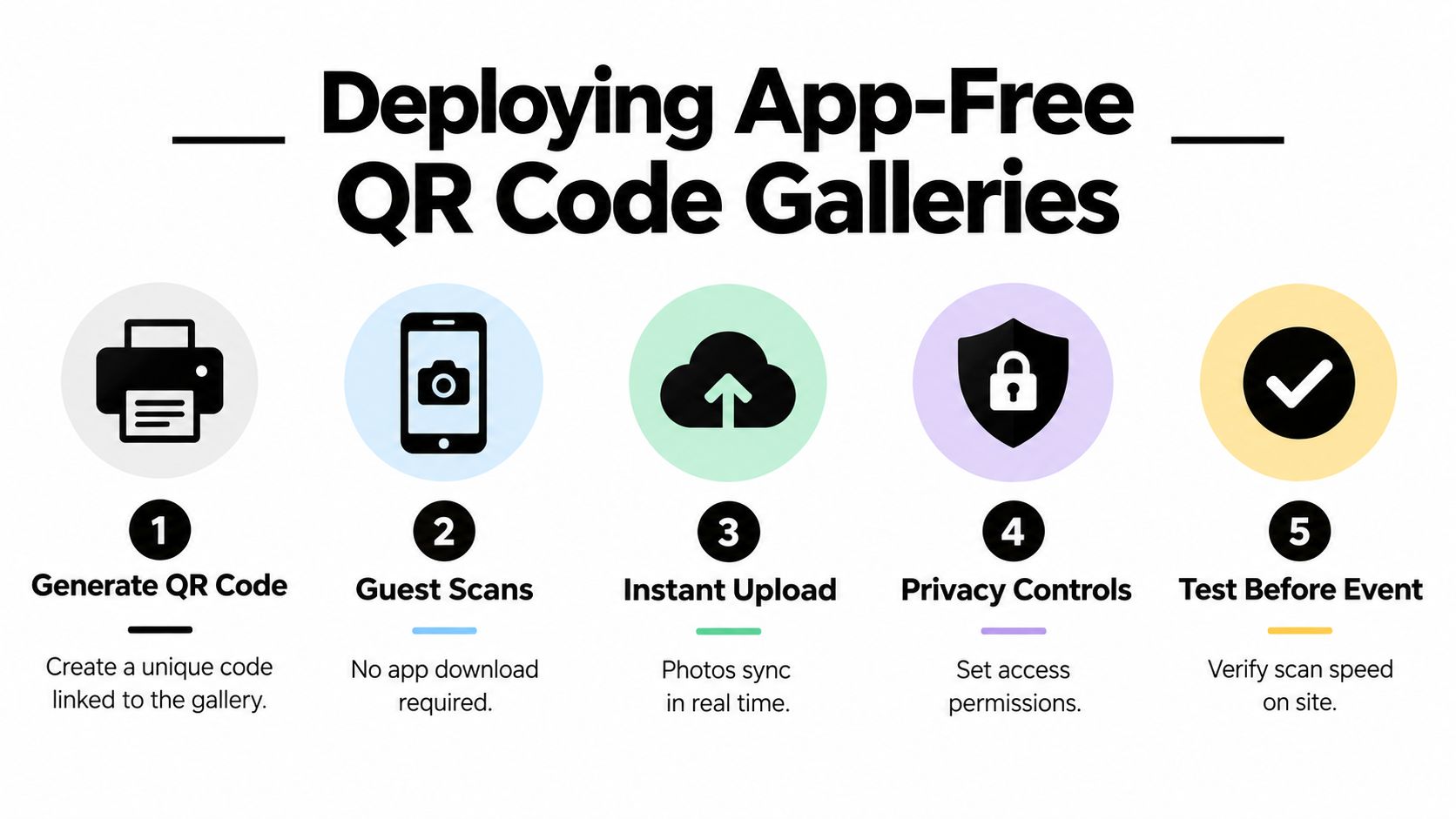
Create the gallery first, then decide whether guests can upload, view, or do both. Test the complete journey on the phones your audience is likely to carry. A QR code that works on the organizer's device can still fail because of a weak venue connection, low contrast, small print, or an unnecessary landing page.
Use this operational sequence:
- Create a dedicated gallery: Give the event its own destination rather than combining uploads from different occasions.
- Set permissions first: Decide whether uploads require approval, whether guests can view all submissions, and who can download the collection.
- Generate and test the code: Scan a printed sample from the distance and angle guests will use at the venue.
- Place it where people pause: Tables, registration desks, photo booths, bars, and exit areas create natural chances to scan.
- Add a plain-language instruction: “Scan to upload your photos” explains the action more clearly than a decorative sign.
The QR gallery workflow described for event sharing reports that app-free flows can produce 2 to 5 times more guest photo contributions than app-based approaches, while table placement and other high-traffic touchpoints can increase uploads by about 2 to 3 times. The same report cites a 100-person wedding averaging more than 540 uploads with table-based QR stands. The practical takeaway is simple: visibility and fast access influence participation, while approval settings protect the gallery after guests contribute.
Remove the obstacles that stop contributions
Do not hide the QR code in a printed program guests may never open. Use signs large enough to scan, repeat the code in several locations, and have staff or hosts mention it at a natural moment. The event photographer can include the link in a delivery message, while the organizer can send it by email or SMS before the event.
Aim for a scan-to-upload journey under 30 seconds. Remove mandatory accounts, unnecessary forms, and unclear upload buttons. If the gallery accepts open submissions, use moderation or approval controls so useful guest contributions are not buried under spam or unsuitable material. Clear access rules also give attendees more confidence about who can view and download their photos.
Organizers can create or manage the access point through Saucial's gallery access page, then apply their own permission rules and event messaging. The platform supports the workflow, but the attendee experience determines whether people finish it. Guests should scan, understand the purpose, upload or browse, and leave without asking the event team for help.
Automating Retrieval with Selfie Photo Matching
The easiest photo-sharing workflow is not the one that lets organizers upload fastest. It is the one that helps attendees find their own images without searching an entire gallery. A guest may remember being photographed at a reception, tournament, or trade show, yet have no idea when the photo was taken or how the photographer named the file. Selfie photo matching turns that gallery-wide search into a personal result set.
The process is simple for the attendee. They open the private gallery, take a reference selfie, and allow the system to compare it with faces in the event collection. The platform then suggests or groups images that may include them. Guests can review, download, or share relevant photos without checking every frame manually.
Design around the images the system can recognize
Face matching works best when both the reference selfie and event images show clear, forward-facing faces. Profiles, sunglasses, hats, heavy occlusion, motion blur, and crowded group shots reduce identification accuracy. Photographers can improve results by combining candid coverage with usable portraits, while organizers should set expectations clearly. No system will match every person in every image.
A face-recognition mobile photo-sharing system described in the ICIP proceedings summary presents automatic identity suggestions as a way to reduce manual input and speed up sharing. The same source reports that 32% of eight million manual tags could be reliably associated with a machine-detectable frontal face in a separate large-scale social-photo study. That evidence supports a focused retrieval workflow, not a promise of perfect recognition.
A practical event gallery needs a fallback path. If matching produces too few results, let guests browse a curated collection. Give photographers or organizers a way to review uncertain groupings before images are presented as a personal set. The system should reduce search time while leaving difficult cases open to human judgment.
Privacy decision: Collect only the information retrieval requires, define who can view the results, and do not treat face data like an ordinary gallery tag.
Make consent and scope visible
Face matching requires clearer boundaries than a standard event link. Academic work on photo privacy discusses access-control benefits alongside the need for consent, limited scope, and secure processing. Organizers should explain what the selfie is used for, how long it remains available, and who controls the resulting gallery.
The strongest setup keeps the gallery private, limits matching to the relevant event, and prevents one attendee's results from appearing to another attendee. On-device or tightly scoped processing can reduce unnecessary data movement, but technology does not replace a clear permission policy. Guests need to understand what they are exchanging for faster retrieval.
Curated personal sets also support stronger post-event engagement than asking attendees to browse a full gallery. Guests receiving only their own photos interact 3.1 times more than guests browsing complete galleries, and nearly two-thirds download at least one image when shown a curated set, according to instant event photo sharing guidance. Engagement also drops sharply after the first two hours, which makes prompt retrieval more valuable than a perfectly organized gallery delivered much later.
A useful workflow therefore combines fast matching with controlled access. Let attendees reach relevant images quickly, show them why the selfie is needed, and provide browsing when recognition cannot make a confident match.
Photographer Upsells and Organizer ROI from Smart Galleries
A gallery earns commercial value only after an attendee reaches the right image. The upload process may be simple for the organizer, but the attendee measures “easy” by how quickly they can retrieve, recognize, and use a photo. If guests must search a full archive or hesitate over access permissions, they leave before considering a print, premium edit, digital package, or branded share.

Turn delivery into a direct attendee channel
Photographers can place optional offers beside images guests have already found:
- Prints and framed products: Let guests choose a favorite photo instead of searching through the complete archive.
- Digital downloads: Offer free previews with paid high-resolution access where the event agreement permits it.
- Premium edits: Sell retouching, color treatments, or a small featured set as an upgrade.
- Sponsored presentation: Add event-approved frames or partner branding without obscuring the image.
- Curated packages: Group team portraits, family photos, or tournament highlights into a focused collection.
The offer should follow retrieval, not interrupt it. A guest who has just found a personal photo understands the value of a print or download. A guest who sees a purchase prompt before finding anything relevant has little reason to continue.
Photographers and organizers must agree on ownership, pricing, branding, and consent before the gallery goes live. A gala fundraiser may allow sponsor framing, while a private wedding may call for a quieter delivery experience. A sports tournament may support team galleries and sports tournament photo sales. A trade show may focus on branded downloads for attendees and exhibitors.
Give organizers a reason to distribute quickly
Prompt delivery keeps the event present while guests are still discussing it. Organizers can place a branded gallery link in a follow-up email, share selected images through approved social channels, or display a QR code at the exit. These touchpoints should make approved sharing easy for people who already want to show where they were, rather than pressure every guest to post publicly.
For a gala fundraiser photo gallery, curated portraits can help organizers thank donors. At a community festival, a moderated upload flow can collect UGC from events while keeping public content under control. At a trade show, fast retrieval helps exhibitors find photos of booth conversations and circulate them internally.
Privacy and commercial terms need to be visible. Tell guests whether images are private, whether downloads are free, and whether optional purchases are available. Keep the sales path secondary to retrieval. If the first screen resembles an advert, guests may leave before finding the image that makes an offer relevant.
Photographers can configure delivery options and the attendee experience through Saucial's organizer settings, then select paid upgrades or branded elements that fit the client's permission framework. The commercial logic is simple: a found image creates an opportunity, while an undiscovered image creates none.
Your Complete Event Day Sharing Workflow
Easy photo sharing is measured by what guests can retrieve, not by how quickly an organizer uploads a folder. Set access rules before arrival, test the guest journey on site, place entry points where people naturally pause, and deliver personal results before attention shifts to the next activity.
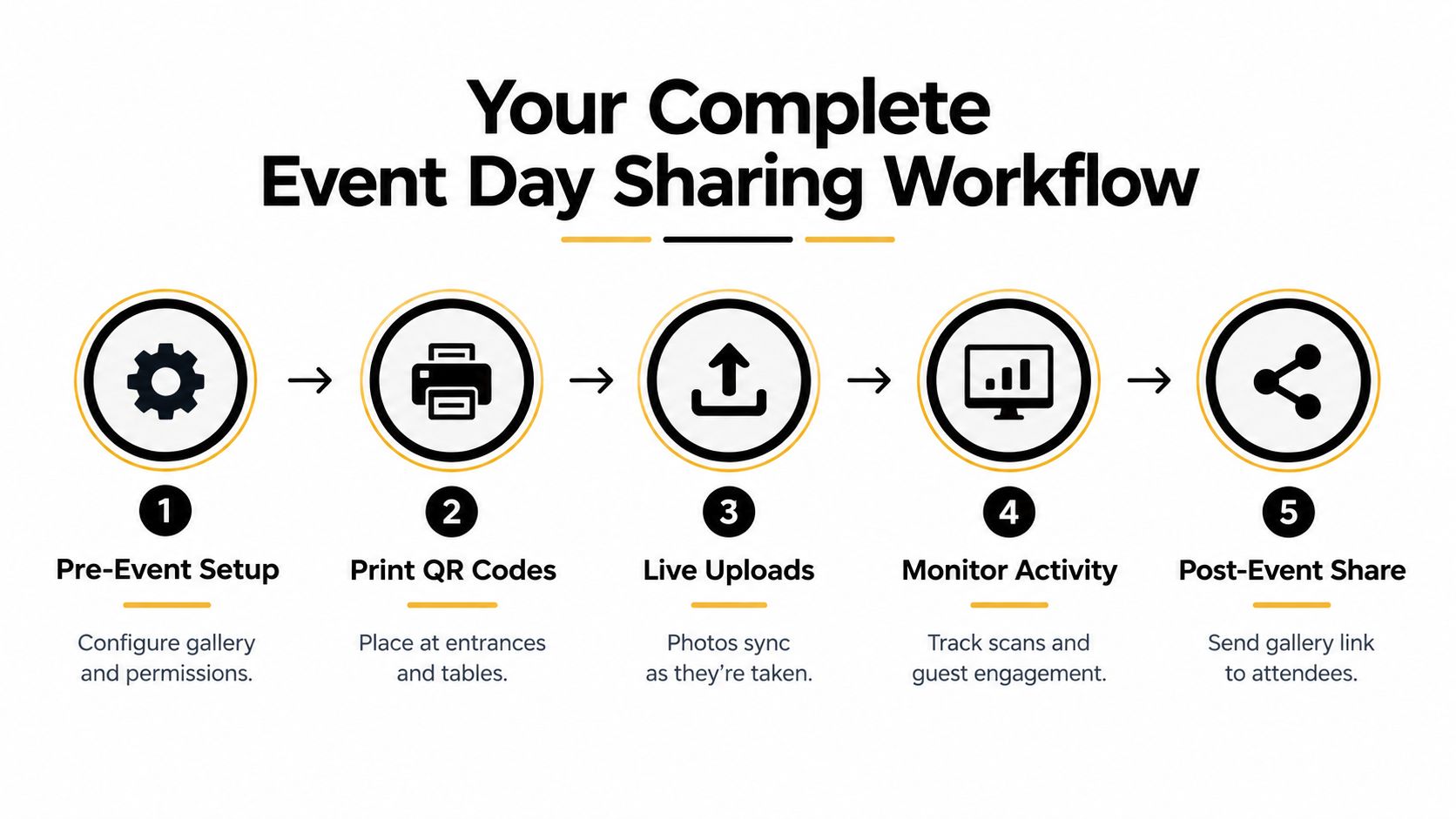
Before the doors open
Create the gallery and define what guests can do. A wedding may allow private uploads and viewing, while a corporate event may require approval before images become visible. Set the retention period, identify the gallery owner, and agree on whether the photographer can offer prints or downloads.
Test the complete path, not only the QR code. Scan from the entrance, a table, and a dimmer part of the venue. Upload a sample image, open the gallery on different phones, and confirm that guests can understand the next step without staff assistance. Check the privacy wording as carefully as the upload function.
Print the QR codes only after testing. Place them at registration, high-traffic tables, the photo booth, and the exit. Add the same gallery link to the event website and pre-event messages, giving guests a digital option before they arrive.
During the event
Assign one person to monitor the gallery. They can spot failed uploads, remove inappropriate content, answer access questions, and tell the event host when the flow needs more visibility. A photographer can upload selected images during the event if the connection and schedule support it, but live delivery should never reduce coverage.
Use short prompts that explain the action and the outcome. “Scan to upload your candid photos” sets the right expectation during the event. “Find your event photos here” suits a retrieval link after the event. Staff reinforcement also matters. Many guests notice a code but will not scan it unless someone explains why it is useful.
Keep permissions aligned with the event phase. Open guest contribution during the event if the organizer wants live UGC, then move to moderated or restricted access afterward. Close or change a public upload path when the event ends instead of leaving it active because it was convenient during setup.
After the final photograph
Send the event photo sharing link while the event is still fresh, with a target of the first two hours. Give guests a direct route to personal results, followed by clear options to download, share, or request an approved upgrade. Retrieval should come before any commercial message.
Use a short follow-up that explains what guests will see and what they can control. If selfie matching is available, describe the process plainly and include the privacy information. If the gallery contains only selected images, say so. Guests should not assume the system failed because they cannot find every photograph.
Review the workflow after delivery. Record where guests stopped, which signs attracted scans, whether photographers received fewer search requests, and which gallery controls required manual intervention. The next event should inherit those decisions rather than restart from a blank folder.
Upload event photos through the dedicated gallery workflow only after permissions and the attendee journey are ready. A clean upload supports the process, but the practical test is whether guests can retrieve and use their images without help.
Saucial provides an event photo sharing link, QR code gallery access, and a selfie-based “Find My Photos” experience, allowing attendees to retrieve relevant images without an app or complex guest setup. Visit Saucial to create a more private, retrieval-focused workflow for your next event.