Custom Filter Instagram: A Practical 2026 Guide
Most guides about a custom filter on Instagram start in the wrong place. They walk you through Meta Spark as if you can still open the software, publish an effect, and wait for approval. You can't. Meta discontinued its third-party Spark tools and removed creator- and brand-made effects from Instagram, Facebook, and Messenger on January 14, 2025, while Meta-owned effects remained available, as Meta's announcement explains.
For event organizers, the question is no longer “How do I make a custom Instagram filter?” It's which job are you trying to solve: applying a branded look after capture, creating live AR on another platform, or helping attendees find and share event photos through an organizer-controlled link or QR code. Those are different products, with different friction, privacy requirements, and measurement.
My recommendation is direct. Use Instagram to promote the experience and encourage UGC, but don't make it the only place attendees can retrieve their photos. Build the durable find my photos layer separately, then connect social effects, branded frames, QR signage, and post-event messages to it.
Why Custom Instagram Filters Are a Different Question in 2026
A custom Instagram filter is no longer a straightforward publishing project. Meta announced the shutdown of third-party Meta Spark on August 27, 2024, and removed creator- and brand-made AR effects on January 14, 2025. Third-party access to Meta Spark Studio, Meta Spark Player, and Meta Spark Hub ended with that change.
For event organizers, the practical question is now different: which tool should handle the job? A campaign may need to serve guests using different phones, social networks, and levels of technical confidence. An effect limited to one platform can attract attention during the event while leaving the organizer without a reliable way to deliver photos afterward.
Three jobs hidden inside one keyword
People searching for “custom filter Instagram” usually mean one of three products:
- An editing preset: A Lightroom, CapCut, or similar look applied after capture. It can define colors, contrast, grain, and brand mood, but it does not provide live face-tracking AR.
- An interactive AR effect: A live overlay that responds to a face, gesture, or environment. In 2026, this belongs on Snapchat, TikTok, or a WebAR experience rather than in third-party Instagram effects.
- An event-owned sharing workflow: A branded gallery, event photo sharing link, or QR code gallery where attendees retrieve approved images, often with selfie photo matching.
Choose based on the event job, not the word “filter.” A wedding usually gains more from an elegant post-capture preset and a private gallery than from an animated lens. A youth festival can use Snapchat or TikTok to encourage public UGC. A trade show booth may need WebAR for a quick interaction, then a controlled photo-delivery experience for follow-up.
Practical rule: Separate the attention layer from the delivery layer. Social effects attract participation. Owned event distribution delivers lasting value.
Instagram still supports branded posts, stories, reels, and creator content. Use it to announce the activation, publish examples, and prompt guests to tag the event. Treat any platform-dependent effect as a campaign asset, not permanent infrastructure. Build photo retrieval separately, then connect social promotion, branded frames, QR signage, and post-event messages to that owned layer.
Spark AR Basics You Still Need to Understand
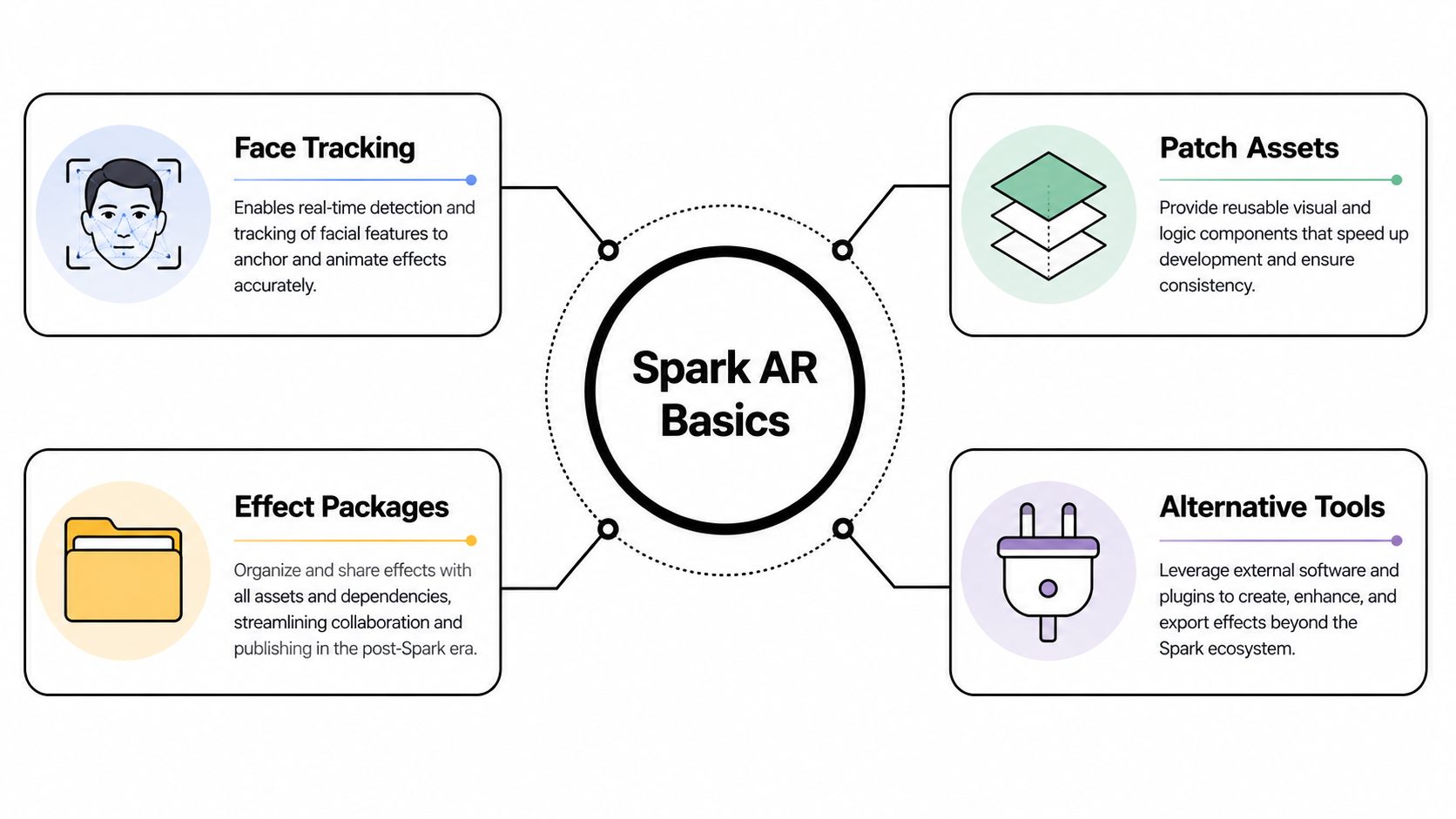
You don't need to learn Meta Spark Studio to plan a strong event effect, but you should understand the vocabulary. Those same ideas appear in Snapchat Lens Studio, TikTok Effect House, WebAR projects, photo booth software, and post-capture editing pipelines.
Meta launched Spark AR in 2017. By 2021, more than 2 million AR effects had reportedly been published across Meta's family of apps, with most effects originating on or being used through Instagram, as reported by coverage of Meta's AR ecosystem. That scale explains why many designers and event agencies still use Spark terminology, even though third-party Instagram publishing has ended.
Face tracking creates the anchor
A face effect needs a dependable reference point. Face tracking identifies facial landmarks or a face mesh, then attaches an asset to that moving surface. Glasses can follow the eyes, a crown can follow the head, and a logo can sit near the cheek or forehead.
The strongest event concepts use one obvious action. A guest raises an eyebrow, opens their mouth, turns toward the camera, or steps into a frame. The trigger should be easy to understand without instructions that compete with the event itself.
A world effect works differently. Instead of following a face, it anchors an object to the surrounding environment, such as a branded sign, floating confetti, or a virtual product. A frame overlay is simpler still. It adds a graphic border or approved design around a captured image without needing live 3D tracking.
Assets and packages determine performance
An effect combines several ingredients: textures for visual surfaces, scripts or logic for interaction, and 2D or 3D meshes that define what appears on screen. The publishing tool packages those components into a deliverable that runs inside a supported camera experience.
That structure gives you useful questions to ask a designer:
- What moves with the face: Is the logo attached to a stable facial anchor, or will it disappear when the guest turns?
- What happens under load: Are large textures or complex 3D assets necessary for the idea?
- Which delivery platform owns the package: Will guests need Snapchat, TikTok, a browser, or a photo gallery?
- What survives after capture: Can the branded photo be delivered through a controlled event link?
The old Spark review workflow is no longer a route to new third-party Instagram publication. The concepts remain useful, but the distribution decision must come first.
Picking the Right Tool for an Event Filter in 2026
No tool wins every event. Choose based on guest behavior, not on which software a designer prefers.
| Effect type | Best for | App required | Organizer control | Measurable UGC |
|---|---|---|---|---|
| Editing preset | Weddings, galas, curated photo galleries | No, if applied before delivery | High | Moderate |
| Snapchat Lens Studio effect | Youth events and social-first activations | Yes, Snapchat | Medium | High inside Snapchat |
| TikTok Effect House effect | Festivals and creator-led campaigns | Yes, TikTok | Medium | High inside TikTok |
| WebAR experience | Trade show booths and browser-led interactions | Usually no app, browser access required | High with the right vendor | Moderate to high |
| Organizer-controlled gallery and branded frame | Private retrieval, event sharing, photographer sales | No dedicated app | High | High when sharing is tracked |
A branded Lightroom preset can outperform live AR at a wedding because the couple usually wants a consistent visual identity across professional photos, guest uploads, and the final gallery. The preset doesn't need to track a face or ask guests to open another social app. It just makes the delivered images feel connected.
Snapchat Lens Studio and TikTok Effect House make more sense when public participation is the goal. A tournament, youth festival, or creator activation can use a playful effect to encourage stories and short-form videos. The trade-off is clear: guests participate inside that platform, and the organizer has less control over the complete retrieval experience.
WebAR fits a different environment. At a trade show booth, a QR code or printed trigger can open a browser-based interaction without requiring an app download. That lowers a major barrier, but it introduces hosting, browser compatibility, consent, and vendor-management responsibilities.
Match the tool to the attendee's next action
Ask what you need the guest to do after the effect:
- If the next action is post a story, use a social AR platform.
- If it's download a branded image, use an organizer-controlled gallery.
- If it's find every photo they appear in, use selfie photo matching.
- If it's buy a print or premium edit, connect the gallery to a photographer-led sales flow.
- If it's scan and interact at a booth, consider WebAR with a clear browser fallback.
An event photo sharing link should be easy to distribute through email, WhatsApp, SMS, event websites, and venue signage. A platform-independent event photo workflow can make the photo-delivery layer available even when guests don't use the same social network.
Don't commission an AR effect before deciding where the resulting images will live. The effect is the invitation. The gallery, link, or retrieval experience is the product attendees remember.
Designing and Building a Branded Effect That Actually Works
Most event effects fail at the camera, not in the design file. A concept can look polished in a studio preview and become unreadable when a guest stands under colored lights, wears glasses, turns sideways, or shares the frame with a friend.
Start with one interaction. A face trigger, gesture, or simple environmental action gives attendees a clear reason to participate. Decorative complexity usually adds weight without adding meaning.
Design for movement and imperfect light
Use standardized face-tracking anchors for glasses, labels, and overlays. Place sponsor marks where they remain visible as the user moves, and test them against different skin tones, facial hair, glasses, head angles, and camera distances. A logo that vanishes when the user turns slightly has failed, even if it looked perfect in a design review.
Keep textures compressed and avoid heavy 3D assets unless they contribute directly to the experience. Event phones vary widely in performance, and venue lighting is rarely consistent. Test front-camera behavior under bright entrance lighting, dim ballroom conditions, colored stage light, and uneven shadows.
Release gate: Don't approve an effect until it works on real phones in the actual lighting conditions your guests will encounter.
Run a device matrix covering current iOS and Android phones, plus lower-powered devices common in your audience. Record frame-rate behavior, load time, tracking loss, and whether users complete the capture. Also check whether text remains legible, whether multiple faces confuse the effect, and whether the camera recovers after a person leaves the frame.
A 2025 UX study of 52 users found that interactivity and playfulness had the strongest relationship with satisfaction when people used AR effects, according to the reported UX study. The practical lesson is simple: technical polish should support an obvious, enjoyable action. It shouldn't bury the interaction under visual noise.
Treat approval as a creative constraint
Sponsor requirements often produce the worst effects. A brand team asks for a large logo, several partner marks, a slogan, a product render, and animated confetti. The result loads slowly and communicates nothing.
Give each sponsor a defined placement and test it at the size attendees will see. Keep consent language, brand approvals, and data handling separate from the visual concept. If the effect feeds an event gallery, explain how images are collected, who can access them, and how long the organizer retains them.
For the post-capture layer, photographers can use an organizer upload workflow that keeps approved event images separate from the social effect itself. That separation lets the creative team experiment with attention while the organizer controls the images distributed afterward.
Publishing, Review, and Approval in the Post-Spark Era
The old third-party Instagram submission path is gone. You can't build a new brand effect in Meta Spark Studio and publish it to Instagram as though the shutdown never happened. Meta-owned AR effects may still appear in the Instagram camera, but that doesn't restore independent creator and brand distribution.
The practical publishing path now depends on the chosen delivery layer.
Choose a route before production
For Snapchat, the team builds in Lens Studio, tests on supported devices, and follows Snapchat's current submission process. TikTok Effect House follows the same broad pattern, with its own creation tools, policies, and review requirements. Neither option should be described as an Instagram replacement in a literal sense. They're alternative social environments with their own audiences.
WebAR shifts the workflow to a browser. A vendor hosts the experience, the organizer distributes a QR code or short link, and guests open it on their phones. That can reduce app friction, but you still need to test browser permissions, camera access, network conditions, and fallback behavior.
A fourth route is often the most durable for events: apply a brand-approved frame, overlay, or preset to images inside an organizer-controlled gallery. Guests receive the images through a link or QR code photo gallery, rather than relying on a disappearing social effect.
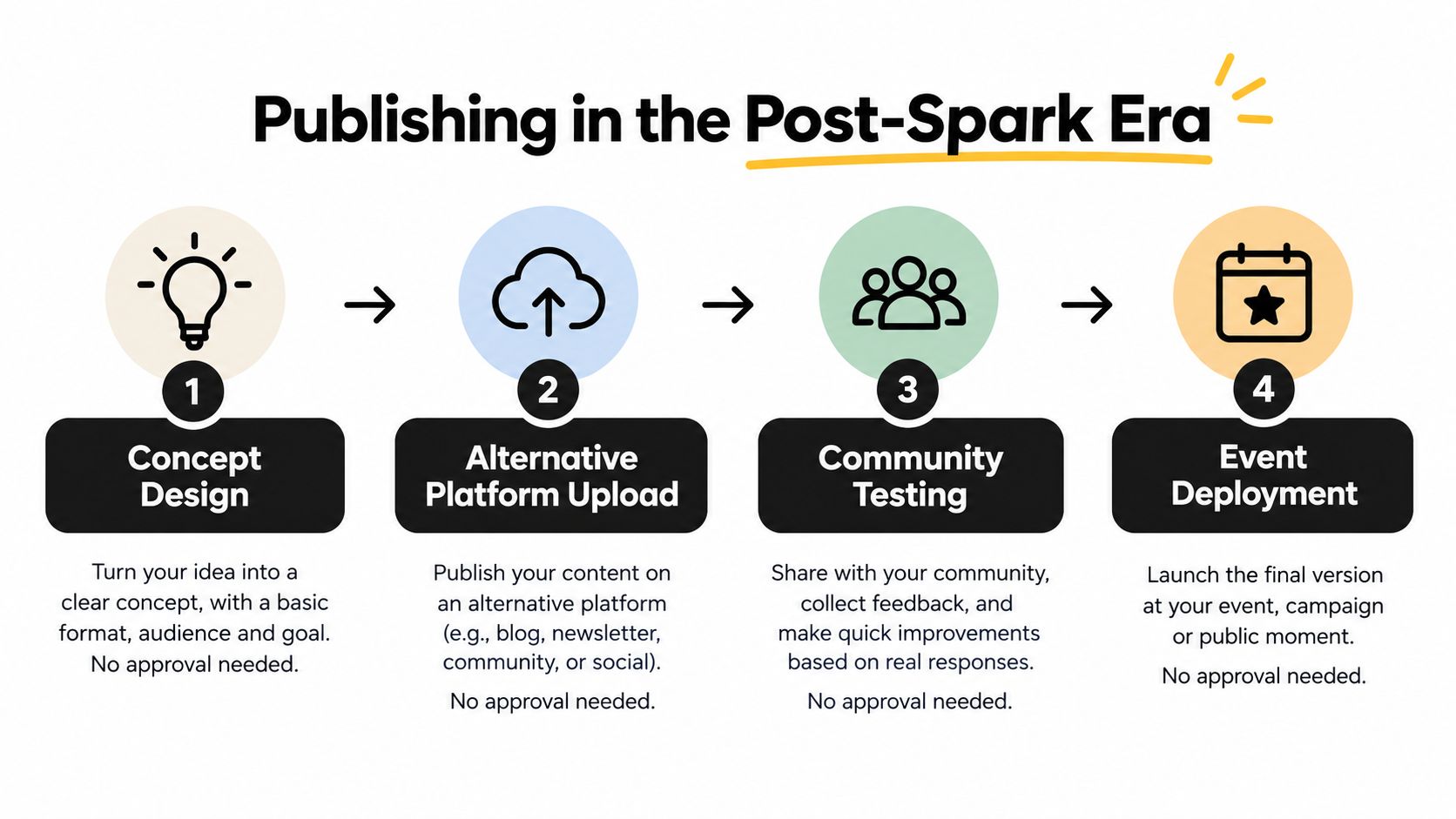
The approval mindset still matters, even when a platform's process differs. Check community rules, brand permissions, privacy notices, camera behavior, and the experience for people who decline participation. Don't let a vendor promise “Instagram approval” for a custom third-party effect without clarifying exactly what technology they're offering.
A short explanation of the changed workflow can prevent expensive misunderstandings:
For the event-owned layer, use an organizer access workflow that makes control explicit. Decide who uploads photos, who approves branded treatments, who distributes the link, and who can change access after the event. The best publishing route is the one that matches those responsibilities instead of hiding them behind a social platform.
Event Use Cases That Turn Filters Into Measurable UGC
A filter becomes useful when it gives attendees a reason to create something and gives the organizer a way to continue the interaction. The following patterns work because each one connects the creative moment to a delivery action.
Gala fundraiser
A gala can use a sponsor-branded frame around guest selfies, with a QR code displayed on tables, at the registration desk, and near the photo backdrop. The frame makes the image recognizable in social feeds, while the QR destination provides a separate route to the event gallery.
After the photographer uploads the approved images, guests scan the code and use a selfie to find photos they appear in. The organizer can report QR scans, gallery visits, photo retrieval, branded shares, and sponsor-frame usage as separate behaviors. That's much more useful than reporting a single impression total.
The frame should support the fundraiser without overwhelming the guest. Put the sponsor mark in a stable corner or border, keep the image flattering, and make the gallery permission-conscious. Guests who don't want public posting should still be able to retrieve approved photos privately.
Youth sports tournament
A tournament can pair a Snapchat lens with a branded gallery. Players and supporters use the lens for playful social content, while the professional photographer captures action shots independently.
The gallery becomes the reliable find my photos destination. Parents can search for their child through selfie photo matching, download approved images, and choose optional products such as prints or premium edits. The photographer gets a direct attendee channel instead of handing the organizer a folder and waiting for families to ask for specific files.
This split protects the campaign from social-platform dependence. The lens may create public UGC, but the gallery handles the more important retrieval behavior, including sports tournament photo sales.
Trade show booth
A trade show booth benefits from a short WebAR interaction triggered by a QR code or printed call to action. The effect might add a product-themed overlay, animate the booth environment, or create a branded portrait that a visitor can share.
After the scan, the visitor can receive a follow-up email link to a private gallery tagged to the interaction. The email gives the exhibitor a controlled continuation, while the gallery stores the approved photo experience rather than forcing every visitor to search through a social feed.
A small experimental study found 74.4% of participants reported high interactivity and 71.8% reported high enjoyment with an Instagram AR Story filter, but the sample included only 39 people, so the findings should guide creative direction rather than forecast campaign conversion, as described in the experimental study.
The strongest event campaigns don't ask the filter to do everything. They give it one memorable job, then hand the attendee to a controlled photo experience.
Measuring Real Engagement Beyond Impressions
Impressions are easy to report and weak as an event decision metric. A person can see an effect without opening it, open it without recording, record without sharing, and share without visiting the event gallery. Those actions have different value and should appear separately in the report.
Use a funnel that follows the attendee's behavior:
- Filter tap or effect open: Shows initial interest in the creative.
- Recording completed or photo saved: Shows active participation.
- Story, post, or direct share: Shows whether the attendee distributed the content.
- QR scan or link click: Shows movement from social attention to the event-owned layer.
- Selfie match or gallery retrieval: Shows whether the attendee found a relevant photo.
- Return visit: Shows continuing interest after the first retrieval.
- Photographer action: Captures downloads, print interest, premium edits, or other approved upsell behavior.
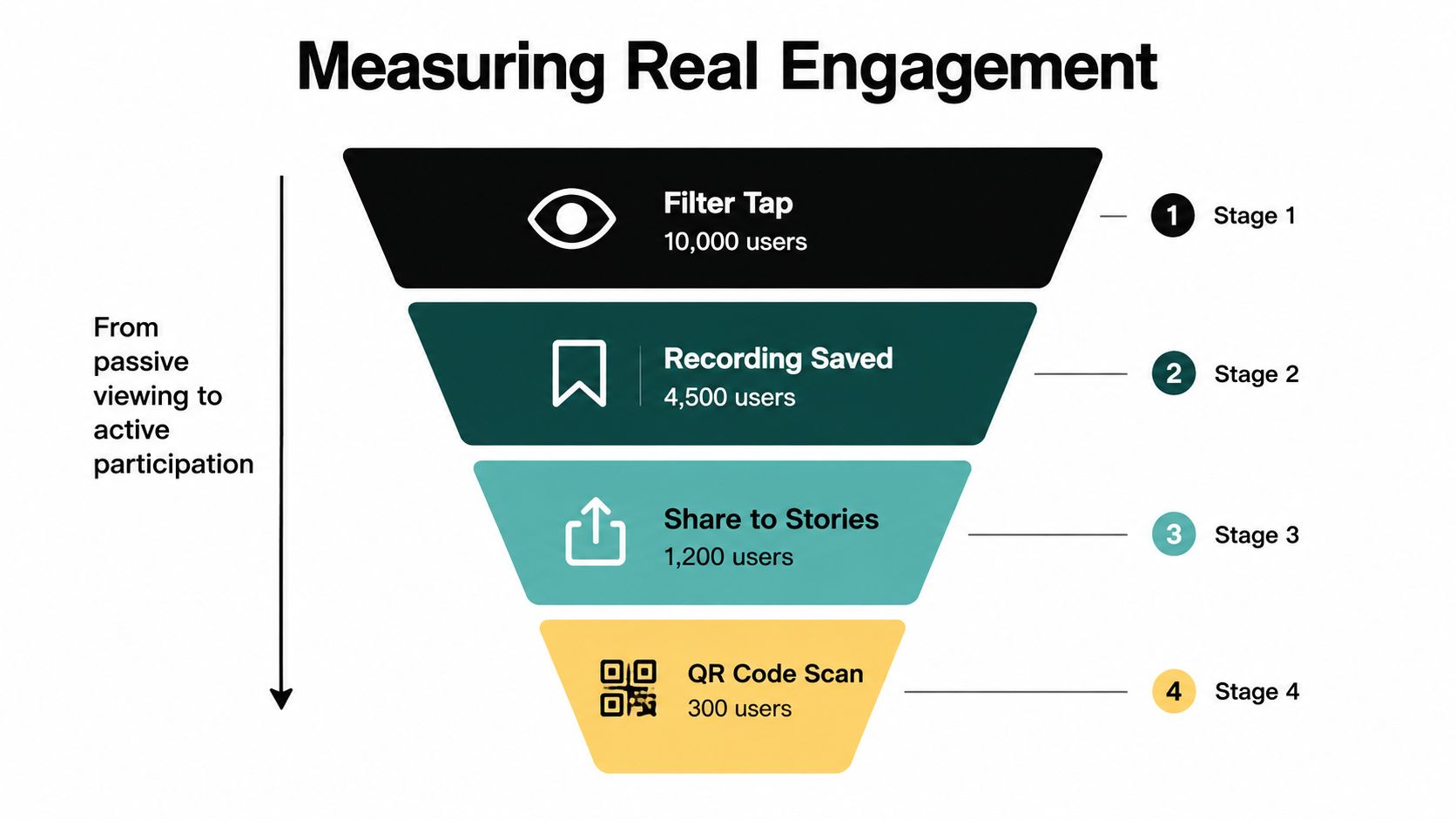
Instrument each handoff
Use a unique QR code for each station when you need location-level insight. A gala can distinguish table scans from backdrop scans. A trade show can separate the booth counter from a printed badge insert. For links distributed by email, social, and SMS, use tagged destinations so the team can compare channels without guessing.
Track branded posts separately from self-taken photos. A guest may share an image captured with the effect, while another guest may retrieve a professional photograph and post it later. Both can support UGC from events, but they represent different creative and distribution paths.
A useful report answers operational questions:
- Which entry point worked: Did guests respond to table signage, booth staff, stories, or email?
- Where did participation stop: Did people open the experience but fail to save an image?
- Did social activity create retrieval: Did QR scans and link clicks lead to selfie matches?
- Did attendees return: Did the gallery continue receiving visits after the event?
- Did the photographer receive value: Did attendees download, buy, or request approved upgrades?
Privacy belongs inside the measurement plan
A public social effect and a private attendee retrieval experience aren't the same thing. The effect may encourage public sharing, while a face recognition event gallery or selfie-matching workflow may process images to help an attendee locate their photos. Consent, retention, access controls, and deletion procedures need clear ownership before launch.
Don't collect more information than the workflow requires. Tell attendees what the camera experience does, what the gallery does, and whether a photo may appear publicly. Provide a non-selfie route when appropriate, such as a curated gallery link or event code.
The organizer should control the destination, not just the design. A managed gallery settings workflow can help teams define distribution and access rules before they publish QR codes across a venue.
The pre-launch checklist
Before commissioning any version of a custom Instagram filter, confirm:
- The job: Decide whether you need an editing preset, live AR, or event-owned photo delivery.
- The platform: Choose Instagram promotion, Snapchat, TikTok, WebAR, or a gallery based on guest behavior.
- The fallback: Provide an event photo sharing link or QR code photo gallery that works beyond the social effect.
- The interaction: Keep the trigger obvious and test it with real faces, movement, lighting, and multiple people.
- The release gate: Test current iOS and Android devices, including lower-powered phones, and record failures.
- The permissions: Approve sponsor marks, explain consent, and define image access and retention.
- The funnel: Measure opens, captures, shares, scans, matches, gallery visits, and photographer actions separately.
- The report: Tie every metric to a decision, such as improving signage, changing the trigger, or adjusting delivery.
Instagram is still valuable for promotion and UGC, but it shouldn't carry the entire event photo experience. Put the durable find my photos workflow on a layer the organizer controls, then let social effects and branded frames feed attention into it.
Saucial gives event organizers and photographers an organizer-controlled event photo sharing link, QR code gallery, and selfie photo matching experience so attendees can find approved images without an app or complicated account setup. If you're planning a gala, tournament, trade show, wedding, or activation, visit Saucial to turn your branded camera campaign into a measurable photo-delivery workflow.