Alumni Association Software: Photo and Engagement Compared

What does your alumni association software do on Monday morning, when the gala is over and 400 guests want the photo of themselves with their classmates? That's the gap most buying guides skip. They compare databases, directories, and donation forms, then assume someone will send a folder link and hope. I judge these tools differently. If alumni can't find my photos quickly, without another login, and if face matching isn't consent-controlled, your most shareable event asset becomes admin work and privacy risk at the same time.
Alumni Association Software Options at a Glance
Start with the category, not the brand name. The four types below do different jobs, and their photo features aren't interchangeable.
| Software type | Photo gallery | Face-recognition matching | Event distribution link | Privacy controls |
|---|---|---|---|---|
| Alumni CRM and database suite | Often an add-on gallery | Rare, confirm in writing | Email or portal link | Consent fields on the alumni record |
| Event registration platform | Basic photo upload to event page | Usually none | Event page link | Attendee data settings |
| General file-sharing folder | Folder of files | None | Shared folder link | Folder permissions only |
| Event photo platform such as Saucial | Organizer-controlled gallery | AI selfie matching for each attendee | Shareable link and QR code | Organizer controls over sharing and retrieval |
What Each Row Means in Practice
An alumni CRM and database suite is your system of record. It holds constituent profiles, giving history, communication preferences, and event attendance. That strength doesn't make it a photo tool. Some suites include a gallery, some rely on an integration, and some store a link. You need to test the photo layer separately, including whether attendance and consent can limit who receives the gallery.
An event registration platform is built around sign-up, payment, ticketing, and check-in. Photos usually sit on the event page as a follow-up extra. That's fine for a small set of stage shots. It breaks down when hundreds of guests each want the handful of images they're in, because the platform wasn't designed for per-person retrieval.
A general file-sharing folder is familiar and cheap, and that's why teams default to it. It also puts the work on guests. They scroll, zoom, and give up. Staff then field individual requests for weeks. Permissions are blunt too. Someone with the link can typically see the whole set, not just their own photos.
An event photo platform reverses that logic. Instead of asking guests to search a folder, it matches people to images and gives each person a private set. Our approach at Saucial fits that model, with an organizer-controlled gallery and a shareable link and QR code for distribution. That doesn't replace your CRM. It handles the event photo sharing link and retrieval job the CRM usually does poorly.
Practical rule: If photos drive post-event engagement, the photo layer decides your shortlist. The CRM decides whether that activity flows back into alumni records.
Don't let a vendor blur these categories in a demo. Ask which job the product owns, records, registration, storage, or retrieval, and where it hands off to another system. A suite that claims to do everything may do the photo part thinly. A specialist photo tool that can't export activity may leave your advancement team blind. The strongest setups are often paired, CRM for the record, photo platform for the guest experience, with a clear data flow between them.
How Photo Galleries and Face Matching Differ
A gallery and matching solve different problems. A photo gallery controls which images exist in a set and who can open it. Face matching identifies which images contain a specific person. Confusing the two leads buyers to purchase a nice-looking page that still forces guests to hunt through hundreds of faces.
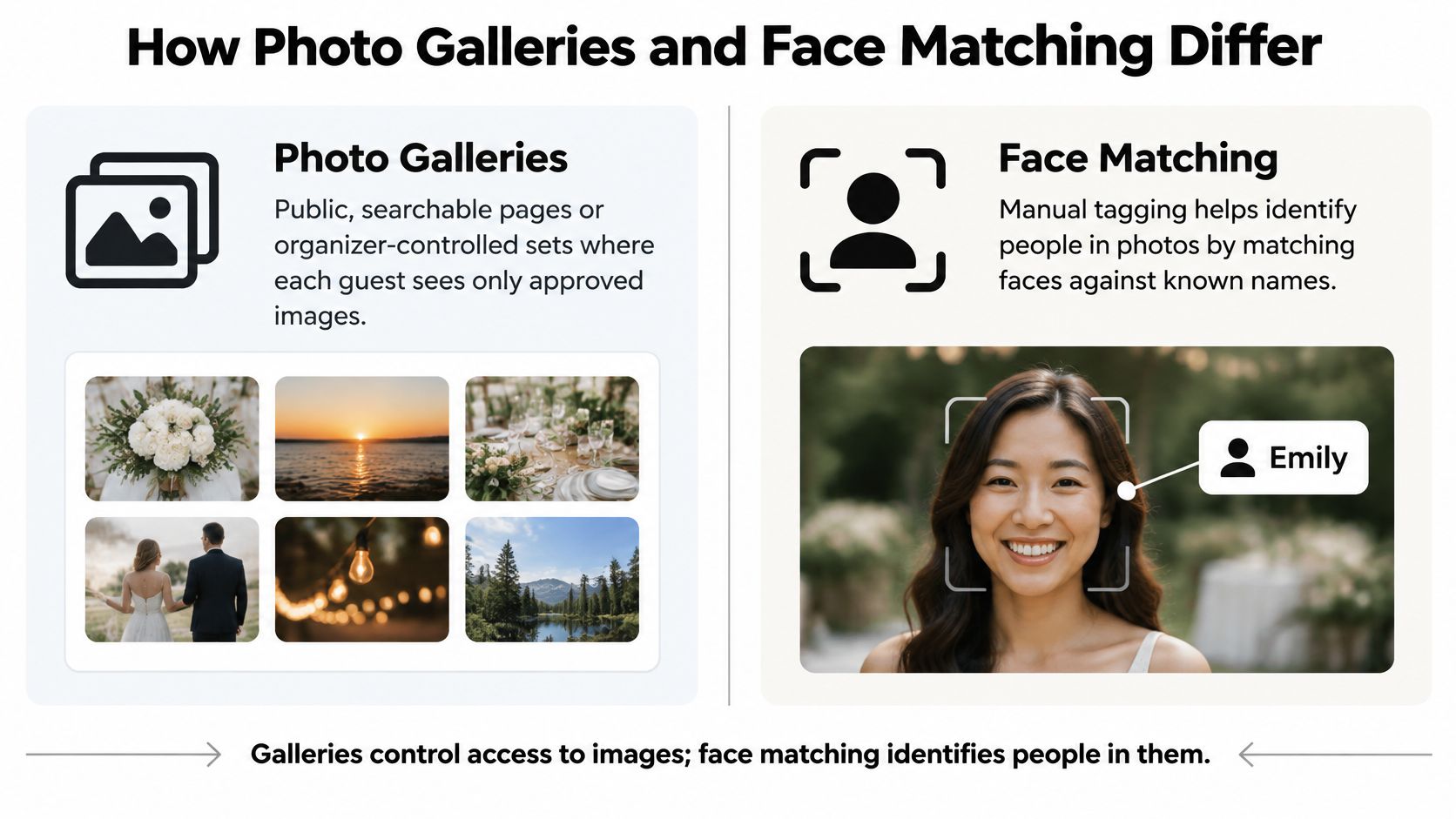
Gallery Access Is a Control Decision
At one end, a public searchable gallery lets anyone browse every image. That can work for approved stage photos from a conference keynote. It's risky for a donor dinner, a reunion with children present, or any event where guests didn't expect to be searchable by strangers.
At the other end, an organizer-controlled gallery lets staff decide what's published, who can retrieve photos, and whether downloading or sharing is enabled. Curated sets also protect your brand. You can remove duplicates, closed eyes, and unflattering candids before anyone sees them. That curation step matters more at fundraisers, where a sponsor logo or a donor's image carries reputational weight.
Matching Is a Labor Decision
Manual tagging looks simple in a demo with ten photos. At a reunion weekend with several photographers, it becomes hours of staff or volunteer time, and errors multiply when people share surnames or change appearance since graduation. Guests wait days, by which point the urge to share has faded.
Selfie photo matching changes the work. We use AI-powered face recognition to find the event photos that feature each attendee. Organizers upload the set through our upload workflow, processing runs in the background, and an attendee submits a selfie to retrieve their matches. There's no app to install and typically no account for guests, which removes the two friction points that kill retrieval after a long event day.
A link that needs no account retrieves more photos than a portal that requires a login.
Distribution Links Decide Reach
A link trapped inside a portal reaches only alumni who remember their password. A single QR code photo gallery link can travel through the channels you already use, email, WhatsApp, SMS, a venue screen, table cards, and LinkedIn. Each channel catches a different segment. Older alumni may act on email at home. Younger graduates may scan a table QR code before dessert arrives.
Speed matters too. If the gallery appears while guests are still comparing notes about the evening, shares happen naturally and carry your event branding into their networks. If it arrives a week later, you're asking them to reconstruct enthusiasm they've already spent.
| Feature | What good looks like | Red flag |
|---|---|---|
| Gallery access | Guests see only their matches or approved sets | Public, searchable gallery by default |
| Face matching | Selfie-based matching run on request | Biometric matching with no stated retention limit |
| Distribution link | One link across email, WhatsApp, SMS and QR | Login required before viewing |
| Opt-out and deletion | Guest can remove face data on request | No deletion path described |
Run three questions on any vendor before you discuss price. First, can a guest who has never used the system find their photos in under a minute on their own phone? Second, can the organizer control who sees the gallery, down to attendee-only access? Third, can the same link work across every channel your event uses, without a separate upload or permission set for each one? If a vendor hesitates on any of those, the demo gallery is hiding operational work your team will inherit.
Consent and Privacy Controls for Event Photos
A CRM record says someone graduated in a certain year and gave last spring. An event photo shows where they were, who they stood with, what they drank, and sometimes that their child came along. That's a different risk profile, and treating privacy as a compliance checkbox misses it.
CASE guidance, summarized in research on technology-enabled alumni engagement, notes that privacy laws differ by country and individuals may need to provide opt-in consent before an institution contacts them. The same research identifies data privacy, low digital literacy, outdated databases, limited institutional support, and inconsistent follow-up as barriers to success. For photos, those barriers converge at one moment, the instant you ask a guest to submit a selfie.
Controls to Check One by One
- Biometric processing versus image search: Ask whether the system creates a face template, how it's derived, and whether matching runs only on request or across every uploaded face by default.
- Retention period: Get a specific limit for face templates and for the photos themselves. Ask if you can shorten it per event, and what deletion removes, including backups.
- Deletion and opt-out workflow: A guest should be able to remove their face data and request removal from images without emailing three departments. Staff should be able to action it and prove they did.
- Private retrieval as the default: Guests seeing only their own matches is safer than a public searchable face recognition event gallery. Public sets should be a deliberate choice for approved images, not the starting state.
- Audit logs: You should be able to see who accessed a gallery, who downloaded what, and who changed sharing settings. Our settings area is where organizer controls belong, visible and adjustable, not buried in a support ticket.
- Region-specific defaults: An association with chapters in several countries can't run one consent standard everywhere. Ask where data is hosted and whether defaults can change by region.
A Dinner Where This Gets Real
Say you're running an alumni dinner that mixes major donors, recent graduates, current student scholarship recipients, and faculty. A photographer captures table groups all evening. Some students are happy to be featured in advancement materials. A donor's guest isn't an alumnus at all and never consented to biometric matching. A faculty member brought a teenage child.
In that room, matching should be opt-in, galleries should be private by default, and signage at check-in should say plainly that photography is happening, how selfie matching works, and how to opt out. Your registration form should carry the same language, so consent is captured before the evening, not argued after it. Staff at the door need a one-sentence answer for guests who ask, because hesitation at check-in reads as evasion.
Group images need special care. One person opting out doesn't remove a table photo for nine others, but it should remove that person from matching and, where feasible, from featured sets. Ask vendors how they handle that conflict. Vague answers here become manual Photoshop work for your team later.
I would choose the system with clearer controls and less guest friction over the one with the longest feature list. Legal, IT, advancement, and events staff all have to defend this choice. A tool they can explain in plain language to a concerned alumnus will survive. A tool that needs a technical diagram to justify won't.
Verification Checklist Before You Choose
Software represented 62.5% of the estimated global alumni-engagement-platforms market in 2025, according to Marketintelo's 2025 market research report. With that much spend concentrated in software, verify the workflow, not the pitch. Work through these items on a vendor call and require answers you can test.
- Closed loop: Registration or CRM identity flows to event check-in, then to consent state, then to photo access, then engagement written back to the alumni record.
- Alumni profile: A durable profile linked to program and graduation data, with self-service updates and complete export in a standard format.
- Consent sync: Attendance and consent status move into the alumni CRM, so galleries reach only eligible attendees and respect opt-outs and retention rules.
- Upload and processing: Staff drag and drop event photos, and our AI processes faces in the background without manual tagging.
- Link and QR delivery: Organizers get a unique link they can share with attendees via any channel, plus a QR code for venue screens and follow-up emails.
- Measurement: Reports show time from event to gallery, attendee retrieval rate, shares per attendee, and gallery visits by cohort and event type.
Map gallery activity to the four engagement modes, communication, experiential activity, philanthropy, and volunteering, rather than counting views alone. A photo view is a touchpoint, not a relationship outcome. Finish with the decisive test. Does the photo feature connect to the alumni record, or does it sit as a standalone link producing views nobody can use for follow-up?
Which Software Fits Each Alumni Event Type
What does each alumni event need from photo software? The room changes the answer. A gala needs donor-grade presentation and a follow-up list. A reunion needs retrieval across thousands of images. A dinner needs speed while people are still at the table. The table below maps five common event types to the photo need, the channel that gets the link in front of alumni, and the privacy setting that keeps face matching under control.
| Event type | Main photo need | Best distribution channel | Privacy setting |
|---|---|---|---|
| Gala fundraiser | Donor-facing gallery with sponsor frames | QR code at venue and email follow-up | Private link with opt-in matching |
| Reunion weekend | Find-my-photos access across class years | WhatsApp group and email | Private retrieval with opt-in matching |
| Alumni dinner | Quick selfie matching at check-in | QR code on tables and email | Opt-in matching with short retention |
| Virtual or hybrid event | Stage and screenshot images | LinkedIn and event website | Public gallery only for approved images |
| Sports or homecoming match | Action shots grouped by team | Team channels and SMS | Organizer-approved sharing only |
Why One Channel Isn't Enough
Alumni don't live in your portal. A study of 60 alumni found LinkedIn used by 90%, WhatsApp by 75%, Facebook by 70%, email by 65%, and institutional portals by 60%, according to research on technological advancements in alumni relations management. The lesson for event galleries is plain: put the retrieval link where alumni already talk. A selfie-based find-my-photos link that travels through WhatsApp, email, LinkedIn, and venue QR codes matches behavior alumni already have. It should open from the shared link, let an attendee take a selfie, and show the photos that feature them without a second account or a forgotten password at 11 p.m. after a reunion.
Matching the Priority to the Event
For a gala fundraiser, the priority is donor-facing quality and follow-up. A curated gallery with sponsor frames, sent by email the next morning and teased by QR code at the venue, gives development officers a warm reason to contact table hosts. The privacy setting matters as much as the pictures. Use a private link with opt-in matching and keep the gallery limited to attendees who consented. Measure gallery visits alongside pledge follow-up. A high view count with no donor follow-up is not a result.
For a reunion weekend, volume is the problem. Multiple class years, several venues, and thousands of images make folder scrolling hopeless. Attendees take a selfie and instantly see all photos featuring them, which keeps retrieval personal even when the total set is huge. WhatsApp class groups spread the link faster than a central email. A private retrieval link with opt-in matching keeps each attendee's results separate. The failure mode after the event is a shared folder nobody can search. The test is whether an alum can find their own photos quickly without creating an account.
For an alumni dinner, speed at the table wins. A QR code on each table lets guests retrieve photos during the evening and share them while conversation is live. Opt-in matching with short retention suits a one-night event, because the value is immediate and the data does not need to sit around. The trade-off is that short retention can cut off late requests. Set the window from the event date, not the upload date, and print that date on the table card.
Virtual and hybrid events produce different assets: stage stills, speaker screenshots, and audience reaction shots where permitted. These suit an approved public set on LinkedIn and your event website, because the goal is reach rather than personal retrieval. Face matching adds little to a webinar screenshot, and a public gallery can expose people who never agreed to appear. Use a public gallery only for approved images. For anything else, keep it behind the same opt-in matching rule as an in-person event.
Sports and homecoming events generate action shots that players and families want grouped by team. Distribute them through team channels and SMS, with organizer-approved sharing so images of minors aren't released without review. That approval step is the difference between a shareable gallery and a consent problem. The software should let an organizer mark a team set as approved before any public link goes out.
Across all five, the decision comes down to what happens after the event. Can an alum open one link, take a selfie, and find their photos without another login? Can you show which attendees consented and which galleries they were allowed to enter? A gallery that cannot report opt-ins by event type cannot be audited, and a gallery that requires a new account will lose the alumni who most wanted the pictures. Choose the channel that matches the room, then test the selfie flow on a real phone before you sign.
Pricing and Setup Questions for Vendors
Ask every vendor the same questions and require answers in writing. Verbal assurances in a demo don't survive staff turnover or a contract dispute.
- Pricing model: Is the fee per event, per year, or per guest? Are photo storage and face matching billed separately, and what happens when attendance exceeds your estimate?
- Setup effort: How many days pass from contract to first event? Which of your staff must configure consent fields, branding, and retention settings?
- CRM integration: Does the photo layer connect natively to your alumni CRM, or does it rely on export and manual import? Who maintains that connection when either system updates?
- Retention defaults: How long are face templates and photos kept after an event? Can you change that period per event, and can you verify deletion?
- Regional hosting: Where is data stored? Can storage follow country-specific privacy rules for international chapters?
- Support: What onboarding and event-day help is included? What help desk coverage exists for alumni who can't retrieve their photos?
- Exit terms: Can you export all photos, consent records, and engagement data when the contract ends, and will the vendor delete its copies?
Record each answer in your comparison sheet. Where an answer stays vague, mark it clearly as unconfirmed and treat it as a risk until it's resolved. A vendor that's precise about retention and vague about price is telling you something. So is the reverse. The pattern of evasions usually predicts where your implementation will stall.
Run a One-Event Pilot Before You Commit
Your right choice depends on what your association runs, not on which vendor demos best.
If you run several photo-heavy events a year, galas, reunions, homecoming, regional dinners, prioritize an event photo platform with consent sync and measurement built in. Retrieval rate and shares per attendee will justify the cost in a way database completeness can't. If you mainly run records, donations, and communications, with modest photo needs, a CRM suite with a photo add-on may be enough, provided consent and retention controls are confirmed in writing before you sign. If your events are small and infrequent, a file-sharing folder may cover you, but accept its limits. There's no matching, privacy is coarse, and staff will absorb retrieval requests personally.
How to Run the Pilot
Pick one upcoming event with enough attendance to stress the workflow but not so much prestige that a stumble becomes a donor problem. A mid-size reunion or regional dinner is ideal. Before the event, write down your baseline targets.
- Time from event to gallery: Set a target your team can hit with real photographer turnaround, and measure against it.
- Attendee retrieval rate: Decide what share of attendees retrieving at least one photo counts as success.
- Shares per attendee: Track outbound shares, because they carry your event into networks you can't email.
- Consent integrity: Count opt-out requests, how fast you actioned them, and whether any guest reported seeing photos they shouldn't.
Run the flow with care. One event photo sharing link, one QR code displayed at the venue, and one follow-up email. Don't add a portal announcement, an app push, and three reminders, or you'll never know which channel did the work. Brief your check-in staff on signage and the opt-out answer. Brief your photographer on upload timing, because a fast gallery depends on files arriving promptly, not on matching speed alone.
Afterwards, review the numbers and the consent records together. Look at who retrieved photos by cohort. Recent graduates retrieving heavily while older alumni don't may signal a channel problem, not a product failure. Check whether gallery activity was written back to alumni records in a form your advancement team can use for follow-up segmentation.
We fit buyers whose main need is a find-my-photos link with organizer-controlled sharing and selfie matching for events such as galas, alumni dinners, and sports tournaments. That fit still needs proving on your own event, with your own alumni, under your own consent rules. Present the pilot results to legal, advancement, and IT together, with the opt-out log beside the engagement numbers. If all three groups can defend the workflow, you've found software that works after the event, which is where alumni association software earns its keep.
If your next gala, reunion, or alumni dinner deserves better than a folder link nobody opens, try the find-my-photos approach on one real event and measure retrieval for yourself. We built Saucial so organizers upload photos once, share one link or QR code, and let attendees use a quick selfie to see only the photos they're in, with organizer control over what's shared. Visit Saucial to set up your pilot event and see how your alumni respond.