8 Actionable Tips for Wedding Photographers in 2026

Being a successful wedding photographer today requires more than just a great eye and technical skill. It demands a mastery of client communication, efficient workflows, and smart business strategies that set you apart. In a world of instant gratification, how you manage everything from pre-shoot planning to final photo delivery can make or break your reputation and profitability. This guide provides actionable, in-depth tips for wedding photographers looking to not just survive, but thrive.
We will move beyond generic advice and dive into specific techniques, tools, and modern workflows. The goal is to elevate your service from simply capturing moments to creating an unforgettable client and guest experience. You'll learn how to implement systems that save you time, generate more revenue, and impress everyone involved.
This blueprint is designed for immediate implementation. We'll cover everything from leveraging AI-powered platforms like Saucial for rapid, engaging gallery delivery to mastering the business side of your craft. Forget surface-level suggestions; these are detailed strategies for building a more efficient, profitable, and future-proof wedding photography business. Prepare to learn how to master client-facing communication, streamline your post-production, and turn your photo delivery process into a powerful engagement and marketing tool. Each tip is a building block for creating a standout brand that clients will rave about long after the final photos are delivered.
1. Master Facial Recognition Setup for Instant Photo Matching
In today's fast-paced digital world, clients and their guests want instant access to their photos. One of the most innovative tips for wedding photographers is to leverage galleries that use facial recognition technology, like Saucial. This allows guests to find every photo they're in simply by uploading a selfie, eliminating the need to scroll through hundreds of images. However, the success of this technology hinges entirely on the quality and consistency of your photos.
To ensure the AI can work its magic, you must optimize your shooting technique for clear, high-quality facial captures. This isn't just about taking a good photo; it's about capturing data the software can accurately read. Proper setup dramatically reduces your post-event workload by minimizing manual tagging and ensures guests have a seamless, impressive experience finding their images.
How to Optimize Your Photos for Face Matching
Think of the facial recognition software as your assistant. To help it succeed, you need to provide it with clean, well-lit, and unobstructed views of faces.
- Scout and Adjust for Venue Lighting: Arrive early to scout the venue's lighting conditions. A reception hall with warm, colored uplighting can throw off skin tones and confuse the AI. Create a custom white balance profile on your camera specifically for the event space to ensure natural-looking skin tones.
- Shoot at Eye Level: Whenever possible, position yourself to capture faces directly at eye level. Photos taken from extreme high or low angles can distort facial features, making it harder for the software to find a match.
- Prioritize Facial Clarity: Use a continuous autofocus mode (AF-C or AI Servo) during dynamic moments like dancing or speeches. This helps keep faces sharp even with subject movement, which is critical for accurate recognition.
- Capture Multiple Angles: During key moments, don't just take one shot. Move around and capture a few different angles. This increases the probability that at least one of the images will have a clear, front-facing view perfect for a match.
By proactively shooting with facial recognition in mind, you create a far superior end-product and a high-tech experience for everyone involved. For a deeper dive into optimizing your camera and gallery settings, you can explore the specific configurations on Saucial's platform.
2. Create Rapid Drag-and-Drop Upload Workflows for Same-Day Delivery
The modern wedding experience extends beyond the event itself; it lives on social media almost immediately. A crucial tip for wedding photographers is to close the gap between capturing a moment and sharing it. By establishing a rapid upload workflow, you can deliver a gallery of key moments the very same day, capitalizing on the peak excitement of the couple and their guests. This isn't about delivering the full, final gallery, but a curated preview that generates immediate buzz and gratitude.
Platforms like Saucial are designed for speed with simple drag-and-drop interfaces, but the real velocity comes from your process before the upload. A streamlined on-site and post-event workflow is what enables you to cull, perform basic edits, and get photos online while the event's energy is still high. This quick turnaround drastically boosts guest engagement, as people are far more likely to download and share photos while the memories are fresh.

How to Implement a Same-Day Workflow
Your goal is to minimize friction between shooting and uploading. Every step should be pre-planned to make the process as efficient as possible on the wedding day.
- Cull in Real-Time: If possible, shoot tethered to a laptop during slower periods, like the cocktail hour. This allows you or an assistant to begin the culling process immediately, flagging highlights and rejecting missed shots as they come in.
- Use Smart Organization: In your editing software, use dedicated collections (Lightroom) or sessions (Capture One) to instantly flag 'same-day preview' images. A simple star rating or color label system can separate your top selects for a quick export.
- Prepare Your Upload Tools: Don't wait until the end of a long night to figure out the upload process. Have the gallery uploader, like Saucial's, pre-installed and logged in on your laptop before you even leave for the venue.
- Schedule an Immediate Editing Block: The moment you get back from the wedding, dedicate a focused 90-minute to 2-hour block for this task. It's far more effective to push through and complete the preview gallery before post-event fatigue fully sets in.
Adopting a same-day delivery mindset elevates your service from just taking pictures to curating an immediate, shareable experience. To see how a fast, batch-oriented upload system can transform your delivery speed, you can explore the drag-and-drop upload process on Saucial's platform.
3. Leverage QR Codes and Shareable Links for Frictionless Photo Discovery
Delivering photos is no longer just about sending a gallery link days after the event. A powerful modern strategy, and one of the most effective tips for wedding photographers, is to provide instant, frictionless access to photos using QR codes and shareable links from a platform like Saucial. By strategically placing QR codes around the venue, you empower guests to access their images on their own devices immediately, turning photo delivery into an interactive part of the wedding experience. This transforms passive attendees into active participants and promoters of your work.
This method eliminates the common friction points of photo delivery, such as guests having to ask the couple for the link or waiting weeks to see their pictures. Instead, they can scan a code, find their photos via facial recognition, and share them on social media while the excitement of the event is still fresh. This not only enhances the guest experience but also amplifies your brand's reach organically.

How to Implement QR Codes for Instant Gallery Access
Integrating QR codes into the event flow requires some planning with the couple or wedding coordinator, but the payoff in guest satisfaction and organic marketing is immense.
- Plan Your Placements: Identify high-traffic areas and natural "pause points" where guests will see and have time to scan a QR code. Ideal locations include the bar, guest book table, on table centerpieces, or on a dedicated sign near the exit.
- Design and Print Materials: Work with the couple to incorporate the QR code into wedding materials. Consider printing it on small "exit cards" handed to guests as they leave, on the back of the menu, or on thank-you notes placed at each seat. The message should be simple, like "Scan to find your photos!"
- Prepare Your Links in Advance: Generate a unique gallery link and corresponding QR code through your delivery platform at least a week before the wedding. This gives you ample time for printing and testing. Ensure the link leads directly to a user-friendly gallery where guests can immediately start finding their images.
- Leverage Digital Sharing: Ask the wedding planner or couple to include the gallery link in their post-event thank-you email or text message. This ensures anyone who missed the QR code still gets easy access within 24 hours, maximizing engagement while the memories are top-of-mind.
4. Implement Tiered Monetization: Free Access, Premium Edits, and Print Upsells
Transforming your photo delivery from a one-time service into a continuous revenue stream is one of the most impactful tips for wedding photographers today. Instead of just delivering a gallery to the couple, you can create a direct-to-attendee sales funnel. The model is simple: offer guests free, instant access to find their photos, then provide optional premium upgrades like high-resolution downloads, professional retouching, and printed products.
This approach dramatically increases your earning potential per event without adding significant workload. Guests get the immediate gratification of finding their photos for free, which creates a positive experience and builds a customer base. From there, a percentage will naturally opt for premium options, turning your gallery into a self-sustaining profit center. Platforms like Saucial are built to handle this monetization layer natively, automating the entire process from free access to final sale.
How to Build Your Monetization Funnel
The key is to offer clear, compelling value at each tier. Start with an irresistible free offer and make the upsells feel like a natural and worthwhile enhancement to the guest's experience.
- Start with Simple Tiers: Begin with a straightforward model. Offer free, web-resolution downloads with a watermark and sell high-resolution, watermark-free versions for a small fee, typically $5 to $10. This is the easiest entry point and often has a high conversion rate.
- Introduce Print and Product Upsells: Once you’ve validated demand for digital downloads, add physical products. Price them competitively to encourage purchases: canvas prints ($30–$60), metal prints ($40–$80), and standard 8x10 prints ($15–$25).
- Create Urgency and Scarcity: Drive immediate action by adding a time limit to offers. A simple message like, "Premium downloads and print orders are available for 30 days post-event," encourages guests to make a purchase decision sooner rather than later.
- Bundle Products for Higher Value: Bundles often outperform individual item sales. Create packages like "Get 5 high-res photos plus one 8x10 canvas print for $50." This provides clear value and simplifies the purchasing decision for guests.
- Be Transparent with Pricing: Avoid sticker shock. Clearly communicate the pricing structure on the gallery's landing page and at the event itself if possible. When guests know what to expect, they are more likely to engage with the upsells.
By strategically monetizing the gallery for all attendees, you're not just a photographer for the couple; you become the photographer for every guest. To learn more about setting up these monetization features, you can explore the gallery configurations on Saucial's platform.
5. Organize and Tag Photos by Event Zone or Moment Type for Easy Discovery
Beyond just capturing beautiful images, one of the most impactful tips for wedding photographers is to implement a strategic organization system from the moment you import your photos. Pre-structuring your gallery into logical categories based on event zones (Ceremony, Reception) or moment types (First Dances, Toasts) transforms a massive photo dump into an intuitive, navigable experience. This thoughtful curation not only delights clients and guests but also streamlines your own post-production workflow.
When guests can easily jump to the part of the day they’re most interested in, their satisfaction with the gallery skyrockets. This approach also significantly enhances the performance of technologies like Saucial's face matching, as it allows the algorithm to prioritize specific, relevant photo sets. For clients or vendors reviewing images, this logical structure simplifies the process of finding key shots, saving everyone valuable time.
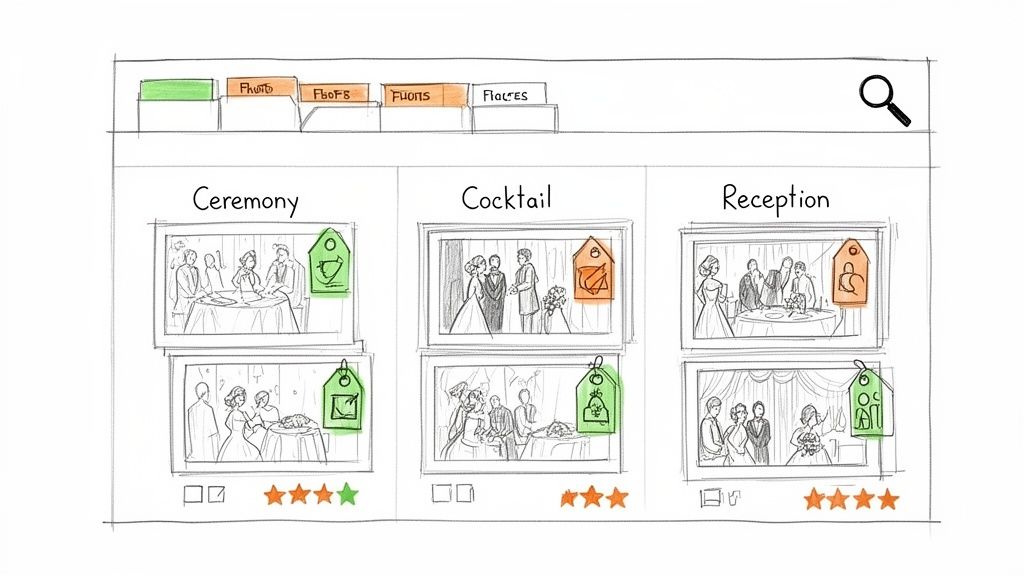
How to Implement a Smart Gallery Structure
Think of your gallery as a well-organized storybook. Each section should represent a different chapter of the wedding day, making it easy for anyone to follow along and find their place in the narrative.
- Standardize Your Folder Naming Convention: Create a consistent folder naming system you can use for every event. A clear format like
YYYY-MM-DD_ClientName_01Ceremonyensures all your projects are sorted chronologically and are easy to search through on your hard drives. - Tag During Import, Not After: The most efficient time to apply keywords and tags is during the initial import process in software like Lightroom. Batch tagging images as they come in ("getting ready," "portraits," "reception details") is far faster and more consistent than trying to do it after culling thousands of photos.
- Use Ratings and Labels for Curation: Implement a rating system to speed up your selection process. For example, use stars to flag your top picks for the final gallery (⭐⭐⭐⭐⭐), images needing review, or secondary shots. This visual hierarchy makes culling and editing significantly more efficient.
- Create Intuitive Gallery Sections: When uploading to a client gallery, mirror your folder structure with dedicated sections or albums. Common wedding categories include: Getting Ready, First Look, Ceremony, Family Formals, Cocktail Hour, and Reception. This prevents guests from having to scroll endlessly to find a specific moment.
By building this organizational framework into your workflow, you create a more professional, user-friendly product and reduce post-event friction for yourself and your clients. For an example of how this looks in a live gallery, you can see how Saucial structures event moments.
6. Use Analytics and Engagement Metrics to Optimize Future Events
Many photographers deliver a gallery and consider the job done, but one of the most powerful tips for wedding photographers is to treat each event as a source of valuable business intelligence. By using a gallery platform with built-in analytics, like Saucial, you can move beyond guesswork and make data-driven decisions. Tracking which photos are downloaded most, which distribution methods drive traffic, and what moments generate real engagement provides a roadmap for refining your future work.
This analytical approach transforms your post-event process from a simple delivery task into a strategic review. Instead of just hoping clients are happy, you can see exactly what resonates with them and their guests. This insight is crucial for optimizing your shooting style, justifying your pricing, and demonstrating tangible ROI to clients, which is especially valuable for corporate and recurring events.
How to Optimize Your Business with Photo Analytics
Think of your gallery data as a direct feedback loop from your clients and their guests. Analyzing this information helps you understand what truly has an impact, allowing you to focus your efforts where they matter most.
- Review Your Top-Performing Photos: After each wedding, identify the top 5-10 most downloaded images. Look for patterns. Are they candid emotional moments, perfectly posed group shots, or dramatic dance floor scenes? A photographer might notice that photos of the first dance are consistently in the top three downloads, prompting them to experiment with new angles and lighting for that specific moment.
- Track Distribution Channel Effectiveness: Don't just send a link; measure its performance. A/B test different delivery methods. For one wedding, rely on QR codes placed at the exit. For the next, use a combination of email and SMS. Comparing the gallery visits and download rates from each will show you which method is most effective for your audience.
- Calculate Key Performance Metrics (KPIs): Build a simple spreadsheet to track metrics for each event. Calculate your engagement rate (total downloads divided by gallery visits) and your conversion rate for print sales (total purchases divided by downloads). This helps you understand guest behavior, such as realizing attendees who download at least one photo are eight times more likely to purchase a print.
- Share Insights with Clients and Partners: Use anonymized data to build trust and demonstrate your value. Sharing a report with a wedding planner that shows "the gallery generated 1,200 visits and a 35% download rate" reinforces your professional impact and justifies your fees for future collaborations.
By regularly analyzing engagement metrics, you stop guessing what clients want and start knowing. This data-driven strategy not only improves client satisfaction but also sharpens your business acumen, making every wedding a stepping stone to a more successful future. To see how these analytics work in a real-world platform, you can explore the features offered by Saucial.
7. Communicate Privacy and Permissions Clearly to Build Attendee Trust
While innovative technology like facial recognition offers incredible convenience, it can also raise privacy questions for guests. One of the most important tips for wedding photographers using modern tools is to communicate transparently about how photos will be stored, used, and accessed. Clearly explaining that guests use the technology to find their own photos, rather than being tracked by the photographer, is crucial for building trust and encouraging engagement with the gallery.
Proactive communication transforms a potential concern into a valued feature. When guests understand that their privacy is protected and they have full control over their images, they are far more likely to embrace the "find my photos" experience. This not only prevents confusion but also reinforces your professionalism and respect for everyone attending the event, leading to a more positive overall experience.
How to Build Trust Through Clear Communication
Your goal is to make guests feel secure and informed. Use simple, direct language and make privacy information easy to find and understand.
- Draft a Simple Privacy Statement: Create a straightforward statement for your website or the gallery landing page. For example: "Event photos are shared via Saucial, a secure platform where you can find only the photos you appear in using a quick selfie. Your privacy is our priority."
- Use Pre-Event Communication: Include a brief explanation in pre-wedding communications. A small card inserted into the invitation or a note on the couple's wedding website can explain the photo experience: "Look for our 'Find Your Photo' station at the reception! It's a fun, private way to see all your pictures."
- Employ Plain Language: Avoid technical jargon like "biometric data" or "GDPR compliance." Instead, use friendly terms. Say "Find your photos with a selfie" instead of "Engage with our biometric facial recognition system."
- Create a Privacy FAQ: Add a dedicated FAQ page to your website to address common questions like, "Is my face being tracked?" or "Who can see my photos?" This shows you are transparent and have considered their concerns.
- Offer a Simple Opt-Out: Reassure guests by providing a clear and easy way to have their images removed. A simple line like, "If you prefer not to have your photos in the gallery, please email us at [your email], and we will remove them promptly" can make all the difference.
By addressing privacy head-on, you build confidence and ensure everyone feels comfortable. You can learn more about creating a secure and private login experience for guests on Saucial's platform.
8. Master the Client-Facing Pitch: Position Photo Delivery as an Engagement and Revenue Tool
The days of delivering photos in a simple online folder are over. One of the most impactful tips for wedding photographers is to reframe how you present your services. Instead of just selling images, sell an experience and a tangible return on investment. By positioning photo delivery as an engagement and revenue tool, you transition from a vendor to a strategic partner, justifying higher fees and delivering far more value.
This modern approach involves using a platform like Saucial, which transforms a standard gallery into an interactive hub. It provides guests with instant photo access via facial recognition, drives social sharing, and even creates new revenue streams through print and digital upsells. This positions you as a tech-forward professional who understands the importance of guest experience and event ROI, making your services indispensable to clients.
How to Reframe Your Pitch and Packages
Shifting your pitch requires you to focus on outcomes, not just deliverables. Instead of saying, "You'll get 800 edited photos," you'll say, "I'll deliver an interactive gallery that boosts guest engagement and provides valuable post-event analytics."
- Create a One-Sheet Comparison: Design a simple, one-page document that visually compares "Traditional Delivery" (e.g., a basic gallery link) with "Enhanced Delivery via Saucial." Highlight key metrics like engagement rates, attendee satisfaction, and optional revenue generation. This makes the value instantly clear.
- Show, Don't Just Tell: Create a short video screencast demonstrating the guest experience. Show how a guest can upload a selfie and instantly see all their photos. This powerful visual is far more convincing than a verbal explanation and highlights the seamless, high-tech experience you provide.
- Use Case Studies and Data: Leverage data from past events. A powerful pitch might sound like: "For the Smith wedding, 65% of guests accessed the gallery, leading to 38 premium downloads and generating over $800 in print sales for the couple." Concrete numbers prove your value.
- Integrate into Your Packages: Don't position this as an optional add-on. Build it into your core packages. Your pricing menu could list "Premium Delivery with Saucial Platform" as a standard feature, reinforcing that this is the modern, professional standard you provide.
By adopting this mindset, you're no longer just a photographer; you're a partner who enhances the event experience and delivers measurable results. You can explore how to build these packages on Saucial's platform to see the features in action.
8-Point Comparison: Wedding Photography Workflow & Revenue Tips
| Item | Implementation Complexity 🔄 | Resources & Speed ⚡ | Effectiveness ⭐ | Expected Outcomes / Impact 📊 | Ideal Use Cases & Tips 💡 |
|---|---|---|---|---|---|
| Master Facial Recognition Setup for Instant Photo Matching | Moderate — requires testing camera, lighting, positioning and workflow tuning | Camera (24MP+), consistent lighting, autofocus, batch tools; setup time upfront | High — greatly improves automatic match accuracy ⭐ | Fewer manual tags, up to ~80% fewer support requests; higher first-attempt matches 📊 | Best for events needing fast personal discovery; scout lighting, capture multiple angles, test 10–20 samples |
| Create Rapid Drag-and-Drop Upload Workflows for Same-Day Delivery | Medium–High — workflow design, tethering, and post-event editing schedule | Fast laptop, SSDs, reliable internet, AI culling/edit presets; enables same-day uploads ⚡ | High — increases timely availability and sharing ⭐ | Same-day galleries → 40–60% more social sharing; fewer client follow-ups; higher upsells 📊 | Ideal for weddings, trade shows; tether during event, pre-create folder structure, keep secondary backup SSD |
| Leverage QR Codes and Shareable Links for Frictionless Photo Discovery | Low — generate codes/links and coordinate printing/placement | Minimal: printable assets, short links, basic analytics; instant attendee access via phone ⚡ | High — removes access friction, widely adopted by guests ⭐ | Higher gallery visits/downloads; measurable channel performance; 2–3x engagement vs folders 📊 | Use at exits, table cards, emails; test across iOS/Android, include short URL and printed instructions |
| Implement Tiered Monetization: Free Access, Premium Edits, and Print Upsells | Medium — set tiers, pricing, vendor integrations and UX for upsells | E‑commerce integration, print vendor setup, analytics; fulfillment handled by vendors ⚡ | High — converts delivery into revenue stream (typical purchase rates 15–25%) ⭐ | Incremental revenue per event (20–40% profit uplift); recurring upsell income; measurable AOV 📊 | Best for weddings/galas; start with simple high-res fee, bundle prints, set limited-time offers to drive purchases |
| Organize and Tag Photos by Event Zone or Moment Type for Easy Discovery | Medium — requires consistent taxonomy and tagging during import | Lightroom/AI tools, metadata workflows; upfront time reduces later search time ⚡ | High — improves findability and match efficiency ⭐ | Faster attendee navigation, reduced algorithm load, higher download rates (≈40% uplift) 📊 | Use time-first folder naming, batch tag on import, create gallery sections (Ceremony, Reception, Details) |
| Use Analytics and Engagement Metrics to Optimize Future Events | Medium — learning curve to interpret data and run experiments | Saucial analytics, simple spreadsheets; time investment for analysis and A/B tests ⚡ | High — enables data-driven decisions that improve performance over time ⭐ | Better targeting of moments, pricing optimization, channel allocation; +25–40% revenue growth over time 📊 | Export metrics regularly, track engagement/conversion, A/B test distribution (QR vs SMS), review top downloaded photos |
| Communicate Privacy and Permissions Clearly to Build Attendee Trust | Medium — requires clear copy, signage, and possible legal review | Low–Moderate: privacy text, signage, opt-in options; template privacy FAQ ⚡ | High — increases trust and participation when communicated well ⭐ | 30–50% higher engagement and fewer privacy inquiries; lowers reputational risk 📊 | Use plain language, include privacy FAQ on gallery, offer simple opt-out, provide retention period info before event |
| Master the Client-Facing Pitch: Position Photo Delivery as an Engagement and Revenue Tool | Medium — create sales materials, case studies, and package pricing | Low–Moderate: one‑sheets, case decks, demo video; time to collect results ⚡ | High — justifies premium pricing and encourages platform adoption ⭐ | Higher close rates (≈30%) and higher average project fees (≈20%); more Saucial adoption by clients 📊 | Build a 1‑page comparison, include case studies and ROI figures, offer Saucial as a tiered add-on in proposals |
From Photographer to Strategic Partner: Your Next Chapter
The journey through these essential tips for wedding photographers reveals a fundamental shift in the industry. The days of simply being a talented artist with a good camera are fading. Today’s market demands more; it requires a strategic business partner who understands not just composition and light, but also workflow efficiency, client experience, and a modern, technology-driven approach to delivering value. The tips we've covered are not just isolated suggestions, they are interconnected pillars that support a thriving, future-proof wedding photography business.
Moving beyond the camera is where you differentiate yourself. Mastering your craft is the entry fee, but how you manage the entire client lifecycle, from initial consultation to final gallery delivery and beyond, is what secures your reputation and your profitability. By integrating powerful workflows, you transform from a service provider into an indispensable part of the wedding experience itself.
Key Takeaways: From Actionable Tips to a Cohesive Strategy
Reflecting on the advice shared, several core themes emerge that are crucial for your growth. These are the concepts that will elevate your business from simply surviving to truly thriving in a competitive landscape.
Experience is the Product: Your final photos are only one part of the deliverable. The experience of receiving those photos is just as important. Instantaneous, frictionless access via facial recognition and QR codes, as seen with tools like Saucial, makes your clients and their guests feel valued and impressed. This modernizes the post-event interaction and turns a simple gallery link into a memorable, shareable event.
Efficiency Drives Profitability: Every moment you spend on tedious, manual tasks is a moment you are not shooting, marketing, or growing your business. Implementing rapid drag-and-drop uploads for same-day sneak peeks or leveraging smart organization by event moment isn't just about speed, it’s about reclaiming your time. This efficiency is directly tied to your bottom line and your ability to scale.
Monetization is a Multi-faceted Opportunity: Your service doesn't have to end with the final payment for your package. Implementing tiered monetization models, where you offer free, watermarked access and upsell to premium edits, prints, or full-resolution downloads, creates new revenue streams. This approach provides value at every level and transforms your photo gallery from a static collection into a dynamic, revenue-generating platform.
Trust and Communication are Your Foundation: In an age of digital everything, clear communication about privacy and data usage is non-negotiable. Building trust by being transparent about how facial recognition works and giving attendees control over their images is paramount. Similarly, mastering the client-facing pitch to explain why your advanced delivery system is a benefit-not just for them, but for their guests-positions you as a forward-thinking expert.
Your Actionable Next Steps
Feeling inspired is great, but taking action is what creates change. Don't try to implement everything at once. Instead, choose one or two areas that will have the biggest impact on your current business challenges.
- Start with a Workflow Audit: Identify your biggest time-sink. Is it culling and editing? Is it gallery delivery and fielding emails from guests? Pinpoint the bottleneck and focus on implementing a tip that directly addresses it, such as adopting a rapid upload system.
- Introduce One New Technology: Experiment with QR codes at your next event. Create a simple card for the welcome table or bar that links to the future gallery. Measure the engagement and see how it streamlines the photo-sharing process for guests.
- Refine Your Pitch: Practice explaining the value of an enhanced delivery experience. Frame it not as a technical feature but as a benefit: "Your guests will be able to find their photos instantly without scrolling through hundreds of images."
By embracing these modern tips for wedding photographers, you are not just capturing memories; you are creating a seamless, engaging, and memorable experience that extends far beyond the wedding day. You are evolving from a photographer into a strategic partner, an innovator, and a savvy business owner poised for long-term success.
Ready to revolutionize your photo delivery and create an unforgettable experience for your clients and their guests? Discover how Saucial uses AI-powered facial recognition and streamlined workflows to deliver photos instantly, boost engagement, and open up new revenue opportunities. Explore the platform designed for the modern event photographer at Saucial and take the first step toward a more efficient and profitable business.


