The Ultimate Guide to Software for Photography Business Success
Picking the right software for a photography business is about so much more than just a good photo editor. To really thrive, a modern studio needs a connected system of tools—for managing clients, delivering galleries, and handling all the behind-the-scenes business stuff. It’s this integration that creates a smooth, professional experience from the first inquiry to the final photo delivery.
Building Your Modern Photography Tech Stack
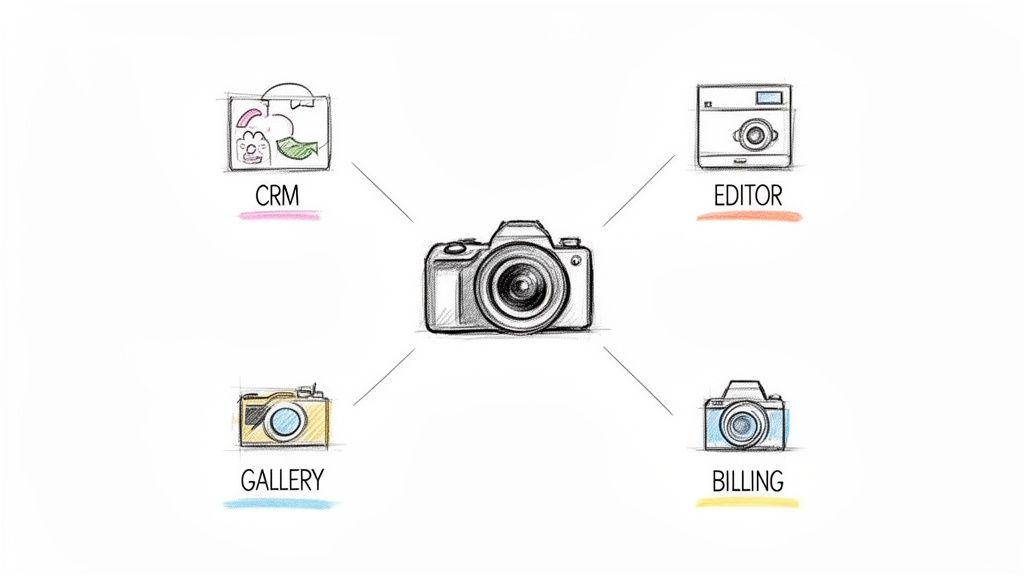
Making the leap from hobbyist to full-time pro means building a real business foundation. Your creativity is the heart of what you do, but the right software is the backbone that supports your growth and keeps you sane. A solid tech stack can automate the grunt work, make you look like a total pro, and free you up to spend more time actually shooting.
Think of it as your digital command center. Instead of getting lost in spreadsheets, chasing down payments, and drowning in email chains, your software should work together seamlessly. This guide will break down the essential pieces of that command center, helping you figure out what you truly need and how to get it all to play nicely.
The Core Pillars of Your Business Workflow
Every successful photography business I've seen leans on a few key types of software. Knowing what they are helps you look at your own setup and see where the gaps are—gaps that could be costing you time, money, and even clients.
Let's break down what these core categories are, what they do, and which features you should actually care about.
Key Software Categories for Photographers
This table gives a quick look at the essential software types every photography business needs, what they do, and the features that actually matter.
| Software Category | Primary Function | Must-Have Features |
|---|---|---|
| Client Management (CRM) | Your operational hub for leads, booking, contracts, and invoicing. | Lead capture forms, automated emails, digital contracts, online payments, project tracking. |
| Post-Production & Editing | Where your creative vision comes to life. | RAW processing, batch editing, preset support, AI-powered culling, masking tools. |
| Gallery Delivery & Proofing | Your digital storefront for delivering images to clients. | High-res downloads, online print store, client proofing/favorites, mobile-friendly design. |
| Business & Financial | The tools that keep your business running and profitable. | Bookkeeping integration, scheduling tools, expense tracking, mileage logs. |
Understanding these categories is the first step. The real magic happens when you find tools that work together, creating a smooth flow for both you and your clients.
It's More Than Just Editing Software
While the global photo editing software market was valued at around $449.2 million in 2023, that’s just one piece of the puzzle. The real game-changer isn't just better editing tools; it's the rise of integrated software that manages the entire client journey from start to finish.
The goal is to build a system where a new lead can book, sign a contract, pay their invoice, and receive their photos—all with minimal manual effort on your part. That’s when you can really scale.
Innovation in photo delivery is especially exciting right now. For event photographers, platforms like Saucial are using face recognition to create an incredible "find my photos" experience for guests. Attendees can instantly see every photo they're in, turning a logistical nightmare into a brilliant marketing and sales tool. This is a perfect example of how the right software for a photography business can create entirely new value and set you apart.
Mastering Your Post-Production Workflow
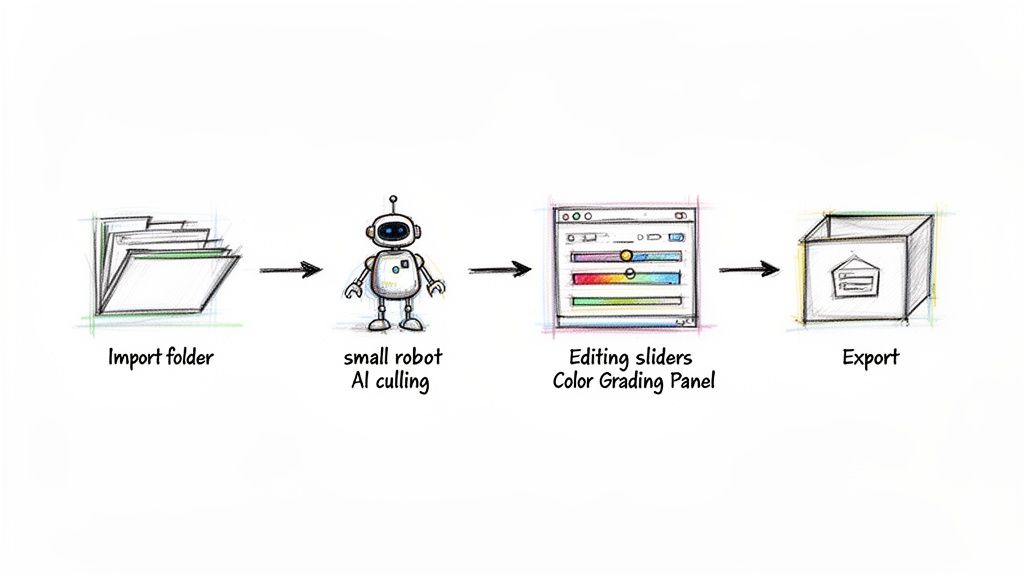
This is where the magic happens. Post-production is how you turn great RAW files into signature art that clients rave about. But let's be honest—it’s also a black hole for your time. For so many of us, the hours spent staring at a monitor can easily double the time we spent on our feet at the actual shoot, creating a massive bottleneck.
Getting your workflow dialed in isn't just about editing faster; it's about making your entire business more profitable. The real goal is to build a smart, repeatable process that slashes manual work and frees you up for creative tasks, letting you serve more clients and deliver galleries weeks sooner.
Beyond The Lightroom vs. Capture One Debate
For a long time, the conversation around post-production revolved around two titans: Adobe Lightroom and Capture One. And for good reason. They are both phenomenal pieces of software for a photography business, giving you everything you need for RAW processing, color grading, and organizing your life's work. Lightroom is a no-brainer if you’re already in the Adobe ecosystem, while many photographers swear by Capture One for its incredible color science and rock-solid tethering.
But the industry has moved on from that simple "either/or" choice. The most profound shift in how we work today comes from weaving artificial intelligence into our established routines.
The real game-changer isn't jumping from one editor to another. It's about layering intelligent automation on top of the tools you already use. This is how the pros are getting back hundreds of hours a year.
Think of AI-powered tools as assistants, not replacements. They're here to do the grunt work—the repetitive, non-creative stuff—so you can pour all your energy into the images that truly matter.
AI Culling: Your First Big Win
You just got home from a 10-hour wedding with 5,000 photos on your memory cards. Before you can even think about your favorite presets, you’re facing the soul-crushing job of culling. That means clicking through thousands of near-identical images to find the keepers. It's a four-to-eight-hour slog of pure tedium.
This is exactly where AI culling software like AfterShoot or FilterPixel completely changes the game. These tools analyze your entire shoot in minutes, not hours. They automatically group duplicates, flag blurry shots, and even catch people with their eyes closed.
- AfterShoot: It's incredibly fast and accurate. It hands you a culled gallery with star ratings and color labels that you can drag right into Lightroom, saving you hours of that initial triage.
- FilterPixel: This one does a similar job but with a really clean, intuitive interface. It makes reviewing the AI's suggestions a breeze, so you can make your final calls and get to editing.
By automating just this one step, you can cut your culling time by a staggering 80-90%. You get to jump straight to the fun part with a clean, pre-selected gallery of your best shots.
AI Editing: Your Personal Style, Scaled
Once the keepers are chosen, the next time-sink is applying consistent edits across an entire gallery. This is where an AI editing assistant like ImagenAI comes in. It actually learns your unique editing style from your own past work.
You "train" the AI by feeding it a few thousand of your previously edited photos from your Lightroom catalogs. It studies everything—your exposure tendencies, your signature color toning, your white balance preferences—and creates a personal AI profile that edits just like you.
When a new gallery is ready, you send the RAW files to ImagenAI, and it sends them back in minutes with edits based on your style. This delivers a level of consistency across an entire wedding that’s incredibly difficult to achieve by hand. It gives you a perfect, on-brand starting point, leaving you to add the final, human touch.
Of course, editing is only half the battle; getting those photos to the right people is the final piece of the puzzle. To finish your workflow with a flourish, you can upload and share event photos effortlessly with Saucial, which uses face recognition to connect your polished images directly to guests. A fully automated pipeline—from culling to delivery—is what separates a busy photographer from a truly efficient one.
Get Your Business Running on Autopilot with a Smart CRM
Amazing photos are the heart of your business, no doubt. But they won't save you if your studio is drowning in administrative chaos. This is exactly where the right software for a photography business—specifically a Client Relationship Management (CRM) system—becomes your lifeline. Think of it as the central nervous system for your entire operation, keeping everything organized, professional, and moving forward without you having to manually push every button.
A good CRM is so much more than a fancy digital address book. It's really an automation powerhouse built to manage the entire client journey, from the first "hello" to the final thank you note. It’s your virtual studio manager, one who never forgets to send a follow-up, track a payment, or chase down a signature.
Putting Your Client Experience on Autopilot
For too many photographers, the path from a new inquiry to final gallery delivery is a messy, stressful patchwork of flagged emails, random spreadsheets, and sticky note reminders. It's a system just begging for something to fall through the cracks. A smart CRM takes that chaos and transforms it into a smooth, automated workflow that just works.
Platforms like HoneyBook, Dubsado, and Studio Ninja were literally built by and for creatives. They get that our process isn’t a single transaction but a whole series of crucial steps:
- Lead Capture: A potential client fills out the contact form on your website.
- Automated Reply: The CRM instantly fires off a personalized email with your pricing guide and a link to book a call.
- Booking & Contracts: The client picks a time, digitally signs your contract, and pays the retainer—all in one elegant, seamless flow.
- Onboarding: As soon as they're booked, the system automatically sends a welcome packet and a pre-session questionnaire.
- Reminders: It handles all the nagging for you, sending automated reminders for upcoming payments and session dates to both you and the client.
This isn't about being lazy; it's about creating a consistently professional and impressive experience for every single person who inquires.
A Real-World Client Journey with a CRM
Let’s play this out with a common scenario. A newly engaged couple, Sarah and Tom, are on the hunt for their wedding photographer. They land on your website and fill out your contact form.
Without a CRM, you might see their email hours later, scramble to find your latest pricing PDF, and then manually type out a reply. You're already playing catch-up.
With a CRM, the moment they hit "submit," your automated workflow springs into action.
- The Instant Connection: Sarah and Tom get a beautifully branded email in their inbox within seconds. It thanks them for their interest, confirms you got their details, and attaches your wedding photography guide. That immediate response makes them feel valued and shows them you run a tight ship.
- Effortless Scheduling: The email includes a link to your online scheduler. They can see your real-time availability for consultations and book a call right then and there. No more endless back-and-forth emails trying to find a time that works.
- The Professional Proposal: After a great call, you send a proposal directly from your CRM. This isn't just an email; it's a single, elegant document that includes the package details, a legally binding contract they can sign with their finger, and an invoice for the retainer. They can review, sign, and pay in under 5 minutes from their phone.
From the client's perspective, this entire process is incredibly smooth, modern, and reassuring. It builds a foundation of trust long before you ever pick up your camera. They see a photographer who runs a serious, organized business.
This level of automation does more than just save you a few hours. It guarantees every lead gets the same high-quality, prompt treatment, preventing amazing opportunities from slipping away. While other photographers are digging through their inboxes, your CRM has already moved a new lead halfway to becoming a booked client. When you offload all these repetitive tasks, you free up your time and mental energy to focus on what actually grows your business: shooting, creating, and building real relationships.
Modernizing Photo Delivery for Events
Your photo delivery is the last handshake with your client. It's the final, crucial touchpoint in their experience, and it can mean the difference between a satisfied customer and a raving fan who brings you new business. For far too long, especially with large-scale events, this final step has been a clumsy, passive process.
We’ve all been there. You shoot a gorgeous gala, a buzzing conference, or a massive fundraiser and come away with hundreds—sometimes thousands—of incredible images. But for the guests, the experience of finding those photos is often a painful chore. They’re stuck scrolling endlessly through a sea of faces, hoping to catch a glimpse of themselves, and many just give up. This old model creates a massive disconnect right when you should be creating delight.
The Problem with Traditional Galleries for Events
Standard online galleries work beautifully for one-on-one clients like weddings or family portraits, where the subjects know exactly who they're looking for. But that whole approach falls apart for event photography. The sheer volume of photos and people turns a simple search into a frustrating ordeal.
This friction doesn't just annoy the guests; it’s a huge missed opportunity for you and the event host. When photos are hard to find, they don't get shared. The post-event buzz dies down, and all that potential for organic marketing just evaporates.
The traditional event gallery treats every guest the same, forcing them to do all the work. Modern software flips that on its head, delivering a personal experience directly to each individual and turning a logistical headache into a moment of pure magic.
Imagine turning that frustrating hunt into an instant, personal reveal. This is exactly where AI-powered software gives your photography business a massive edge.
A New Era of Photo Delivery with AI
Now, let’s replay that scenario. A guest from the same gala pulls out their phone, scans a QR code, and snaps a quick selfie. Within seconds, a private, curated album pops up with every single photo where they appear. This isn't some futuristic fantasy; it's the "find my photos" experience that platforms like Saucial deliver today.
By using face recognition, this technology completely eliminates the search. It creates an immediate, satisfying experience that wows guests and makes them feel truly seen. The impact is huge:
- Dramatically Improved Guest Experience: Attendees get instant access to their best moments, leading to way more satisfaction and a better feeling about the whole event.
- Massive Post-Event Engagement: When photos are this easy to find, they get shared on social media like crazy. This extends the event's reach and creates a ton of valuable user-generated content.
- Less Admin Work for You: You can finally say goodbye to all those "can you find my photo?" emails and focus on what you do best.
This shift comes as the broader digital photography market is booming. Valued at $55.74 billion in 2024, the market is on track to hit $70.95 billion by 2029. This growth is being driven by innovations that create real value for photographers and their clients. If you want to dive deeper, you can explore detailed market projections to see how tech is shaping our industry.
Let's break down just how different these two approaches are in practice.
Traditional Galleries vs AI-Powered Delivery
| Feature | Traditional Gallery (e.g., Pixieset) | AI-Powered Delivery (e.g., Saucial) |
|---|---|---|
| Photo Discovery | Guests must manually scroll and search through hundreds or thousands of photos. | A selfie instantly finds and delivers a personal gallery with only their photos. |
| Guest Experience | Often frustrating and time-consuming, leading to abandonment. | Fast, personal, and delightful. Feels like a VIP service. |
| Social Sharing | Low. People won't share photos they can't easily find. | Extremely high. Frictionless access encourages immediate sharing. |
| Marketing Value | Minimal. Limited organic reach and no lead capture. | Massive. Gathers attendee emails and generates huge social buzz. |
| Photographer's Role | Passive delivery. The job is "done" once the gallery is sent. | Active engagement. Creates a new relationship with every attendee. |
The takeaway is clear: while traditional galleries still have their place, they simply can't compete with the personalized, instant gratification that AI-powered delivery offers for event photography.
Transforming Delivery into a Revenue Stream
Here’s where it gets really exciting. AI-powered delivery can turn what was once a cost center into a serious profit generator. With old-school galleries, your job ends when you hit "send." With a direct-to-attendee platform, a whole new relationship begins.
Because each guest gets their own personal gallery, you suddenly have a direct sales channel to hundreds of potential customers. This takes you beyond the single contract with the event organizer.
You can easily enable options like:
- Direct Print Sales: Guests can order high-quality prints of their favorite shots right from their personal gallery.
- Digital Downloads: Offer high-resolution digital files for purchase, perfect for social media or personal archives.
- Premium Edits: Provide add-on services like advanced retouching or special creative edits.
This model completely changes the economics of shooting events. You're no longer just a service provider; you're a vendor with a direct-to-consumer sales funnel baked right into your workflow. You can even fine-tune your monetization strategy by adjusting your event gallery settings to fit the goals of each event.
By embracing this modern approach, you deliver a far superior experience that wows guests, provides more value to event hosts, and unlocks significant new revenue for your business. It's a clear win for everyone involved.
Integrating Your Tools for Peak Efficiency
Having a collection of powerful apps is one thing, but the real magic happens when those tools start talking to each other. This is where you go from running your business to building a business that practically runs itself. We're moving beyond just using software for a photography business and into creating a truly cohesive, automated system.
Imagine this: a client pays their final invoice, and their photo gallery is automatically unlocked and sent to them without you lifting a finger. Or, a new booking in your scheduler instantly creates a client folder in Dropbox and a project card in Trello. This isn't a pipe dream; it's the power of a properly integrated workflow.
Connecting Your Digital Dots
The whole point here is to get rid of the tedious, manual tasks that eat up your day and are just asking for mistakes. Every time you have to copy and paste a client's email from one app to another or manually send a gallery link after checking your bank statement, you're wasting time that could be spent behind the camera.
Direct integrations are the low-hanging fruit. A lot of modern photography platforms are designed to play nicely together. Your CRM, for example, might have a native feature to link directly with your gallery software, creating a seamless handoff from booking to delivery.
Using Automation to Fill the Gaps
But what if your favorite tools don’t connect directly? That’s when automation platforms like Zapier or Make (which used to be Integromat) become your secret weapon. These services act as a bridge, letting you build custom "if this, then that" recipes between just about any apps you use.
These little automated recipes—often called "Zaps" or "Scenarios"—can handle countless tasks. Here are a few real-world examples I see photographers using all the time:
- New Inquiry Automation: A potential client fills out your contact form. A Zap instantly creates their profile in your CRM, adds them to a "prospects" list in your email marketing tool, and shoots you a text so you can follow up quickly.
- Post-Booking Workflow: A client signs their contract. An automation immediately creates a shared folder for them in Google Drive and drops their session date into your personal Google Calendar.
- Review Request Trigger: Two weeks after a gallery is delivered, an automated email goes out asking the client for a review on your Google Business Profile.
This kind of automation can even revolutionize the photo delivery experience for event attendees, as this flowchart shows.
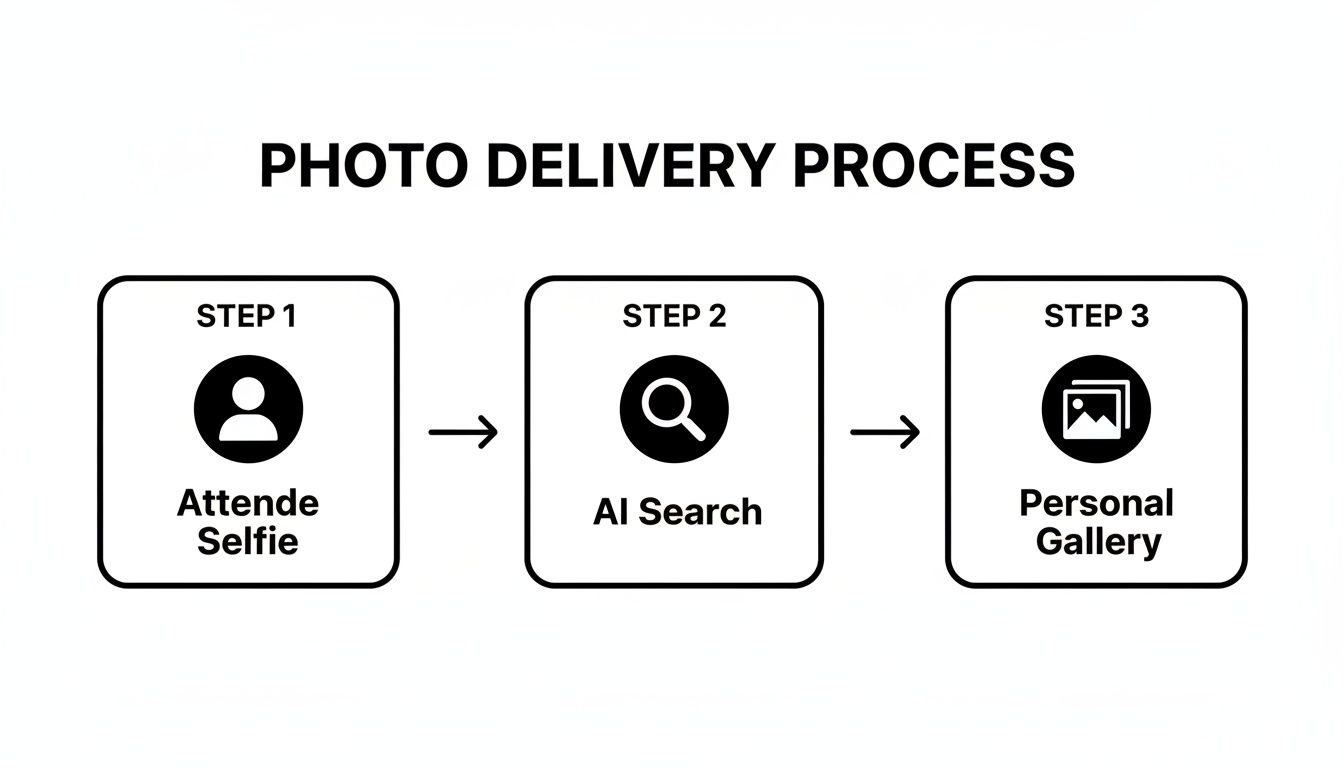
This simple flow completely removes the frustrating manual search for guests and cuts down on your post-event admin work.
The real power of integration is creating a reliable system that executes your business processes perfectly every single time, without you having to think about it. It’s about building a machine that handles the admin so you can focus on the art.
A Mature Market for Integrated Solutions
The growing demand for these connected workflows tells us a lot about where the industry is heading. North America, for instance, is the biggest market for photo editing and management software. In fact, the North American photography studio software market makes up a whopping 49% of the regional distribution. This shows a serious investment in tools that do more than just edit—they provide complete business solutions. If you're interested in the data, you can read the full market analysis on photo editing software.
For event photographers, platforms like Saucial are taking this to the next level by building AI-powered delivery right into the workflow. Instead of spending hours sorting and sending photos, you just upload the gallery and let the system do the heavy lifting. You can create a Saucial account to see for yourself how this automated 'find my photos' experience can fit into your process, saving you hours and giving attendees an unforgettable experience.
Answering Your Top Photography Software Questions
Choosing the right software for your photography business is a huge decision. It's easy to get analysis paralysis. You're not just picking a tool; you're building the engine that will run your business, manage your client experience, and ultimately, put money in your pocket.
Let's cut through the noise and tackle the real questions photographers ask when trying to build their tech stack. This isn't about finding one "perfect" program, but about making smart, confident choices that fit your business, whether you're just starting out or ready to scale.
What’s the Absolute Must-Have Software for a New Photographer?
When you're first launching, every dollar feels enormous, and the sheer number of software options is overwhelming. If you can only make two investments, make them count. You need a powerful one-two punch: a top-notch editing program and a professional gallery delivery platform.
Editing software like Adobe Lightroom Classic is your non-negotiable. It's where you craft your final product and define your signature style. But how you deliver that product is what shapes your client's lasting impression.
This is where a solid gallery system like Pic-Time or Pixieset comes in. They do so much more than just host images. They handle client proofing, manage print sales, and secure downloads, making you look like a seasoned pro from your very first client. Many even have basic invoicing and contact management, giving you just enough to get off the ground without needing a full-blown CRM right away.
How Can I Justify Paying for Subscriptions Every Single Month?
It's easy to see a monthly subscription fee as just another bill. The trick is to stop thinking about the cost and start thinking about the investment in your most limited resource: your time.
Do a quick calculation. How many hours will a piece of software save you each month? Let's say a $50/month CRM automates five hours of admin work—things like chasing contracts, sending payment reminders, or responding to initial inquiries. You're essentially buying back your time for just $10 per hour. Is your time worth more than that? I guarantee it is.
That reclaimed time is pure gold. You can reinvest it into things that actually grow your business, like marketing, networking, shooting, or just taking a well-deserved break. The software pays for itself not just in convenience, but in opportunity.
For tools focused on event photo sharing, the justification is even more direct. They create entirely new revenue streams through direct-to-attendee print and digital sales. In many cases, the income from a single event can cover the subscription cost for months, providing a clear and immediate return.
Do I Really Need an All-in-One Studio Management System?
Honestly, not every photographer needs a massive studio management system from day one. But as your business grows, you'll hit a tipping point where its value becomes undeniable. For most, that happens when you find yourself juggling more than five to ten clients at once.
That's when an all-in-one system like HoneyBook or Dubsado stops being a "nice-to-have" and becomes a "can't-live-without." It’s what prevents a crucial email from being missed or a contract from falling through the cracks. It shifts your entire workflow from being reactive and chaotic (we've all been there with spreadsheets and endless email threads) to proactive and automated.
The biggest win here is creating a consistent, polished experience for every single client. Imagine it: every inquiry automatically gets your pricing guide, every booked client receives the same onboarding questionnaire, and every final invoice goes out on schedule, without you lifting a finger. This isn't just about being efficient; it's about building trust and a reputation that brings in referrals.
How Do I Handle Client Privacy with Face Recognition for Photo Delivery?
This is a huge—and completely valid—concern. The absolute key is to partner with a platform that puts consent first. When it comes to event photography, the entire process should be driven by the guest, not the photographer.
For example, a guest at a wedding or conference should have to actively choose to use a "find my photos" feature by taking a selfie. The photos they're shown were taken at an event they chose to attend, where a photographer's presence was expected. It’s a closed loop.
A trustworthy platform will always:
- Require user consent: The attendee must opt-in by providing their image. No one is ever searched without their permission.
- Create private galleries: The results should be a temporary, personalized gallery accessible only to that individual.
- Avoid public databases: The system should never create a public, searchable database of faces from event photos.
Before you commit, demand to see a provider's privacy policy. It needs to be crystal clear. This allows you to confidently explain to event organizers and attendees how the tech works to make their lives easier while fiercely protecting their privacy.
Ready to modernize your event photo delivery and create an unforgettable "find my photos" experience for attendees? See how Saucial uses AI to connect guests with their moments instantly, drive post-event engagement, and unlock new revenue streams for your photography business. Explore Saucial today.


