A Guide to QR Code for Photo Sharing at Events
A QR code for photo sharing is the simplest way to get event pictures into your guests' hands. Instead of making them hunt for a link later, they can just point their phone's camera at a code and instantly get connected to a digital gallery. It’s a direct, personalized path to finding, downloading, and sharing their favorite moments from your event.
Why QR Codes Are Changing the Game for Event Photos
Let's be honest: sending out a generic gallery link days after your event is a recipe for low engagement. The modern, and much smarter, approach is using a QR code for photo sharing. This gives your guests a personalized "find my photos" experience by tapping into a behavior they already use every day. It's a fundamental shift from clunky, hard-to-navigate galleries to an interactive system that delivers instant gratification.

From Passive Scrolling to Interactive Discovery
The old method was just broken. We've all been there: an organizer emails a link to a massive, unsorted folder of photos. You're forced to endlessly scroll through hundreds of pictures, hoping to spot yourself. It’s tedious, slow, and most people give up.
A QR code completely flips that dynamic on its head. Instead of a delayed, one-size-fits-all link, you’re providing an immediate, on-site gateway to the photos. Guests can scan a code at the check-in desk, on their table, or on a digital screen and dive right into the photo experience while the event is still buzzing.
The real power of a QR code is its ability to act as a bridge. It connects the physical event space with a personalized digital experience, making photo access a part of the event itself—not an afterthought.
Tapping into Universal Guest Behavior
Scanning QR codes isn't a niche activity anymore; it's a deeply ingrained habit. In 2024 alone, global QR code scans hit a massive 41.77 million, which is a staggering 433% increase in just two years. With over 83 million US adults already scanning codes regularly, it’s a reliable tool for any event organizer. This widespread comfort with scanning makes an event photo sharing link delivered via QR code a no-brainer for any audience, from black-tie galas to community sports tournaments.
- Universal Compatibility: QR codes work perfectly on both iOS and Android, so you don't have to worry about platform-specific headaches like AirDrop.
- Frictionless Access: Guests don't need to download an app. A quick scan opens their web browser, an action every single smartphone user knows how to do.
This is where a platform like Saucial truly shines. The QR code is just the starting point. A guest scans the code, takes a quick selfie, and the system's AI-powered selfie photo matching instantly pulls up a gallery containing only their photos. This face recognition event gallery eliminates all the friction, turning photo delivery from a chore into a genuinely fun, high-tech experience that makes people want to share their pictures right away.
Turning Your Event Photos into a Scannable Gallery
So, you have a hard drive full of amazing event photos. Now what? Getting those images into the hands of your guests used to be a real headache, but turning them into an interactive, shareable gallery is actually quite straightforward these days. Let's walk through how it works, using a platform like Saucial to see how fast you can go from a folder of pictures to a live QR code gallery.
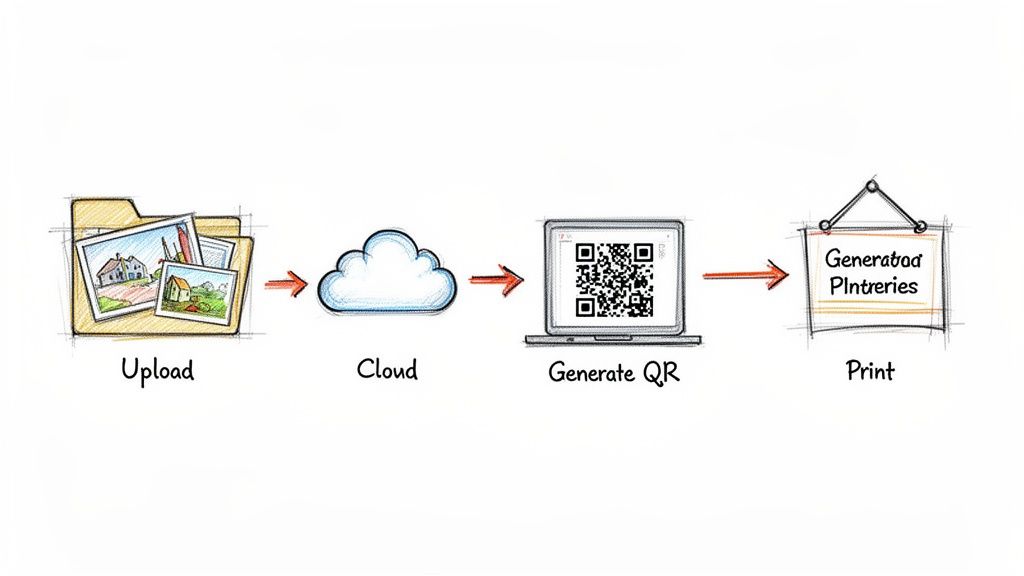
The whole idea is to remove the clunky, technical steps that made photo sharing a chore. The journey begins with your raw photos and ends with a guest finding and sharing their favorite moments with a smile.
First, Get Your Photos Uploaded
The starting line is simple: get all your event photos in one place. Whether you've just received a link from your photographer or you're pulling images from different cameras, just consolidate them into a single folder on your computer.
From there, you just upload them. With a service like Saucial, for example, you get a simple drag-and-drop uploader. You can grab hundreds—or even thousands—of photos and let them upload in one go. These systems are built to handle the big, high-resolution files that come straight from a professional’s camera, so you don't have to worry about resizing anything.
As soon as you hit upload, the platform starts working behind the scenes. It processes every image and, crucially, begins running its AI-powered facial recognition. This is what lays the groundwork for that cool selfie-matching feature your guests will use later.
Next, Generate Your Link and QR Code
Once the upload and processing are finished, the system instantly creates a unique event photo sharing link for your gallery. This one link is the front door to every photo from your event. Forget about messing with cloud drive permissions or trying to email huge files—you now have a single, clean URL.
The real beauty of an all-in-one system is the built-in QR code generator. You don’t have to go find a third-party tool and paste your link in. Platforms like Saucial create the QR code right there, permanently linking it to your event gallery.
This completely avoids the risk of a broken link or a code that points to the wrong place. In a single click, you can download a high-resolution QR code, ready to be added to your event signage. If you want to see how easy that first part is, you can check out the Saucial upload process yourself.
Connecting the Code to a Face Recognition Gallery
This is where things get really interesting. That QR code doesn't just point to a massive, jumbled album of every photo you took. It’s wired directly into a smart gallery that runs on face recognition.
When a guest scans your code, the first thing they're asked to do is snap a quick selfie.
The system takes that selfie, scans the entire event album in a second, and shows them only the photos they appear in. For the guest, this is a total game-changer.
- No More Scrolling: They don't have to waste time hunting through hundreds of photos of people they don't know.
- Instant Personalization: It feels like a private gallery made just for them.
- Increased Sharing: Guests who can find their photos instantly are significantly more likely to download them and post them on social media.
That seamless jump from a QR scan to a personalized photo collection is what elevates a basic QR code for photo sharing into a seriously effective engagement tool.
Strategic QR Code Placement for Maximum Scans
You can have the most brilliant photo-sharing system in the world, but it's useless if your guests don't know it exists. The real difference between a handful of scans and event-wide engagement almost always comes down to smart placement. Just creating a QR code for photo sharing is step one; weaving it into the natural flow of your event is where the magic happens.
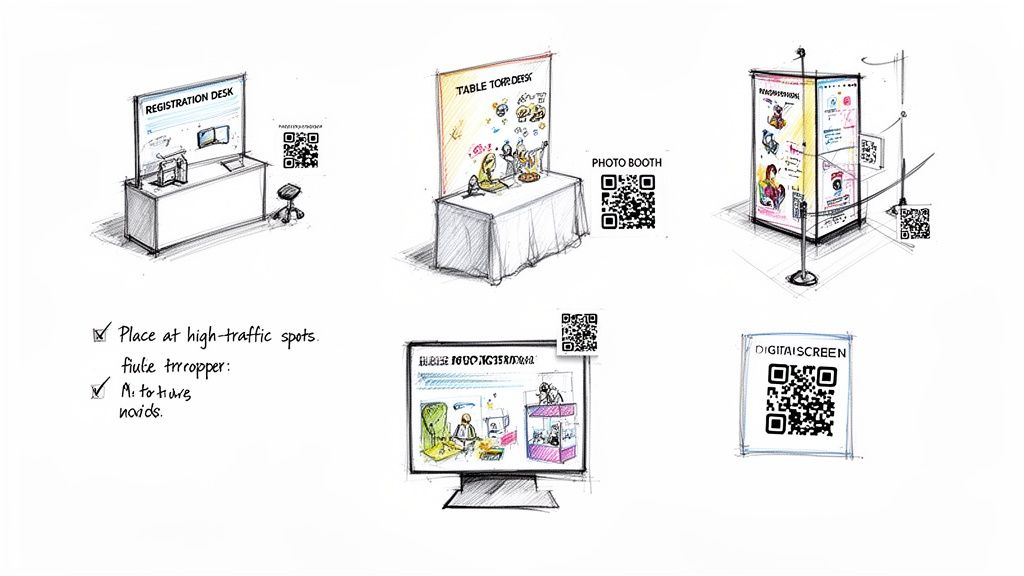
Put yourself in your guests' shoes for a minute. Where do they walk? Where do they stop and wait? Where do they hang out? Those are your prime real estate for QR code signage. The goal is to make scanning feel like an obvious, helpful next step, not a chore they have to figure out.
High-Visibility Hotspots for Your QR Code
Every event has a unique layout, but I've found that some spots are almost guaranteed winners for getting eyeballs and scans. Think of these as your go-to starting points.
- Check-In or Registration Desk: This is your first touchpoint. A big, clear sign here with a simple instruction means every single person sees it right as they arrive.
- Dining Tables: Table tents or even small, well-designed cards are perfect. People have downtime when they're sitting, making it the perfect moment to pull out their phone, scan, and browse.
- Near the Bar or Food Stations: Anywhere a line forms is a golden opportunity. A sign at the bar gives people something to do while waiting for a drink. Trust me, they'll appreciate the distraction.
Key takeaway: The secret is repetition without being obnoxious. Seeing the code in a few different, logical places massively increases the chance a guest will scan it when the moment feels right for them. A single sign tucked away in a corner is a recipe for failure.
You Need More Than Just a Code—You Need a Clear Ask
The sign your QR code lives on is just as important as the code itself. A lonely, naked QR code with no context is almost always ignored. You have to tell people exactly what to do and what awesome thing happens when they do it.
This means your signage has to be direct and highlight the benefit. Forget "Scan Me." You need action-oriented language that makes people curious and promises a quick win.
Examples of Calls-to-Action That Actually Work:
- "Find Your Photos Instantly! Scan Here."
- "Spotted by Our Photographer? See Your Pictures Now."
- "Your Personal Event Gallery is Ready. Scan to View."
Notice the difference? That simple change in wording turns a mysterious black-and-white box into a clear, enticing invitation.
If you're using a platform like Saucial with a face recognition event gallery, you can get even more specific and powerful: "Scan, Snap a Selfie, and Instantly Find All Your Photos." This one-liner perfectly sets expectations and telegraphs the cool, personalized experience they're about to have. It's a game-changer for boosting scan rates.
QR Code Placement Ideas by Event Type
Where you put your code isn't a one-size-fits-all solution. A corporate conference has a different flow than a wedding. This table breaks down some of the most effective spots based on the kind of event you're running.
| Event Type | Primary Placement Location | Secondary Placement Location | Pro Tip |
|---|---|---|---|
| Weddings & Social Parties | Bar, cocktail tables, dining tables. | Restroom doors, photo booth area, gift table. | Place a card on each dinner plate. It feels personal and is impossible to miss. |
| Corporate Conferences | Registration desk, session room entrances, lanyards. | Charging stations, coffee break areas, networking lounges. | Print the QR code directly on attendee badges for constant, easy access. |
| Trade Shows & Expos | At the entrance to your booth. | On handout materials (flyers, brochures), swag bags. | Use a large digital screen with the QR code cycling through. Motion attracts attention. |
| Festivals & Concerts | Venue entry points, food/drink vendor stalls. | Jumbotrons between sets, merchandise tables. | Make the signage huge and weatherproof. It has to compete with a lot of other visuals. |
Think of this table as a starting point. The best approach is to walk through your venue before the event and identify the natural gathering points and high-traffic pathways specific to your setup.
Keep the Buzz Going: Driving Engagement After the Event with Dynamic QR Codes
Think the QR code's job is done once the event wraps up? Think again. When you use a dynamic QR code for photo sharing, that little black-and-white square becomes a living, breathing channel that keeps delivering value long after the last guest has left. It's a massive leap from the static, one-and-done QR codes most people are familiar with.
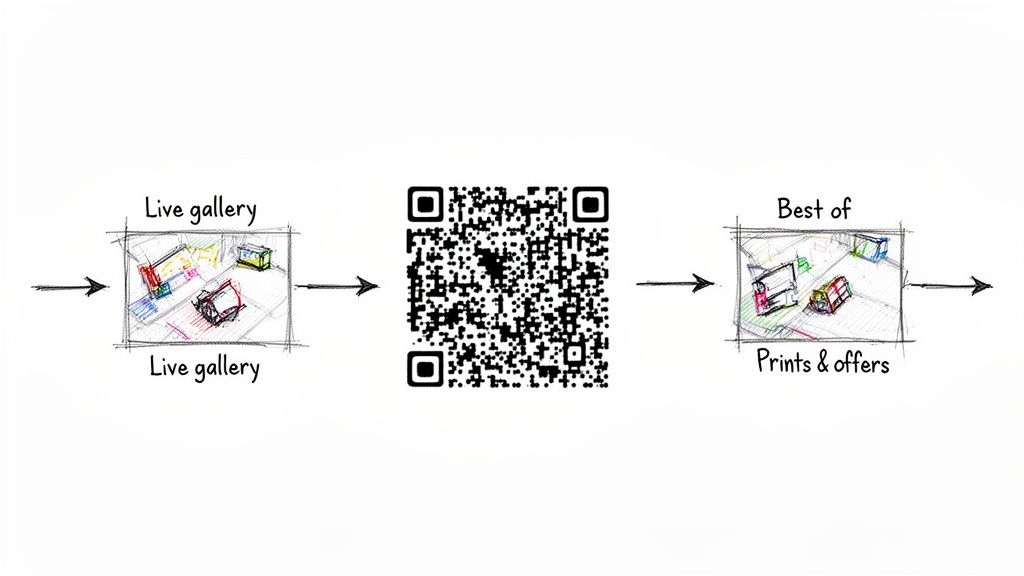
Here’s the difference: a static code is a dead end. Its destination is burned in forever. Print it, and you're committed. A dynamic code, however, is flexible. It points to a special redirect link that you control. This means you can change where that QR code sends people at any time, without having to reprint a single sign or badge.
Guide the Attendee Journey Beyond the Event Floor
This flexibility is a game-changer. That one QR code you put on every table and name tag can now take on multiple roles, guiding your guests through a carefully crafted post-event journey.
Here's how that might look in practice:
- During the Event: The code is your gateway to immediate fun. Guests scan it and are taken directly to the AI-powered face recognition event gallery. They snap a quick selfie, find their photos instantly, and start sharing. The energy in the room skyrockets.
- The Day After: You log in and update the code's destination. Now, when someone scans it, they land on a curated "Best Of" album. It's a perfect way to let them relive the highlights and keep the good vibes going.
- A Week Later: Time for another switch. The same QR code now points to a photographer upsell page. This is where attendees can order professional prints, buy full-resolution digital copies, or even snag sponsor-branded photo frames.
You've just turned a simple utility into a powerful engine for post-event engagement. You're not just sending a follow-up email; you're continuing the conversation, creating new revenue opportunities, and keeping your event top-of-mind, all through a familiar touchpoint.
Marketers are already all over this. Industry data shows that over 90% of them are using QR codes, and the smart ones are almost exclusively using dynamic codes to keep their campaigns fresh and extend their reach.
Why Dynamic Codes Simply Get Better Results
This isn't just a clever party trick; it's a strategy that delivers real, measurable results. Think of each QR code as a live touchpoint. For an event, the code on a guest's lanyard can evolve from a QR code photo gallery link during the party, to a feedback survey the next day, and finally to an early-bird offer for next year's conference.
This kind of sustained, relevant interaction blows a generic "thanks for coming" email out of the water. You're meeting people where they are, with content that makes sense for that moment. For a deeper dive into how marketers are getting creative with this, check out the latest Bitly statistics report.
Navigating Privacy and Attendee Consent
Bringing AI features like face recognition into your event photo workflow is a game-changer, but it also means we need to talk seriously about privacy. When you're asking guests to snap a selfie to find their photos, being upfront and transparent isn't just good practice—it's absolutely critical for building trust and getting people excited to join in.
The entire process hinges on giving your attendees clear information and putting them in control. This shouldn't feel like some black-box technology working in the shadows. Instead, frame it for what it is: an optional, helpful tool designed to save them the hassle of scrolling through hundreds of photos. As the event organizer, it's on you to explain how it works and what the benefit is.
Putting Guests in Control
The best way I've found to manage consent is with a straightforward opt-in. The attendee must always be the one to kick off the search. When a guest scans your QR code for photo sharing, takes a selfie, and taps the search button, they are explicitly giving their permission for that single search.
This is a world away from systems that might try to scan faces from a crowd without anyone knowing. A process driven entirely by the attendee creates a clear, ethical boundary that respects everyone's privacy.
Here’s what that looks like in practice:
- No Pre-Tagging: The software isn't scanning and identifying people in the background.
- User-Initiated Search: The magic only happens when a guest decides they want to find their pictures and takes that selfie.
- Clear Purpose: The selfie is used for one thing and one thing only: to find their photos from that specific event. It isn't stored or used for anything else.
The Organizer's Role in Data Management
A platform you can trust should give you, the organizer, the keys to the kingdom when it comes to data policy. You're the one who controls the main photo gallery and sets the rules. A system like Saucial is built around these organizer-controlled settings, so you can easily manage photo visibility and data to match your event's privacy standards.
The goal is to make privacy a feature, not an afterthought. By being upfront about how selfie photo matching works, you empower guests to make an informed choice, which ultimately leads to higher trust and more enthusiastic participation.
This approach keeps the user experience simple and respectful, even with sophisticated tech humming under the hood. If you want to build a secure and easy-to-use access system for your own events, you can explore options for creating a secure authentication portal that puts user consent first. This way, every face recognition event gallery you launch starts on a solid foundation of transparency and trust.
Alright, you’ve set up your QR codes and the photos are flowing. But how do you actually know if it's working? Just counting QR scans doesn't tell you much. The real magic is in understanding what happens after the scan—that's where you find out if your photo strategy is a genuine hit or just a neat trick.
Let's move past the basic numbers and dig into the data that really shows the impact on guest engagement and your brand's reach.
Key Metrics That Actually Matter
Forget about vanity metrics. To see a real return on your efforts, you need to focus on data that shows genuine guest interaction. These are the numbers that tell the true story.
- Unique Users: How many different people actually found their photos? This is way more insightful than raw scan counts, which can get inflated if someone scans the code five times trying to find their picture.
- Photo Downloads: This is a big one. It means a guest not only found their photo but liked it enough to save it. It’s a direct thumbs-up on the quality of your content.
- Social Shares: When someone shares their photo right from the gallery, they're creating powerful user-generated content (UGC) for you. This extends your event’s reach in the most authentic way possible.
The ultimate goal is to connect these engagement metrics to business outcomes. A high download rate is great, but a high conversion rate on print sales is even better.
Turning Data into Revenue for Photographers
For photographers, a QR-powered gallery is a direct line to every attendee. Think about it: instead of just dumping a folder of images on the event organizer, you’re suddenly connected to hundreds of potential new clients. This completely changes the game, opening up new, trackable ways to make money.
Let’s say you’re shooting a 1,000-person gala. If just 20% of the guests scan the on-site QR code, that’s 200 warm leads delivered straight to your gallery. From there, you can offer them anything from sports tournament photo sales to paid digital downloads or even custom prints. It turns the simple act of photo delivery into a serious revenue stream.
This isn't just a niche idea; it's part of a massive trend. The global QR code market is on track to blow past $33 billion by 2031, and it's being driven by exactly these kinds of smart, engagement-focused applications. You can dig deeper into the numbers with this fantastic QR code statistics overview.
Ultimately, pairing a face recognition event gallery with a QR code massively cuts down the time between taking a photo and making a sale. You spend less time answering "Can you find my photo?" emails and get a crystal-clear, measurable path to boosting your income—all while giving guests an experience they'll love.
Your Top Questions, Answered
Thinking about using QR codes to share your event photos? It's a fantastic idea, but I know a few practical questions always come up. Let's walk through the common ones so you can feel confident you're giving guests a great experience.
Do My Guests Need to Download a Special App?
Nope, and that’s the beauty of it. Modern systems like Saucial are completely browser-based. A guest simply scans the code, and a secure webpage pops up right on their phone.
From there, they can snap a quick selfie to find their pictures. It completely removes that annoying "please install our app" step that nobody wants to deal with.
What Happens if the Venue WiFi is Terrible?
This is a classic event planner headache, and a totally valid concern. While the QR code itself works without a connection, their phone will need internet to actually load the photo gallery.
My advice? Place your QR code signage in spots you know have a decent signal, like near the main entrance or the bar. The good news is that most platforms are built for mobile and load surprisingly fast even on a standard 4G or 5G connection, so flaky WiFi isn't usually a deal-breaker.
How Can I Make Sure the Photos Stay Private?
You have complete control. This isn't like a public Facebook album where anyone can see everything.
When you use a platform with AI-powered matching, like Saucial, each guest gets their own personal, private gallery. They scan, take a selfie, and the system shows them only the photos they're actually in. It keeps everything private and saves your guests from having to scroll through hundreds of pictures of strangers.


