Event QR Code How to Instantly Share Event Photos
Let's be honest, the way we've been sharing event photos is completely broken. Attendees are left scrolling through endless, disorganized online albums, desperately trying to find a single picture of themselves. For organizers and photographers, it's a logistical migraine of manual sorting and fielding a constant barrage of "can you find my photo?" requests.
An event qr code is the elegant fix for this mess, seamlessly connecting the great photos you take with the people who actually want to see them—instantly.
The Problem with Old-School Photo Sharing
Think about the last amazing event you went to. A lively charity gala, a packed marathon finish line, or maybe a vibrant community festival. A professional photographer was there, capturing hundreds, maybe thousands, of incredible shots.
But what happened after the event ended? Days, or even weeks later, a link to a giant, unsorted gallery on Dropbox or Google Drive probably landed in your inbox. And that's where the excitement fizzles out.
A Familiar Attendee Headache
For your guests, this experience is almost universally frustrating. They're forced to play digital detective, scrolling through a sea of strangers, hoping to catch a glimpse of themselves in the background. Most people give up after a few minutes.
Those powerful, professional photos you invested in? They end up lost and unseen. The whole process feels impersonal and completely misses the mark on the instant gratification everyone craves today.
The real issue isn't the quality of the photos; it's the broken delivery system. When people can't easily find their own moments, the value of professional event photography tanks for everyone.
An Organizer's Logistical Nightmare
Behind the curtain, it's even more chaotic for the event organizers and photographers. The work that happens after the event is a mountain of thankless tasks:
- Manual Sorting: You're stuck spending hours trying to organize photos by time or location, which is a nearly impossible feat for large, dynamic events.
- Constant Inquiries: Your inbox gets flooded with emails from attendees, sponsors, and VIPs, all asking for help finding their pictures.
- Lost Engagement: By the time the photos are ready, the initial buzz from the event has faded. That means fewer social shares and less post-event momentum for your brand.
Imagine a fundraiser with hundreds of attendees, each one excited to see and share their memories. By 2025, global QR code scans across 50 countries had already surged by 57%, with projections for another 22% growth. This explosion is directly tied to a QR code photo gallery solving these exact problems. If you're curious, you can explore more QR code statistics to see just how much they're changing the game.
How to Create an Instant "Find My Photos" Experience
Let's be honest, the old way of sharing event photos is broken. You spend hours, sometimes days, painstakingly sorting through hundreds or even thousands of images, trying to organize them into some semblance of order. Your guests, meanwhile, are left scrolling endlessly through a massive, jumbled gallery, hoping to spot a picture of themselves. It's a frustrating process for everyone involved.
The good news? It doesn't have to be this way anymore. We can now create a "find my photos" experience that feels less like a chore and more like a little bit of magic.
It all starts with a simple drag-and-drop. Once your event is over and you've got your final, edited photos, you just upload them all in one go to a platform built for this. Forget tagging faces or creating dozens of separate folders. Modern systems use AI to scan every single photo and automatically identify who is in them. This is the heavy lifting that used to eat up all your time, now done in the background.
Generating Your Master Event QR Code
After the AI has worked its magic on your photos, the system will give you a single, unique event QR code. Think of this as the master key to your entire gallery. This isn't just a link to a messy Dropbox folder; it's a gateway to an intelligent portal designed for one thing: getting people their photos instantly.
The real beauty here is its simplicity. You only need one QR code for the whole event. You can put it on welcome signs, table tents, napkins, or even project it onto a wall. This single point of access is what makes the whole process so smooth for your guests.
This diagram pretty much sums up the headache we're trying to leave behind.
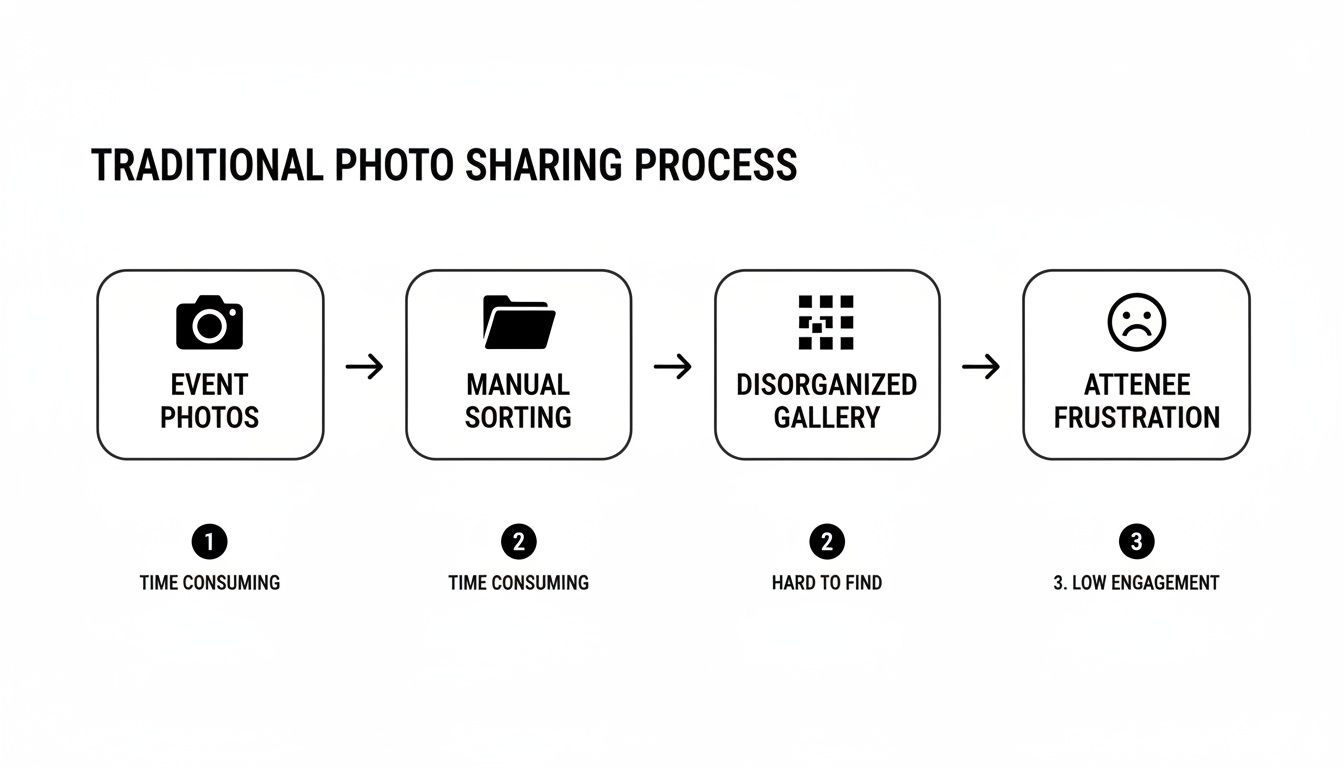
As you can see, the old workflow was a recipe for a bad experience.
The Guest Experience: A Seamless Selfie Match
This is where your guests will be genuinely impressed. When someone scans your event QR code, they aren't dumped into that giant, disorganized gallery we all dread.
Instead, their phone prompts them to take a quick selfie. That's it. No apps to download, no accounts to create, no passwords to remember. They just snap a picture right there in their browser.
The system uses that selfie for a one-time search, comparing it against all the faces it found in your event photos. Within seconds, it pulls up a curated collection of only their photos.
This is the heart of the "find my photos" experience. It respects people's time and delivers that instant gratification we all love. It turns a tedious task into a fun, surprising, and personal interaction.
The technology is surprisingly robust, too. It can find people in group shots, lurking in the background, or even captured from a weird angle. Of course, they still have the option to browse the full gallery if they want to, but that initial personalized feed is what makes the whole thing feel special. You can get a feel for how clean this is by exploring the Saucial photo upload and gallery creation process.
The interface is simple and direct, guiding the user to the one action that matters. By replacing endless scrolling with a single tap and a selfie, you’re not just sharing photos—you're giving every single guest a personalized, memorable experience.
Where to Place Your QR Code to Get the Most Scans
You’ve created the perfect QR code to your photo gallery. Now what? The hard truth is that a brilliant code is useless if nobody sees it. Its success all comes down to smart, strategic placement.
The key is to think like an attendee. Where do people naturally gather? When will they have their phones out anyway? You want to place your code in high-traffic spots where scanning it feels like the most natural thing in the world, not some chore they have to go looking for.
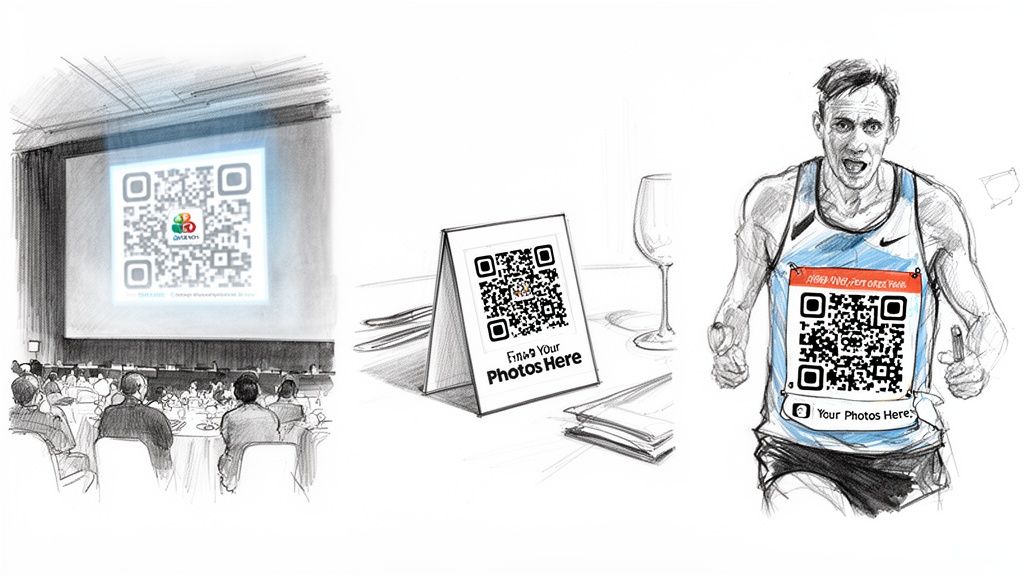
High-Impact Placement Ideas
To get the most scans, think beyond a single sign at the check-in table. Weave the QR code into the fabric of the event experience, hitting people at multiple touchpoints, both physical and digital.
Here are a few proven locations that just work:
- Corporate Conferences: The main stage screen is prime real estate. Flash a huge, branded QR code up there between speakers. For a more personal touch, print them on the back of name badges or place them near the all-important charging stations.
- Weddings & Galas: Table tents are a classic for a reason. Put one on every dinner table and make sure there’s another one right at the bar where guests will definitely be spending time.
- Marathons & Races: This one’s a no-brainer—print the QR code directly onto the race bibs. Suddenly, every single participant is a walking advertisement for your photo gallery.
- Trade Shows: Booth signage is a must. Also, include the code on any handouts or flyers you're giving away and make sure it’s featured prominently in the digital event app.
This isn't a fringe strategy anymore. QR code usage exploded by 433% globally from 2020 to 2023. With over 2.9 billion people projected to use them by 2025, they're a universally understood tool for everything from contactless payments to sports tournament photo sales. If you're curious, you can find more shocking QR code statistics that show just how mainstream this tech has become.
To make this even easier, here's a quick-reference guide for some of the most effective QR code placements, broken down by event type.
QR Code Placement Ideas by Event Type
| Event Type | Primary Placement Location | Secondary Placement Location | Pro Tip |
|---|---|---|---|
| Wedding | Table Tents/Menus at each seat | Bar Signs, Photo Booth Backdrop | Add a sweet message like, "Scan to see all the memories we're making!" |
| Conference | Main Stage Screen (between talks) | Back of Attendee Badges | Use a branded, short URL with the QR for easy typing if needed. |
| Marathon/Race | Printed directly on Runner's Bib | Start/Finish Line Banners | The bib is your best bet; every runner gets one and keeps it. |
| Trade Show | Large Signage at Booth Entrance | Business Cards, Product Flyers | Link the QR to a gallery and a lead capture form to maximize ROI. |
| Gala/Fundraiser | Program Booklets, Auction Paddles | Cocktail Napkins, Step-and-Repeat | Place it anywhere guests will have downtime, like during dinner or auctions. |
This table should give you a solid starting point, but don't be afraid to get creative based on your specific venue and crowd.
Design and Display Best Practices
Placement is only half the story. A blurry, tiny, or confusing QR code will get ignored, no matter where you put it. A few simple design tweaks can make all the difference.
A great QR code is more than just a black and white square; it’s a clear invitation. Your design and call-to-action must work together to tell guests exactly what to do and why it’s worth their time.
First off, nail the contrast. You can't beat a classic black code on a plain white background for scannability. If you want to use brand colors, just make absolutely sure the code itself is significantly darker than the background it's on.
Next, include a clear call-to-action (CTA). This is so simple, but so many people forget it. Never assume guests know what the code does. A simple line of text like "Scan to Find Your Photos!" or "Get Your Pictures Here" right below the code can dramatically boost your scan rate.
Finally, get the size right. On printed materials like a flyer or table tent, your code should be at least 1x1 inch (or about 2.5x2.5 cm). If you're projecting it onto a large screen, it needs to be much, much bigger. Before you go live, walk to the furthest point in the room where someone might see it and do a test scan with your own phone. It’s the only way to be sure.
Turning Your Photo Gallery Into a Sales Engine
Think of an event QR code as more than just a clever way to share photos. It’s your secret weapon for unlocking brand new revenue streams. As a photographer, this simple tool completely changes the game. You're no longer just working for the event organizer; you suddenly have a direct sales channel to every single guest.
Your gallery is no longer just a digital folder for delivering photos. It's an automated, always-on sales engine. Forget the administrative headache of tracking down individual orders and sending invoices. This gives you a direct, frictionless path for attendees to buy the moments they love, right when they're most excited about them.
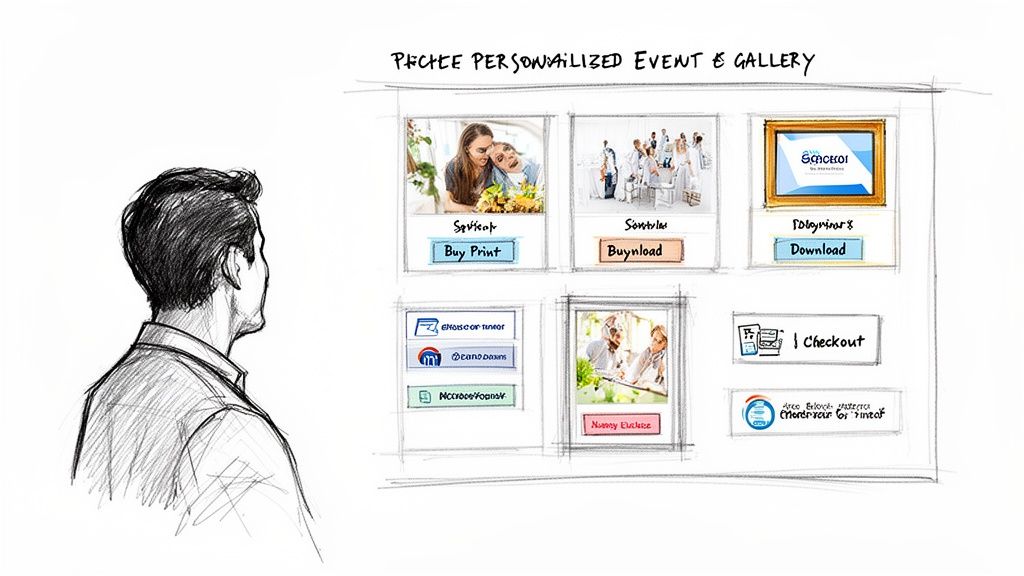
Monetize with Digital Downloads and Prints
The most straightforward way to generate income from your gallery is by selling high-resolution digital files and professional-quality prints. Picture a guest at a charity gala who finds that one perfect shot of them and their partner. Instead of having to email you later, they can buy the digital file or order a framed print right from their phone, right there on the spot.
This kind of self-service model is incredibly efficient. You just set your prices once, and the system handles every part of the transaction. No more back-and-forth emails or manual payment processing.
- Digital Downloads: I've seen a lot of success offering both single photos and bundled packages. A common pricing strategy that works well is setting a single download at $10 and a package of five for $30. It’s a simple way to encourage larger purchases.
- Print Services: The real game-changer is integrating with a professional printing lab. This puts fulfillment on autopilot. When a guest orders a canvas, the lab prints, packs, and ships it directly to their door without you lifting a finger.
This whole approach capitalizes on the guest's immediate excitement, which dramatically increases the chance they'll make a purchase.
Create Powerful Upsell Opportunities
Beyond one-off sales, a smart gallery setup opens the door for all sorts of upsells. You're not just selling individual photos anymore; you're offering curated experiences and premium products. This is where your creativity can really pay off and boost your average order value.
Start thinking about premium packages that bundle digital and physical items. For example, you could create a "Gala Experience" package that includes all of a guest's digital photos from the night, one large framed print, and a set of smaller 5x7s perfect for sharing with family. Tools like Saucial are built specifically to handle these kinds of integrated e-commerce workflows.
By building curated packages directly into the gallery, the upsell feels less like a pushy sales pitch and more like a helpful, valuable next step. You're simply offering a complete, convenient solution.
Partner with Sponsors for Branded Content
For corporate events, trade shows, and fundraisers, your QR code system can become a huge asset for sponsors. Imagine partnering with the event's title sponsor to offer branded digital frames on every photo downloaded from the gallery.
Here's how that plays out in the real world: An attendee at a tech conference finds their new headshot in the gallery and downloads it. The photo automatically arrives with a clean, professionally designed digital frame that includes the conference sponsor's logo. This gives the sponsor something tangible for their investment—their brand is now attached to hundreds of positive memories being shared across social media and LinkedIn.
It's a true win-win-win. The guest gets a free, professionally branded photo. The sponsor gets authentic brand exposure. And you, as the photographer or organizer, can charge a premium for this sponsorship package, creating an entirely new revenue channel from your photography.
Measuring Your Success and Boosting Post-Event Engagement
Putting a QR code out there is one thing, but knowing if it actually worked is a whole different ballgame. The real value isn't just in the setup; it's in understanding the impact it had. How do you show an event organizer that your photo-sharing strategy was a home run? The secret is to look past the surface-level numbers and track the metrics that prove people were genuinely engaged.
This is about more than just counting how many times a QR code was scanned. You need to dig into the data to see the full story of how guests interacted with the photos. This is the kind of concrete proof that organizers, stakeholders, and sponsors love to see.
Key Metrics That Actually Matter
To get a real sense of how well your QR code performed, you need to focus on the numbers that show real, active engagement. These stats tell you how people actually used the gallery, not just that they opened it.
- Unique Scans: This tells you exactly how many different people scanned your code. It's a fantastic, no-fluff measure of how effective your QR code placement was.
- Selfie Matches Initiated: How many guests actually used the selfie feature to find their photos? This is a direct indicator of how much they valued that quick, personalized experience.
- Social Shares from the Gallery: This is where the magic happens for brand reach. It quantifies just how much user-generated content (UGC) was created directly from your event photos.
- Total Revenue Generated: If you turned on any monetization features, this is the bottom line. Track every dollar from print sales, digital downloads, or sponsored photo frames to show a clear return on investment.
This kind of measurable interaction is exactly why the QR code market is booming, with projections to hit $15.23 billion by 2026. It's no surprise that dynamic QR codes, which offer these detailed analytics, make up a 65% market share. For an event QR code photo gallery, that data is gold. You can discover more insights about the QR codes market on Mordor Intelligence.
Keeping the Buzz Alive After the Event
The conversation doesn't have to stop when the last guest leaves. That photo gallery is your secret weapon for re-engaging attendees and keeping the event's energy going for days or even weeks. A quick follow-up after the event can dramatically boost photo views, shares, and sales.
A few days after the event wraps up, send a friendly follow-up email to everyone who registered. Just include a direct link to the gallery and a quick reminder of how easy it is to find their photos. This is a simple but incredibly effective way to catch anyone who might have been too busy to scan the code on-site.
Your event photo gallery isn't just a delivery tool; it's a long-term engagement asset. A thoughtful post-event strategy turns a one-time interaction into a lasting connection with your audience.
This post-event email is also a perfect opportunity to give sponsors another shout-out or even tease the next event. You can manage these communications and dive into all the performance data right from your dashboard. To see how this works, you can explore the options in the Saucial settings panel. By using this data, you can fine-tune your strategy for the next gig, making your photo-sharing even more effective every time.
Got Questions About QR Code Photo Galleries? We've Got Answers.
Jumping into new tech for your events always brings up a few questions. While using a QR code for photo sharing is pretty simple, it's smart to think through things like privacy, accuracy, and how it all fits into your existing routine. Let's walk through the common concerns I hear from photographers and event organizers.
How Do You Handle Guest Privacy with Facial Recognition?
This is, without a doubt, the most important question. And the answer is simple: the guest is always in control. We built this with privacy at its core.
A guest has to actively opt-in by taking a selfie if they want to use the photo matching feature. That selfie is only used for that one search, in that one gallery. It isn't stored, sold, or added to some creepy database. Think of it as a temporary key that gets thrown away after you unlock the door. On top of that, you can set galleries to be private or public, giving you another layer of security.
What If the AI Doesn't Find All of Someone's Photos?
Look, AI-powered matching is shockingly good, but it’s not magic. Weird lighting, a hand covering half a face, or a slightly blurry action shot can sometimes throw it off. That’s exactly why we designed the system with a foolproof backup.
After a guest runs a selfie search, they can still scroll through the entire gallery just like any other online album. The "Find My Photos" feature is all about saving them time and giving them that instant "wow" moment, but it never blocks them from seeing every single shot. It’s the best of both worlds: automation gets them 90% of the way there in seconds, and they can easily browse the rest.
The point of selfie matching isn't to be perfect; it's to kill the tedious, endless scrolling. It delivers a personalized highlight reel instantly, while always keeping the full collection just a click away.
Will This Mess Up My Current Photography Workflow?
Not at all. This was designed by photographers, for photographers, to fit right into your existing process, not blow it up. You don't need any special gear on-site or a complicated tagging system in your editing software.
Your routine stays the same. Shoot your event, cull your images, and edit your final selects just like you always do. Once you’ve exported your JPEGs, you just upload them. That’s it. The platform does all the heavy lifting in the background, letting you get back to what you do best. You can see just how smooth it is when you create your first AI-powered gallery right here.
Are QR Code Galleries Only for Huge, Professional Events?
While it’s an absolute lifesaver for massive conferences and festivals, this tool is just as powerful for smaller events. I've seen it work wonders for weddings, corporate retreats, school proms, and even big family reunions.
Any event where people are excited to see their photos is the right event. The time you save and the incredible experience you give guests are huge wins, no matter if you have 50 attendees or 5,000.
Ready to completely change how you deliver event photos? With Saucial, you can create an instant "Find My Photos" experience that guests will be talking about for weeks. Try Saucial for free and see how easy it is to get started.


